NetSuite shipping integration connects your NetSuite account to carriers so that rating, label printing, and tracking happen inside NetSuite instead of on a carrier website. The mechanics of how you do that changed, and most guides on this topic (including earlier versions of this one) still describe the old way.
Read this before you follow any setup guide. The legacy feature called Shipping Integration with FedEx, UPS, and USPS/Endicia is closed. In Oracle’s own words: “The Shipping Integration with FedEx, UPS, and USPS/Endicia is not available to new customers. It is available with limited support only for existing customers before they transition to NetSuite Ship Central.” If you are setting up shipping today, NetSuite Ship Central is the supported path.
This guide covers what changed and why it matters, how Ship Central differs from the legacy integration, and an honest comparison of the third party shipping apps worth considering, including which ones have changed hands recently.
What is NetSuite Shipping Integration?
It is a process that links your NetSuite account with a shipping carrier, allowing you to manage various shipping tasks like printing labels and packing slips, calculating rates, and tracking shipments all from a single platform.
This integration proves immensely time-saving, especially for online sellers aiming to keep customers promptly informed about their order status.
Uses
The utilization of NetSuite shipping software brings numerous advantages, some of which include:
- Efficient time-saving through label printing and returns directly from NetSuite.
- Consolidated shipment tracking in a single location.
- Customer updates and sales order management.
- Additionally, NetSuite shipping software facilitates cost savings by streamlining international shipping processes.
NetSuite offers many selling channels. You can also use NetSuite to ship internationally and save yourself the hassle of dealing with customs forms and other paperwork.
What are the Steps Involved?
- First, select the items you want to ship
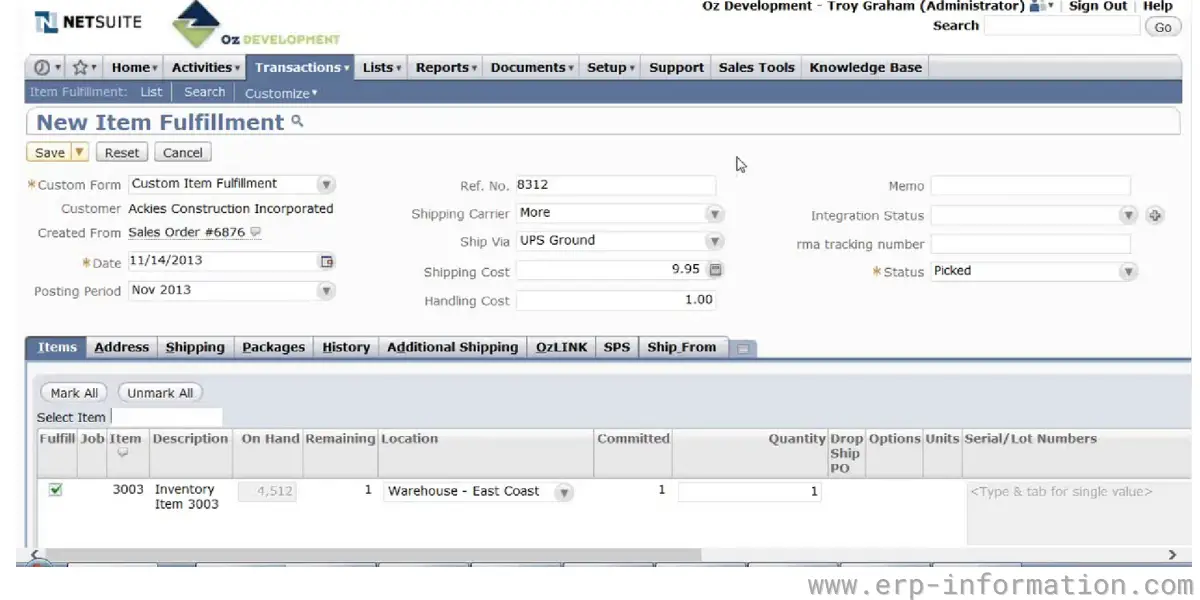
- The next step is connecting your NetSuite account to a carrier like FedEx or UPS. Compare and select the best carrier to fulfill customer expectations at the best shipping costs.
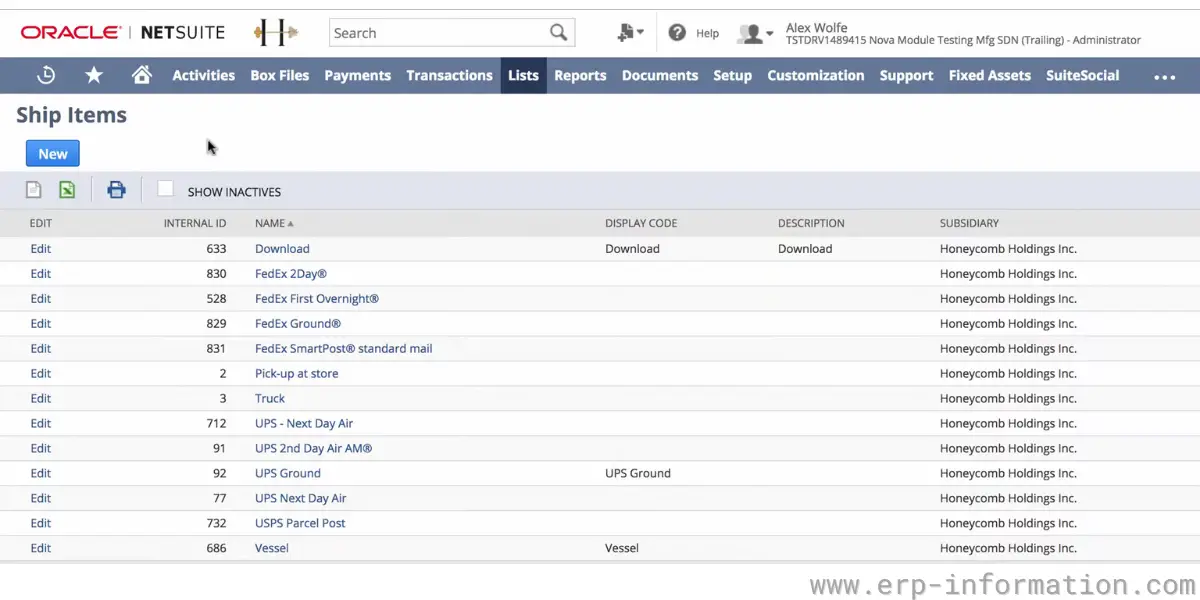
- Then, choose the shipping method for tracking inventory. Several options include scanning items as picked and packed or relying on cycle counts.
- Once you’ve selected a method, the next step is setting up your NetSuite locations. You’ll need to include information such as the ship-from and ship-to locations.
- After giving location information, mention the number of shipments you need. It may be one or multiple shipments. Also, mention your package information, such as package size, weight, number of items, Etc.
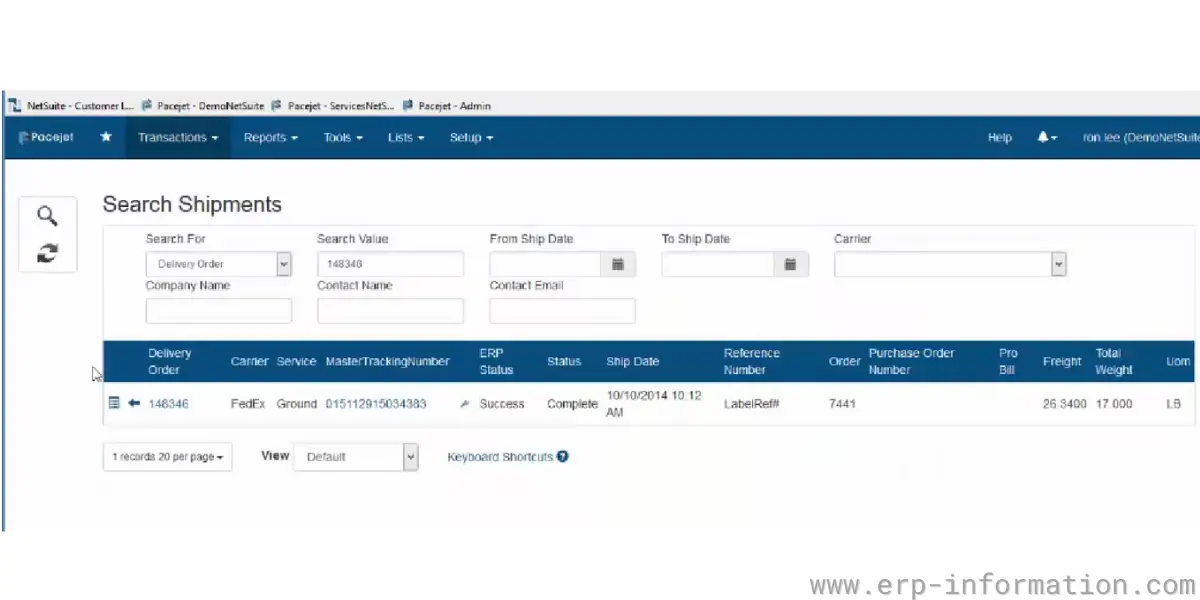
- Then add predefined conditions such as whether the package contains sensitive items, costly items, whether you need fast delivery, international delivery Etc.
- You’ll also need to create shipping labels in NetSuite and generate a tracking number for each order. NetSuite shipping software offers different label printing options, including integrated shipping, thermal, and paper labels.
- Finally, you’ll need to integrate your shopping cart with NetSuite to process and track orders automatically.
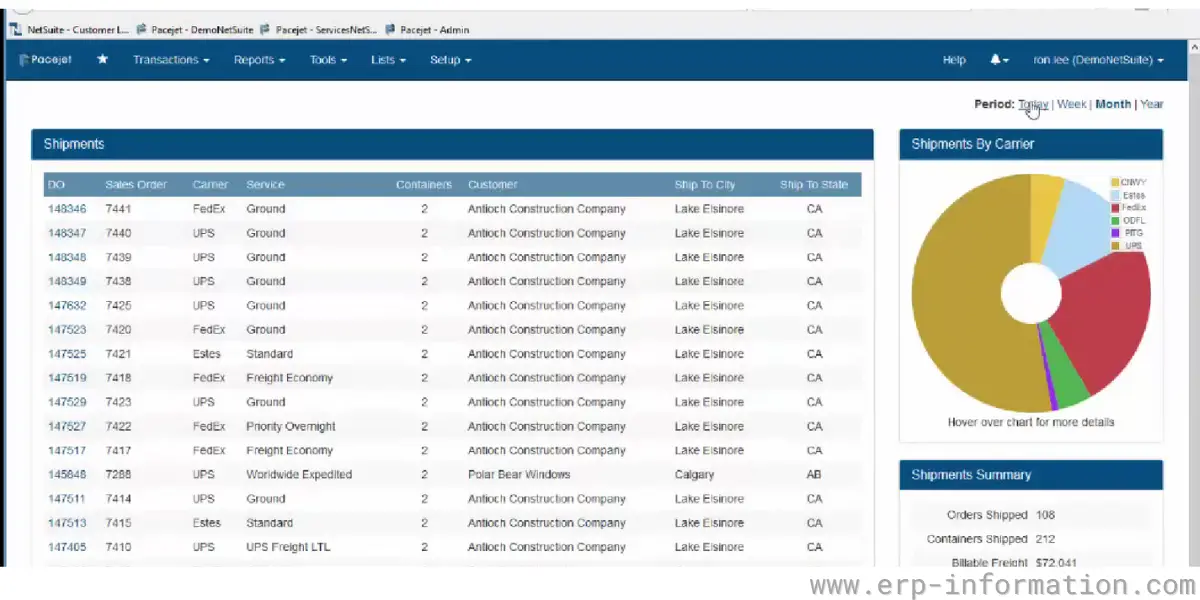
NetSuite integration with shipment is a quick and easy way to get your shipments out the door.
Following these steps, you can print labels and track your shipments in one place, keeping your customers updated on their order status.
NetSuite Ship Central vs the legacy integration
NetSuite Ship Central is a SuiteApp available to all NetSuite accounts and is now NetSuite’s standard shipping solution. It is a touchscreen driven pack station: warehouse staff scan an order, Ship Central rate shops across carriers, validates the address, produces the label, and handles returns.
Two implementation details are worth knowing before you plan an integration, because they determine which accounts and printers you need:
- Carrier connections run through ShipEngine. Ship Central uses an embedded ShipEngine account to reach UPS, FedEx, USPS, DHL and others, rather than the direct per-carrier registrations the legacy feature used.
- Label printing runs through PrintNode to reach printers on your network.
| Legacy Shipping Integration | NetSuite Ship Central | |
|---|---|---|
| Available to new customers | No | Yes, all accounts |
| Support status | Limited, pending transition | Current standard |
| Carrier connection | Direct FedEx / UPS / USPS-Endicia registration | Embedded ShipEngine account |
| Label printing | In-app label printing | PrintNode to network printers |
Oracle also names the ShipStation Connector in NetSuite Connector as an alternative depending on requirements, and publishes a “Comparing NetSuite Shipping Options” reference (SuiteAnswers ID 1046701) for choosing between them. If you are on the legacy integration today, the self-service upgrade path is documented as SuiteAnswers ID 1015202.
How to set up the legacy Shipping Label Integration (existing accounts only)
These steps apply only if your account already has the legacy feature enabled. On a new account the checkbox described below will not be available, and Ship Central is the route to use instead.
- Go to Setup > Company > Enable Features
- Go to the Transactions subtab
- In the Shipping & Receiving section, check the Shipping Label Integration box
- Click Save
UPS®, UPS & Shield Design®, and UNITED PARCEL SERVICE® are registered trademarks of United Parcel Service of America, Inc.
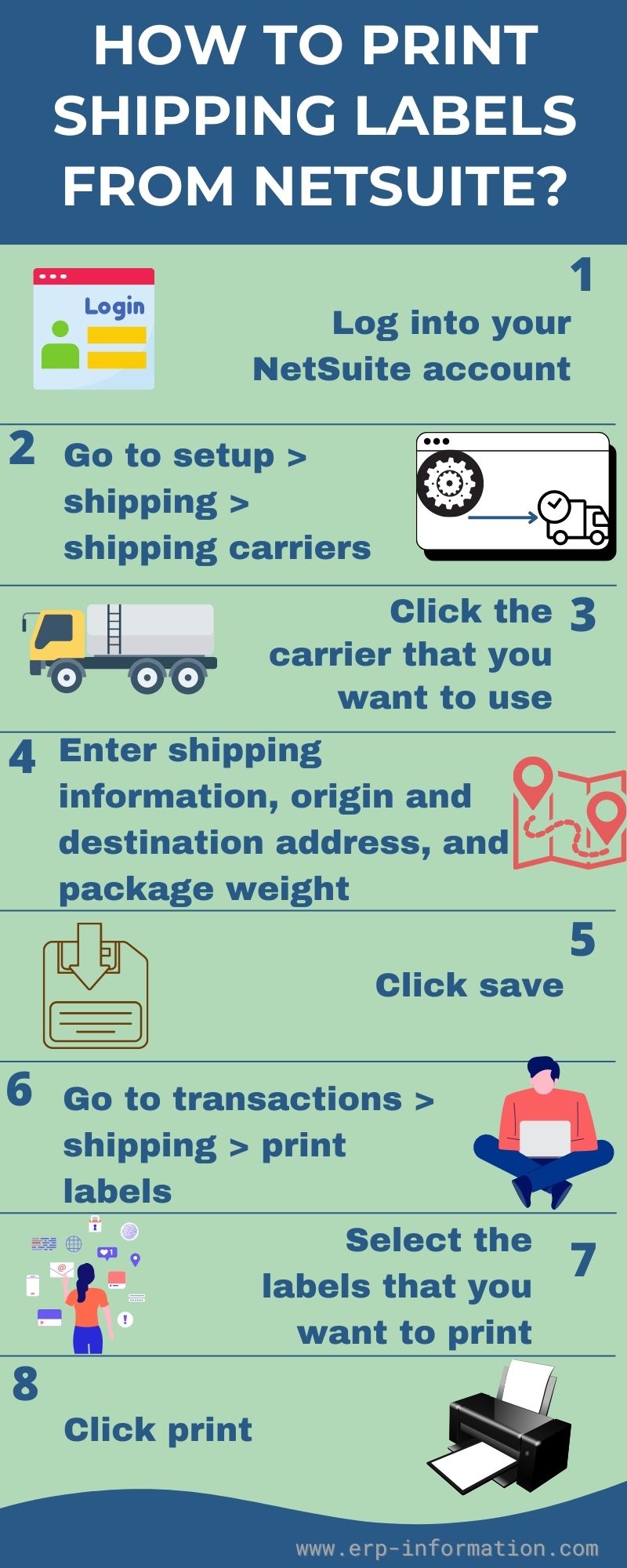
How to print shipping labels from NetSuite
You must connect your account to a shipping carrier before NetSuite can produce labels. On Ship Central, that connection is made through the embedded ShipEngine account during setup, and printing is routed via PrintNode. The sequence below describes the legacy carrier-registration flow, retained here because a large number of existing accounts still run it:
- Log into your NetSuite account.
- Go to Setup > Shipping > Shipping Carriers.
- Click the carrier that you want to use.
- Enter your shipping information, including your origin address, destination address, and package weight.
- Click Save.
- Go to Transactions > Shipping > Print Labels.
- Select the labels that you want to print.
- Click Print.
Factors to be Considered While Choosing the Best NetSuite Shipping Integration
Seamless Carrier Integration
A top-tier NetSuite shipping integration should seamlessly integrate with your preferred shipping carriers. This ensures that your existing carrier relationships remain intact, minimizing disruptions to your shipping workflow.
Confirm that the integration supports major carriers like FedEx, UPS, DHL, and others relevant to your business.
Customization Capabilities
Every business has unique shipping requirements. Look for an integration solution that offers a high degree of customization.
From setting shipping rules to defining packaging preferences, the ability to tailor the system to your specific needs is crucial. This ensures that the integration aligns seamlessly with your existing processes.
Ease of Scalability
As your business grows, so does your shipping volume. The selected NetSuite shipping integration should be scalable to accommodate increased order volumes without sacrificing performance.
Ensure that the integration can adapt to the evolving needs of your business, whether you’re shipping a handful of orders or dealing with a high-volume, peak-season rush.
Support for Your Shipping Volume
Consider the current and anticipated volume of shipments your business handles. The chosen NetSuite integration should be capable of supporting your shipping volume without compromising speed or accuracy.
Evaluate the integration’s track record with businesses similar to yours to gauge its performance under varying workloads.
Real-Time Tracking and Reporting
Visibility into the shipping process is vital for effective management. The NetSuite integration should provide real-time tracking and reporting capabilities.
This ensures that you and your customers can monitor shipments at every stage, fostering transparency and trust.
Compatibility with NetSuite Updates
NetSuite regularly releases updates and improvements. Ensure that the chosen shipping integration is compatible with the latest NetSuite versions.
This compatibility ensures that you can take advantage of new features and improvements without sacrificing the stability of your shipping processes.
Shipping Apps Integrated with NetSuite
1. Descartes Pacejet
Now branded Descartes Pacejet after Pacejet became part of the Descartes Systems Group, this is the most established multi-carrier shipping SuiteApp in the NetSuite ecosystem and the one most often shortlisted by mid-market and enterprise shippers.
It handles parcel, LTL, 3PL, and export in one workflow, with roughly 80 integrations spanning parcel carriers (FedEx, UPS, USPS, DHL, Amazon, Canada Post, Purolator), LTL carriers (Estes, ABF Freight, Averitt Express, FedEx Freight), and 3PLs (BlueGrace, CH Robinson, SEKO, Echo). Descartes states its LTL rate shopping reaches carriers representing about 93 percent of North American LTL capacity.
- Predictive packing estimates cartons before the pack bench to avoid dimensional weight surprises.
- Scan-pack validation checks order accuracy at packing.
- Compliance output covers GS1 labels, commercial invoices, and automated EDI transmission.
- Compatible with native NetSuite functionality including Advanced Shipment Data, Transportation Management, and NetSuite WMS.
Descartes publishes no list price for Pacejet and quotes on request. It also carries certified integrations for Acumatica, Microsoft Dynamics 365, Sage X3, IFS, and Infor CSI, so it is a reasonable choice if NetSuite is not the only ERP in the group.
2. XPS Ship
XPS Ship is a robust shipping app that integrates smoothly with NetSuite. It’s designed to simplify the shipping process by automating tasks such as order processing, label creation, and real-time shipment tracking.
When integrated with NetSuite, XPS Ship ensures that orders are seamlessly transferred, and shipping data is accurately updated within NetSuite, providing a cohesive shipping solution within the familiar NetSuite environment.
Key Features of XPS Ship Integration with NetSuite
E-commerce Integration
This integration allows for a smooth flow of order data from the e-commerce platform directly into XPS Ship and NetSuite.
As a result, businesses can easily process and fulfill e-commerce orders within the NetSuite environment, streamlining the entire order fulfillment process.
Real-time Tracking
XPS Ship enables businesses and their customers to track shipments as they progress through the shipping process by real-time tracking capabilities. This functionality ensures transparency and visibility and allows customers to monitor the status of their orders.
Live Support
The platform offers live support to assist users with any shipping-related queries or issues they may encounter.
Streamline Shipping
XPS Ship streamlines the shipping process by automating various aspects of shipping, such as label generation, carrier selection, and rate shopping. It ensures that the shipping process is efficient and error-free.
On-the-Go Shipping
It offers flexible on-the-go shipping, allowing users to manage and process shipments from anywhere, at any time.
Whether it’s through a mobile app or a web interface that empowers businesses to handle shipping tasks even while they’re away from their desks.
3. TrueCommerce EDI Solutions
TrueCommerce EDI Solutions provides seamless integration between NetSuite and various carriers and trading partners. It facilitates efficient and automated electronic data interchange (EDI) communication for order processing, shipping, and fulfillment.
By integrating TrueCommerce EDI Solutions with NetSuite, businesses can streamline their shipping processes and enhance overall supply chain efficiency.
Key Features of TrueCommerce EDI Solutions
Order Fulfillment
TrueCommerce EDI Solutions streamline order fulfillment processes by automating the exchange of order data between NetSuite and various trading partners.
It ensures that orders are seamlessly received, processed, and fulfilled within NetSuite’s environment. This automation enhances order accuracy, reduces processing time, and improves overall order fulfillment efficiency.
Integration with Multi-Channels
The platform offers integration capabilities with multiple sales channels, enabling businesses to connect with various online marketplaces-commerce platforms and retail systems.
This integration ensures a centralized hub for managing orders, inventory, and shipping processes from diverse sales channels within NetSuite. It brings all sales data into one unified platform for streamlined operations and better decision-making.
Automotive Supply Chain
It meets the distinctive needs of the automotive industry by enabling smooth communication throughout the automotive supply chain.
Moreover, it accommodates specific EDI standards and demands prevalent in the industry. This capability enables accurate and efficient data exchange, such as parts orders and shipping notifications, among automotive suppliers and manufacturers.
This fosters enhanced supply chain operations and promotes better collaboration within the automotive sector.
Analytics
TrueCommerce EDI Solutions provides analytical capabilities that allow businesses to gain insights into their EDI transactions and supply chain performance.
4. Extensiv Order Manager (formerly Skubana)
Extensiv Order Manager is a shipping app that seamlessly integrates with NetSuite. It provides a centralized hub for efficient order management, end-to-end validation, valuable insights, exceptional service, and flexibility in order processing.
The integration enhances the overall shipping and order fulfillment experience within the NetSuite environment.
Worth knowing if you are searching for this product under an old name: Extensiv Order Manager was Skubana. 3PL Central acquired Skubana in April 2021, then rebranded the combined company (3PL Central, Skubana, Scout, and CartRover) to Extensiv in May 2022. Documentation and reviews still circulate under both names.
Key Features of Extensiv Order Manager
Mission Control
Extensiv Order Manager offers a central hub or “Mission Control” for managing and overseeing the entire order management process.
End-to-End Validation
It ensures end-to-end validation of orders, from order creation to fulfillment. It verifies and validates all order data, including customer details, product information, and shipping preferences, to ensure accuracy and completeness.
Unprecedented Insights
The platform provides extensive insights into order management processes and performance. It offers in-depth analytics and reporting capabilities that provide valuable data-driven insights.
Service & Responsiveness
Extensiv Order Manager focuses on delivering excellent service and responsiveness throughout the order management lifecycle. It ensures prompt responses to customer inquiries, order updates, and shipping notifications.
Agility & Control
It offers agility and control in managing orders within NetSuite. It allows for quick adjustments and modifications to orders, shipping methods, and delivery schedules.
5. MyCarrier (MyCarrierTMS)
MyCarrierTMS is a shipping app integrated with NetSuite that focuses on streamlining transportation management. It offers features such as rate negotiation, freight optimization, shipment visibility, and integration capabilities with NetSuite.
It further helps businesses optimize their shipping operations, negotiate better rates with carriers, and ensure efficient transportation management within the NetSuite platform.
Key Features of MyCarrier
Live Quotes
MyCarrierTMS provides a feature for live quotes, enabling users to obtain real-time shipping quotes from various carriers.
This feature allows for quick and accurate comparison of shipping rates, helping businesses choose the most cost-effective and efficient shipping options based on their specific needs and requirements.
Integrated Cargo Insurance
The platform integrates cargo insurance capabilities within the platform, allowing businesses to easily secure and manage insurance for their shipments.
Digital Document Sharing
Additionally, it facilitates the seamless sharing and management of digital shipping documents. Users can efficiently share important shipping-related documents, such as bills of lading, invoices, and shipping labels, within the system.
QuickShip
The QuickShip feature expedites the shipping process by enabling users to swiftly generate shipping labels, schedule pickups, and initiate shipments with minimal manual steps.
This streamlined shipping workflow significantly saves time and effort, especially for frequently shipped items or routine orders.
Report and Analyze
MyCarrierTMS provides robust reporting and analytics capabilities, allowing users to generate detailed reports and analyze shipping data. Businesses can gain insights into shipping trends, carrier performance, shipping costs, and more.
6. Kuebix TMS
Kuebix Transportation Management System (TMS) is an integrated shipping app that connects seamlessly with NetSuite.
It streamlines transportation processes, optimizes freight management, enables efficient carrier selection, and rate shopping, and provides real-time visibility into shipping operations.
The integration enhances the efficiency and effectiveness of shipping and logistics operations within the NetSuite ecosystem.
Key features of Kuebix
Web services (API) integrations
Kuebix has established API integrations with all major carriers that support such connections, enabling swift onboarding and efficient data sharing to create a seamless experience for our shippers.
For carriers that do not support web services, Kuebix provides EDI integrations and tariff uploads, ensuring you can access and view all your carrier rates and real-time information directly within Kuebix.
Freight intelligence
Kuebix TMS captures every rate, shipment, and service level, offering companies immediate access to comprehensive reports and dashboards through predictive analytics.
This empowers businesses with the critical intelligence required to enhance logistics decisions daily
Flexible and speed
With an intuitive user interface that requires minimal training, Kuebix allows you to book your first shipment within minutes.
Out-of-the-box ERP integrations and carrier web services streamline onboarding, while Premier Applications let you extend the base TMS.
Ownership: check which Kuebix you are being sold
Kuebix has had an unusually turbulent few years, and a lot of what is written about it online is out of date in a way that matters to a buyer.
Trimble acquired Kuebix in 2020 for a reported $200 million, then announced it would stop selling and developing the platform, supporting existing customers for up to 36 months with a full sunset planned for 2025. A great deal of still-circulating commentary stops at that announcement and concludes the product is dead.
It is not. FreightWise bought Kuebix from Trimble in late 2023 and relaunched it, so the planned sunset did not happen. FreightWise has since added an entry level, self-signup version called OnKue starting around $69 per month, and Estes became the first carrier in its Preferred Carrier Program in January 2025. If you are evaluating Kuebix, confirm you are looking at the FreightWise product and current roadmap rather than Trimble-era material.
FAQs
Which shipping carriers does NetSuite support?
Through NetSuite Ship Central, carrier connections are made via an embedded ShipEngine account, which reaches UPS, FedEx, USPS, DHL and others. The older direct integration covered FedEx, UPS, and USPS/Endicia only. Third-party SuiteApps such as Descartes Pacejet extend this considerably, adding LTL carriers (Estes, ABF, Averitt, FedEx Freight) and 3PLs (CH Robinson, SEKO, Echo, BlueGrace) alongside parcel.
Is NetSuite’s built-in shipping integration still available?
Not to new customers. Oracle states that the Shipping Integration with FedEx, UPS, and USPS/Endicia “is not available to new customers” and is supported only on a limited basis for existing customers until they move to NetSuite Ship Central. Ship Central is the current standard shipping solution and is available to all NetSuite accounts.
What is NetSuite Ship Central?
Ship Central is NetSuite’s native shipping execution SuiteApp: a touchscreen pack station that handles carrier rate shopping, address validation, label generation, and returns. It connects to carriers through ShipEngine and prints through PrintNode. It replaces the legacy Shipping Label Integration feature.
What are the top shipping apps that integrate with NetSuite?
The commonly shortlisted options are Descartes Pacejet (the most established multi-carrier SuiteApp), ShipHawk, ShipStation (which Oracle itself names as an alternative via the ShipStation Connector in NetSuite Connector), XPS Ship, ShipJunction, ProcessWeaver, and ReadyCloud. For freight-heavy operations the TMS options include Kuebix and MyCarrier. Each trades off differently on parcel versus freight, price, and depth of NetSuite integration.
Does SuiteSync handle NetSuite shipping?
No, and this is a common mix-up worth correcting. SuiteSync is a Stripe-to-NetSuite integration for payments, invoices, and revenue reconciliation. It has nothing to do with shipping or carrier labels. It is also being retired: users are required to migrate to the Stripe Connector for NetSuite before 13 April 2027.
Is Kuebix TMS still available?
Yes. Trimble announced in 2022 that it would wind Kuebix down, which is why much of the material online treats it as discontinued, but FreightWise acquired the platform from Trimble in late 2023 and relaunched it. An entry-level version called OnKue starts at roughly $69 per month.
Conclusion
The decision comes down to what you actually ship. If you are parcel-only and moderate volume, Ship Central on its own may be enough, and it is the supported native path for any new account. If you ship freight, need LTL rate shopping, or have to produce compliance documents and EDI, a dedicated SuiteApp such as Descartes Pacejet will do things Ship Central does not attempt.
The trap to avoid is following a setup guide written for the legacy integration. That feature is closed to new customers and on limited support, so time spent configuring against it is time wasted. Confirm which path your account is on before you start, and if you are still on the legacy integration, treat the migration to Ship Central as scheduled work rather than something to defer indefinitely.
References