A human-machine interface, almost always shortened to HMI, is the screen and software an operator uses to watch and control a machine or process. In industry the word has a narrower meaning than “any screen you touch”: it is the operator-facing layer sitting on top of the controllers that actually run the equipment, usually a PLC.
Human Machine Interfaces have a wide range of applications in both personal and professional settings.
This article will look closely at the Human Machine Interface definition, its uses, components, trends, and more.
What is Human Machine Interface?
It is the interface between the human operator and the machine. It encompasses hardware and software elements enabling users to interact with a machine or system.
In many cases, this interaction takes the form of commands or requests; in others, it may be feedback from the machine about its status or operation.
Whatever their specific purpose, HMIs are an essential part of modern life. They allow us to control complex systems and processes with ease and precision.
As we continue to rely more and more on technology, they will become increasingly important and fascinating tools for interacting with the world around us.
A human-machine interface aims to provide an intuitive, easy-to-use, and efficient platform for performing its intended function.
Depending on the application, this may involve simple display screens or more complex control panels with multiple displays, dedicated keyboards, trackballs, touchscreen panels, etc.
They are typically used in industrial applications to monitor and control production processes. That can involve starting and stopping equipment to view real-time process status and performance data.
There is a standard for how these screens should be built. ANSI/ISA-101.01-2015, Human Machine Interfaces for Process Automation Systems, approved as an American National Standard in July 2015, covers the whole HMI lifecycle rather than just the look of a screen: the design philosophy a plant writes down first, then implementation, operation and ongoing maintenance. Its recurring themes are situational awareness, consistency between screens, sane alarm handling and navigation an operator can follow under pressure. It applies across continuous, batch and discrete industries, and it is the reference to cite when someone asks why a new display looks deliberately grey and undecorated.
Other terms for human-machine interface
You will also see it called an operator interface terminal (OIT), a local operator interface (LOI), an operator panel, or the older man-machine interface (MMI), which has fallen out of use. A graphical user interface (GUI) is not a synonym. A GUI is a style of interface, one that most modern HMIs happen to use; an HMI is the role the device plays in a control system.
HMI Components
An HMI is built from two halves that are bought and specified separately: the panel hardware that sits in the cabinet door, and the software that runs on it and on the engineer’s PC. Getting the split clear is what makes vendor datasheets readable.
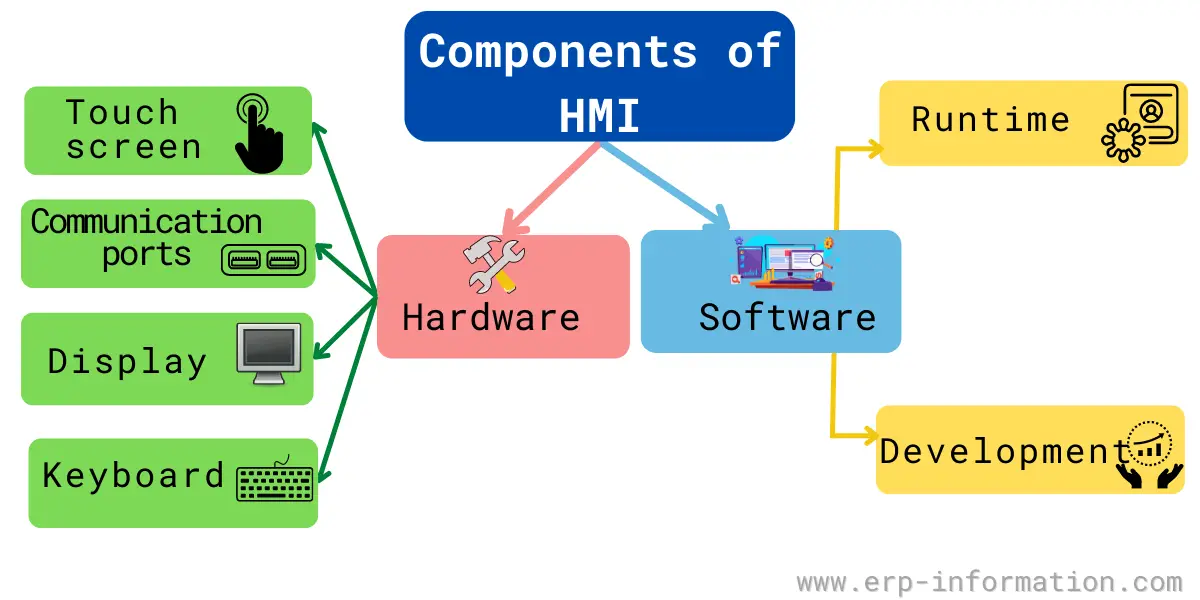
Hardware includes
- Display. An LCD, TFT or LED panel, commonly 4 to 21 inches. Touch is either resistive, which works through a glove but needs firmer pressure, or projected capacitive, which feels like a phone and is now the default on new panels.
- Processor (CPU). The panel’s brain, and the component that decides what the HMI can actually do. Compact panels typically run an ARM system-on-chip. Mid-range units use x86 processors such as Intel Atom or Celeron, and panel PCs driving heavy trending, alarm handling and data logging move up to Core i3 or i5. A screen that only shows a handful of static graphics needs far less than one keeping months of history.
- Memory. RAM holds the running application, while flash or ROM stores the operating system, the runtime and the downloaded project. Recipe data, alarm history and trend logs also live here unless they are pushed to a server.
- Communication ports. Ethernet carries the industrial protocols most new installations use, such as PROFINET, EtherNet/IP and Modbus TCP. Serial ports, RS-232 and RS-485, are still common for Modbus RTU and PROFIBUS on existing plant. USB is generally there for project transfer, printers and barcode scanners.
- Power supply. Almost always 24 V DC taken from the control cabinet rather than mains.
- On-board I/O, on combined units. Some products merge the HMI and the PLC into one device with its own digital and analog terminals, which removes a controller from small machines.
Software includes
- Runtime. The program that executes on the panel itself. It draws the screens, polls tag values from the controller, evaluates alarm conditions and records trends. It is what is running when the machine is in production.
- Development or configuration software. A separate tool that runs on an engineer’s PC, where screens are drawn, tags are mapped to controller addresses, and alarms are defined. The finished project is compiled and downloaded to the panel. This is normally vendor-specific, and it is the main reason changing HMI brand mid-project is painful.
- Communication drivers. The protocol stacks that let the runtime talk to PLCs and other equipment: Modbus, PROFIBUS, PROFINET, EtherNet/IP, CANopen and increasingly OPC UA. The driver list in a datasheet decides what the panel can be connected to.
- A web server, on newer panels. Many HMIs now serve the same screens to a browser or phone over HTML5, so the panel is no longer the only place the process can be seen.
Types of HMI
HMIs are usually sorted into three kinds by what the operator does with them. The categories are old but they still describe the market accurately, and they map onto very different price brackets.
Pushbutton replacer
The simplest kind, and the origin of the category. It takes the bank of physical buttons, switches and indicator lamps that used to cover a cabinet door and puts them on one screen. The operator starts and stops equipment and sees status lamps, but nothing is recorded. It earns its place by cutting wiring and panel cut-outs rather than by adding intelligence.
Data handler
Used where the process has to be evidenced, not just run. It adds trending, recipe storage, production reports and printouts, which means it needs a real processor and somewhere to keep history. This is the tier most food, pharmaceutical and regulated manufacturing sits in, because the record matters as much as the control.
Overseer
A PC-class interface, usually running Windows or Linux, that supervises many machines or a whole site rather than one line. This is where an HMI stops being a panel and becomes the front end of a SCADA or MES deployment, and where the comparison further down this page starts to matter.
Uses of Human-Machine Interface
Here we are listing its most common uses.
- It communicates with input and output sensors and programmable logic controllers(PLCs).
- Monitors and controls machinery like starting and stopping machines and performs sophisticated operations.
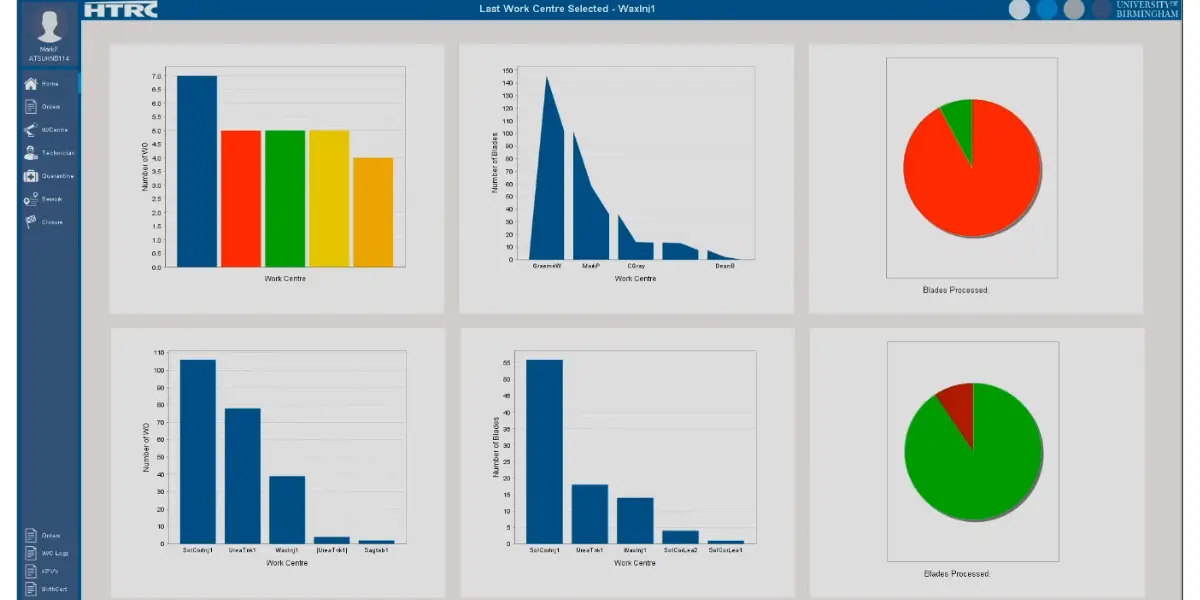
- Allows operators to see data in graphs and charts through digital dashboards.
- Allows operators to view and manage alarms.
- Eliminates manual recording of mechanical processes by allowing PLCs to provide real-time data to display.
- It helps to decrease human errors.
- It helps to reduce machine downtime and increases accuracy by enabling operators to control machines.
- It enhances communication between manufacturing processes and between machines and men.
Role of HMI in SCADA System
SCADA system is the central control system of industrial processes.
The human-machine interface is an important part of this system. It connects to Programming Logic Controller (PLC) and displays data from PLC, and gives input to PLC from users.
In this way, it helps the manager or operator to monitor and control the processes.
HMI Examples
The most common examples are the keypad/keyboard of a computer and touchscreens. The HMI screen and other devices help human beings to communicate with machines.
Other devices used in industries are multi-touch-enabled control panels, push buttons, mobile devices, or a tablet.
Push buttons and physical selector switches still appear alongside the screen, and safety functions such as emergency stop are deliberately kept as hardware rather than as a touch target, because they must work even if the panel software has locked up.
What is the Difference Between HMI and SCADA?
| HMI | SCADA |
| It shows visual information to help the operator to monitor the industrial process. | It collects information and controls system operation. |
| It does not connect to the database. | It connects to the database. |
| It does not collect and record data. | It collects and records data. |
| It provides a good communication tool for the SCADA system. | It is the main monitoring and controlling system. |
Trends in Human Machine Interface Software
High-performance HMI
It is becoming a trend nowadays. Operators prefer this because it is fast and interacts effectively. It focuses more on complicated indicators and allows the operator to view and respond to the problem quickly and efficiently.
In addition, it provides clear and simple graphs and charts and optimizes the user experience.
Remote monitoring
Remote monitoring allows operators to become flexible and accessible. Operators can monitor and view the information on the industrial processes even if they are far away from the shop floor or field.
Cloud HMI
With its help, operators can view and access data from field devices. You can also send information from the local human-machine interface to the cloud that can be accessed and examined remotely.
Touch screens and mobiles
Advanced human-machine interface allows operators to tap or touch the screen instead of pushing buttons or switches to monitor data and access control. In addition, mobile allows the user to instantly access and monitor remotely.
Browser-based HMI
Rather than installing vendor software on every client, the project is served over HTML5 and opened in an ordinary browser, so the same screens work on a panel, a laptop and a phone without a separate mobile build. For sites with several plants or a mobile maintenance team this removes most of the client-installation problem, at the cost of depending on a server and a network that must now be treated as production infrastructure.
Edge computing and combined HMI-PLC hardware
The clear direction of travel is away from a standalone panel that only draws screens and towards a device that also controls the machine and processes data locally. Filtering and aggregating at the edge means only useful data travels upstream, which keeps response times short and bandwidth costs down.
OPC UA and MQTT for connectivity
Vendor-specific drivers are gradually giving way to OPC UA, which carries structured data types and built-in security, and to MQTT with Sparkplug B for publish-subscribe data movement. Multi-protocol support is now the practical requirement on any enterprise-grade panel, and it is what makes a unified namespace across a plant achievable.
Cybersecurity as a specified requirement
Once an HMI is reachable from a browser it is part of the attack surface. IEC 62443 is the international standard for industrial automation and control system security, and the practical expectations that follow from it are encrypted sessions, certificate-based OPC UA connections, per-user accounts with real privilege levels, and network segmentation between the control network and everything else. On a panel bolted to one machine this was once ignorable. It is not any more.
Advantages and disadvantages of HMI
Advantages
- Good coordination between the operator and machine helps to monitor and control the system.
- Operators can easily access the updates of input information and increased capacity.
- Operators have access to emergency stop buttons and other safety uses.
- As a result of improved accuracy and quality control operator can easily input and monitor the data.
- The interface can be changed to fit the operator’s needs of what he wants to do. This makes the system more flexible and easier to use
Disadvantages
- Expensive to Install and maintain. You may need special software or hardware that costs a lot of money.
- The interface can be difficult without operation skills. For effective usage, the operator will need to have training.
- Scalability is limited, which means the system might be unable to work with new changes or upgrades.
- Compatibility may also be limited, which means it will only work with certain machines or systems.
- The interface may not always work because of limited reliability, which can cause problems.
- It may face some security issues. It can also be easier for hackers to get into if it is not secure.
FAQs
What are the types of HMI?
There are three, sorted by what the operator does with the screen.
The pushbutton replacer swaps physical buttons, switches and lamps for a screen, with no data recorded.
The data handler adds trending, recipes, reports and printouts, so it needs a real processor and storage.
The overseer is a PC-class interface running Windows or Linux that supervises many machines or a whole site, and is where an HMI becomes the front end of a SCADA or MES system.
What are the components of an HMI?
Hardware: a display, usually LCD or TFT with resistive or capacitive touch; a processor, ARM on compact panels and x86 such as Atom, Celeron or Core i3/i5 on units doing heavy trending; RAM plus flash for the OS, runtime and project; communication ports, Ethernet for PROFINET, EtherNet/IP or Modbus TCP and serial RS-232/RS-485 for Modbus RTU and PROFIBUS; and a 24 V DC supply.
Software: the runtime that executes on the panel, the vendor development tool that runs on an engineer’s PC and downloads the project, and the communication drivers that let it talk to the PLC. Newer panels add an HTML5 web server.
Is an HMI the same as SCADA?
No. SCADA is a supervisory system that collects and records data across many machines or a whole site; an HMI is the operator-facing screen.
A SCADA system contains an HMI, but most HMIs are not part of a SCADA system at all. They are panels attached to a single machine talking to a single PLC, with nothing supervisory above them.
Is there a standard for HMI design?
Yes. ANSI/ISA-101.01-2015, Human Machine Interfaces for Process Automation Systems, was approved as an American National Standard in July 2015.
It covers the full HMI lifecycle, from the written design philosophy through implementation, operation and maintenance, and it emphasizes situational awareness, consistency, alarm management and clear navigation. For security, IEC 62443 is the relevant standard.
What is an HMI controller block diagram?
It is a schematic of how the parts of an HMI connect: the display and touch input, the processor and memory, the communication ports, and the power supply, with the link out to the PLC or controller.
Engineers use it to reason about a design before building it, and to see where a signal path or a protocol boundary sits.
Conclusion
One correction worth making, because it is a common muddle and this page has a whole section on it above: an HMI is not by definition part of a SCADA system. A SCADA system does include an HMI as its operator-facing layer, but most HMIs in the world are not part of one. They are panels bolted to a single machine, talking to a single PLC, with no supervisory system above them at all. SCADA is a system architecture; HMI is a role within it, and also a product you can buy on its own.
If you are specifying one, the two decisions that matter most are the processor, because it sets what trending and logging the panel can sustain, and the driver list, because it decides what the panel can be connected to at all.
Reference