If you sell software subscriptions, bundled hardware and services, or multi-year contracts, revenue recognition under ASC 606 stops being an accounting formality and becomes a monthly reconciliation problem. NetSuite Advanced Revenue Management (ARM) is Oracle’s answer to that problem inside NetSuite.
One thing trips up almost every buyer: ARM is not a single module you switch on. It is sold as two separate licensed features, and most of the capability people associate with ARM, including fair value allocation across performance obligations, lives in the second one. Getting that wrong is how finance teams end up licensing ARM and then discovering it will not do the allocation they bought it for.
This guide covers what ARM actually is, the difference between Essentials and Revenue Allocation and which one you need, how ARM maps onto the ASC 606 five-step model, the four records that drive it, what it costs, how to migrate off classic revenue recognition, and where ARM is the wrong tool.
What is NetSuite ARM?
NetSuite Advanced Revenue Management automates revenue forecasting, recognition, reclassification, deferral, and auditing through a rule-based event handling framework. In Oracle’s own wording, it lets you “defer revenue for recognition across future periods according to the rules you configure.”
The practical difference from NetSuite’s older classic revenue recognition is that ARM separates the billing event from the revenue event. A sales order can invoice on day one, in full, while revenue is recognized over 36 months against a schedule that ARM maintains, adjusts for contract modifications, and reports on. Classic revenue recognition tied schedules directly to transaction lines and could not allocate across performance obligations.
ARM supports ASC 606 and IFRS 15, handles multi-currency and multi-subsidiary consolidation, and produces the revenue waterfall and deferred revenue rollforward reports auditors ask for.
Essentials vs Revenue Allocation: which one do you need?
This is the part vendor marketing blurs. ARM ships as two features in NetSuite, and they are licensed and enabled separately.
| Advanced Revenue Management (Essentials) | Advanced Revenue Management (Revenue Allocation) | |
|---|---|---|
| What it does | Deferral and recognition. Builds revenue arrangements, elements, rules, and plans; posts recognition journal entries; forecasts and reclassifies | Splits a contract’s total consideration across multiple performance obligations using fair value |
| Prerequisite | The Accounting Periods feature must be enabled first | Essentials must be enabled first. It is an add-on to Essentials, not an alternative |
| Fair value methods | Not included | SSP, VSOE, ESP, TPE, plus fair value price lists, range checking, and fair value formulas |
| Who needs it | Anyone recognizing revenue over time from a single obligation: a straight subscription, a support contract, a fixed-term licence | Anyone selling bundles: software plus implementation plus support on one order, hardware plus a service plan, tiered SaaS with onboarding |
The rule of thumb: if a single sales order line carries one distinct promise to the customer, Essentials is enough. The moment one order contains several distinct promises that were sold at a discount to their individual list prices, ASC 606 requires you to allocate the transaction price across them by relative standalone selling price, and that is Revenue Allocation.
Enabling either feature is a one-way door. Oracle documents that Advanced Revenue Management (Essentials) cannot be disabled once enabled. Test it in a sandbox first.
How ARM maps to the ASC 606 five-step model
Auditors think in the five steps. NetSuite thinks in records. This is how they line up.
| ASC 606 step | Where it happens in NetSuite |
|---|---|
| 1. Identify the contract | The revenue arrangement record, created from an approved sales order, invoice, or project |
| 2. Identify performance obligations | Revenue elements, one per distinct promise, generated from the source transaction lines |
| 3. Determine the transaction price | The arrangement total, adjusted for variable consideration and contract modifications |
| 4. Allocate the price to obligations | Fair value price lists and allocation, which requires the Revenue Allocation feature |
| 5. Recognize revenue as obligations are satisfied | Revenue recognition rules generate revenue plans, which post journal entries per period |
Step 4 is the one that fails silently. With Essentials only, NetSuite will happily recognize revenue line by line at the price on the order, which is not ASC 606 compliant for bundled sales.
The four records that drive ARM
Almost every ARM support question comes down to not knowing which of these four objects is wrong.
- Revenue arrangement. The contract-level container. Created from previously approved sales transactions, so nothing reaches ARM until the source document is approved. Where contract terms and renewals themselves need managing, that sits in NetSuite contract management rather than in ARM.
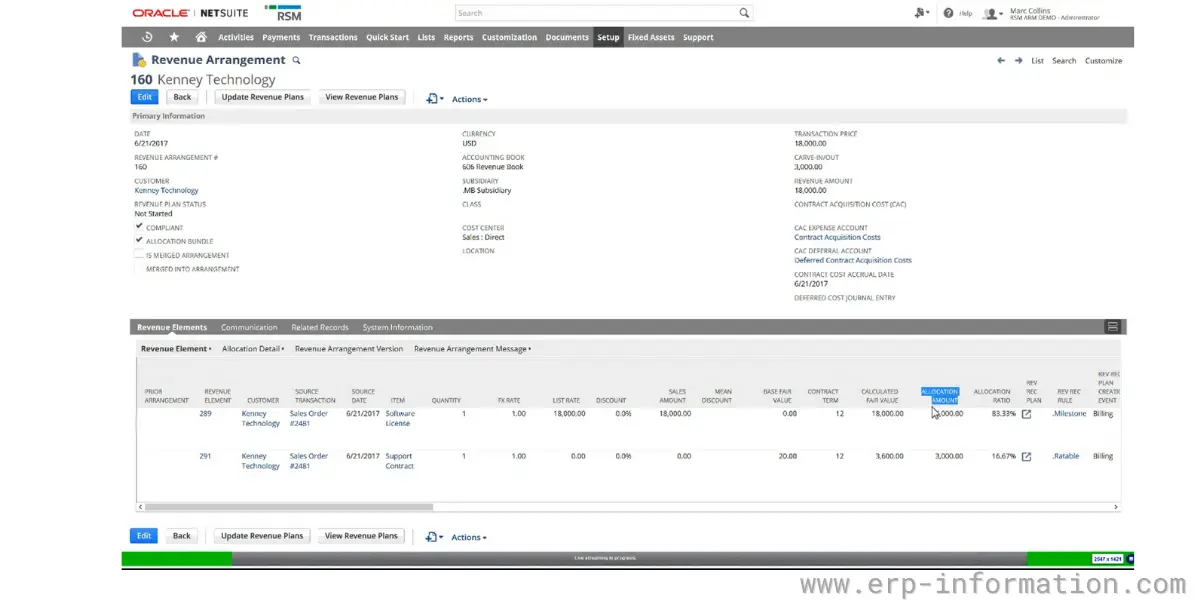
- Revenue element. One row per performance obligation, carrying the allocated amount, the fair value, and the recognition rule that will apply.
- Revenue recognition rule. The template: the recognition method, the amount source, and the start and end date logic. Prepackaged rules cover the common straight-line and milestone cases; custom rules cover the rest. Once a rule has been used, it cannot be deleted.
- Revenue plan. The generated schedule of dated amounts. Plans can be driven by billing, by fulfillment, by project percent-complete, or by performance milestones written into the contract.
Fair value, SSP, and allocation
Revenue Allocation supports fair values based on standalone selling price (SSP), vendor-specific objective evidence (VSOE), best estimate of selling price (ESP), and third-party evidence (TPE). You maintain these on fair value price lists, which can vary by item, currency, and subsidiary.
- Item revenue categories let you set fair value for a whole class of items instead of maintaining SSP item by item, which is the difference between a maintainable price list and a full-time job.
- Fair value formulas derive a price from other fields, useful when SSP is a percentage of list or a function of contract term.
- Range checking flags transactions where the actual selling price falls outside the acceptable band around fair value, which is the exception report your auditors will want to see.
- A single item or group of items can carry different standalone selling prices depending on context.
Reporting and forecasting
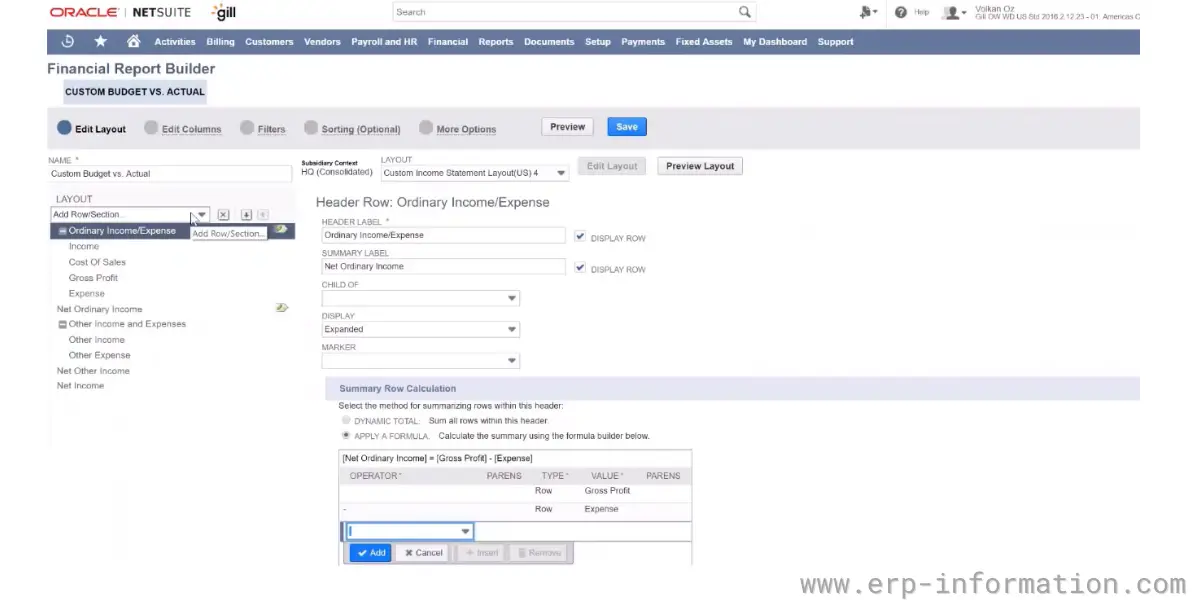
ARM generates revenue waterfall reports natively, broken down by revenue element, customer, subsidiary, and custom segments. Scheduled revenue for future periods appears in the forecast, so deferred revenue balances are visible before they post rather than after.
- Drill-down from a reported balance to the originating transaction, which is what makes an audit trail defensible rather than merely present.
- Reclassification handles the contract asset and contract liability positions ASC 606 requires when billing and recognition diverge.
- Dashboards can combine revenue arrangements for a portfolio view.
- Contract modifications are evaluated as either a separate contract or a termination-and-new-contract, and the schedule is adjusted accordingly.
What NetSuite ARM costs
Oracle publishes no list price for NetSuite modules, so any figure you see is triangulated from partner quotes rather than a rate card. With that caveat:
- NetSuite add-on modules generally run $300 to $1,500+ per month depending on functionality and scale.
- For SaaS and services companies selling bundles, ARM is commonly quoted at roughly $5,000 to $15,000 per year on top of the base NetSuite licence.
- ARM is not included in every NetSuite edition. Confirm what your existing licence covers before assuming you already have it.
- Budget separately for implementation. Because Oracle requires professional services involvement for the classic-to-ARM move, the services line is not optional.
Essentials and Revenue Allocation are licensed separately, so a quote for “ARM” that does not name both features is worth clarifying in writing before signing.
Setting up ARM: prerequisites and sequence
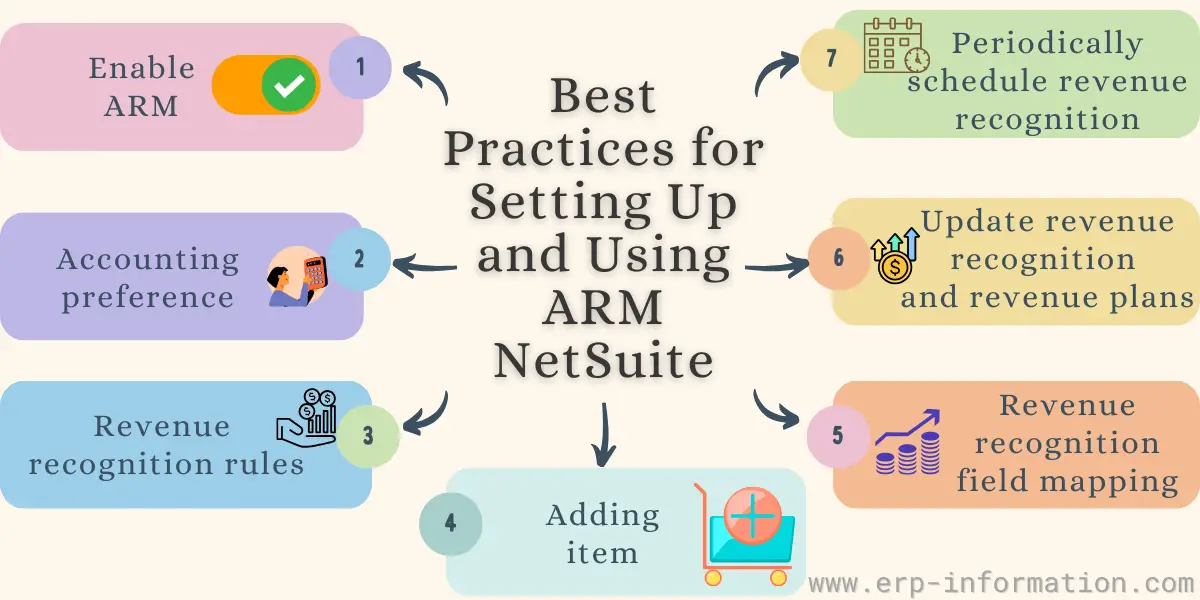
1. Enable the prerequisites, in order
- Accounting Periods must be enabled before Advanced Revenue Management (Essentials).
- Essentials must be enabled before Revenue Allocation.
- Neither can be switched off afterwards. Prove the configuration in a sandbox account first.
2. Set accounting preferences and arrangement sources
- Turn on automatic creation of revenue arrangements and plans. Doing it manually at volume is where errors enter.
- Choose which transactions create arrangements: sales orders, invoices, or projects.
- Select a default or customized revenue arrangement form to match your reporting fields.
3. Map accounts and posting rules
Map revenue, deferred revenue, contract asset (unbilled receivable), contract liability, and FX gain/loss accounts before any plan posts. Correcting an account mapping after journal entries exist is materially harder than getting it right first.
4. Build recognition rules and fair value price lists
- A recognition rule needs its method, amount source, and start and end date logic defined. Rules already in use cannot be deleted, so name them deliberately.
- Build SSP tables and fair value ranges by item, currency, subsidiary, and segment. Use item revenue categories rather than individual items wherever the pricing logic allows.
5. Map fields, then run the periodic jobs
- Revenue recognition field mapping connects sales order fields to the revenue arrangement.
- Update revenue arrangements and revenue plans when source transactions change.
- Schedule the revenue recognition journal entry job on a regular cadence rather than running it ad hoc at close.
Migrating from classic revenue recognition
If you are on NetSuite’s classic revenue recognition, understand what this move actually involves before scheduling it.
- It is not self-service. Oracle states that “the assistance of NetSuite Professional Services or a qualified NetSuite partner is required to move from classic Revenue Recognition to Advanced Revenue Management.” Contact your account representative to have the feature provisioned.
- Settings do not carry over. Classic revenue recognition templates and schedules do not convert into ARM rules and plans. ARM is configured from scratch.
- The two coexist during cutover. Order-to-revenue workflows that began before ARM was enabled continue under classic revenue recognition; workflows created after ARM is enabled and Configuration Mode is switched off use ARM. Plan for parallel running rather than a clean break.
- Define the cutover date deliberately, ideally at a period or year boundary, so comparatives stay explainable to auditors.
Where ARM fits
ARM earns its cost where contracts contain multiple obligations, span periods, or get modified mid-term. That concentrates in:
- Software: SaaS, on-premise licensing, digital goods, particularly where a subscription is sold alongside implementation
- High-tech manufacturing: semiconductors, electronics, where hardware ships with embedded software or a service plan
- Professional services: advertising, architecture, engineering, management consulting, law, where milestone and percent-complete recognition apply
- Telecom: equipment and service providers, the classic bundled-handset allocation case
- Industrial products: aerospace and defense, discrete manufacturing, process manufacturing, with long-duration contracts
When ARM is the wrong tool
ARM is not a general-purpose upgrade and it is not suitable for every NetSuite account. Skip it, or postpone it, when:
- You recognize revenue at a point in time. Straightforward product sales delivered and invoiced in the same period need no deferral engine.
- Your deferral is simple and low-volume. A handful of annual support contracts can be handled with standard deferred revenue schedules at a fraction of the licence and implementation cost.
- Your item and pricing data is not clean. ARM allocates against fair value price lists. If SSP is unknown or item setup is inconsistent, ARM will produce confidently wrong numbers faster than a spreadsheet did.
- Nobody owns the process. ARM shifts work rather than removing it: someone has to maintain rules, fair values, and exception reports every period.
For heavy subscription billing scenarios, also compare against NetSuite SuiteBilling, which handles the billing side of recurring contracts and feeds ARM rather than replacing it.
FAQs
What are the fair value methods supported by NetSuite ARM?
Standalone selling price (SSP), vendor-specific objective evidence (VSOE), best estimate of selling price (ESP), and third-party evidence (TPE), plus other fair value methods your company uses. These are maintained on fair value price lists and require the Advanced Revenue Management (Revenue Allocation) feature, not Essentials alone.
Is there a migration tool from classic revenue recognition to ARM?
No. Oracle does not provide a self-service migration utility, and NetSuite is cloud-only, so there are no on-premise environments to migrate from. Oracle requires the assistance of NetSuite Professional Services or a qualified NetSuite partner to move from classic Revenue Recognition to Advanced Revenue Management. Classic settings do not carry over; ARM is configured from scratch, and the two run in parallel during cutover.
Is there a NetSuite ARM certification?
There is no ARM-specific certification. NetSuite’s program is tiered into Associate, Specialist, and Professional levels, and revenue management knowledge is assessed within the broader Financial User and ERP Consultant Professional tracks. SuiteFoundation Specialist is the prerequisite for the other certifications. Exams cost $250, run 90 to 120 minutes, and are delivered through NetSuite MyLearn.
Can NetSuite ARM be turned off once enabled?
No. Oracle documents that Advanced Revenue Management (Essentials) cannot be disabled after it is enabled. Enable it in a sandbox account first and validate your rules, account mappings, and fair value price lists before touching production.
Do I need both ARM Essentials and Revenue Allocation?
Only if you sell bundles. Essentials handles deferral and recognition for contracts with a single performance obligation. Revenue Allocation is an add-on to Essentials that splits the transaction price across multiple performance obligations using fair value, which ASC 606 requires whenever one order contains several distinct promises sold at a discount to their standalone prices.
How much does NetSuite ARM cost?
Oracle publishes no list price. NetSuite add-on modules typically run $300 to $1,500+ per month, and ARM is commonly quoted around $5,000 to $15,000 per year on top of the base licence for SaaS and services companies. ARM is not included in every edition, and Essentials and Revenue Allocation are licensed separately, so confirm both by name in any quote.
Conclusion
NetSuite ARM is a capable ASC 606 engine for companies whose contracts genuinely need one: multiple performance obligations, revenue spread across periods, contracts that change mid-term. It is not a light switch. It cannot be disabled, the migration from classic revenue recognition requires Oracle or a partner and rebuilds your configuration from scratch, and the allocation capability most buyers assume they are getting sits in a separately licensed add-on.
Before you buy, settle two questions: do your contracts contain multiple distinct promises, and can you defend a standalone selling price for each of them? If the answer to both is yes, ARM is the right tool and Revenue Allocation is not optional. If the answer to either is no, spend the money on cleaning up item and pricing data first.
References
- Oracle NetSuite Applications Suite – Advanced Revenue Management (Essentials) and (Revenue Allocation)
- Oracle NetSuite Applications Suite – Revenue Recognition and Advanced Revenue Management (Essentials)
- Oracle NetSuite Applications Suite – Setup for Advanced Revenue Management (Essentials)
- Oracle NetSuite – Revenue Recognition and Revenue Management
- Oracle NetSuite – NetSuite Certification