You’ve probably heard of software-defined networking (SDN), but what about software-defined perimeter?
SDN and SDP are two of the most important new technologies to hit enterprise networks in years, but many people don’t know what they are or how they can be used.
This post provides a high-level overview of SDP, including its key features, architecture, deployment models, benefits, and common use cases.
What is a software-defined perimeter?
A software-defined perimeter (SDP) is a security architecture that provides a secure, flexible, and easily manageable perimeter around an organization’s resources for protecting networked systems from potential cyber-attacks.
The idea is older than the marketing around it. It grew out of the Global Information Grid Black Core work done at the US Defense Information Systems Agency from around 2007, and the term itself was published and popularised by the Cloud Security Alliance, which set up its SDP working group in 2013 and has maintained the specification since. That matters when you are reading vendor material: SDP is a published architecture with an open specification behind it, not one company’s product name.
It hides IT infrastructure like routers, servers, etc., so that hackers can not determine the deployment model, whether cloud or on-premise.
The SDP model establishes a zero-trust security perimeter that dynamically creates secure, individualized connections between users, devices, and services regardless of location. Only authorized users can access the network infrastructure.
How does it work?
The SDP uses software to create and enforce policies that allow only authorized users and devices to access the resources inside the perimeter. It can be implemented in public clouds, private clouds, or on-premises data centers.
This framework is based on zero-trust security, meaning all users and devices are treated as untrusted until they are authenticated and authorized.
This software uses encryption and other security measures to generate a secure tunnel between the user and the resource, ensuring that only authorized users can access the resource.
It can be used in conjunction with other security technologies, such as firewalls and intrusion detection/prevention systems (IDS/IPS), to create a more secure environment. This software can also help reduce the complexity of managing multiple security technologies.
How do users get access over an SDP?
Unlike traditional security models that rely on firewalls and virtual private networks (VPNs), the SDP model uses advanced security technologies, including identity-based access control, micro-segmentation, and transport layer security (TLS).
- User identity-based access: An individual can access the server or any resources using unique credentials. A third-party provider verifies it. The user’s unique identity might have a combination of username and password. Sometimes multi-factor authentication also be there.
- Device verification: It includes the user’s device checking for malware and anti-virus infections. The software-defined perimeter can create a blocklist of devices and not allow them to be used.
- SDP controller authentication: It is a logical component of SDP and is responsible for selecting the servers and devices that can be connected. After the user and device authenticate, the controller informs the SDP gateway about their approval. The SDP gateway is responsible for granting or refusing access.
- User access: The user can now access network resources that were previously hidden. They can also use their device normally. That is possible because the user operates within an encrypted network that only includes them and the services they need to access.
- Secure network connection: The user can enter through the SDP gateway when it virtually opens. The gateway creates a secure network connection between the user’s device and the services they can access. Other users or servers can not share this connection.
Key features
- Its ability to create a secure and isolated zone for conducting business transactions.
- Its ability to dynamically manage access control for users and devices.
SDP Architecture
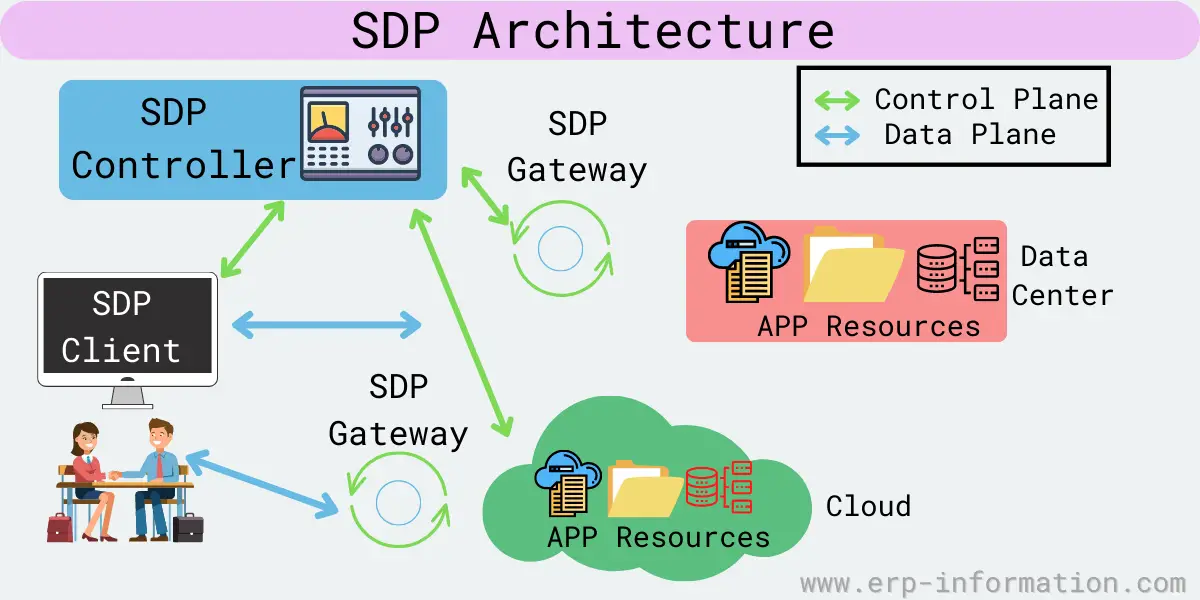
The architecture includes the following components:
Controller
This software creates and manages security zones. In addition, it defines which client or user devices can communicate with each other.
It sits between the user devices and the servers or applications in the zone and provides security and access controls. It can be deployed both on-premises and in the cloud.
Clients
The clients are devices that access resources inside the perimeter and are used to access the applications or data in the zone. They include laptops, smartphones, and tablets.
These clients are of 2 types initiating hosts and accepting hosts. Initiating host communicates with the controller to define to which device they can connect, and the accepting host accepts communication that the SDP controller allows.
Gateways
Gateways are also used as a component in some architecture. For example, they function as accepting hosts between two devices.
SDP deployment models
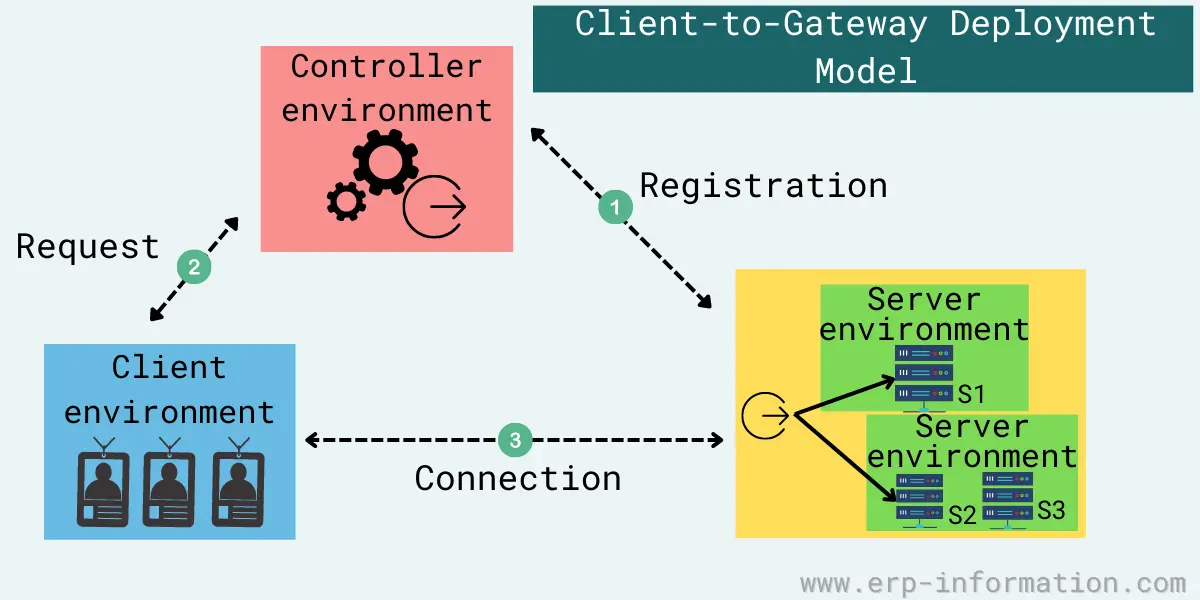
Client-to-gateway deployment
This deployment model minimizes the damage from lateral movement attacks, like OS and application vulnerability exploits, MitM attacks, and server scanning.
You can deploy it inside a network or directly on the internet to segregate authorized users from unauthorized ones and protect servers. It is ideal for organizations using either cloud-based or legacy on-premises applications.
Client-to-server deployment
It is the same as client-to-gateway deployment. The difference is that here SDP protects the server instead of the gateway.
It would be best to consider some factors to decide which deployment is good, including analysis of load-balancing needs, the servers’ elasticity, and the number of servers a company is required to protect behind this software. This model is good for enterprises with cloud-based applications.
Server-to-server deployment
This model allows organizations to protect servers that offer representational state transfer (REST) services, Simple Object Access Protocol(SOAP) services, a remote procedure call (RPC), or an application programming interface (API) from all unauthorized hosts on the network. It is most suitable for companies that use cloud-based IoT.
Client-to-server-to-client deployment
It is ideal for companies using chat and video conference applications. In this model, It scatters the IP addresses of connecting clients in this deployment, with the server intervening for both clients.
Client-to-gateway-to-client deployment
This model is the same as client-to-server-to-client deployments. Here, each client acts as an initiating host, an accepting host, and sometimes both when connecting.
Gateway-to-gateway deployment
This network model is ideal for IoT devices that cannot install SDP clients, like printers, scanners, and smart sensors.
In this model, one or more servers sit behind an accepting host and act as a gateway, and clients sit behind an initiating host and act as a gateway.
Use cases
SDP strengthens the network against common threats, like DoS attacks, MitM attacks, brute-force attacks, port scanning, server vulnerabilities, and lateral movement attacks.
Other use cases are as follows.
Supports various devices
It authenticates various devices, including laptops, smartphones, Internet of Things (IoT) devices, and tablets.
Controls broad network access
It does not grant broad access to network segments. Hence, devices can only access the specific services and hosts that policy permits.
That limits the network attack surface and helps prevents port and vulnerability scanning from being done by malicious users or software.
Monitors IT resources
It allows companies to continually monitor and manage their IT resources without increasing costs.
Supports a broader risk-based policy
These systems weigh many risk factors to make security decisions, like data from threat intelligence sources, new software, and malware outbreaks.
Secures hybrid and private clouds
It enables companies to lock up public and hybrid clouds that use both private and public clouds.
Controls access and applications
It can control which applications users have access to. For example, if an employee only needs to access email and HR software, they cannot access other corporate applications.
Simplifies security management
SDP lets companies manage all their security in one place with one set of policies. As a result, they no longer need to deploy and manage multiple security tools.
SDP, Zero Trust and ZTNA: one idea under three names
If you are researching this in 2026, the most useful thing to know is that the industry mostly stopped saying “software-defined perimeter” and started saying something else. You will find far more current material, and far more products, under Zero Trust Network Access (ZTNA). The terms are closely related rather than interchangeable, and the distinction is worth holding onto:
- Zero Trust is the principle: never grant access on the basis of network location, verify every request, and give the least privilege that works.
- SDP is an architecture that implements that principle, using the controller, client and gateway model described above, with resources hidden until a user is authenticated.
- ZTNA is what the market now sells. It is built on SDP ideas and adds identity-based policy, device posture checks and continuous re-verification during a session rather than only at connection time. It is reasonable to think of ZTNA as SDP’s successor generation.
The practical consequence: searching for “SDP products” will return a thin and somewhat dated set of results, while the same requirement described as ZTNA returns the live market. If a vendor is still leading with SDP as its headline term, check the date on the page you are reading.
What you actually buy in 2026
This is the part most SDP explainers leave out. Standalone SDP or ZTNA is increasingly not sold as a product on its own. It has been absorbed into two larger bundles, and knowing the acronyms saves a lot of confusion on a vendor call:
- SSE (Security Service Edge) – ZTNA bundled with a secure web gateway and a cloud access security broker. Gartner’s 2025 Magic Quadrant for SSE placed Zscaler, Palo Alto Networks, Netskope and Skyhigh Security in its Leaders quadrant.
- SASE (Secure Access Service Edge) – SSE plus the networking side, typically SD-WAN, sold as one platform.
- Other names that come up repeatedly in this space include Microsoft, Cloudflare and Cisco among the large platforms, Appgate, Okta, Lookout and iboss in the specialist tier, and Twingate and Teleport among the lighter, faster-to-deploy tools that suit smaller or remote-first teams.
Two things follow from this for anyone specifying a replacement for remote-access VPN. First, buying ZTNA on its own is now a comparatively niche purchase, so expect to be quoted a platform. Second, adoption is no longer early: industry estimates put well over two-thirds of new remote-access deployments on ZTNA rather than VPN. The question in most organisations has moved from whether to replace the VPN to which platform absorbs it, and the honest answer usually depends on which security vendor you are already committed to rather than on the access technology itself. If you are looking at the gateway side of this, our guide to secure web gateways covers the adjacent component.
SDP vs VPN
Before knowing the difference, let us know what VPN is.
What is VPN?
A Virtual Private Network (VPN) is a secure connection between a user’s device and a private network over the internet. It enables users to securely access and transmit data across public networks as if they were connected to a private network, such as their office network or a cloud network.
A VPN generates an encrypted tunnel between the server and the user’s device. All data sent and received through this tunnel is encrypted to protect against interception, hacking, and other unauthorized access attempts.
The main difference between SDP and VAN is that SDP provides more granular control over access to resources within the data center or cloud.
That allows companies to give specific users or applications access to particular resources while keeping other resources hidden.
On the other hand, VAN is a more traditional security model where all devices have the same level of access to resources.
| SDP | VAN |
| It lets companies manage all their security in one place with one set of policies. | It requires multiple security tools to be managed separately. |
| It can be used in private and public clouds. | It can be used only in private clouds. |
| It can control which applications users can access. | It can not control which applications users can access. |
| It weighs many risk factors in making security decisions. | It does not weigh many risk factors. |
FAQs
What are the benefits of SDP Over traditional security methods?
It offers several benefits over traditional security methods. First, this software allows companies to use the cloud for more computing and storage capacity while maintaining high levels of security.
Second, it makes it possible to quickly deploy applications and services in the cloud without worrying about security configurations.
Finally, the software provides more granular control over resource access within the data center or cloud. That allows companies to give specific users or applications access to particular resources while keeping other resources hidden from view.
What are the challenges of SDP?
The main challenge of SDP is its implementation. It cannot be easy to set up and manage an SDP system.
There is also a lack of trained personnel who can work with these systems. In addition, these systems can be expensive to purchase and operate.
What is mutual Transport Layer Security?
Mutual Transport Layer Security (TLS) is a security protocol that provides two-way authentication between a client and a server. In mutual TLS, both parties must authenticate each other by exchanging digital certificates before any data is transmitted. That provides an extra layer of security compared to the traditional one-way TLS authentication model, where only the server is required to authenticate itself to the client.
Conclusion
Software-defined perimeter is a security technology that uses software to create secure perimeters around an organization’s networks. It can be used in various use cases, including cloud computing, data center security, and remote access.
The SDP architecture comprises three core components: clients, controllers, and gateways. Using software to define the perimeter provides more flexibility and agility than traditional security technologies. One closing caution if you are comparing options: SDP describes an architecture, not a product category you can shop from today, so a shortlist built by searching that term alone will be incomplete. Describe the requirement as ZTNA, expect the answer to arrive inside an SSE or SASE platform, and judge the vendors on how well they fit the security stack you already run.