Deltek Vantagepoint is a project-based ERP built for professional-services firms, such as architecture, engineering, and consulting practices, that need to run projects, resources, and accounting in one system. It is Deltek’s successor to Deltek Vision, and this review covers its modules, pricing, real strengths, and the weaknesses worth knowing before you commit.
Vantagepoint fits firms that bill by project and want timesheets, resource planning, and project accounting tied together instead of stitched across separate tools. It suits mid-sized architecture, engineering, and consulting firms best, and it is heavier than smaller services businesses usually need.
Latest version: Deltek Vantagepoint 2026.3 (build 2026.3.0.152), released June 15, 2026.
Deltek ships Vantagepoint on a calendar-based, roughly quarterly cadence (2026.1, 2026.2, 2026.3). The 2026.2 release introduced the redesigned “Harmony” interface and the Dela AI assistant. Deltek’s 2026.3 release notes add a grid-based Dela Insights configuration screen, further Harmony styling changes that Deltek describes as visual only, new public APIs for resource-planning assignments and AP payment exports, and FEC file generation for firms filing in France. Anyone evaluating screenshots or reviews written before 2026 is looking at a materially different product.
What is Deltek Vantagepoint?
Deltek Vantagepoint is a comprehensive project and financial management solution designed to streamline business processes for the professional services industry.
It aims to provide complete visibility into every aspect of business, enabling better, faster, and more informed decision-making.
It provides a centralized location for all project-related data, including schedules, tasks, resources, budgets, and documents.
Deltek Vantagepoint Pricing
Deltek doesn’t publish a price list for Vantagepoint, and that is deliberate. What you pay depends on how many people use it, which modules you switch on, and whether you run it in Deltek’s cloud or on your own servers, so any figure you find online is a starting point rather than a quote.
From reseller and marketplace listings, entry pricing begins around $30 per user per month, but most professional-services firms end up in the $75 to $200 per user per month range once project accounting and resource planning are switched on. A 25-seat architecture or engineering firm usually pays between $3,000 and $6,000 a month; firms with 30 to 75 users tend to see annual subscriptions of $60,000 to $150,000. Implementation and data migration are quoted on top of that and commonly run from $30,000 to well over $200,000, mostly driven by how much legacy data (often from Deltek Vision) has to be moved across. Deltek does not offer a self-service free trial. You request a personalized demo instead, and partners can sometimes set up a guided sandbox for qualified buyers.
| Scenario | Indicative cost |
|---|---|
| Entry, per user / month | from ~$30 |
| Typical full user, per user / month | ~$75 to $200 |
| 25-user A/E firm | ~$3,000 to $6,000 / month |
| 30 to 75 users | ~$60,000 to $150,000 / year |
| Implementation (one-time) | ~$30,000 to $250,000 |
Figures are indicative and compiled from public reseller and marketplace listings (Vendr, SelectHub, Capterra). Ask Deltek or a Deltek partner for a firm quote based on your user count and modules.
Deployment and Scalability
Deltek Vantagepoint can be deployed on-premise or in the cloud. The on-premise deployment option requires a one-time payment, while the cloud-based deployment is subscription-based.
In practice it scales best for small-to-large professional-services firms rather than very small ones. The per-user pricing and the setup effort make it hard to justify below roughly 10 to 15 users, while larger architecture, engineering, and consulting firms are where its depth pays off. The cloud option removes the server and upgrade burden and is where most new buyers land.
Modules
Deltek Vantagepoint offers a variety of modules to help you manage your projects more effectively. They include
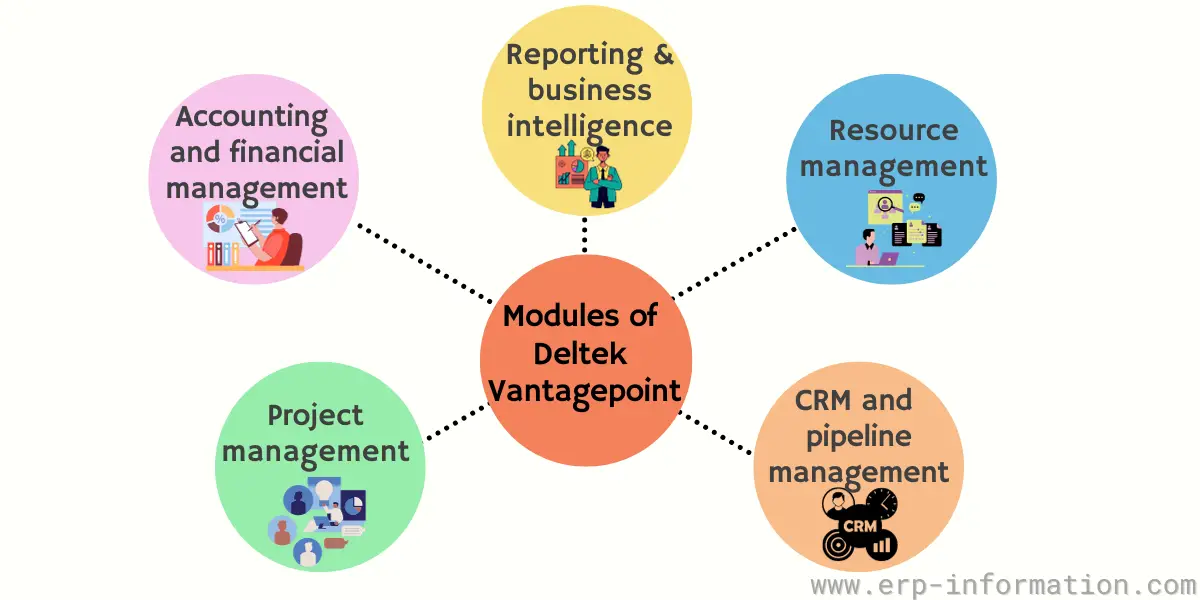
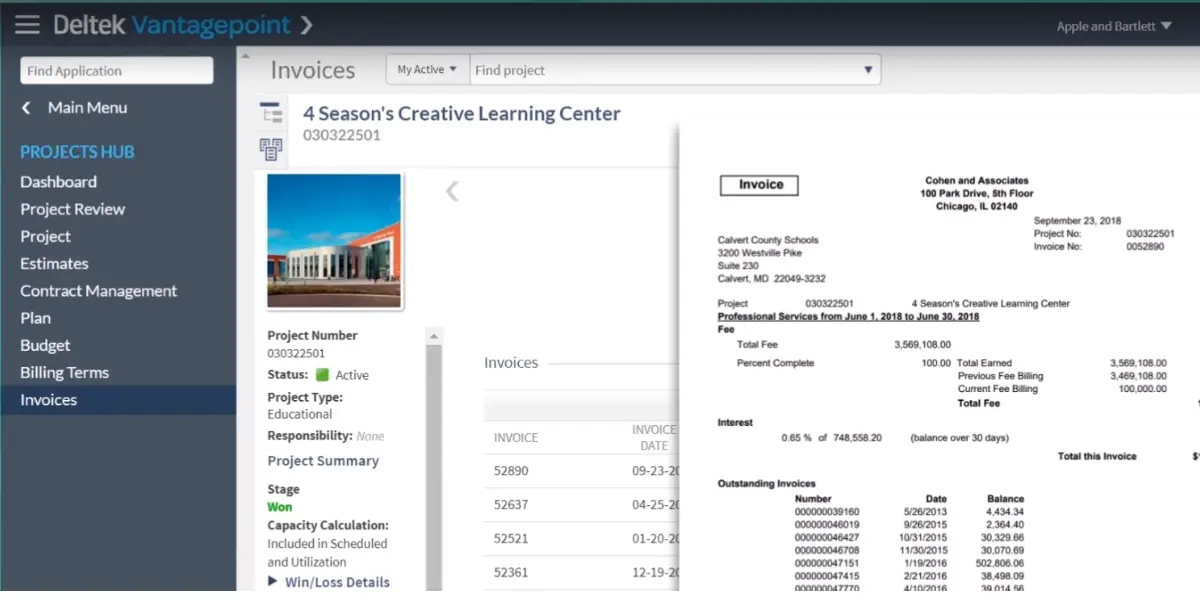
Accounting and Financial Management
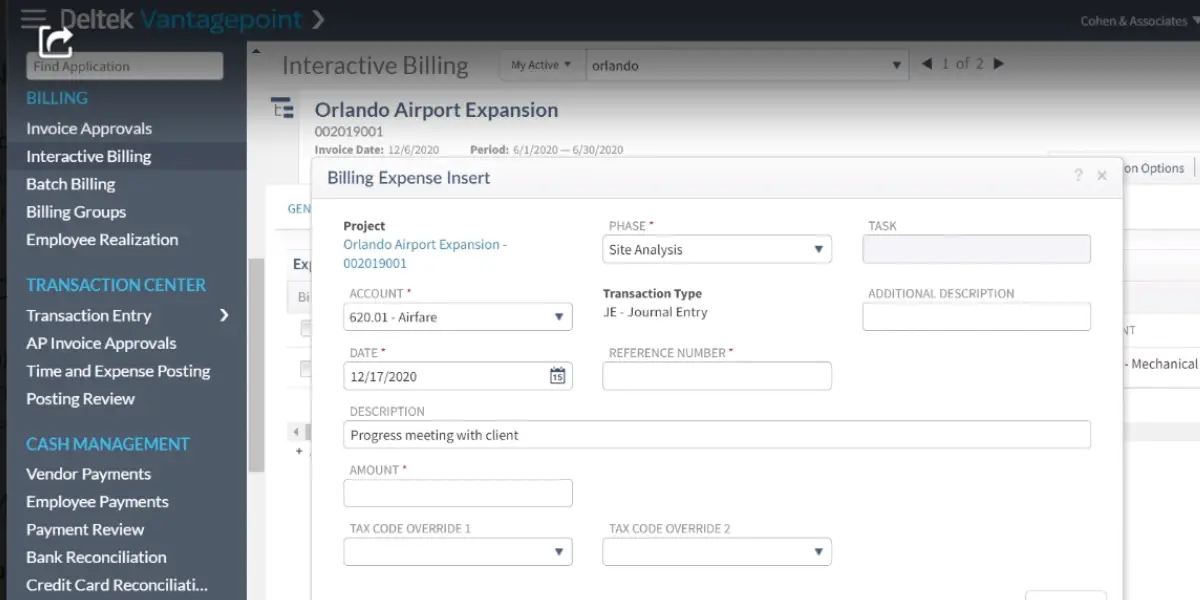
Deltek Vantagepoint offers a variety of accounting and financial management features to help efficiently capture time and expenses.
You can speed up payments using interactive billing tools and keep track of your projects’ finances.
CRM and Pipeline Management
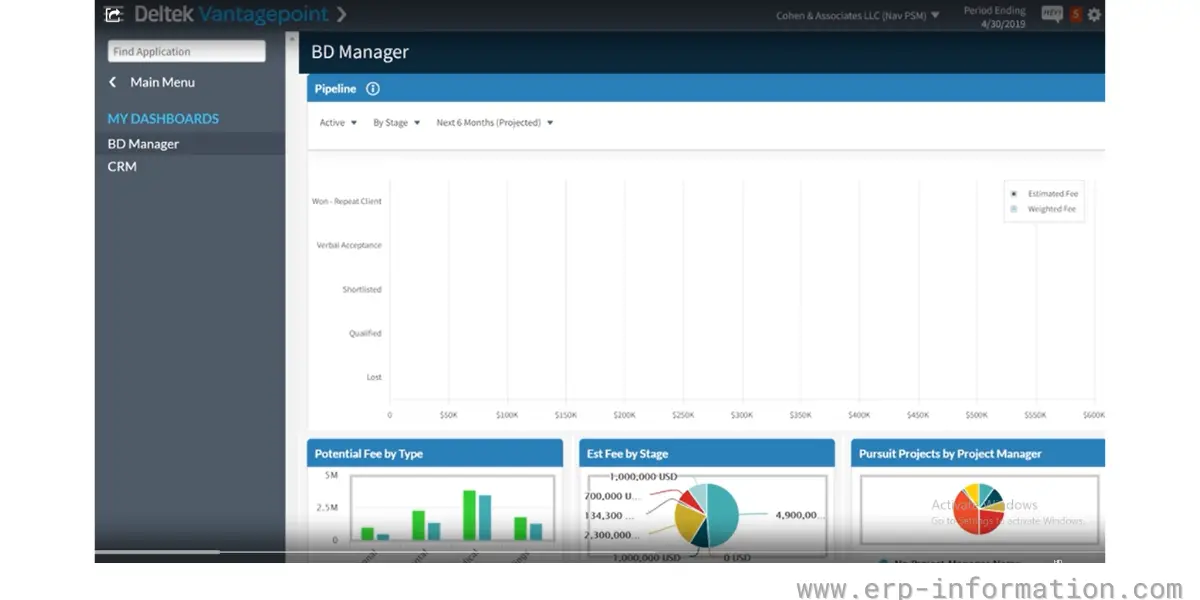
Vantagepoint’s CRM sits in the same database as accounting and project delivery, so contacts, firms, and opportunities are tied directly to the projects and invoices they relate to. Business developers track the pipeline, log touchpoints, forecast wins, and hand a won opportunity straight into project setup without re-keying the details.
A mobile business-card scanner speeds up adding or updating contacts on the road. One caveat worth knowing before you buy: CRM access is bundled at the role level, so anyone who needs the full role effectively needs a CRM licence even if they never work the pipeline, which nudges up the seat count on larger teams.
Project Management
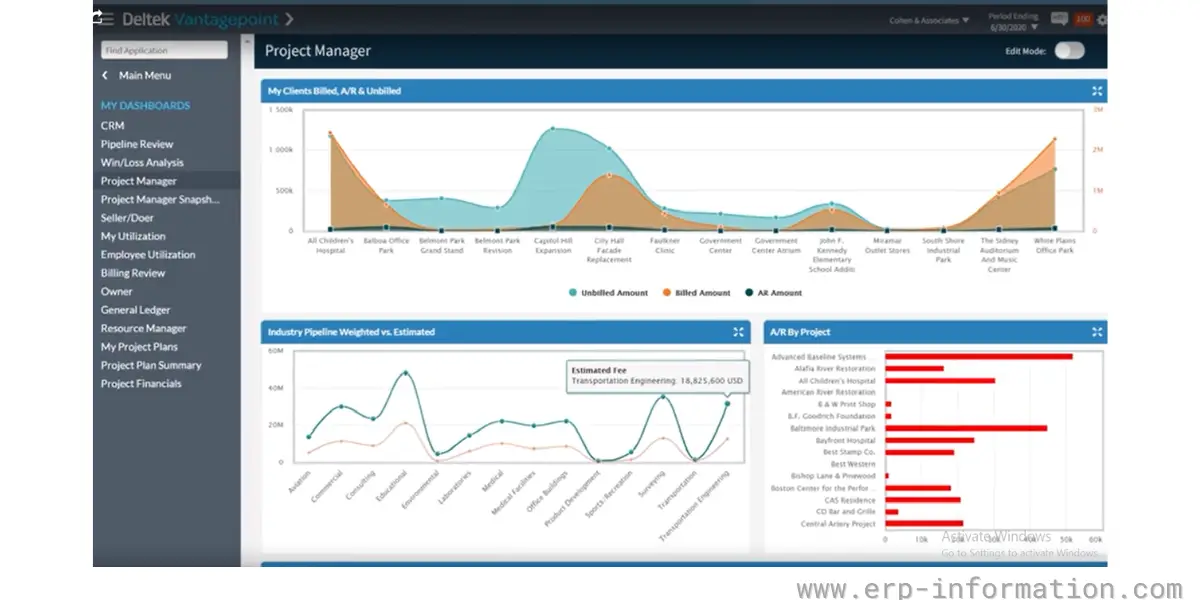
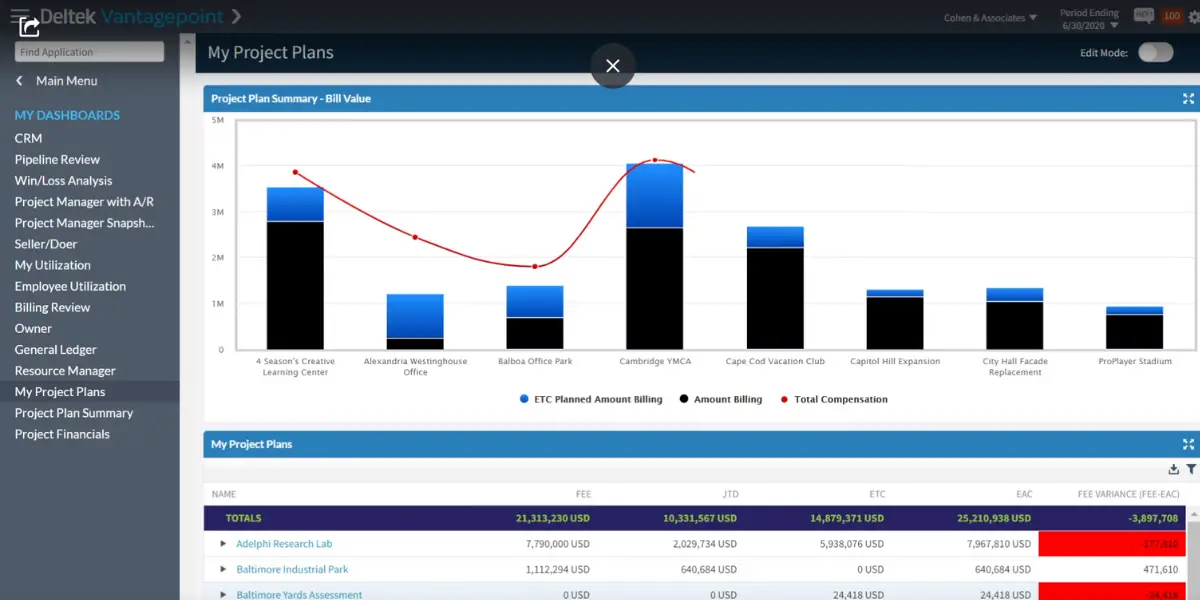
The project command center gives you complete visibility into your entire project.
The project lifecycle helps you reduce schedule and cost overruns, make project planning, find risks, prepare for changing demands, expedite invoices to exceed expectations, and ensure that they are completed on time and within budget.
Reporting and Business Intelligence
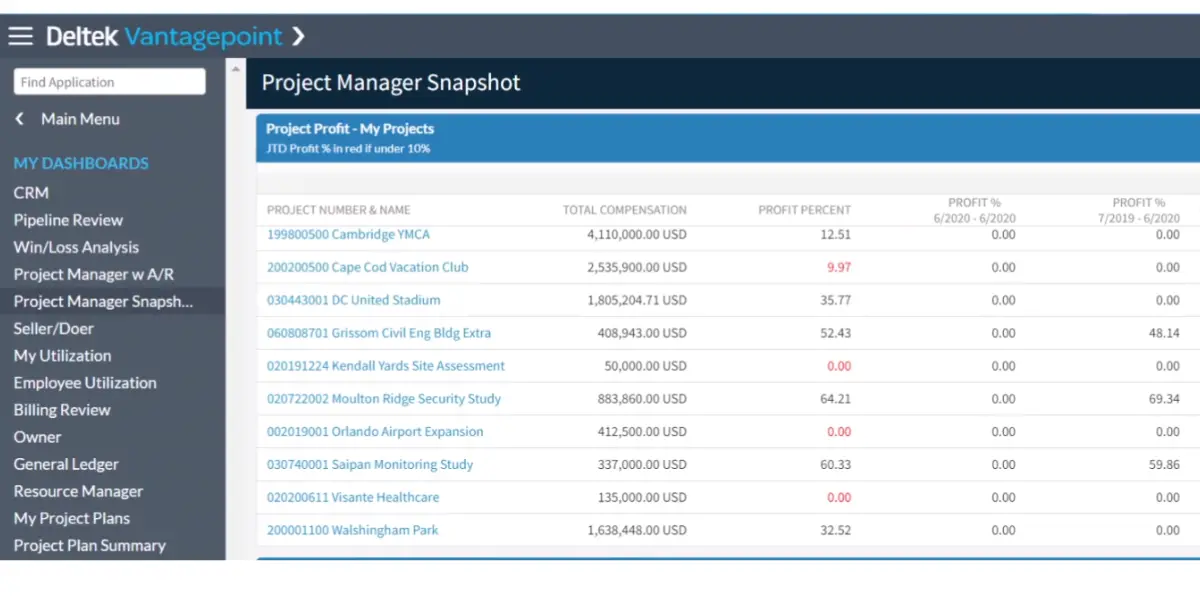
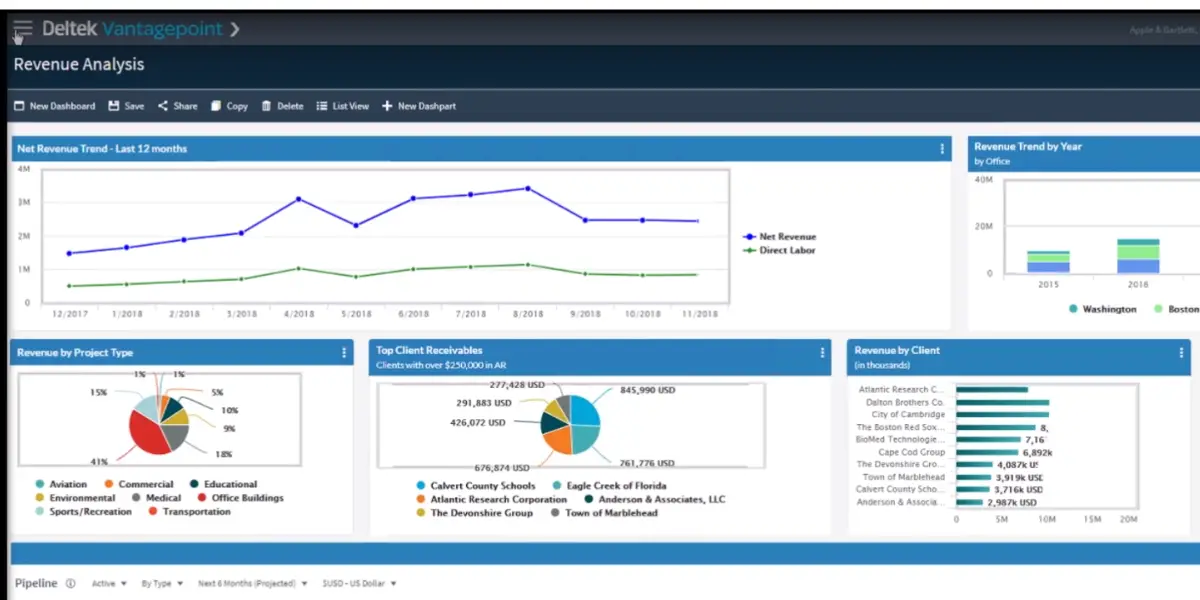
You can tailor Deltek Vantagepoint’s reporting to meet your specific needs. You can choose which data to include and customize the layout and format of your reports. The software provides role-based dashboards and rich visual analysis.
Resource Management
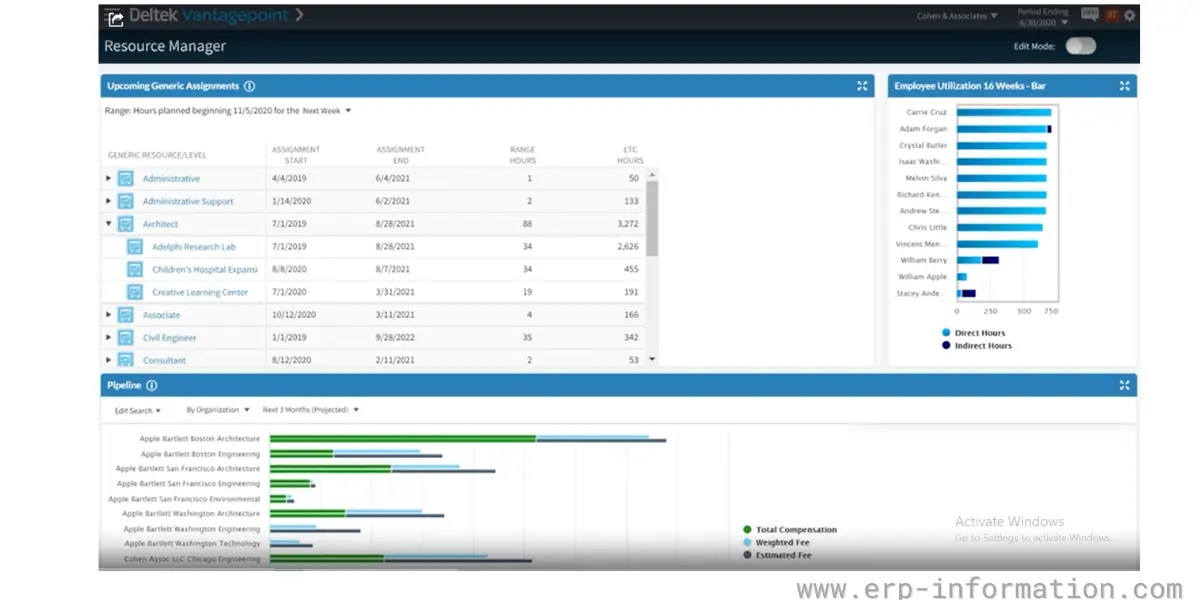
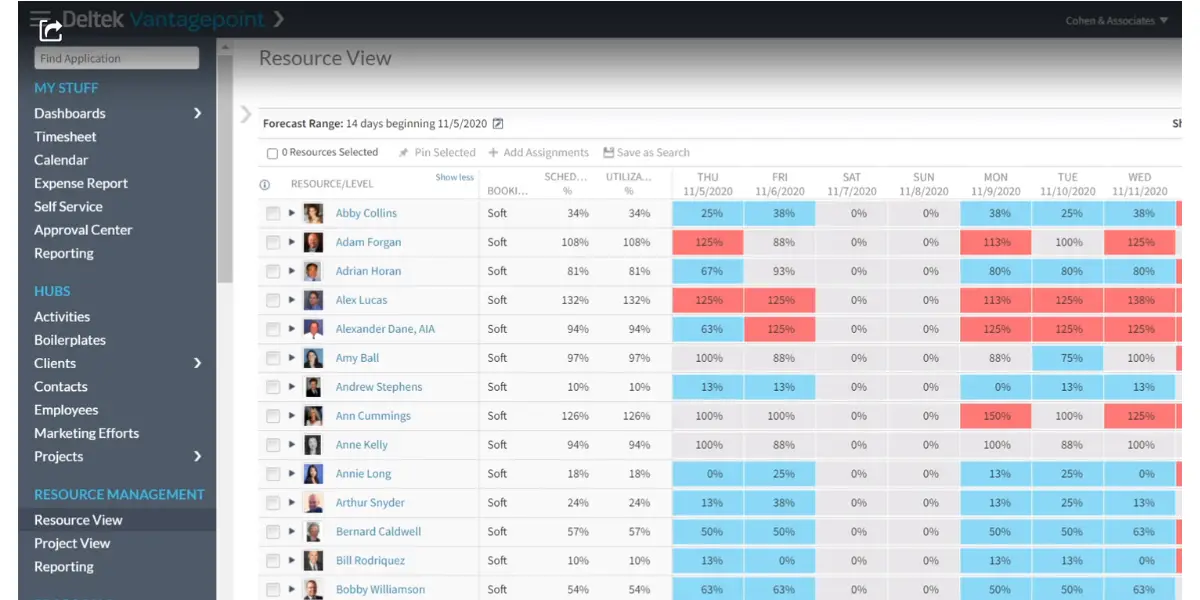
Its resource management features will help you identify the best resources for your projects based on expertise and availability, create good project plans with real resources, and optimize resource usage.
Industries Supported By Vantagepoint
Vantagepoint mainly serves two industries they are,
1. Architecture and Engineering Firms
Deltek Vantagepoint is a powerful project and financial management tool for A&E firms. It gives firms a holistic view of their projects, helping them to be more productive, collaborative, efficient, and profitable.
2. Consulting Firms
Deltek Vantagepoint is a complete engagement management solution for consulting firms. It gives firms the tools they need to succeed, from start to finish, by providing a holistic view of all engagements and insights that help firms make better decisions.
The software is quite helpful for both industries and has distinct features that make it unique from its competitors.
Other Details
Languages supported
Vantagepoint is available in several languages, including English, Spanish, French, German, Italian, Japanese, Korean, Portuguese, and Russian.
Vantagepoint integration
Vantagepoint integrates with popular software such as Microsoft Office 365, SharePoint, and Dynamics CRM, allowing a seamless user experience.
Likes
- The reporting feature provides a filter button.
- You can correct time entries directly in the timesheet after they have been logged.
- It allows you to add your own hub.
- It provides a single source of truth. You can easily share the information across your organization.
- The resource planning tool is good compared to other project management tools.
- It offers user-friendly mobile options.
- The user-defined fields and custom hubs are useful.
- Allows you to review projects and their profitability.
Dislikes
- Formatting reports is difficult.
- You can’t pull the reports from multiple grids.
- Poor usability.
- There is no dedicated community area to share dash parts, dashboards, and invoice formats.
- Poor custom proposals.
- You will not get all the data in the same place, and you need to open 3-4 reports to get all the data and combine them in another platform like MS Excel.
- Poor customer support.
- Setting up a project takes more time. You need to open many screens to set up a project.
- Expensive software for small and mid-sized companies.
- Difficult to search and navigate online documentation.
- The reporting feature could be better.
- Difficult to use for a non-accounting person.
- CRM module is embedded with the role, so to have full access, you need to have a CRM license even if you don’t want that module.
- The screen layout is limited to 3 columns, which makes your screen too long.
Vision to Vantagepoint Upgrade Process
Most descriptions of this upgrade online are generic database advice: back up, install, restore. That is not how Deltek runs it. Deltek states that Vantagepoint is not a reimplementation and not a data conversion, and tells customers to consider it the next release of Vision. Your data is upgraded in place. The real work is preparation, and Deltek publishes a named path for it.
The upgrade route Deltek actually documents runs in four stages, supported by three named resources most firms do not know they are entitled to:
- Learn. Get your administrator into the Vantagepoint Readiness Portal, which holds the checklists, videos and upgrade documents. There is no cost to access it. If your firm was never invited, Deltek directs you to email [email protected].
- Request a preview environment. This is a test copy of your own data in Vantagepoint. Deltek is explicit that requesting or receiving a preview environment does not commit you to upgrading, which makes it the cheapest way to find out what breaks. Cloud customers keep the preview for 30 days after the production upgrade.
- Test and prepare. Read the Upgrade Considerations (Eliminations and Limitations) document in the Readiness Portal under Manage Your Upgrade. Deltek also advises deleting data from modules you no longer use before upgrading, because your data is upgraded without regard to which modules you currently license. A firm that abandoned CRM years ago will otherwise carry every stale lead and opportunity across.
- Schedule the upgrade, then re-evaluate security roles afterwards. Deltek calls this out specifically: user-defined info centers (UDICs) and workflows carry over and stay fully supported, but roles need review because the underlying model changed.
The third resource is the Customer Assistance Program (CAP), a complimentary Deltek programme giving direct access to product experts, regular meetings, training sessions and a template upgrade plan. Deltek invites you to the next CAP session when you request either a preview environment or the installer through the Readiness Portal. It costs nothing and is routinely left unused.
What You Actually Lose Moving From Vision to Vantagepoint
This is the part vendor and partner pages skip, and it is the first thing an evaluating firm should read. Deltek says it has no plans to eliminate any major component, but names specific things being phased out in the transition: MODI, Document Management for SharePoint, and the Abra HR interface. Some search functionality is also not yet supported, and saved searches built in the old smart client upgrade as SQL rather than as native saved searches.
The larger caveat is one the marketing rarely states: Vantagepoint is not yet entirely browser-based. Deltek confirms that most functionality sits in the browser but some remains in the smart client, specifically parts of payroll, purchasing, asset management, and some configuration and utilities. A limited set of users will need to work in both interfaces. That is not the same as running two systems in parallel, and Deltek is careful to say so, but if your evaluation assumed every user gets a single modern browser experience on day one, adjust it. Deltek’s stated direction is a pure browser-based product, and each release moves more functionality across, but it is not finished.
On-premise is not going away. Deltek says on-premise deployments continue to be available, with the caveat that Vantagepoint is cloud-first: some functionality may only work in the cloud, and new releases and features may reach cloud customers first and on-premise customers later.
Deltek Vision to VantagePoint: Pros and Cons
Pros
New user experience
The most visible change from Vision is the Harmony interface, a cleaner browser-based UI with role-based dashboards, the hubs, that keep projects, contacts, and firms one click apart. Most teams find day-to-day navigation quicker than Vision’s older desktop layout.
Extra functions
You’ll have access to all the same features you’re used to in Vision, plus a few new ones. It provides data migration, seamless transition, reporting, and customization.
Easy to track
One of the most notable new features is custom reporting. With Deltek Vantagepoint, you can tailor your reports to include only the data that’s relevant to you. That makes it easy to track your progress and spot any potential problems.
Integrations
Another great new feature is the integration with other software programs. For example, Deltek Vantagepoint can easily connect to accounting, CRM, and project management software. That makes it easy to keep all your data in one place and accessible from anywhere.
Cons
Complex to upgrade
The preparation is real work even though the data upgrades in place. Security roles need re-evaluating afterwards, unused-module data should be cleared out beforehand, and firms consistently report that the project takes longer than a version upgrade sounds like it should.
System downtime and data loss
You may experience some system downtime during the upgrade process. And if something goes wrong, you could lose data.
Weighing those against each other: for a firm already on Vision the upgrade is no longer really a choice, because sustaining support has already removed the regulatory updates most finance teams rely on. For a firm evaluating Vantagepoint fresh, the honest summary is that the depth is genuine and the usability complaints in the list above are genuine too. Both things are true, and the reporting limitations in particular are the ones existing customers raise most often.
Vantagepoint Alternatives
If Vantagepoint is not the right fit, the closest alternatives for project-based and professional-services firms are:
- Deltek Ajera – Deltek’s lighter option aimed at smaller architecture and engineering firms that want solid project accounting without Vantagepoint’s full weight.
- Unanet A/E – project-based ERP popular with A&E firms and government contractors, strong on resource planning and compliance.
- BQE CORE – time, billing, and firm management built for small-to-mid A&E and consulting practices, and generally quicker to adopt.
- Kantata (formerly Mavenlink) – professional-services automation for consultancies that lead with resource management and utilisation.
- BST Global – enterprise-grade ERP for large, often global, A&E organisations.
Generic work-management tools such as Wrike and Smartsheet come up in comparisons too, but they handle task and project tracking rather than the project accounting and billing that Vantagepoint is built around.
Deltek Vantagepoint vs. Deltek Vision
Vantagepoint is the successor to Deltek Vision, not a separate product, and if you are still on Vision the timeline matters more than the feature list. Deltek’s Vantagepoint upgrade FAQ states that Vision 7.6 received a final year-end update in January 2026 and then moved to sustaining support, which Deltek defines as no new software enhancements, hot fixes or regulatory updates. Deltek’s knowledgebase is more precise still: the last regulatory release was Cumulative Update 105 in February 2026, and Vision sustaining support begins February 1, 2026. For Deltek Cloud customers, Deltek says access to your Vision instance will wind down in the first quarter of 2027.
One correction worth making, because most pages on this topic repeat it. You will see December 31, 2026 quoted everywhere as Vision’s end-of-life date, and firms are planning around it as the moment updates stop. Deltek’s own upgrade documentation does not use that date, and one Deltek partner states plainly that Deltek has not published a single public end-of-life date. The practical reading is less comfortable than the December headline: if you run payroll in Vision, the regulatory and tax updates you depend on stopped in February 2026, not at the end of the year. Firms budgeting a calm fourth-quarter migration are already seven months into an unsupported regulatory position.
The cost question has a clearer answer, and it is the one most comparison pages get wrong. Deltek’s upgrade FAQ asks how much it costs to upgrade to Vantagepoint and answers, in full: there is no cost to upgrade. The Vantagepoint license comes with an active Vision subscription, and Deltek describes the move as an upgrade rather than a reimplementation or a data conversion. Partner pages that tell you the upgrade carries licensing costs are describing their own implementation services, not Deltek’s license terms. What you budget for is migration effort, training, and the change in how people work.
The real differences are practical. Vantagepoint moves most day-to-day work into a modern browser interface (though not all of it, as the section below sets out), keeps everything in a single unified database where Vision spread data across separate modules, adds proper mobile access, and puts CRM and project management in the same place as accounting. The trade-off firms mention most is adoption: enough has moved around that some teams treat it as learning a new system rather than a simple upgrade.
| Deltek Vision (legacy) | Deltek Vantagepoint | |
|---|---|---|
| Status | Sustaining support since Feb 1, 2026 (no enhancements, hot fixes or regulatory updates). Deltek Cloud access winds down Q1 2027 | Current, actively developed (2026.3, June 2026) |
| Interface | Older desktop style (smart client) | Browser-based for most functions; parts of payroll, purchasing, asset management and some configuration still run in the smart client |
| Database | Separated by module | Single unified hub |
| Mobile access | Limited | Built in |
| License | Existing license | Included with an active Vision subscription. Deltek: there is no cost to upgrade |
| Best for | Nothing new. Every Vision firm is now on a migration clock | New buyers and firms migrating off Vision |
Sources: Deltek Vantagepoint Upgrade FAQ (Deltek, dated 9 January 2026); Deltek knowledgebase article 92744 on Vision 2025 year-end updates; Deltek Vantagepoint Upgrade Resources; Deltek Vantagepoint 2026.3 release notes (15 June 2026). Checked 15 September 2026.
FAQs
Does VantagePoint offer a free trial?
No. Deltek Vantagepoint is enterprise software sold through a sales process, not a self-serve signup. Instead of a free trial, you request a personalized demo from Deltek or a partner, and qualified buyers can sometimes arrange a guided sandbox to evaluate it.
What is VantagePoint API?
The Vantagepoint API provides broad coverage of the Vantagepoint solution, including access to information stored in configuration, the hubs, and access to transaction-related functions.
How much does it cost to upgrade from Deltek Vision to Vantagepoint?
Nothing, for the license itself. Deltek’s Vantagepoint upgrade FAQ answers the question directly: there is no cost to upgrade. The Vantagepoint license is included with an active Vision subscription, and access to the Vantagepoint Readiness Portal and the Customer Assistance Program is also free. What firms actually pay for is the project around it: data preparation, testing, training, and any partner implementation help. Budget for effort and services, not for new licenses.
When does Deltek Vision support actually end?
Earlier than the date most pages quote. Deltek moved Vision 7.6 to sustaining support on February 1, 2026, after a final year-end update and a last regulatory release (Cumulative Update 105) in February 2026. Sustaining support means no new enhancements, hot fixes or regulatory updates. Deltek Cloud customers additionally lose access to their Vision instance during the first quarter of 2027. The widely repeated December 31, 2026 end-of-life date does not appear in Deltek’s own upgrade documentation.
Is Deltek Vantagepoint fully browser-based?
Not entirely. Deltek states that most Vantagepoint functionality is in the browser but some remains in the smart client, specifically parts of payroll, purchasing, asset management, and some configuration and utilities. A limited set of users will need both interfaces. A fully browser-based product is Deltek’s stated direction and each release moves more across, but it is not complete today.
Conclusion
Our verdict: Deltek Vantagepoint is a strong, purpose-built choice for architecture, engineering, and professional-services firms that run on project profitability, and an almost automatic shortlist entry for anyone still on Deltek Vision facing its December 2026 end of life. Having accounting, resource planning, CRM, and project delivery in one database is a real advantage over stitching generic tools together, and the resource planning in particular stands out.
It is harder to recommend for small firms or non-accounting teams. The price, the implementation effort, the reporting limitations, and the learning curve are all genuine, and a lighter tool will serve a sub-10-person shop better. In short: a confident yes for mid-to-large A&E and consulting firms that want depth and will invest in the rollout, and a probable no for small teams that mainly need simple project tracking.
References: