
If you have been searching for this product you have probably met both names already. Epicor ECM and Epicor DocStar are the same software. DocStar is the older brand, and the confusion is worth clearing up before anything else, because vendor pages, partner sites and review listings still use the two interchangeably.
What it does is narrower than the phrase enterprise content management suggests. This is not a general-purpose file store competing with SharePoint. It is a document capture and workflow engine designed to sit next to an ERP, pull the paperwork out of accounts payable, sales orders and HR, and push the extracted data into the system of record.
This review covers what Epicor ECM actually includes, which Epicor ERPs it plugs into and how, deployment options, what drives the price when nobody publishes one, what an implementation involves, and where a different product would serve you better.
What is Epicor ECM?
Epicor Enterprise Content Management is a document management and process automation platform. It captures documents from scanners, email and file drops, reads the data off them, classifies and indexes them, routes them through approval workflows, stores them against a retention policy, and hands the extracted values to your ERP or accounting system.
Where DocStar came from, and why the name still matters
docSTAR was an independent document management vendor founded in 1996 and based in Schenectady, New York. Epicor acquired it on 3 January 2017, after which the product was folded into the Epicor portfolio and progressively rebranded to Epicor ECM.
There is a second-order consequence that explains the competitive landscape here. Before the acquisition, Epicor’s document management story was told through a partnership with Altec and its doc-link product. Buying DocStar brought the capability in-house and ended that longstanding relationship, which is why doc-link is still the product Epicor customers most often evaluate against ECM, and why the two have such similar functionality.
Practically, treat any material written before roughly 2019 that says “DocStar” as describing the same product under its old name. Screenshots and menu labels from that era will mostly still be recognisable.
How it works
Every document that enters the system follows the same lifecycle.
- Capture: documents arrive by scanner, email, watched folder, mobile photo or direct upload from the ERP.
- Classify and extract: the system identifies what kind of document it is and reads the fields off it, so an invoice yields a vendor, number, date, line items and total without anyone typing them.
- Route and approve: workflow rules send it to the right approver, escalate when it stalls, and record every action.
- Collaborate: documents are shared across teams with permissions and version history rather than by email attachment.
- Retain and dispose: content is held for the period your records retention policy specifies, then destroyed on schedule.
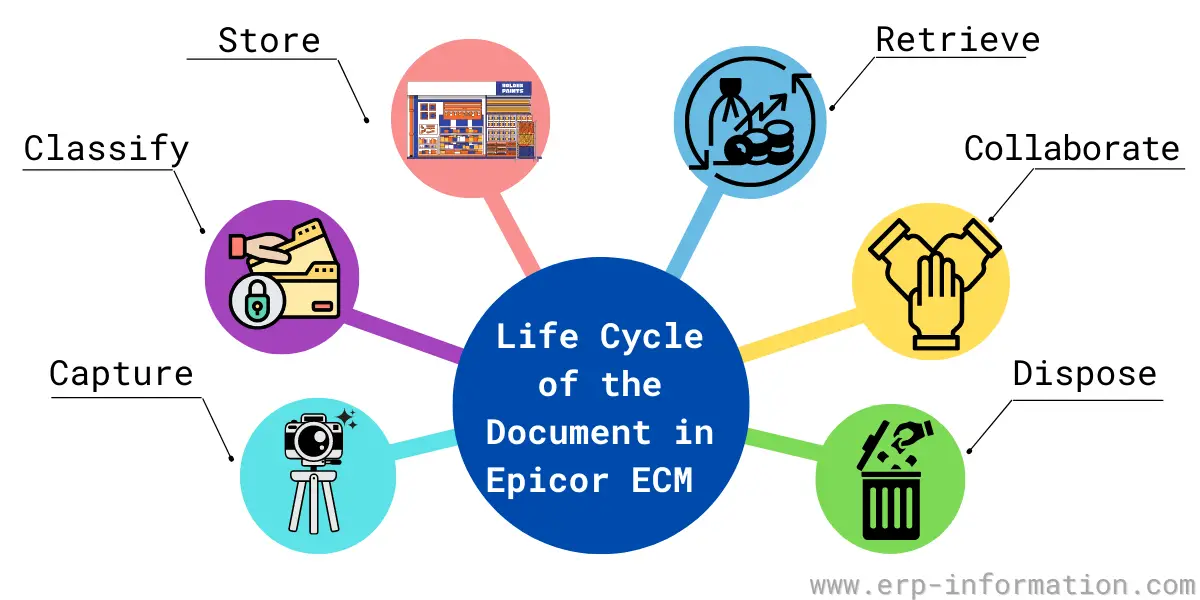
The last step is the one buyers under-value and auditors care about most. Defensible disposal, where you can show a document was destroyed on policy rather than at someone’s discretion, is a large part of why regulated businesses buy this category at all.
Epicor ECM capabilities
These are the components Epicor names in the product. Not all are licensed by default, so check which are in your quote. The table summarises what each one is for before the detail below.
| Component | Core or add-on | What it does |
| Intelligent Data Capture | Core | AI and machine learning that classifies documents and extracts field data |
| Automated workflows | Core | Rules-based routing, approvals, escalation and audit trail |
| PackageWorks | Core | Bundles related documents into one reviewable package |
| Electronic forms | Core | Drag-and-drop digital forms replacing paper or PDF |
| Electronic signature | Core | DocuSign signing embedded in the workflow |
| HR documents | Core | Paperless employee files, routed and stored centrally |
| ValiDate | Core | Digital fingerprinting to prove a document is unaltered |
| DocAttach and Reports | Core | Output archiving and versioning, plus workflow analytics |
| AP Automation | Add-on | Vendor invoice capture with PO and receipt matching |
| Sales Order Automation | Add-on | Reads customer POs and creates validated sales orders |
| Vendor PO Acknowledgement | Add-on | Central repository of supplier order confirmations |
| Mobile app | Add-on | iOS and Android capture and approvals |
Intelligent Data Capture
The AI and machine-learning layer that classifies documents and extracts field data. This is the part that determines whether the whole investment pays back, because it decides how many invoices go through untouched versus landing in someone’s exception queue. Accuracy improves as it learns your document set, so expect a tuning period rather than day-one perfection.
Automated workflows
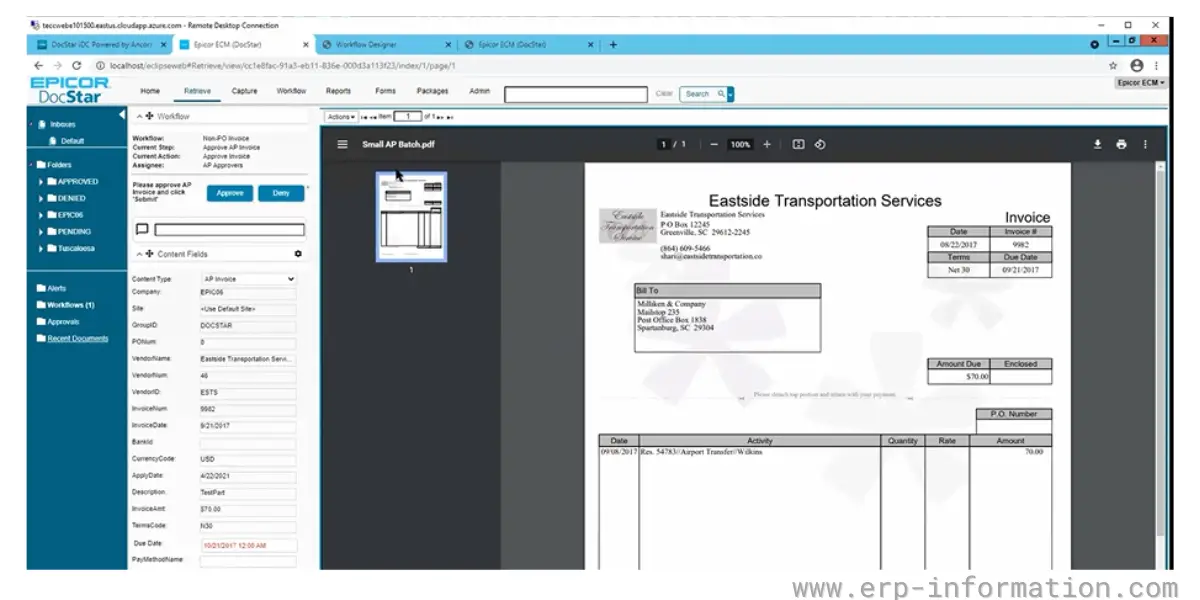
Rules-based routing with approvals, escalations, alerts and a full audit trail. Workflows are where most of the configuration effort in an implementation actually goes.
PackageWorks
Bundles related documents into a single reviewable package, so a case, a claim or a project closeout can be gathered and approved as one item instead of a scattered set of files.
Electronic forms
Custom digital forms built with drag-and-drop design, replacing paper or PDF forms that would otherwise be re-keyed.
Electronic signature
DocuSign integration embedded in the workflow, so signature requests happen inside the approval chain rather than as a separate manual step.
HR documents
Paperless employee files. Onboarding paperwork, tax forms such as the I-9 and W-4, and direct deposit authorisations are stored centrally and routed to the right people. It integrates with an HRIS so records do not have to be maintained twice.
ValiDate document integrity
Digital fingerprinting that lets you verify a document has not been altered since it was filed. This is the feature that matters in a dispute or an audit, and it is genuinely uncommon in lighter-weight document tools.
DocAttach and Reports
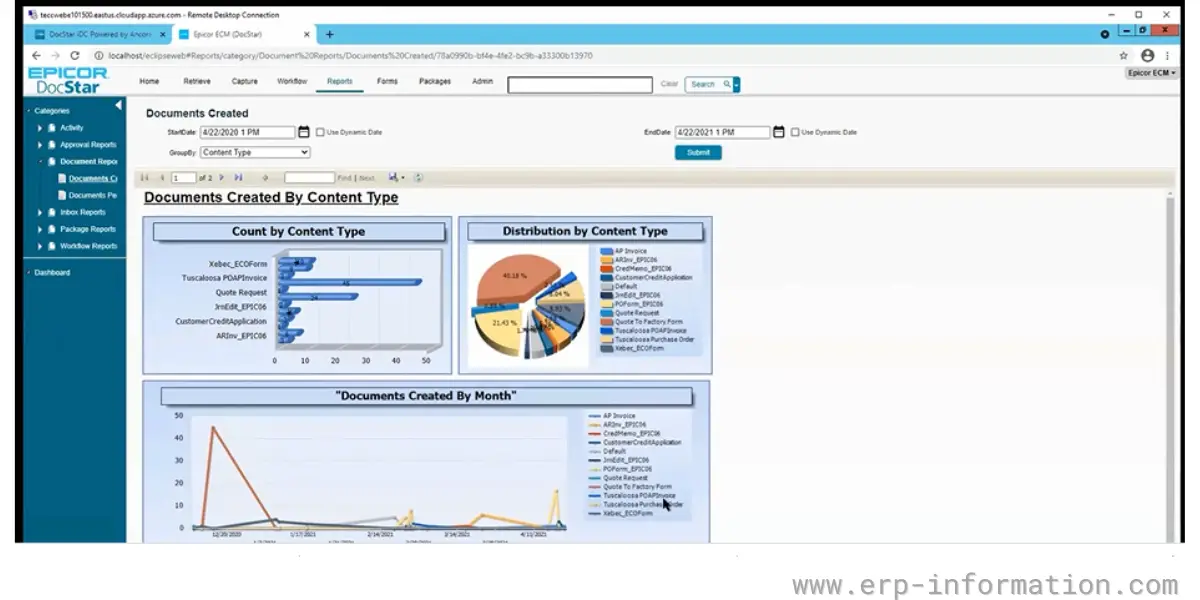
DocAttach automates printing, storing, versioning and archiving of output documents. Reports covers analytics on the content and the workflows themselves, which is how you find the approval step that is quietly costing you four days.
Add-on modules
Three process-specific packages sit on top of the core platform, and they are usually where the business case is actually made.
- AP Automation: vendor invoice capture with matching against purchase orders and receipts, then approval routing. This is the most commonly bought add-on and the one with the clearest payback, because it maps directly onto the procure-to-pay cycle.
- Sales Order Automation: reads incoming customer purchase orders and generates validated sales orders, cutting the re-keying that causes data accuracy problems downstream.
- Vendor PO Acknowledgement: a central repository for supplier acknowledgements so you can see which orders have actually been confirmed.
- Mobile app: iOS and Android, mainly for approvals and capture away from a desk.
Which Epicor ERPs does it integrate with?
This is the question that decides most evaluations, and the answer differs by product rather than being one universal connector.
| System | How ECM connects |
| Epicor Kinetic | Pre-built connector; documents surface against ERP records |
| Epicor Prophet 21 | ECM Agent for Prism, which can return AI-generated answers with the source documents linked |
| Epicor Eclipse | Documents accessed directly inside Eclipse; a DocStorage capability arrived in the 2026.1 release |
| Karmak Fusion | Supported integration |
| Non-Epicor systems | Integrates with any ERP, accounting or business application via the ECM API |
The last row matters more than Epicor’s marketing implies. ECM is not locked to Epicor ERPs, and it is occasionally bought by companies running something else entirely. That said, if you are not on an Epicor system, the specialist ECM vendors are competing on a level field and you should look at them seriously.
One caution when scoping: a pre-built connector is not the same as a finished integration. It gives you the plumbing. Deciding which document types attach to which ERP records, and which extracted fields write back, is configuration work that belongs in your project plan.
Deployment options
Epicor offers ECM as cloud SaaS, as a hosted deployment, on premises, and on AWS GovCloud for organisations with regulatory constraints on where data may live. Cloud is the default and where new development goes.
If you are weighing on-premises, factor in what Epicor has already announced about its ERP line, because it signals the direction of travel for the whole portfolio. Epicor has published a schedule of final on-premises feature releases: Kinetic’s is version 2028.1, tentatively January 2028, with active support through 31 December 2029 and sustaining support from 1 January 2030. Prophet 21’s final on-premises release is 2028.1, tentatively May 2028, with active support through 30 June 2029. BisTrack’s browser and API release is 2028.1, tentatively July 2028, while BisTrack Desktop’s is 2026.2, tentatively December 2026.
Those dates apply to the ERP products rather than to ECM itself, so do not read them as an end date for on-premises ECM. Read them as the strategic signal they are: choosing an on-premises document platform to sit beside an ERP that is heading to the cloud is a decision worth making deliberately.
Epicor ECM pricing
Epicor publishes no price for ECM, and the third-party numbers are worse than useless. Aggregator listings for this product and its DocStar predecessor range from around $47 per month to roughly $2,000 per month. That is not a price range, it is two sites measuring different things, and averaging them would produce a number that describes nothing.
What is worth knowing is what actually moves the number, so you can read a quote properly.
- User count and licence type. Named versus concurrent licensing makes a large difference where many people approve occasionally but few work in the system all day. Ask which model you are being quoted.
- Which add-ons. AP Automation is typically licensed separately from the core platform, and it is usually the reason the deal exists. Confirm it by name.
- Capture volume. ECM pricing frequently keys off document or page throughput. A quote that fits your headcount can still be wrong for your invoice volume.
- Deployment model. Subscription, perpetual licence and hosted arrangements have all existed for this product line; they carry different up-front and ongoing profiles.
- ERP connector and implementation. Services, workflow configuration and any data migration are separate from licence cost and routinely exceed the first year of subscription.
Ask for the quote broken out along exactly those lines. A single bundled figure hides which of them will grow as you add departments.
Implementation and service providers
Epicor ECM is sold and implemented both directly by Epicor and through its channel. Epicor runs a tiered authorised partner programme, with certified partners required to hold and maintain a set number of product certifications, and higher tiers such as Gold and Platinum reflecting sustained implementation track record.
Firms that publicly offer Epicor ECM or DocStar implementation and support services include e2b teknologies, TeccWeb, 2W Technologies, Encompass Solutions, ComTec Solutions, Datix and EstesGroup. Partner capability varies a lot by product line, so confirm ECM specifically rather than assuming an Epicor ERP partner also does document management.
A typical project covers document type analysis, capture template and extraction training, workflow design and approval matrices, the ERP connector configuration, retention policy setup, security and permissions, migration of existing archives, and user training. The two things that consistently overrun are extraction accuracy tuning on messy real-world documents, and getting agreement on approval hierarchies, which is an organisational problem rather than a technical one.
Benefits
It removes re-keying between documents and the ERP
The core value is not storage, it is that data arrives in the ERP without a person retyping it. That eliminates a whole class of transcription error and compresses cycle times in accounts payable, order entry and human resources.
Approvals stop disappearing
Routing with escalation and a complete audit trail replaces email chains, and the reporting tells you where documents actually sit rather than where you assume they do.
Retrieval and audit defensibility
Indexed search plus the ValiDate integrity check means you can produce a document and demonstrate it has not been altered. Combined with policy-driven disposal, that is a materially stronger position in an audit than a shared drive.
It is already integrated if you run Epicor
For a Kinetic, Prophet 21 or Eclipse site, buying the vendor’s own product removes an integration project and a support boundary. That convenience is the honest reason many Epicor customers choose it over a technically comparable specialist.
Limitations and where it is not the right fit
- It is not a general-purpose collaboration platform. If what you want is everyday file sharing and co-authoring across the business, SharePoint, Box or Google Workspace do that better. ECM is aimed at structured, process-driven documents.
- Pricing opacity. Nothing is published, quotes vary by deal, and the public figures are unreliable, so budgeting requires a sales conversation you may not want to have yet.
- Capture accuracy needs investment. Intelligent Data Capture is good but not magic. Poor scans, inconsistent supplier layouts and handwriting all produce exceptions, and someone has to own the tuning.
- The value case is thin without a target process. Bought as generic document storage it tends to disappoint. Bought to fix AP or order entry specifically, it has a measurable payback.
- Less compelling away from Epicor. The integration advantage is the main differentiator. On a non-Epicor ERP you are comparing it on even terms with vendors who do only this.
- Very small organisations. A handful of invoices a week does not justify the licence or the configuration effort, whatever the sales narrative says about businesses of every size.
Epicor ECM alternatives
- Altec doc-link is the most direct comparison and has the most history here. It was Epicor’s document management partner before the DocStar acquisition ended that relationship, the functional overlap is close, and it integrates with a wide range of ERPs including Epicor, Sage and Acumatica.
- DocuWare: strong workflow and AP automation, cloud and on-premises, popular with mid-market manufacturers.
- Laserfiche: deeper records management and governance, often the pick where retention and compliance dominate the requirement.
- M-Files: metadata-driven rather than folder-driven, which suits organisations whose problem is finding documents rather than routing them.
- Hyland OnBase: heavier enterprise platform, more capable and more project.
- Microsoft SharePoint: the default incumbent. Cheap if you already own it, but capture and ERP-integrated workflow are the parts you will end up building or buying separately.
FAQs
Is Epicor ECM the same as Epicor DocStar?
Yes. DocStar is the former brand name. docSTAR was an independent vendor founded in 1996 in Schenectady, New York, and Epicor acquired it on 3 January 2017. The product was subsequently rebranded to Epicor ECM. Documentation, partner sites and review listings still use both names, so material describing DocStar is describing the same software.
Which Epicor ERPs does Epicor ECM integrate with?
Epicor Kinetic via a pre-built connector, Prophet 21 through the ECM Agent for Prism which can return AI-generated answers with source documents linked, Eclipse with documents accessible inside the ERP and a DocStorage capability added in the 2026.1 release, and Karmak Fusion. It can also integrate with non-Epicor ERP, accounting and business applications through the ECM API.
How much does Epicor ECM cost?
Epicor does not publish pricing for ECM, and public third-party figures for it and its DocStar predecessor range from about 47 dollars a month to roughly 2,000 dollars a month, which reflects different things being measured rather than a genuine range. Cost is driven by user count and whether licensing is named or concurrent, which add-ons you take such as AP Automation, document capture volume, deployment model, and implementation services. Ask for a quote broken out along those lines.
Can Epicor ECM be deployed on premises?
Yes. Epicor offers ECM as cloud SaaS, hosted, on premises, and on AWS GovCloud for regulated environments, with cloud as the default. Note separately that Epicor has published final on-premises feature release schedules for its ERP products, including Kinetic 2028.1 tentatively in January 2028 with active support through 31 December 2029. Those dates apply to the ERPs rather than to ECM, but they indicate the portfolio direction.
What is Intelligent Data Capture in Epicor ECM?
It is the AI and machine learning layer that identifies what type of document has been captured and extracts the field data from it, so an invoice yields vendor, number, date and totals without manual entry. Its accuracy determines how many documents process without human touch, and it improves as it learns your document set, so expect a tuning period rather than day-one perfection.
What is the main alternative to Epicor ECM?
Altec doc-link is the closest comparison, partly for historical reasons: Altec was Epicor’s document management partner before Epicor acquired DocStar in 2017, and the functional overlap remains close. Other credible alternatives are DocuWare, Laserfiche, M-Files and Hyland OnBase. If you are not running an Epicor ERP, the integration advantage largely disappears and the specialist vendors compete on equal terms.
Conclusion
Epicor ECM is a capable document capture and workflow platform whose strongest argument is proximity. If you run Kinetic, Prophet 21 or Eclipse, the connector already exists, the vendor relationship already exists, and the support boundary is one line instead of two. Paired with a specific target process, usually accounts payable, it has a measurable return.
The honest qualification is that the product is not uniquely strong on features. Altec doc-link, DocuWare, Laserfiche and M-Files all do this well, and away from an Epicor ERP the case thins considerably. Decide on the process you are fixing first, insist on a quote broken out by users, add-ons and capture volume, and treat extraction accuracy as the thing to test in a proof of concept rather than take on trust.
References:
- Epicor ECM official product page
- Epicor acquires docSTAR (acquisition announcement, January 2017)
- Epicor schedule of final on-premises feature releases
- Epicor authorised channel partners
Using Google Search? Add erp-information.com as a preferred source.