
Every master production schedule has a near-term stretch where planners deliberately stop making changes. That stretch is the frozen zone, and it exists for a simple reason: once you have committed materials, capacity, and labor to specific orders, reshuffling them costs more than it saves.
This guide explains what the frozen zone is, how it fits alongside the slushy and liquid zones, and where the demand and planning time fences sit. It then checks what SAP, Oracle Fusion Cloud, NetSuite and Dynamics 365 actually do inside a fence, because the same fence name does different work in different systems. A worked schedule shows what happens when a change request lands inside the fence versus outside it.
What is the frozen zone?
The frozen zone is the near-term part of the master production schedule where changes are blocked or need an explicit exception, because materials, capacity and labor are already committed to specific orders. In the usual three-zone model it ends at the demand time fence, and its length comes from lead time rather than a fixed number of weeks.
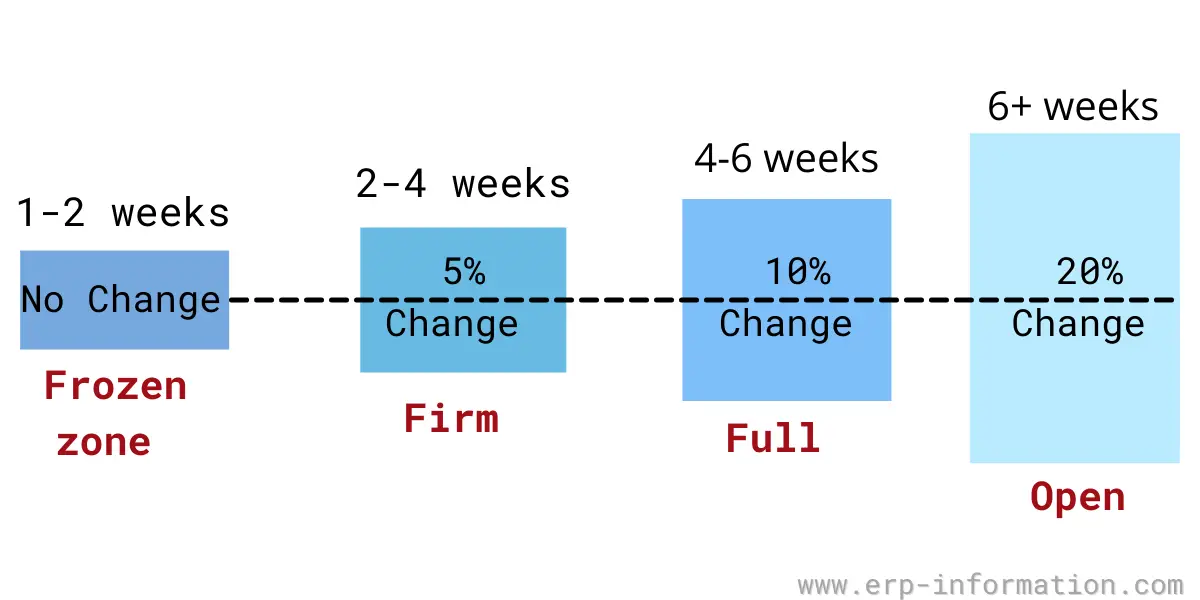
The problem the frozen zone solves is a familiar one for every planner: sales wants the flexibility to promise changes, while the shop floor needs a stable schedule to actually build to. Organizations do their sales and operations planning in the open part of the horizon and execute against the locked part. A time fence is the line that separates the two.
Outside the fence, in the liquid zone, you can freely revise purchase orders and production plans. Inside it, you cannot, at least not without a formal exception. A steady stream of requests to break the fence is worth reading as a signal: it can mean the forecast, or the fence length, is wrong.
Frozen, slushy, and liquid zones
A master schedule is usually split into three time zones. The frozen zone is only the first of them. Moving outward from today, each zone allows a little more freedom to change the plan. The last column describes common plant practice, and each company sets its own change rules:
| Zone | Typical horizon | What can change | Who can authorize a change |
|---|---|---|---|
| Frozen (firm zone) | Now → demand time fence (sized from lead time) | Effectively nothing: quantities, dates and sequence are locked; materials and capacity are already committed | Whoever the change policy names, usually senior management |
| Slushy (trading zone) | Demand time fence → planning time fence (sized from cumulative lead time) | Changes are possible but must be negotiated and re-checked for material and capacity availability | Master scheduler with sales and manufacturing agreement |
| Liquid (free/open zone) | Beyond the planning time fence, out to the planning horizon | The plan changes freely within the limits of the production plan; the system reschedules automatically | The planning system, within plan limits, with no cost penalty |
The slushy zone is where most real negotiation happens. Materials and capacity are partly committed, so a change is not free, but it is not forbidden either, so sales and manufacturing trade off the cost of the change against the value of the order. The liquid zone is where demand planning and rough-cut capacity planning do their work before anything is committed.
Demand time fence vs planning time fence
Two time fences mark the boundaries between the zones, and MRP treats each one differently:
- Demand time fence (DTF) is the nearer fence, and the edge of the frozen zone. Inside it the system plans from actual customer orders only and drops the forecast, so no forecast-driven demand is planned in the frozen window. Oracle Fusion Cloud defines it as a point inside which the planning process “ignores the forecast demand and considers only the sales order demand”.
- Planning time fence (PTF) is the farther fence, and the edge of the slushy zone. Inside it the planning run stops changing the plan on its own, so the master scheduler manages changes by hand. Beyond the PTF, in the liquid zone, MRP plans automatically. Exactly what the run stops doing depends on the system, as the comparison below shows.
Both fences are sized from lead time, which is why a change gets expensive inside them. The vendors’ own help points the same way:
- Oracle Fusion Cloud lets you base either fence on user-defined days or on lead times such as cumulative manufacturing lead time and total lead time.
- NetSuite shows a 5-day planning time fence for an item whose lead time is 5 days.
- SAP says to bear in mind the maximum lead time of the materials.
- JD Edwards World recommends a planning fence of at least 1.5 times the cumulative lead time.
A worked example: inside vs outside the frozen zone
Take a plant that builds one product to an eight-week master schedule. The demand time fence sits at the end of week 2, and the planning time fence at the end of week 5. Weeks 1 and 2 are frozen, weeks 3 to 5 are slushy, and weeks 6 to 8 are liquid.
| Week | Zone | Scheduled build |
|---|---|---|
| 1 | Frozen | 100 |
| 2 | Frozen | 100 |
| 3 | Slushy | 100 |
| 4 | Slushy | 100 |
| 5 | Slushy | 100 |
| 6 | Liquid | 100 |
| 7 | Liquid | 100 |
| 8 | Liquid | 100 |
Now two customers ask for an extra 50 units:
- Request for week 1 (frozen): rejected by default. Materials and capacity for weeks 1 and 2 are already committed, so the extra 50 units only fit if the company’s change policy allows an override and someone accepts the disruption and cost. The master scheduler does not decide this alone.
- Request for week 4 (slushy): negotiable. The scheduler checks whether material and capacity can be freed, then sales and manufacturing agree on whether the order is worth the change.
- Request for week 7 (liquid): accepted routinely. It is far enough out that MRP simply plans the additional materials and capacity on the next run, with no penalty.
Software applies the same logic. NetSuite’s help works through a case for its older time-phased planning: an item has a 5-day lead time and a 5-day planning time fence, and a new sales order is entered today. NetSuite does not create an order right away. Instead, it “creates a planned order with an expected receipt date in 5 days”.
Same request, three different answers, and that is the entire point of the frozen zone. It is not about refusing customers; it is about pushing changes to the point in the horizon where they are still cheap to make.
How long is the frozen zone?
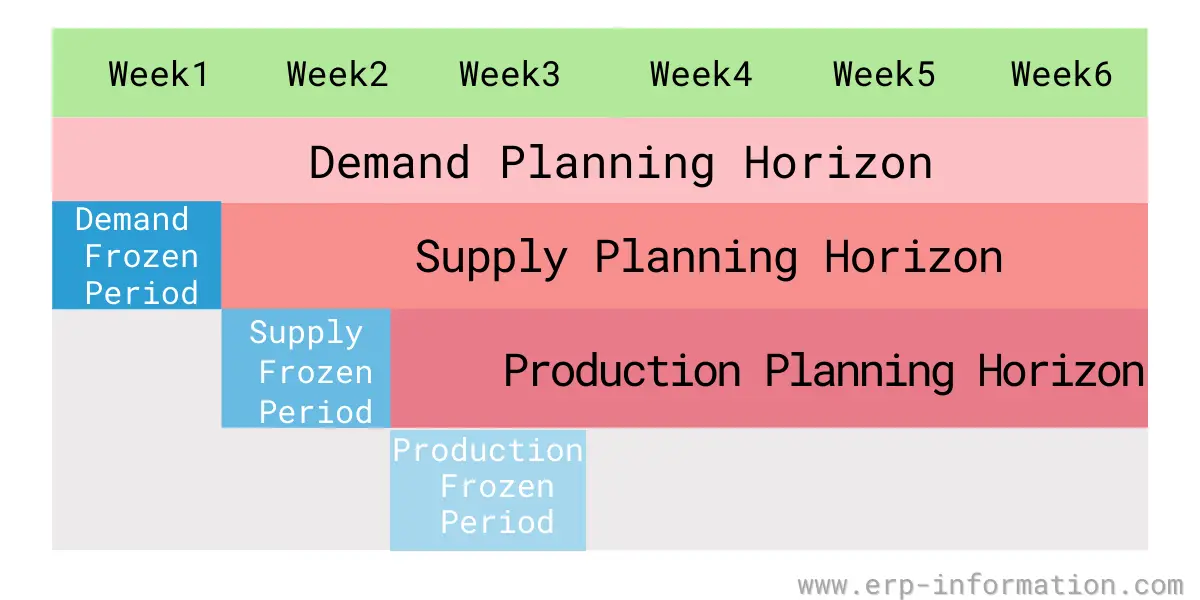
There is no universal number. The frozen period has to cover, at a minimum, the review time plus the lead time to obtain materials and build the product, which is the window in which a change is genuinely impossible to absorb.
In the NetSuite case above, the fence equals the item’s 5-day lead time. A product with long purchased lead times needs a longer fence, and one fence for the whole plant only works if it covers the longest of them.
Set it too short and you invite last-minute churn that the shop floor cannot absorb; set it too long and you turn away business you could have profitably taken. The frozen period is also what cleanly separates demand planning, supply planning, and execution, so most teams review its length whenever lead times or demand volatility shift.
How do you unfreeze the frozen zone?
Inside the fence the planning run stops doing the work for you, so unfreezing is a manual decision. SAP’s documentation says that inside the planning time fence “the MRP controller has time to plan the master schedule items manually”. It adds that interactive planning is “especially useful for adjusting dates of planned orders falling within the planning time fence”.
A request that reaches the fence is worth a short, fixed routine:
- Check what is already committed: released work orders and purchase orders, not just planned orders.
- Price the change: expedite fees, overtime, changeover and any supplier reschedule.
- Weigh that cost against the margin on the order, then ask whoever your change policy names to approve or refuse.
- Make the change by hand in the planning system and record why.
- Count the exceptions per item each month. Repeats point to a forecast or fence problem.
Frozen zone example
Consider an appliance factory that reviews and firms up its production orders once a month. Once a month’s orders are released, that first calendar month becomes the frozen zone: the quantities on those orders cannot be changed or cancelled unless both the buyer and the supplier formally agree.
If a large customer calls midway through that month asking to double an order, the plant does not simply say yes. The components have been ordered and line time has been booked against the existing quantities, so the request is either pushed into the next unfrozen month or escalated for management approval as a costly exception. That is the frozen zone doing its job, protecting a schedule the whole plant is already building to.
Click here for the Online Production Capacity Calculator
How ERP and MRP systems enforce the frozen zone
In a modern system the frozen zone is not a manual convention. It is configured, usually per item, and the planning engine (material requirements planning, or MRP II and supply chain planning tools) behaves differently on either side of each fence.
The catch is naming. We read each vendor’s own help on 27 October 2026, and the same words do different work. Versions read: SAP S/4HANA 2025 FPS02, Oracle Fusion Cloud SCM 26d, NetSuite Supply Planning, Dynamics 365 Supply Chain Management and JD Edwards World.
| System and fence | What the vendor’s help says it does | Closest textbook fence |
|---|---|---|
| SAP S/4HANA: planning time fence (German help: Fixierungshorizont) | The planning run does not automatically change procurement proposals inside it. The material needs an MRP type with a firming type, and the firming type decides whether shortage proposals are created inside the fence. | Planning time fence |
| Oracle Fusion Cloud SCM: demand time fence | Ignores forecast demand and counts only sales orders when calculating gross requirements. | Demand time fence |
| Oracle Fusion Cloud SCM: planning time fence | For discrete items, no new planned orders and no rescheduling of existing orders to an earlier date. | Planning time fence |
| NetSuite Supply Planning: demand time fence | Only sales orders are considered. | Demand time fence |
| NetSuite Supply Planning: planning time fence | No new planned orders, and no rescheduling or cancelling of existing supply orders. | Planning time fence |
| Dynamics 365: freeze time fence | Existing planned orders are not changed, and no new planned orders are suggested. | Planning time fence, called freeze |
| Dynamics 365: coverage time fence | Excludes supply and demand beyond it. It is the outer planning horizon (default 100 days), not a frozen zone. | None: the far edge of the plan |
| JD Edwards World: freeze fence | No planned orders are generated from today to the number of days set. | Planning time fence, called freeze |
| JD Edwards World: planning fence | Controls how forecast and customer orders are used in the ending available calculation, and where the rule changes. | Demand time fence, with rule C or S |
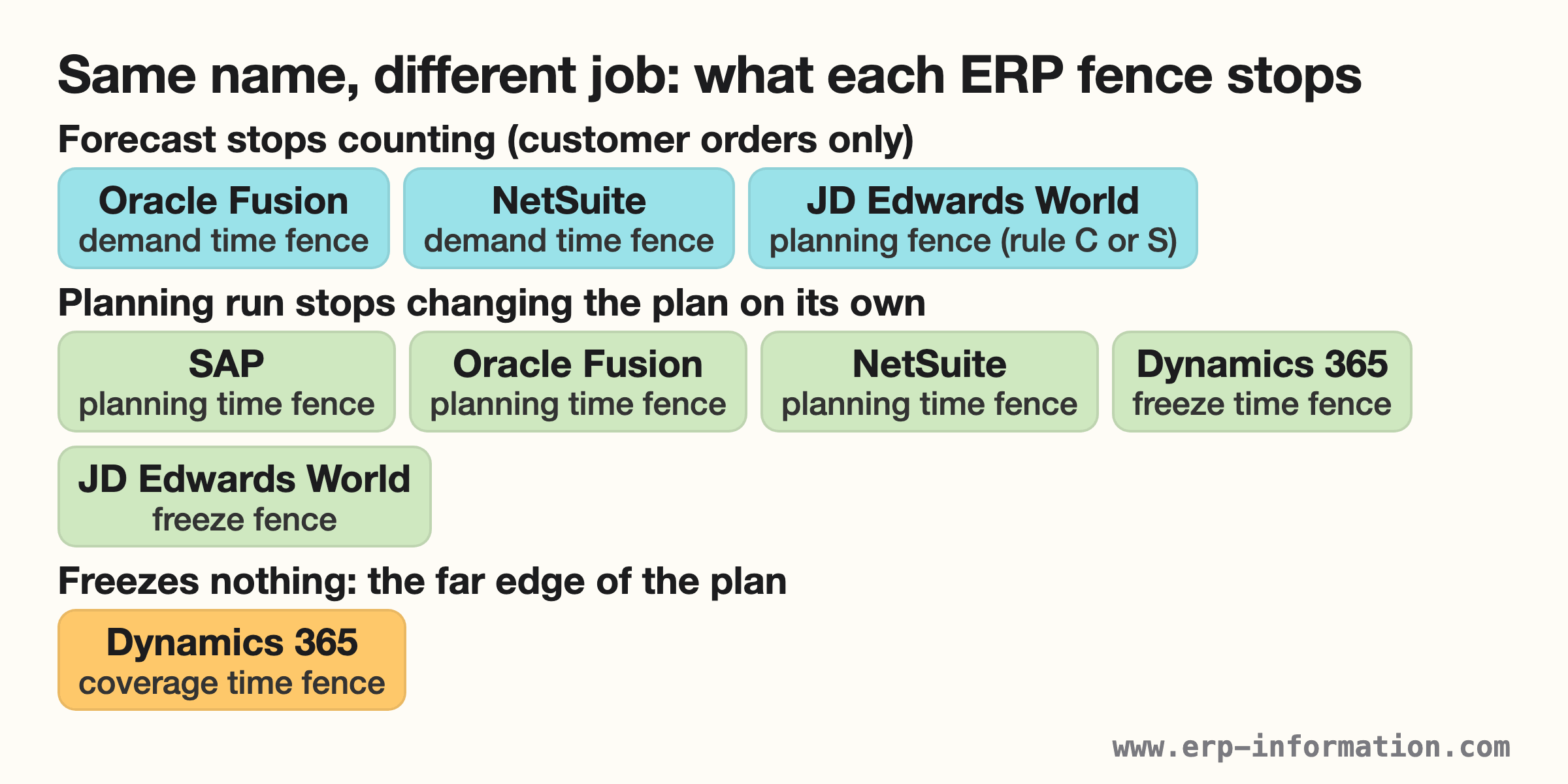
Which fence in your ERP is the frozen zone?
Ignore the name and read what the field does. Three questions settle it:
- Does the forecast still count inside the fence? If it does not, you are looking at a demand time fence.
- Does the planning run still create new orders, or move and cancel existing ones, inside the fence? If it does not, you are looking at a planning time fence.
- Is the fence only the limit of what the system plans at all? Then it is a horizon, like the Dynamics 365 coverage time fence, and it freezes nothing.
Two names are traps. The JD Edwards World planning fence behaves like a demand time fence when you choose rule C or S, and its freeze fence behaves like a planning time fence. Dynamics 365 uses freeze for the planning time fence behavior and coverage for the horizon.
SAP’s German help titles the same page Fixierungshorizont (fixing horizon) and says proposals inside it are no longer changed automatically: “Beschaffungsvorschläge beim Planungslauf nicht mehr automatisch verändert”.
Getting the fences right in the software is what turns the frozen zone from a policy people argue about into a rule the system quietly keeps.
FAQs
What is a frozen period?
The frozen period is the near-term stretch of the production schedule that a company will not change. It is used in manufacturing to keep a consistent flow of output. Because materials and capacity are already committed, the frozen period stops last-minute changes that would disrupt that flow, and any exception is decided case by case under the company’s change policy.
What is the difference between the frozen, slushy, and liquid zones?
They are three time zones of the master schedule with increasing freedom to change. The frozen zone (now to the demand time fence) is locked. The slushy zone (demand time fence to planning time fence) allows negotiated changes that are re-checked for material and capacity. The liquid zone (beyond the planning time fence) can change freely, and the system reschedules it automatically.
How long should the frozen period be?
Long enough to cover review time plus the lead time to get materials and build the product. NetSuite’s own example sets a 5-day fence for an item with a 5-day lead time, and products with long purchased lead times need a longer fence. Too short invites last-minute churn; too long turns away business you could have taken.
What is a demand time fence?
In the usual three-zone model the demand time fence is the boundary of the frozen zone. Inside it, MRP plans from actual customer orders only and ignores the forecast. Firming of planned orders is governed by the separate planning time fence. Systems name these fences differently, so read what the field does.
How do you identify the frozen zone in your production schedule?
Look for the timeframes that are fixed or immovable: those set by the demand time fence, committed materials, released orders, or contracts. Everything inside that boundary is the frozen zone. Changes in that window need coordination and approval well ahead of time to avoid disruption.
What is the frozen zone called in SAP?
SAP calls the setting that does the freezing the planning time fence (Fixierungshorizont in German). Inside it the planning run does not automatically change procurement proposals, and the material needs an MRP type with a firming type for the fence to apply.
What to check in your own system
The frozen zone is the fixed, near-term core of the master production schedule, the window where the plan is deliberately held still so the plant can execute. Read it alongside the slushy and liquid zones and it stops looking rigid and starts looking like what it is: a way to push every change to the point in the horizon where it is still cheap to make.
Before you tune any number, open the help for your own system and find which field stops the forecast and which one stops the planning run from changing orders. Those two fences are your frozen zone, whatever the screen calls them.
Using Google Search? Add erp-information.com as a preferred source.