A manufacturing order is the authority to make a stated quantity of a product: what to make, how many, from which materials, through which work centers and by when. It usually starts as a planned order from MRP and becomes a live shop-floor order when it is released.
Same document, different names: SAP and Microsoft call it a production order, Oracle and NetSuite a work order, Odoo a manufacturing order and Epicor a job. Process industries use SAP’s process order or Dynamics 365’s batch order. The tables below show each system’s statuses.
What is Manufacturing Order?
The APICS Dictionary defines a manufacturing order as a document, “group of documents, or schedule conveying authority for the manufacture of specified parts or products” in specified quantities (APICS Dictionary, 14th edition, 2013). The wording is unchanged since at least the 1992 edition (APICS Dictionary, 1992).
In software the order is a record, not a sheet of paper. SAP’s description is typical: “A production order defines which material is to be processed, at which location, at what time and how much work is required” (SAP Help, S/4HANA).
When SAP creates one, it copies the routing’s operations into the order, explodes the bill of materials, reserves the components held in stock and calculates planned costs (SAP Help). The order then carries the bill of materials and the work centers the job will use.
About the video (note added 18 October 2026): it dates from 2022 and describes a sales order, not a manufacturing order. Its first step is “receiving the order from the customer” (1:14), and it says “GRN creation will be done” once the product is ready to dispatch (1:58). A goods receipt records finished goods coming into stock from production; shipping to the customer is a goods issue, as the process section below shows.
Manufacturing order vs work order vs production order
In the dictionary sense they are the same document: the APICS Dictionary lists production order, job order and shop order each as a synonym of manufacturing order (APICS Dictionary, 2013). Work order is the exception, because its first meaning is narrower: “order to the machine shop for tool manufacture or equipment maintenance” (APICS Dictionary, 2013).
Each ERP vendor then picks one name and builds its own steps around it:
| ERP (docs checked) | What it is called | How finished goods reach stock |
|---|---|---|
| SAP S/4HANA 2025 | Production order; process order in process industries | Goods receipt, movement type 101, or automatic receipt on confirmation |
| Dynamics 365 Supply Chain Management | Production order; batch order for formulas | Report as finished |
| Dynamics 365 Business Central | Production order | Output journal or automatic flushing |
| Oracle Fusion Cloud 26D | Work order | Completion into a subinventory |
| Oracle NetSuite | Assembly work order | Assembly build |
| Odoo 20 | Manufacturing order (MO) | Produce, which sets the MO to Done |
Sources: SAP process order, SAP goods receipt, Dynamics 365 order types, report as finished, Business Central production orders, Oracle work orders, Oracle completion, NetSuite work orders, Odoo manufacturing orders. Epicor Kinetic runs production as jobs created in Job Entry (Epicor); our Epicor Kinetic review covers the product.
Manufacturing Order Process
A manufacturing order moves through the same stages in every ERP, even where the screens differ. SAP’s steps, which the cycle diagram below follows, are the most fully documented:
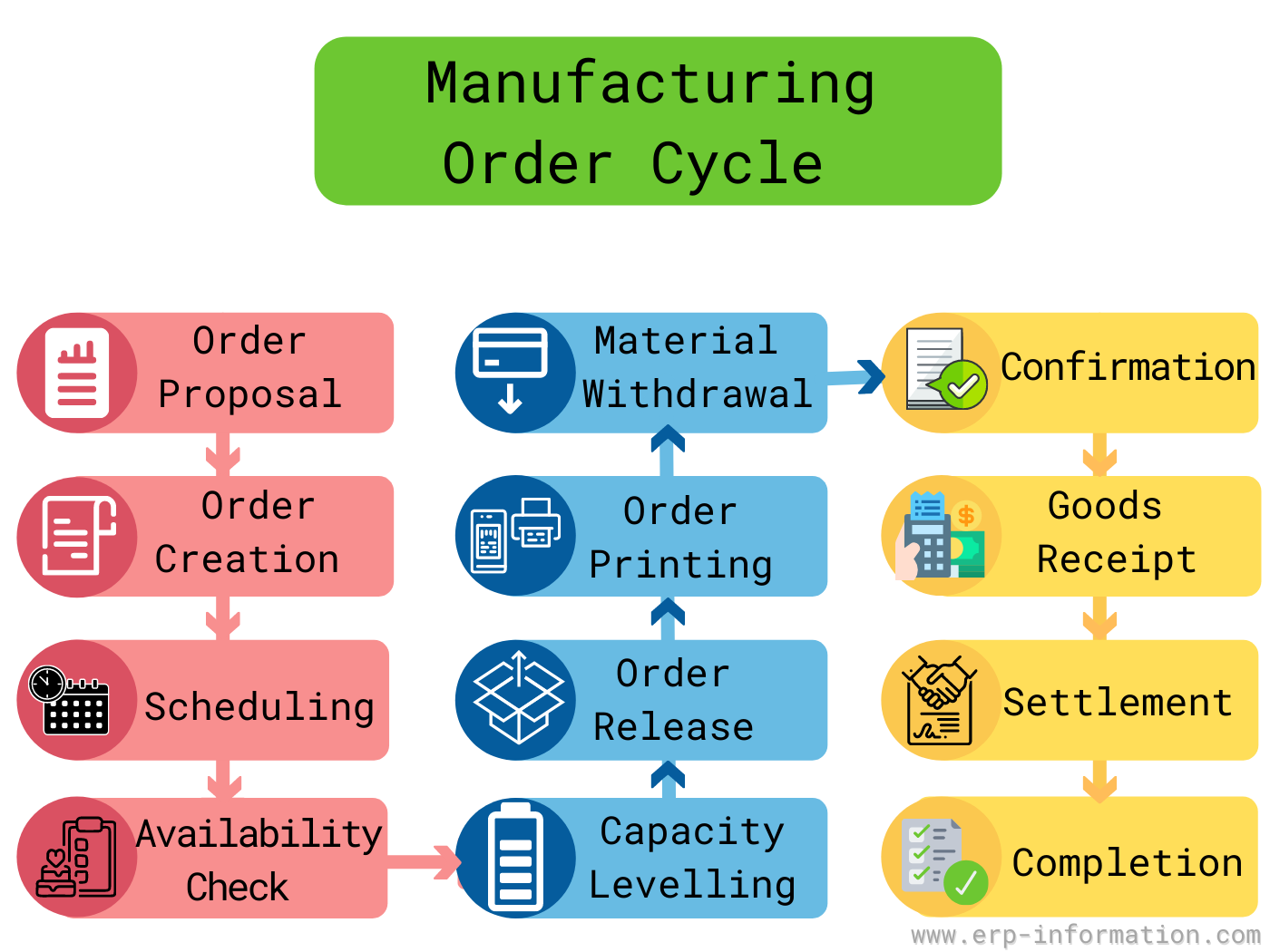
- Planned order. MRP suggests what to make and when. Planned orders “exist only within the computer, and may be changed or deleted by the” next planning run (APICS Dictionary); see our guide to the planned order.
- Firm planned order (optional). A planner can freeze a planned order in quantity and time so the system stops changing it (APICS Dictionary).
- Creation or conversion. The planned order becomes a production order. SAP copies the planned order’s components into it without exploding the BOM again (SAP Help); Dynamics 365 calls the same step firming (Microsoft Learn).
- Release. In SAP a new order “cannot be executed (goods issue, receipt, completion) until it has been released” (SAP Help). A released order is an open order, and with a due date it becomes a scheduled receipt in MRP (APICS Dictionary). Our order release guide covers the timing.
- Material issue. Components move from stores to the order; SAP proposes movement type 261 for this goods issue (SAP Help).
- Confirmation. The shop floor reports yield, scrap and rework quantities, the work actually done, the work center used and who did it (SAP Help).
- Goods receipt. The finished product is posted into stock. SAP’s goods receipt records “the physical inward movement of goods from an external vendor or from production” (SAP Help); Dynamics 365 calls it report as finished (Microsoft Learn).
- Settlement and close. Settlement moves the order’s actual costs to the material or a sales order (SAP Help). Technical completion (TECO) ends the order from a logistics viewpoint and deletes its reservations and capacity requirements (SAP Help); closing (CLSD) needs a zero balance (SAP Help).
A goods receipt note is never a dispatch document. CIMA’s official terminology defines it as “A record of goods at the point of receipt” (CIMA Official Terminology). Sending goods to a customer is the opposite movement, which SAP calls a goods issue (SAP Help).
Earlier versions of this page described a customer order instead: order placement, a warehouse check, picking and packing, then shipping. That is the flow of a customer order. A manufacturing order may be triggered by one, but it ends when finished goods are received into stock and its costs are settled.
Manufacturing order statuses in SAP, Dynamics 365, Oracle, NetSuite and Odoo
The status tells everyone what may happen to an order next. These are the status names each vendor documents, in order:
| ERP | Statuses, in order |
|---|---|
| SAP S/4HANA | CRTD created, REL released, PCNF / CNF partly or finally confirmed, PDLV / DLV partly or fully delivered, TECO technically complete, CLSD closed |
| Dynamics 365 Supply Chain Management | Created, Estimated, Scheduled, Released, Started, Reported as finished, Ended |
| Dynamics 365 Business Central | Simulated, Planned, Firm Planned, Released, Finished |
| Oracle Fusion Cloud 26D | Unreleased, Released, On Hold, Completed, Closed, Canceled |
| Oracle NetSuite | Planned, Released, In Process, Built, Closed |
| Odoo 20 | Draft, Confirmed, In Progress, To Close, Done, Cancelled |
Sources: SAP CRTD, REL, PCNF and CNF, PDLV and DLV, TECO, CLSD; Dynamics 365; Business Central; Oracle; NetSuite; Odoo.
Two cautions when comparing them. Microsoft says of its lifecycle steps that “not all of them are represented as an explicit order status” (Microsoft Learn), and SAP’s process order status table labels CLSD as Completed where its closing pages say Closed (SAP Help).
Some statuses carry rules worth knowing. Business Central records actual consumption and output only against released orders (Microsoft Learn), and in Dynamics 365 the Ended status “prevents any additional costs from being posted to a completed production order” (Microsoft Learn).
How to Create Manufacturing Orders?
There are four common triggers, and most plants use more than one:
- From MRP. Planned orders are converted, one at a time or collectively (SAP Help); in Dynamics 365 firming can be manual, automatic within a time fence or query-based (Microsoft Learn).
- From a sales order. With Odoo’s make-to-order route, confirming a sales order “automatically triggers a purchase order (PO) or a manufacturing order (MO)” (Odoo 20). In Business Central, make-to-order users “typically create a released production order immediately after they enter the sales order” (Microsoft Learn).
- From a stock trigger. NetSuite generates production work orders when an assembly reaches its build point (NetSuite); Odoo uses reordering rules (Odoo 20).
- By hand. SAP allows a production order with no prior requirement (SAP Help), and an Odoo MO can be created from the list with New (Odoo 20).
In SAP GUI these are the transaction codes, with SAP’s own app titles (SAP Fiori apps reference library, S/4HANA Cloud Private Edition 2025):
| Transaction | What it does |
|---|---|
| CO01 / CO02 / CO03 | Create / Change / Display Production Order |
| CO40 | Converting Planned Order to Production Order |
| CO41 | Convert Planned Orders to Production Orders |
| CO11N | Confirm Production Order Operation |
| CO15 | Confirm Production Order |
| COR1 | Create Process Order |
Types of Manufacturing Order
There is no standard list of manufacturing order types. Orders differ in two practical ways: what triggers them, and whether the product is assembled from parts or made from a formula.
The trigger follows the production environment:
| Environment | When the order is made | What triggers it |
|---|---|---|
| Make-to-stock | Before a customer order arrives | Forecast or stock level |
| Make-to-order | After the customer’s order | The sales order |
| Assemble-to-order | Final assembly after the order, from stocked components | The sales order; components by forecast |
| Engineer-to-order | After unique engineering design | The order, which needs new part numbers and BOMs |
Sources: make-to-stock, make-to-order, assemble-to-order, engineer-to-order (APICS Dictionary, 2013).
Formula-based production uses a different order. SAP defines the process order as the “Manufacturing order used in process industries” (SAP Help), and Dynamics 365 uses batch orders where conversion “is based on a formula” (Microsoft Learn).
Manufacturing Order Form
Whatever the system, the order carries the same core data. The blank form below shows a paper layout; an ERP record holds the same fields plus status and costs:
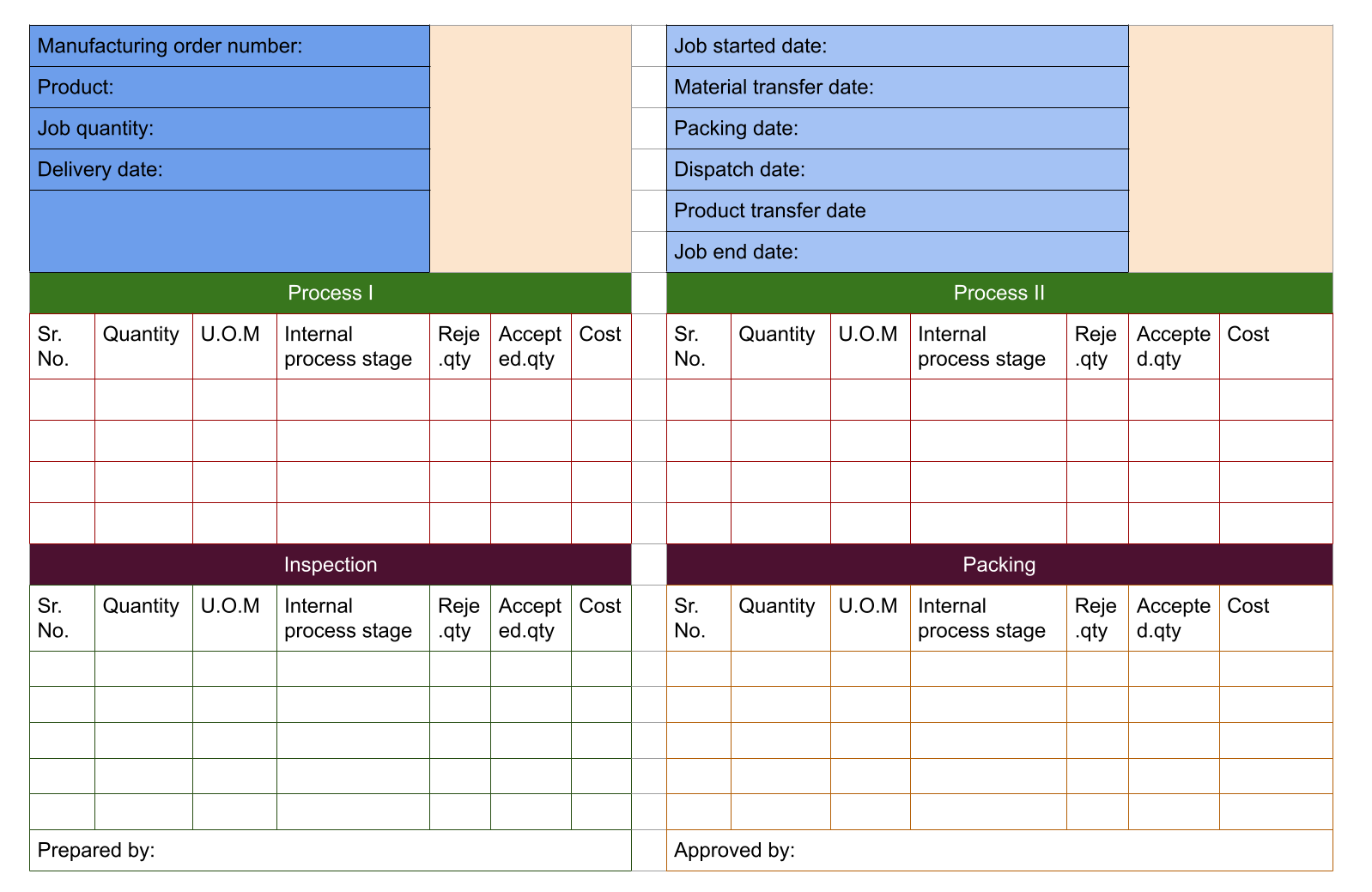
| Field | What it holds |
|---|---|
| Order number and type | Unique ID; production or process order |
| Material and quantity | What to make and how many, with unit of measure |
| Dates | Planned start and finish, and the due date it must meet |
| Components | The bill of materials, exploded for the order quantity |
| Operations | The routing: work center, setup and run time per step |
| Status | Created, released, confirmed, delivered, closed |
| Costs | Planned costs at creation, actual costs as work is reported |
Worked example: a manufacturing order for 500 wall brackets
This is an illustration with our own numbers, so you can see how the order quantities are worked out. Order MO-1001 asks for 500 wall brackets. Each component’s requirement is the order quantity times the quantity per bracket, plus any scrap allowance:
Required quantity = order quantity × quantity per unit × (1 + scrap allowance)
| Component | Per bracket | Scrap allowance | Quantity to issue |
|---|---|---|---|
| Steel plate blank | 1 | 2% | 510 |
| Side arm | 2 | none | 1,000 |
| M6 bolt | 4 | none | 2,000 |
| Powder coat | 0.05 kg | 10% | 27.5 kg |
Each operation’s time is its setup plus the run time for every unit:
| Operation | Setup, min | Run, min per unit | Total, min |
|---|---|---|---|
| 10 Cut and punch plate | 30 | 1.2 | 630 |
| 20 Weld arms to plate | 45 | 3 | 1,545 |
| 30 Powder coat and cure | 20 | 0.8 | 420 |
| 40 Inspect and pack | 10 | 0.5 | 260 |
The 2% scrap allowance is why the plate line issues 510 blanks for 500 brackets. The welding operation takes 1,545 of the 2,855 minutes, more than half, so the weld cell is the work center to check in capacity requirements planning before release.
Manufacturing Order Management System
Order management is split between two layers of software, and the ISA-95 standard names them. ISA-95, “also known as ANSI/ISA-95 or IEC 62264”, sets Level 4 as business planning and logistics, which “includes enterprise resource planning (ERP) systems”, and Level 3 as manufacturing operations management (ISA).
In practice the ERP plans, creates and releases the order, and a manufacturing execution system at Level 3 runs it on the shop floor and reports yield, scrap and time back. ISA says the standard “primarily deals with the interface between levels 3 and 4” (ISA).
Between the two, ISA-95’s XML implementation sends operations requests typed as “Production, Maintenance, Quality, Inventory, or Mixed” (MESA B2MML schema), and inside Level 3 these become job orders dispatched to work centers (MESA B2MML schema). The shop floor usually sees them as a dispatch list: manufacturing orders in priority sequence (APICS Dictionary).
Benefits

A formal order earns its keep in four places:
- Material is reserved, not grabbed. Creating the order reserves the stocked components it needs (SAP Help).
- Costs are collected per job. Settlement moves actual costs to the product or sales order (SAP Help), so actual cost can be compared with planned cost order by order.
- Yield and scrap are recorded. Each confirmation captures good quantity, scrap and rework (SAP Help).
- Capacity can be checked before release. SAP’s release-time availability check can cover material, capacity and production resources and tools (SAP Help).
Which manufacturing order mistakes cost money?
- Treating a planned order as a promise. Business Central deletes planned production orders “the next time you run planning” (Microsoft Learn). Firm the order if the date matters.
- Releasing before the material is there. Dynamics 365 releases when “the material is available to be picked or prepared” (Microsoft Learn); releasing earlier parks work in progress on the floor.
- Calling dispatch a goods receipt. The goods receipt is finished goods arriving in stock from production; shipping is a goods issue (see the process above).
- Leaving finished orders open. Until technical completion an SAP order keeps its reservations and capacity requirements (SAP Help), and it cannot be closed until its balance is zero (SAP Help), meaning every cost on it has been settled.
FAQs
What is manufacturing?
Manufacturing is turning materials and components into finished goods with machines, tools and labour. In an ERP, each run of that work is authorised and tracked by a manufacturing order.
When is the manufacturing order created?
Usually in two stages. MRP first generates a planned order, which is only a suggestion and can be changed or deleted on the next planning run. It becomes a manufacturing order when it is converted and released, after which material can be issued, work confirmed and finished goods received into stock. In make-to-order plants the order is often created straight from the sales order instead.
What is the difference between a manufacturing order and a work order?
In the APICS Dictionary production order, job order and shop order are synonyms of manufacturing order, while work order first means an order for tool manufacture or equipment maintenance. ERP vendors differ: Oracle and NetSuite use work order for production, while SAP, Microsoft and Odoo say production order or manufacturing order. Check the term your own system uses before comparing processes.
What is manufacturing order processing software?
It is software that creates, schedules, releases and closes manufacturing orders, usually the production module of an ERP. Examples are SAP S/4HANA (production orders), Microsoft Dynamics 365 Business Central (production orders; Dynamics NAV moved to Business Central on-premises with the October 2018 release), Oracle NetSuite (assembly work orders), Odoo (manufacturing orders) and Epicor Kinetic (jobs; Epicor rebranded its manufacturing ERP platform as Kinetic in June 2021).
What is the production order definition?
Production order is a synonym of manufacturing order in the APICS Dictionary, and it is the name SAP and Microsoft use. SAP defines a production order as the record of which material is processed, where, when and with how much work, which resources it uses and how its costs are settled.
What’s the role of technology in modern manufacturing order management?
In ISA-95 terms the ERP at Level 4 plans and releases orders, and the manufacturing execution system at Level 3 runs them and reports yield, scrap and time back. The order is the record both systems update, so its status shows planners and the shop floor the same picture.
What are the types of manufacturing production processes?
The standard production environments are make-to-stock, make-to-order, assemble-to-order and engineer-to-order, as defined in the APICS Dictionary. Make to assemble is not a standard term; the dictionary’s term is assemble-to-order, where final assembly waits for the customer order and the components are stocked in advance.
How should your plant set up manufacturing orders?
The order type matters less than matching the trigger and the close to how your plant works:
- Make-to-stock lines: let MRP create planned orders and convert them in batches, firming only the ones inside your frozen horizon.
- Make-to-order or engineer-to-order work: create the order from the sales order so the customer date travels with it.
- Formula or batch production: use your ERP’s process or batch order rather than forcing recipes into a discrete production order.
- Everyone: close orders promptly. An order left open after its last goods receipt keeps reserving material and capacity until it is technically completed.
How this page was checked (18 October 2026): every status, transaction code and rule above links to the vendor’s own documentation, read on that date: SAP S/4HANA 2025, Dynamics 365, Business Central, Oracle Fusion Cloud 26D, NetSuite and Odoo 20. Definitions are from the APICS Dictionary (2013 edition), CIMA and ISA. The worked example uses our own illustrative numbers.
Using Google Search? Add erp-information.com as a preferred source.