A pegged requirement is what lets a planner point at any single production or purchase order and answer one question: which specific demand is this for? In a busy plant, where hundreds of orders share the same components, that link between supply and the demand it serves is what makes the plan traceable.
This guide explains what pegged requirements are, why planners rely on them, the difference between single-level and multi-level pegging, how dynamic and fixed pegging behave in SAP, and how to read a pegging report. A worked multi-level example ties it all together.
What is pegging in the supply chain?
Pegging is the link a planning system builds between a supply element (a production order, purchase order, or stock) and the specific demand element it covers. A pegged requirement is a requirement that names its next-level parent (a higher assembly or a customer order) as the source of its demand, traced through the bill of materials.
Pegging ties two or more orders into a supply-and-demand relationship, so each receipt knows which requirement it belongs to. Because that link follows the purchase orders and production orders through every level of the BOM, it gives planners real visibility into the supply chain: what a shortage will delay, which customer an order ultimately serves, and how a change high in the schedule ripples downward.
That is why pegging is a planning and traceability tool rather than a forecasting one. It does not predict demand; it tells you, order by order, how the demand you already have is being covered.
You can calculate your purchase order finance using the online Purchase order financing calculator
Why is pegging needed?
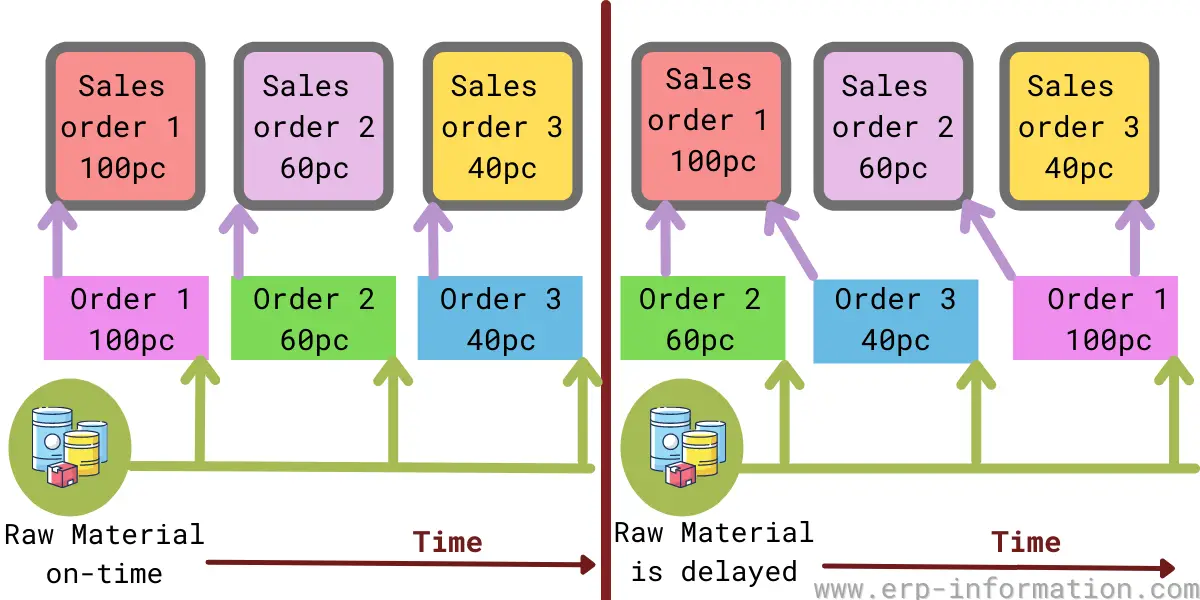
When a firm plans production, MRP explodes each higher-level order down the bill of materials into dependent requirements for its components and raw materials. Without pegging, those hundreds of dependent requirements are just an anonymous pile of demand. Pegging keeps the thread attached, so every component requirement still knows which parent order, and ultimately which customer order, created it.
That thread is what planners actually use day to day:
- Shortage analysis: when a raw material slips, pegging shows exactly which finished orders and customers are affected, so you triage the important ones first.
- Available-to-promise and commitment: planners peg supply to a customer order to confirm the order is genuinely covered before promising a date.
- Change propagation: if a top-level quantity or date changes, pegging traces the change down to every dependent order that has to move with it.
- Traceability: you can follow a purchased lot back up to the order it was bought for, which matters for quality holds and recalls.
What is a pegged requirement?
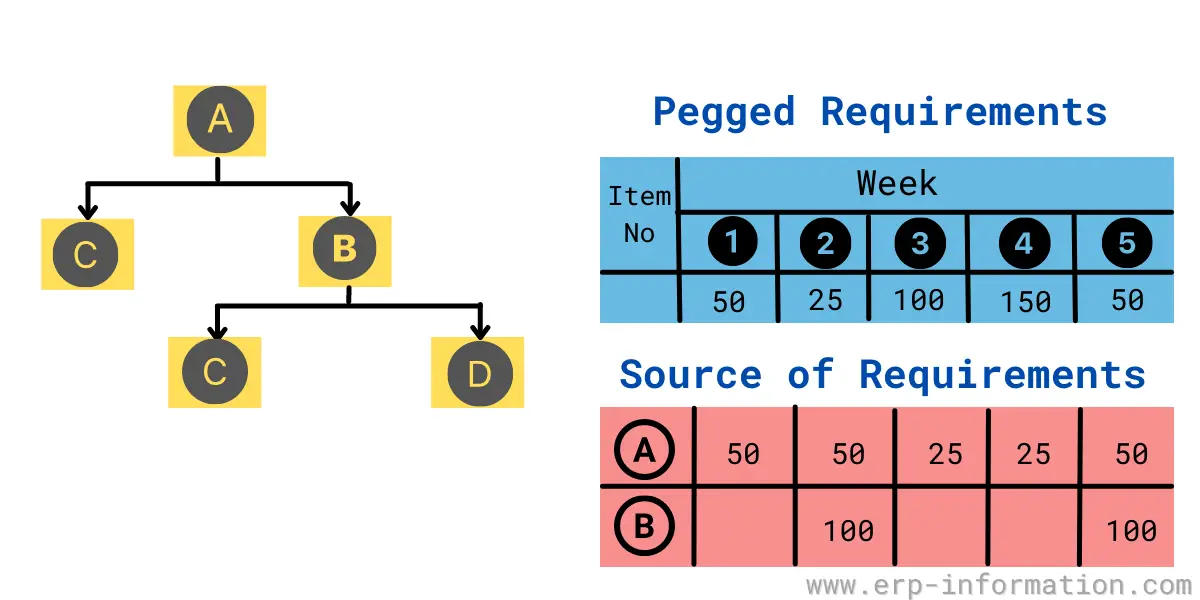
A pegged requirement in production planning is a requirement that shows its next-level parent item (or the customer order) as the source of the demand, using the where-used relationship from the BOM. It lets you track where your materials are going and supports inventory management and traceability.
The diagram below shows the parent-and-child relationship a pegged requirement captures.
Single-level vs multi-level pegging
Pegging works at two depths, and knowing which one you are looking at saves a lot of confusion:
- Single-level pegging links a requirement to the receipt that covers it at one BOM level only. It answers “what supply covers this one requirement?”
- Multi-level pegging follows that chain all the way up or down the BOM. It answers “which final customer order does this raw-material purchase requisition ultimately serve?”
Take a customer order for 100 bicycles. Following the peg downward, each level names the demand that created it:
| BOM level | Element | Pegged to (its parent demand) |
|---|---|---|
| 0 | Sales order: 100 bicycles | The customer |
| 1 | Planned order: 100 bicycle assemblies | Sales order (100 bicycles) |
| 2 | Dependent requirement: 100 frames, 200 wheels | Planned order (100 bicycles) |
| 3 | Purchase requisition: 300 kg steel tube | Frame production order |
Single-level pegging tells you the 200-wheel requirement is covered by a specific wheel receipt. Multi-level pegging lets you start at the steel-tube purchase requisition on level 3 and trace it, peg by peg, back to the customer order for 100 bicycles on level 0. That upward trace is what makes shortage and recall analysis fast.
Dynamic vs fixed pegging in SAP
In SAP PP/DS (in SAP APO and S/4HANA), pegging comes in two behaviors, and the difference matters whenever the plan is replanned:
- Dynamic pegging is the default. The system builds the supply-to-demand links automatically during each planning run, matching receipts to requirements by date and quantity. Those links are recalculated every time you replan or reschedule, so they always reflect the current plan.
- Fixed pegging is a link a planner locks in place. Once fixed, the system will not reassign that receipt to a different requirement during replanning, even if documents change. Planners use it to guarantee that a particular supply stays committed to a particular customer order.
In PP/DS, dynamic pegging is also multi-level: a finished-goods order can be pegged to several sales orders, while its components are pegged further down to their own planned orders and purchase requisitions. The trade-off is the usual one. Dynamic pegging keeps the plan honest but can reshuffle commitments; fixed pegging protects a promise but has to be maintained by hand, so most plants fix only the orders that truly need it.
How to read a pegging report
A pegging report lays out the demand-and-supply relationships MRP has built, so a planner can see coverage at a glance instead of chasing orders one by one. In SAP, the stock/requirements list (transaction MD04) is where planners inspect these relationships for a material, and the PP/DS product view shows the full pegging overview across levels.
Planners lean on the report to:
- Confirm a customer order is fully covered before committing a delivery date.
- Monitor the order-fulfillment pattern and spot demand that has no matching supply.
- Trace a shortage upward to the exact orders and customers it puts at risk.
FAQs
What is pegging in SAP?
Pegging in SAP is the link the system builds between a supply element (a production order, purchase order, or stock) and the requirement it covers. In PP/DS this pegging is dynamic and multi-level: it is created automatically during planning and can be traced up and down the BOM, so you can follow a component back to the finished order and customer it ultimately serves.
What are pegged requirements in SAP?
Pegged requirements are dependent requirements that keep a visible link to the parent order that created them. MRP generates the dependent requirements automatically when it explodes the BOM during a planning run (for example in transaction MD01/MD02); pegging is what preserves the relationship so each requirement still names its source of demand. You view these relationships in the stock/requirements list (MD04).
What is the difference between dynamic and fixed pegging?
Dynamic pegging is created automatically during each planning run and is recalculated whenever the plan is rescheduled, so it always reflects the current plan. Fixed pegging is a link a planner locks so the system will not reassign that supply to a different requirement during replanning. Dynamic keeps the plan accurate; fixed protects a specific commitment.
What is the difference between single-level and multi-level pegging?
Single-level pegging links a requirement to the receipt that covers it at one BOM level. Multi-level pegging follows the chain across every level, so you can trace a raw-material purchase requisition all the way up to the customer order it serves. Multi-level pegging is what makes shortage and recall analysis fast.
What is a pegging report?
A pegging report shows the relationships between demand and supply that MRP has built. Planners use it to confirm that a customer order is covered, monitor the order-fulfillment pattern, and trace a shortage up to the orders and customers it affects.
Conclusion
Pegged requirements are what keep a production plan traceable: every receipt knows the demand it serves, and every requirement knows its parent. Get comfortable with the two depths (single-level and multi-level) and the two behaviors (dynamic and fixed), and the pegging report stops being a wall of orders and becomes the fastest way to answer the question that matters most on the shop floor, which is who is this for.