
A work center is the specific production resource, a machine, a group of identical machines, or a team of workers, where an operation on a routing is actually performed. It is the unit that manufacturing planning schedules work against and measures capacity in.
The distinction that matters is between a work center and a department. A department is an accounting and reporting grouping. A work center is a capacity grouping: everything inside it is treated as interchangeable for scheduling, so a job can be loaded onto the work center without naming which machine or operator will run it.
Why the definition is worth getting right: capacity is planned, loaded and reported at the work center level. Define your work centers too broadly and the schedule hides real bottlenecks; define them too narrowly and you maintain far more routing data than the plan can use.
What is a work center?
The work center is a physical location where specific tasks or activities are carried out in business. It is a physical or logical production area that schedules and routes production operations.
For example, a work center for producing printed materials may have different areas for preparing the paper, cutting type, running press sheets, etc. It can also help improve efficiency by ensuring employees have easy access to the tools and equipment to do their jobs. By creating well-defined work centers, businesses can improve productivity and optimize resources.
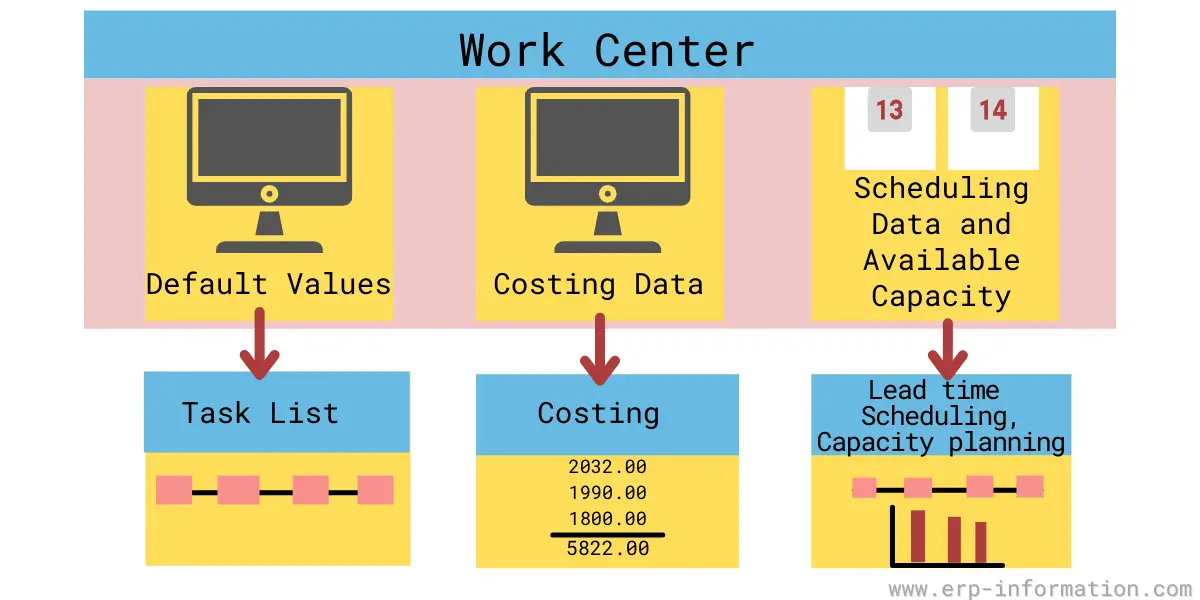
It is usually defined as being either labor or machine-constrained. While it may contain multiple machines or personnel, they are considered identical in processing products assigned to that center.
It may perform multiple operations, but capacity requirements are usually tracked only at the total work center level.
Its definitions can be flexible based on process, reporting capabilities, and organization requirements.
What is the function of a work center in production?
A work center is a place where production takes place. It consists of “equipment, people, and material” required to produce goods or services. The placement of machinery can affect efficiency, resulting in the difference between an assembly line and the batch production process.
Uses of data in the work center
Data here is used for
- Scheduling: Formulas entered here help to calculate the duration of an operation.
- Costing: The formulas here allow you to calculate an operation’s costs.
- Capacity planning: Formulas for calculating capacity requirements and capacity availability are stored here.
Work center scheduling
Workcenter scheduling is a technique used in lean manufacturing to optimize resources and improve flow.
It involves creating a schedule for each center in the production process that shows what work will be done at each center and when it will be done.
That allows the factory to plan production so that suitable types of work are done at the right time, and resources are used efficiently.
The following are the main goals of this scheduling.
- Decreasing lead time
- Decreasing set-up time
- Increasing utilization of machine and labor
- Decreasing work in process inventory
- Meeting due dates
Work center in SAP
In SAP production planning (SAP PP) the work center is a master data object in its own right, not a report. It is created for a specific plant and then referenced by routing operations, which is what links a product’s process steps to the resource that will perform them.
Each work center carries the data the rest of the module depends on: the available capacity and the shift calendar behind it, the formulas used to derive scheduling and costing times from the operation, the cost center and activity types that make an operation cost something, and the standard value key that fixes which times an operation records, typically setup, machine and labour.
What is the work center in SAP PP?
In SAP PP a work center is plant level master data representing the machine or labour resource that carries out a routing operation. It is not a grouping of business activities, so a step such as processing a customer order is not a work center.
The object holds the available capacity and its shift calendar, the formulas that convert an operation into scheduling and costing time, the cost center and activity types used to cost that time, and the standard value key defining which times the operation records.
A work center may be a single machine, a group of machines treated as interchangeable, or a labour group, and the work assigned to it is loaded against its capacity rather than against a named individual.
Capacity calculation in SAP
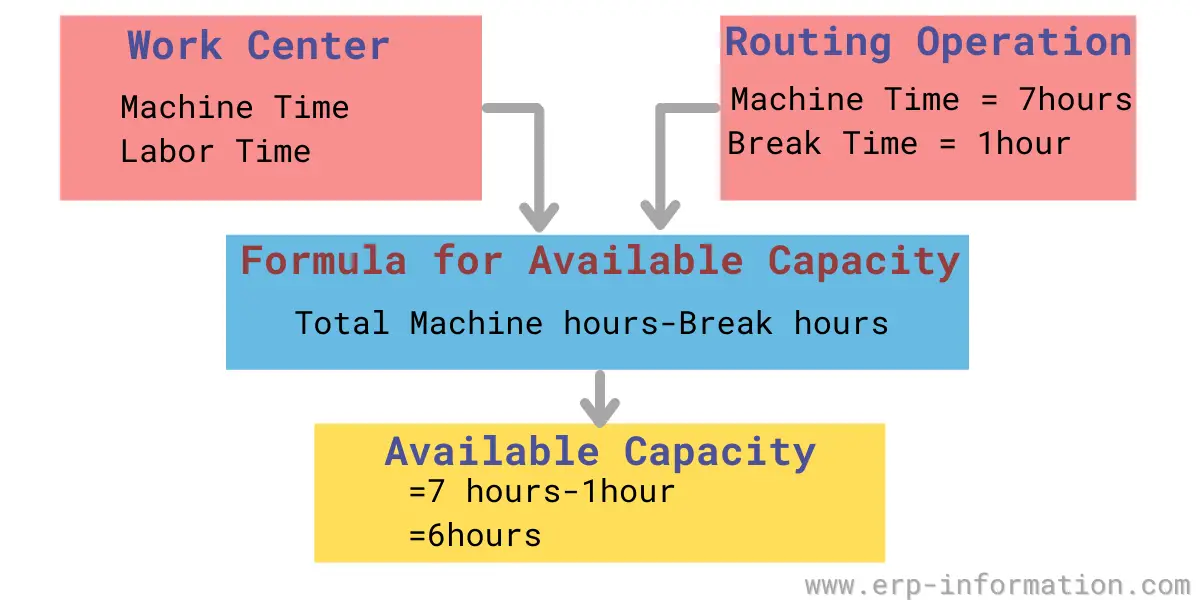
- Available capacity: SAP work center capacity indicates machine or labor available hours. Here break hours are not included. For example, a machine is available for production in the production plant from 10 am to 5 pm, and the break time is 1 hour.
Then the available capacity is = Total available hours – break hours
Available capacity = 7 hrs – 1 hr
Available capacity = 6 hrs
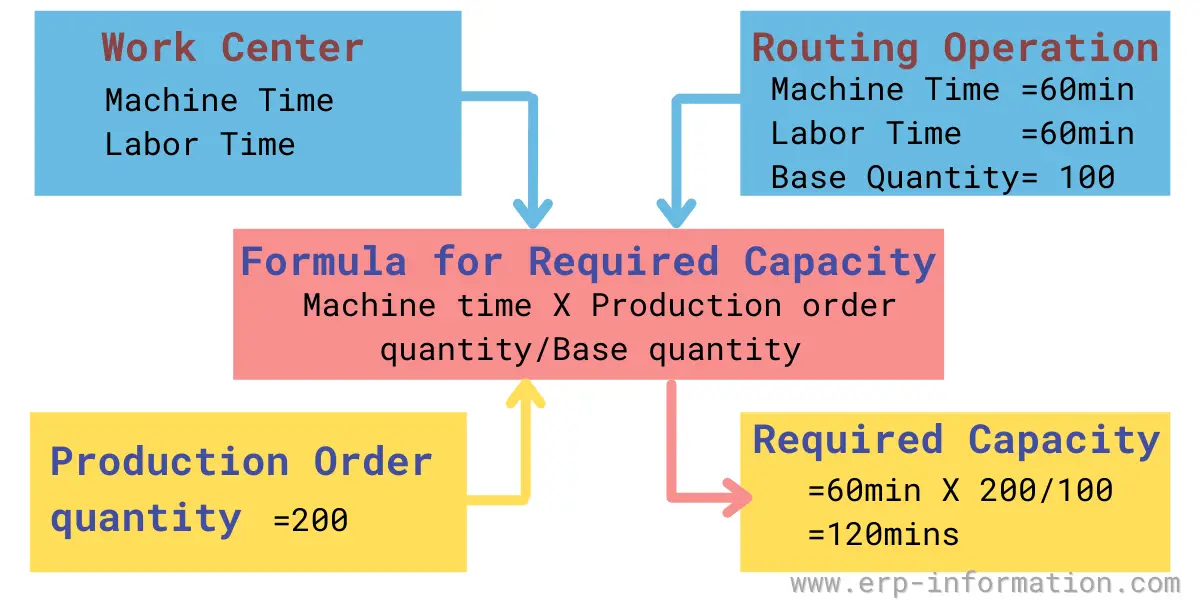
- Required capacity: In the SAP work center, required capacity means the time required to produce a specified quantity of product. To calculate the required capacity, SAP considers operation time and capacity formula.
For example, in a factory, the usage of a machine maintains things like labor time, machine time, and set-up time. Let us assume the routing time and quantity.
- Labor time 60 mins
- Machine time = 60 mins
- The machine set up time = 30 mins
- Base Quantity = 100
- Production order quantity = 200
Now the capacity calculation for that machine is
Required capacity = machine time X production order quantity/base quantity
Required capacity = 60 mins X 200/100
Required capacity = 60 mins X 2
Required capacity = 120 mins.
Evaluate Production Capacity using our Online Production Capacity Calculator
Work center capacity: rated versus demonstrated
Available hours are not capacity. A work center that is staffed for 80 hours a week will not deliver 80 hours of good output, because some of that time is lost to changeovers, maintenance, waiting for material and rework. Two standard measures close that gap.
Rated capacity = available hours x utilization x efficiency
- Utilization is the hours actually worked divided by the hours available. It answers: was the resource running at all?
- Efficiency is the standard hours earned divided by the hours actually worked. It answers: while it was running, did it produce at the rate the routing assumes?
The two are routinely confused, and confusing them hides the problem. A work center running at 60 percent utilization and 100 percent efficiency has an availability problem. One at 100 percent utilization and 60 percent efficiency has a process or standards problem. The remedies are not the same.
Worked example
A work center holds two identical machines, run on one 8 hour shift, 5 days a week.
| Input | Value | Where it comes from |
|---|---|---|
| Machines in the work center | 2 | Work center master data |
| Hours per shift | 8 | Shift calendar |
| Shifts per day | 1 | Shift calendar |
| Days per week | 5 | Factory calendar |
| Available hours per week | 80 | 2 x 8 x 1 x 5 |
| Utilization | 85% | Hours worked divided by hours available |
| Efficiency | 95% | Standard hours earned divided by hours worked |
| Rated capacity | 64.6 standard hours per week | 80 x 0.85 x 0.95 |
So the planner should load roughly 64.6 standard hours into this work center per week, not 80. Loading the available figure is one of the most common causes of a schedule that looks feasible and is not.
The alternative is demonstrated capacity, which skips the two ratios and simply averages the standard hours the work center actually produced over recent periods. It needs no estimates, so where you have clean history it is usually the more honest number, and the two are worth comparing: a rated capacity that sits well above demonstrated capacity means the utilization or efficiency assumptions are stale.
These figures are what capacity requirements planning (CRP) compares its calculated load against, one work center at a time, after rough cut capacity planning has already tested the master production schedule against the few resources that usually constrain it.
Work center structure
It contains mainly three levels.
- Department
- Planning area
- Work center
A work center can also be internal or external. An external work center represents a subcontractor: the operation still consumes lead time and cost and still has to be scheduled, but the capacity belongs to a supplier rather than to your plant, so it is modelled without a shift calendar of your own.
Naming conventions have moved with the way plants organise. Older implementations tended to name work centers after trades, such as electrical, mechanical or instrumentation. Plants organised into cells more often name them after the cell or team that owns the resource, which keeps the work center aligned with who is accountable for its output.
How to optimize your work center for productivity?
There are many different factors to consider when optimizing productivity. Some of these factors include,
- The sequencing of tasks
- The number of resources required for each task
- The dependencies between tasks
- The availability of raw materials
- The utilization of resources
Conclusion
The work center is where workers assemble and make products in a production line. Assembling and making a product can be broken down into various stages or tasks different people perform to create one final good.
The practical test of a work center definition is whether the schedule it produces can be executed. If capacity is planned at a level that hides a bottleneck, or loaded at available hours rather than rated capacity, the plan will keep promising dates the floor cannot hit.
Get the grouping right, keep the utilization and efficiency figures current, and check them against demonstrated capacity from time to time. That is most of what makes work center data useful rather than decorative.
We hope this article helped explain the basics of the topic. Thanks for reading!
Using Google Search? Add erp-information.com as a preferred source.