You’ve probably seen those barcodes with all the lines and squares on them, but what are they, and what do they do?
They are Universal Product Codes. They track products through the supply chain. They’re scanned at each point of sale to ensure that the correct product is being sold.
It is a barcode symbology widely used in the United States and other countries. It consists of 12 digits that uniquely identify a product. You can find this code on most products that you buy in stores.
This blog post discusses the definition, symbology, types, advantages, and disadvantages of UPC, and how it is different from SKU. In addition, the post explains the steps to get UPC for your product.
Definition
A Universal Product Code is a unique code consisting of a series of black lines and spaces that encode numerical data. This numerical data is known as the Global Trade Item Number (GTIN).
When scanned at the point of sale, this code allows retail systems to accurately identify products and retrieve their price and other relevant information. This standardized system ensures that products are easily and efficiently tracked and managed in the supply chain, facilitating smooth transactions and inventory control.
A UPC code enables retailers and manufacturers to precisely track products within their inventory, enhancing recall accuracy and overall inventory management.
By incorporating additional details like batch or lot numbers, companies can efficiently identify and recall defective or hazardous items from retailers, distributors, or warehouses before they reach consumers.
This system is crucial for recalling contaminated food, compromised medical devices, unsafe medications, and faulty products that pose a risk of injury.
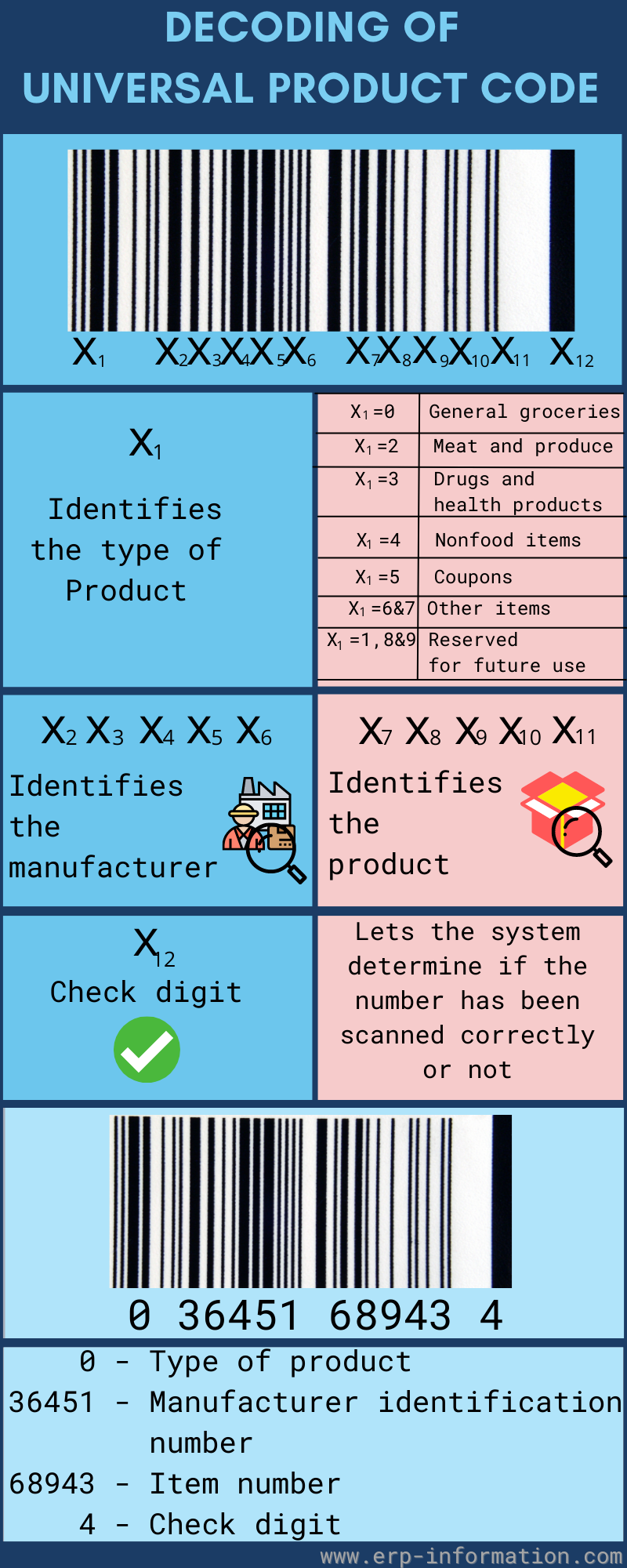
UPC-A and UPC-E are the two symbols in the UPC family. UPC-A is the familiar full-size symbol carrying a 12-digit GTIN-12. UPC-E carries that same GTIN-12, but prints it with its zeros suppressed so it fits on packages too small for a full UPC-A.
UPC Symbology
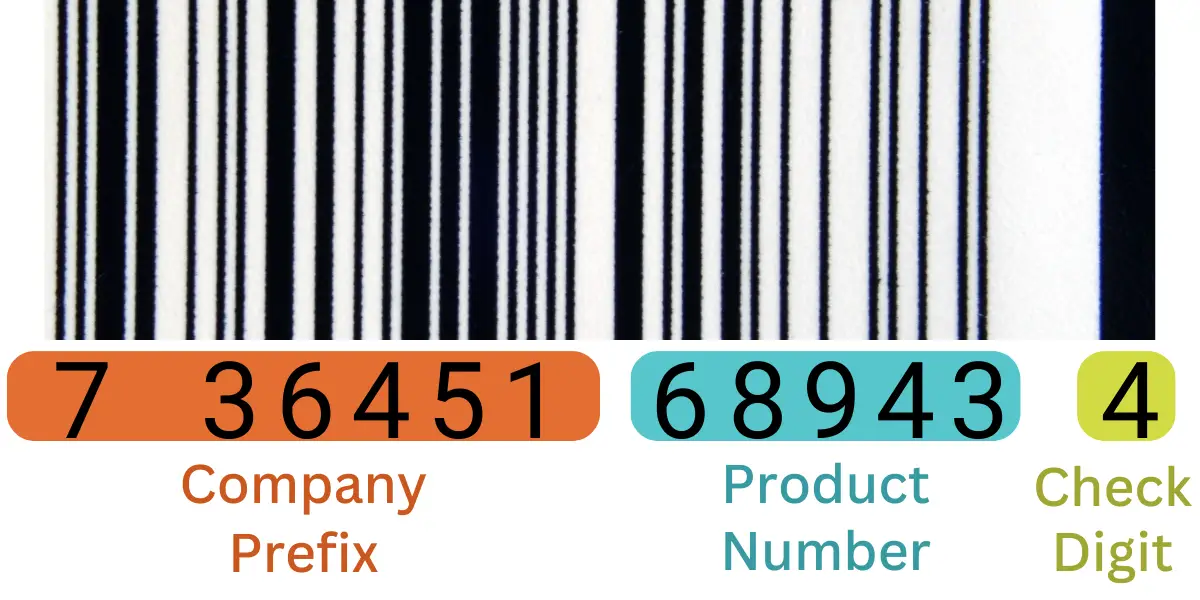
It is made up of four parts:
- The leading digit, which is part of the company prefix rather than a separate product-type field;
- The company prefix, which GS1 licenses to a specific company;
- The item reference, which the company holding the prefix assigns to each of its own products, and which is not the same thing as an SKU; and,
- A check digit is calculated using a special algorithm to ensure a valid code.
Those twelve digits are not split into fixed-size fields. The company prefix comes first, the item reference follows, and the check digit closes the number. Because the prefix can be anywhere from four to twelve digits long, the item reference gets whatever room is left: a short prefix leaves space for many products, a long one leaves space for few. What does stay constant is that the prefix belongs to the company, so the same product carries the same number whichever store sells it.
The last digit is always the check digit. A scanner recalculates it from the digits in front of it, so if a label is smudged or misprinted and the arithmetic no longer agrees, the read is rejected rather than passed on as the wrong product.
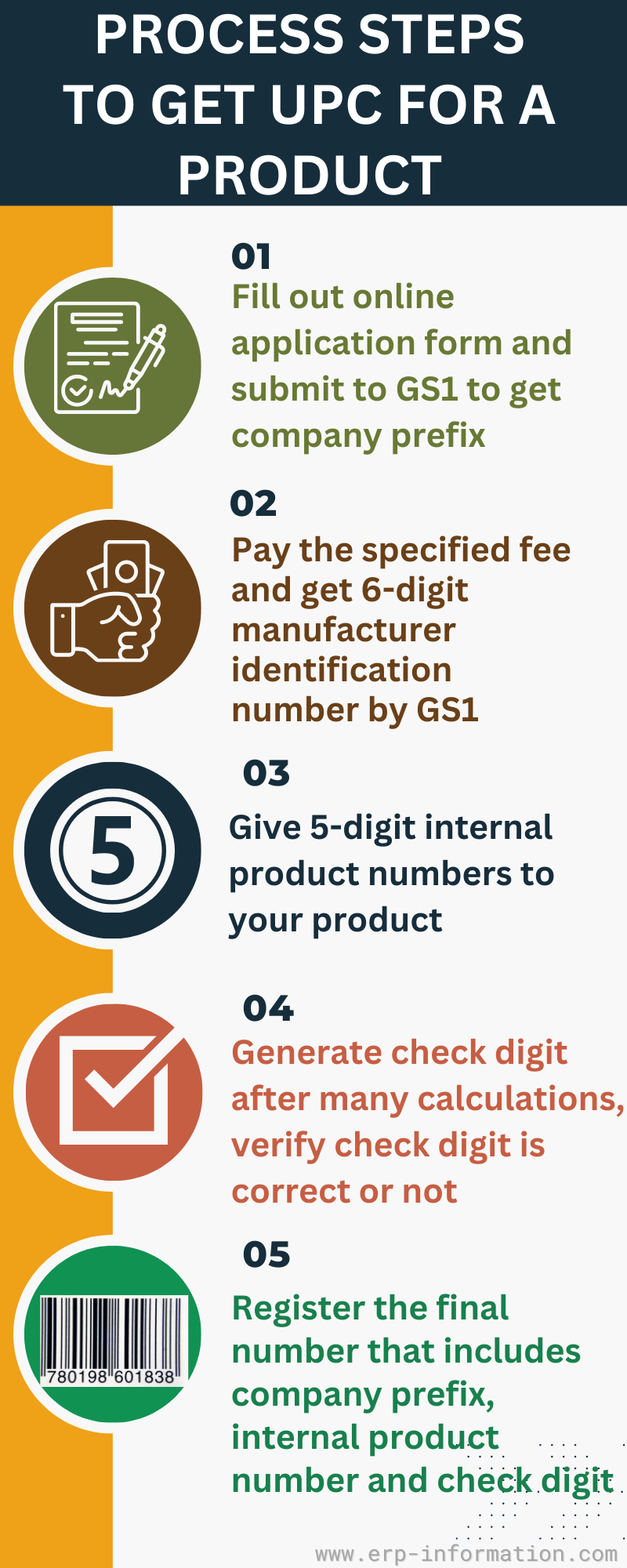
Steps to Get UPC Code for a Product
Application filling
The first step is to license a company prefix from GS1, the global standards body that administers the barcode system. In the United States it operates as GS1 US, which is what the Uniform Code Council became in 2005. Fill out the online application and choose a prefix capacity, which sets how many Universal Product Codes you can create under that prefix.
Paying fee
You have to pay the fee for the code. A prefix capacity plan can be expensive. So make sure that the plan you have chosen will accommodate the long-term use of your business.
Once you pay the fee, GS1 issues your company prefix. It is not a fixed length. The GS1 General Specifications define it as a string of four to twelve digits, and a shorter prefix leaves room for more item numbers beneath it. Whatever its length, that prefix forms the leading digits of every Universal Product Code your company assigns.
Internal product number generation
After getting your company prefix, you assign the item reference yourself. Its length is whatever the prefix leaves you: company prefix digits, plus item reference digits, plus one check digit, always add up to twelve. You are free to choose the digits, but every product needs its own Universal Product Code, so never let the same number stand for two products.
Check digit generation
After generating your company prefix and internal product code, generate your check digit.
It follows a fixed arithmetic rule published by GS1. Working from the right, multiply the digits alternately by three and by one, add the results, and the check digit is the number that brings that total up to a multiple of ten. You can do it by hand, and GS1 publishes a check digit calculator that confirms the result.
Confirm check digit is correct or not. If the check digit is incorrect, the UPC code will not scan properly.
Registration of final barcode
Once all three sets of digits, company prefix, internal product code, and check code are generated, register this number with GS1 so that you will tie your product information to the number you have created.
The below infographic provides summarized information on UPC barcode generation steps.
UPC Code’s Location
They can be found in most products that you buy in stores. The code is usually located somewhere on the product packaging, and you may also print it on the product. They are also found in product manuals, promotional materials, and shipping boxes.
How to Find a Manufacturer’s UPC?
Suppose you want to find the Universal Product Code for a specific product. There are several ways to do so. You can visit the manufacturer’s website or contact them directly to ask for the code. You can also use a UPC lookup tool to find the code. These tools are widely available online, and they are free to use.
When using a lookup tool, you need the product’s name or SKU number. You can usually find the SKU number on the product packaging or manual. Once you have entered the information into the lookup tool, it will return the Universal Product Code for that product.
UPC Lookup Tools
These tools allow you to search for product codes by keyword or browse by category. They also provide information about the product, such as the manufacturer’s name, address, photos, and descriptions. Some tools even let you add products to your inventory.
One example is Verified by GS1, the registry GS1 runs for looking up a GTIN and the company that licensed it.
Types of UPCs
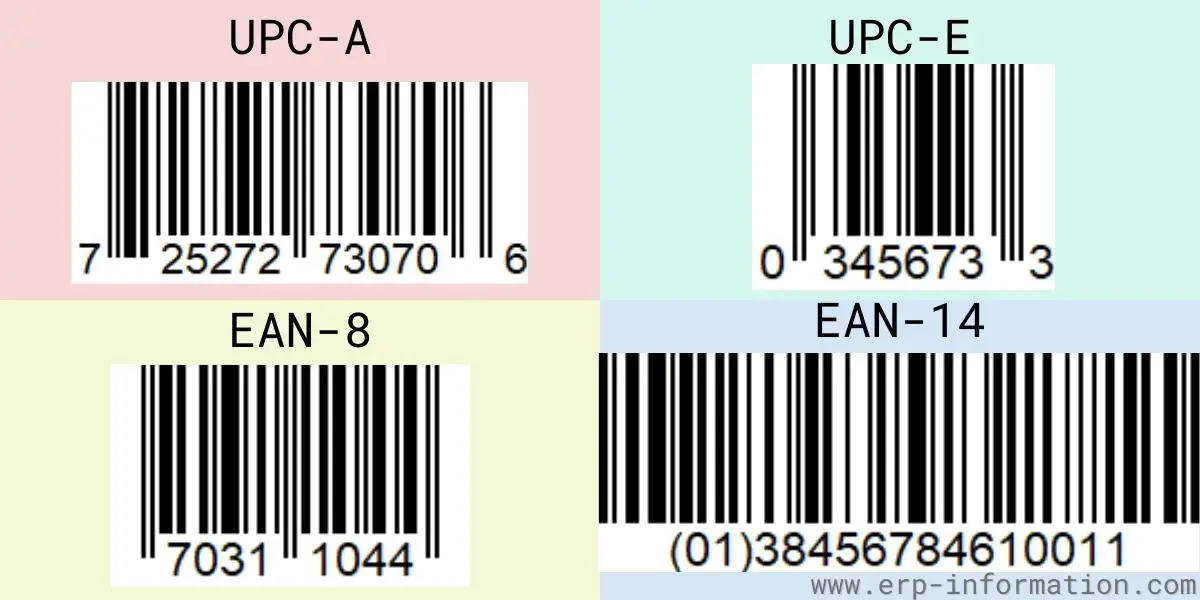
There are a few different types of Universal Product Codes. The most common type is the 12-digit code used to track store products.
There is no separate 6-digit or 9-digit UPC, and none of them is reserved for vending machines or online sales. The only other symbol in the family is UPC-E, which holds the same 12-digit GTIN-12 as UPC-A in compressed form. A shorter number on a package is usually something else: an EAN-8, a coupon code, or an in-store number a retailer assigns for its own shelves and never publishes.
Universal Product Code Generator
A Universal Product Code Generator is a tool that allows you to create Universal Product Codes for your products. This tool is helpful if you want to make your barcodes for tracking purposes or if you want to include them on your product packaging.
There are several generators available online. Most of these tools are free to use and easy to use. You need to enter the information about your product, such as the name and SKU number, and the generator will create a valid code for you.
UPC Barcode Specifications
The barcode specifications describe how a symbol must be sized, printed, and read. They are maintained by GS1 and published in the GS1 General Specifications. The Uniform Code Council held that role until 2005, when it merged with EAN International to form GS1 and was renamed GS1 US.
The specifications define the following:
- The structure and format
- The type of information that can be encoded
- How it should be scanned and read
- They use it in retail environments
- They use it in other industries
The UPC barcode specifications are essential for businesses to create or use barcodes. By following the guidelines in these specifications, companies can ensure that their barcodes will be compatible with scanning equipment and that they will be readable in retail stores.
Advantages
- It is easy to use and can be scanned by retail scanners.
- It speeds up the checkout process in stores.
- It helps businesses track their inventory and sales.
- It can be used to create marketing materials such as flyers and product labels.
Disadvantages
- Barcodes can be expensive to create and print.
- They are not always accepted in all countries.
- They can be challenging to create without using a barcode generator tool.
- They may not be suitable for all products or businesses.
- They require special scanning equipment to read them correctly.
SKU vs UPC
| SKU | UPC |
| Stock keeping unit is an internal tracking number used by retailers to manage inventory and sales data. | It is a globally accepted barcode that identifies a product. |
| Specific to a particular retailer or brand, customized for their inventory management. | Standardized and recognized worldwide, used across different retailers and locations. |
| Created and assigned by the retailer, can vary between different stores for the same product. | Assigned by the manufacturer and remains consistent for the product regardless of where it is sold. |
| It can be used by a retailer to track different variations (like color or size) of a product by grouping them under a single product type. For example, a retailer might assign one SKU to a shoe style and use that SKU to manage inventory for all colors and sizes of that shoe. | Each variation of a product (such as different colors or sizes) will have its own unique UPC. For instance, white shoes and black shoes of the same style would have different UPCs to distinguish them individually. |
What Sunrise 2027 Changes
The retail barcode is changing. GS1 calls the transition Sunrise 2027: by the end of 2027, retail point-of-sale systems worldwide are expected to read and process 2D barcodes in addition to the linear symbols they scan today.
Two 2D symbols are in scope: GS1 DataMatrix, and the QR Code carrying a GS1 Digital Link. The difference that matters is capacity. A UPC-A carries a single identifier, the GTIN. A 2D symbol can carry the GTIN plus a batch or lot number, an expiration date, and a serial number, and a GS1 Digital Link QR resolves to a web address, so one scan can serve the checkout, the recall system, and the shopper’s phone.
What this does not mean is that the UPC is switched off in 2027. Until the installed base of scanners can reliably read 2D at the checkout, any pack carrying a retail 2D barcode still needs a linear barcode beside it. In the United States, UPC-A remains the primary point-of-sale barcode until 2027; from that point brand owners gain the option to drop it, not an obligation. GS1 reports pilots running in 48 countries representing about 88 percent of world GDP.
If you are assigning UPCs today, nothing about the process above changes. The practical preparation is to keep your GTIN data accurate in the GS1 registry, and, if you already print a marketing QR code on the pack, to have it rebuilt to the GS1 Digital Link standard with your GTIN inside it, so it becomes the same code the checkout can read rather than a second one competing for space.
FAQs
How many types of bar codes are there?
There is no fixed number, and the count depends on where the barcode is used.
At retail checkout the EAN/UPC family does most of the work: UPC-A and UPC-E in North America, EAN-13 and EAN-8 elsewhere.
GS1 also defines GS1 DataBar for small or fresh-food items, ITF-14 for cases, GS1-128 for logistics, and the 2D symbols GS1 DataMatrix and QR Code carrying GS1 Digital Link.
Outside the GS1 system there are many more, such as Code 39, Code 128, and PDF417. An ISBN is not a separate symbol; it is a book identifier printed in an EAN-13 barcode.
What is EAN
EAN stands for European Article Number, now formally called the International Article Number. It is the 13-digit retail barcode used across most of the world, and the number it carries is a GTIN-13.
EAN was not replaced by GTIN in 2009. In 2005 EAN International merged with the Uniform Code Council to form GS1, and the numbering schemes were brought under one GTIN naming system. From 1 January 2005, under the initiative known as Sunrise 2005, North American retailers were also expected to scan and process EAN-13 alongside 12-digit UPC symbols.
What are the differences between UPC and EAN?
The differences are as follows.
EAN is used mainly in Europe, while UPC is primarily used in the United States.
EAN codes have 13 digits, while UPCs have only 12 digits.
A UPC-A number is simply an EAN-13 with a leading zero, and modern scanners read both.
Neither one tells you where a product was made. GS1 is explicit that a company prefix identifies the GS1 member organization that licensed it, not the country of origin, and a company headquartered in one country can manufacture anywhere. Country of origin is carried in product master data or printed on the label.
What is the difference between GTIN and UPC?
GTIN (Global Trade Item Number) is the numerical identifier encoded in the barcode. It provides a unique identification number for products, ensuring they can be tracked and managed globally.
UPC is the scannable barcode that appears on product packaging. It visually represents the GTIN in a series of black lines and spaces that can be read by scanners at checkout points. GTIN and UPC together make a barcode.
Conclusion
Understanding the Universal Product Code is essential for modern retail and inventory management.
This unique 12-digit code, represented by black lines and spaces, simplifies product identification and ensures smooth operations throughout the supply chain.
By enabling precise tracking, facilitating recalls, and speeding up checkout processes, UPCs are indispensable for businesses worldwide.
Two things are worth carrying away. A UPC is licensed, not a label you can invent: the prefix comes from GS1, its length varies, and the digits say nothing about where a product was made. And the symbol itself is changing, so if you are designing packaging that will still be on shelves in 2028, plan for a 2D code alongside the one you print today.