
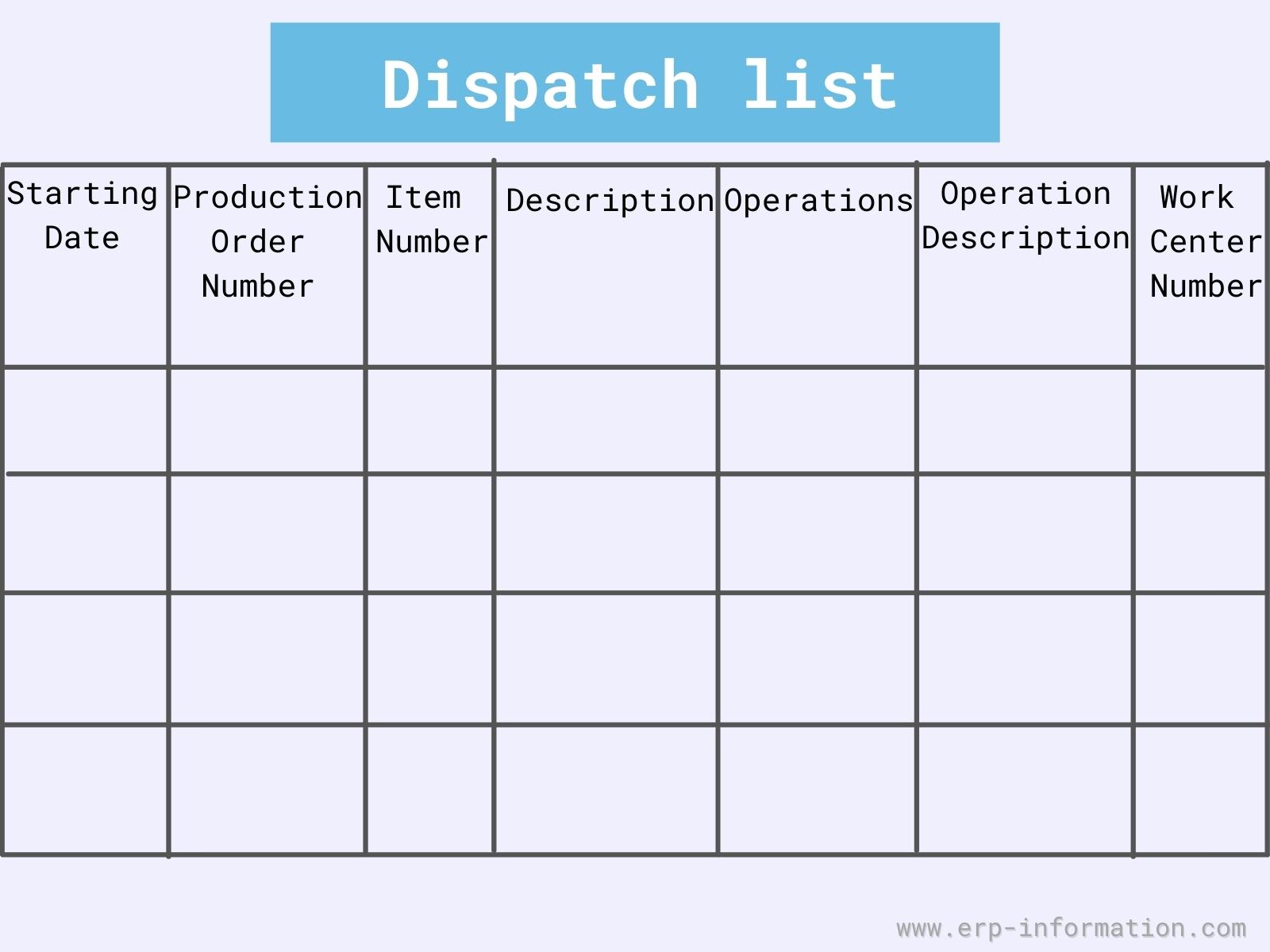
A dispatch list is the running order for one work center: the manufacturing orders waiting there, in the sequence they should be worked. The APICS Dictionary defines it as “a listing of manufacturing orders in priority sequence,” normally generated daily for each work center. Supervisors and operators use it to decide which job runs next.
It is not a list of parts to pick or goods to ship. Those are a picking list and a dispatch plan, both explained further down.
What is a dispatch list?
A dispatch list is a work center’s queue in priority order, with what is needed to run each job: APICS says it contains detailed information on priority, location, quantity and the capacity requirements of each manufacturing order, operation by operation. It reaches the floor on paper or a screen, and it has two other names: work center schedule and priority report. (Definitions here are from the 14th edition of the APICS Dictionary, 2013.)
Oracle’s JD Edwards EnterpriseOne 9.2 guide uses almost the same words: “a sequential listing of manufacturing work orders or rate schedules that contains detailed information about location, quantity, and capacity requirements.” It adds that you “should generate dispatch lists daily by work center or line.”
In an ERP system the list is built, not typed. The JD Edwards Dispatch List program (P31220) lists “the work orders that have remaining operations for a given work center,” so every open operation of a manufacturing order shows up on the list of the work center that performs it.
APICS names the dispatch list as the tool normally used for priority control: giving manufacturing departments the start and completion dates they need to execute a plan. Our guides to priority control and order release cover the steps just before it.
Dispatch list format: what each line shows
Each line is one operation of one order at this work center. Column names differ by system, but these are the fields the APICS definition and the vendor manuals name.
| Field | What it tells the operator | Named in |
|---|---|---|
| Order and item number | Which job, and what is being made | Rover ERP WO.R4: WO ID, Part |
| Operation number | Which routing step runs here, and the steps before and after it | APICS (by operation); Rover WO.R4 |
| Quantity to go | Units still to finish at this work center | JD Edwards 9.2: ordered minus completed |
| Setup and run hours | How much of the work center’s time the job will take | JD Edwards 9.2 formulas, below |
| Start, operation due and order due dates | When this step and the whole order are due | Rover WO.R4 |
| Priority value | Why the job sits where it does, for example its critical ratio | APICS; AddonSoftware |
| Status and location | Whether the job is here yet, in process, complete or scrapped | APICS; Oracle Fusion 26D |
The hours come from the routing standards. JD Edwards 9.2 calculates them like this:
Remaining run hours = standard run hours × (quantity remaining ÷ standard quantity)
Remaining setup hours = standard setup hours − setup hours already recorded
So if the routing allows 1.6 run hours per 100 pieces and 150 pieces are left, the line shows 1.6 × 150 ÷ 100 = 2.4 run hours.
Sample dispatch list (filled in)
Here is a filled dispatch list for one work center, WC-20, sorted by earliest due date. The orders and items are invented for illustration. The list was generated at 06:00 on Monday, and the work center runs two shifts to 22:00, so each day has 16 working hours.
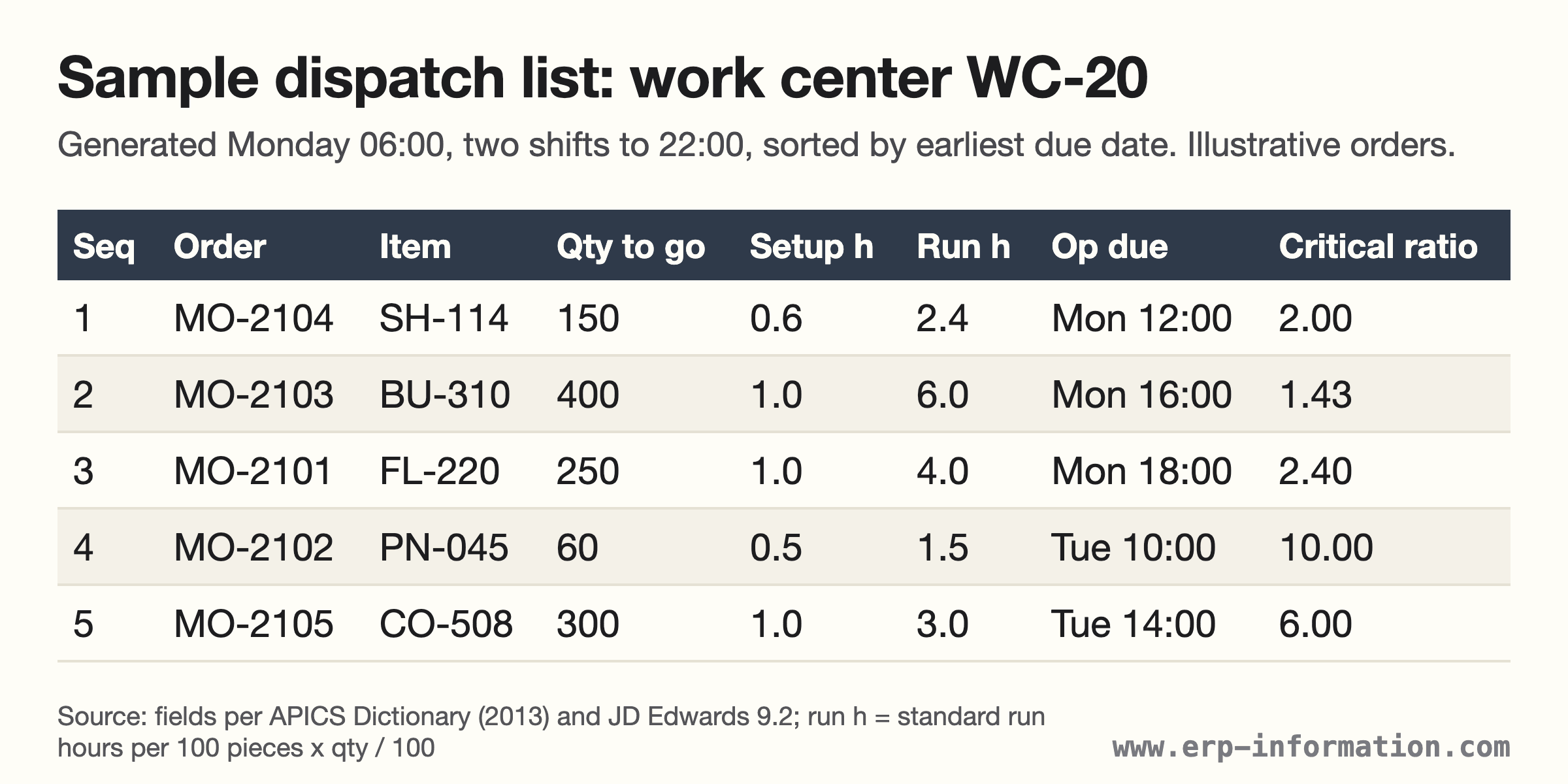
| Seq | Order and item | Qty to go | Setup + run hours | Op due | CR |
|---|---|---|---|---|---|
| 1 | MO-2104 SH-114 | 150 | 0.6 + 2.4 | Mon 12:00 | 2.00 |
| 2 | MO-2103 BU-310 | 400 | 1.0 + 6.0 | Mon 16:00 | 1.43 |
| 3 | MO-2101 FL-220 | 250 | 1.0 + 4.0 | Mon 18:00 | 2.40 |
| 4 | MO-2102 PN-045 | 60 | 0.5 + 1.5 | Tue 10:00 | 10.00 |
| 5 | MO-2105 CO-508 | 300 | 1.0 + 3.0 | Tue 14:00 | 6.00 |
Add up the hours and the queue holds 21 hours of work against a 16-hour day. Whatever the sequence, 5 hours spill into Tuesday. That is a capacity question, not a sequencing one.
How is the sequence decided? Dispatching rules
The order of the lines comes from a dispatching rule. APICS calls these priority rules: “simple heuristics used to select the order in which jobs will be processed.” The open textbook Operations Management (Abbas and Goosheh, 2024) lists the first three below as common criteria.
- First come, first served (FCFS): jobs are “sequenced by their arrival times” (APICS).
- Shortest processing time (SPT): the job with the least work at this operation runs first.
- Earliest due date (EDD): the job due soonest runs first.
- Critical ratio (CR): time left until the due date divided by the work still to do. The lowest ratio runs first.
Critical ratio = time remaining until the due date ÷ work remaining
APICS defines the work remaining as the expected elapsed time to finish the whole job, not just this operation. A ratio below 1.0 means the job is behind schedule, above 1.0 ahead of schedule, and exactly 1.0 on schedule.
Software implements it the same way. AddonSoftware, for example, divides “the number of hours until the scheduled completion date by the number of standard hours of uncompleted work,” so jobs behind schedule show lower ratios. The textbook’s key terms call CR “a dynamic priority rule”: the ratio changes as the clock runs.
Worked example: five orders, four rules
Take the five orders in the sample list, all waiting at WC-20 at 06:00 (hour 0). We sequenced them by each rule and worked out the finish times hour by hour (our calculation). No rule wins on every measure.
| Rule | Run order | Average flow time | Orders late | Total hours late | Worst lateness |
|---|---|---|---|---|---|
| FCFS | 2101, 2102, 2103, 2104, 2105 | 12.8 h | 2 | 15 h | 11 h |
| SPT | 2102, 2104, 2105, 2101, 2103 | 10.2 h | 2 | 13 h | 11 h |
| EDD | 2104, 2103, 2101, 2102, 2105 | 13.2 h | 1 | 3 h | 3 h |
| CR | 2103, 2104, 2101, 2105, 2102 | 14.4 h | 3 | 8 h | 4 h |
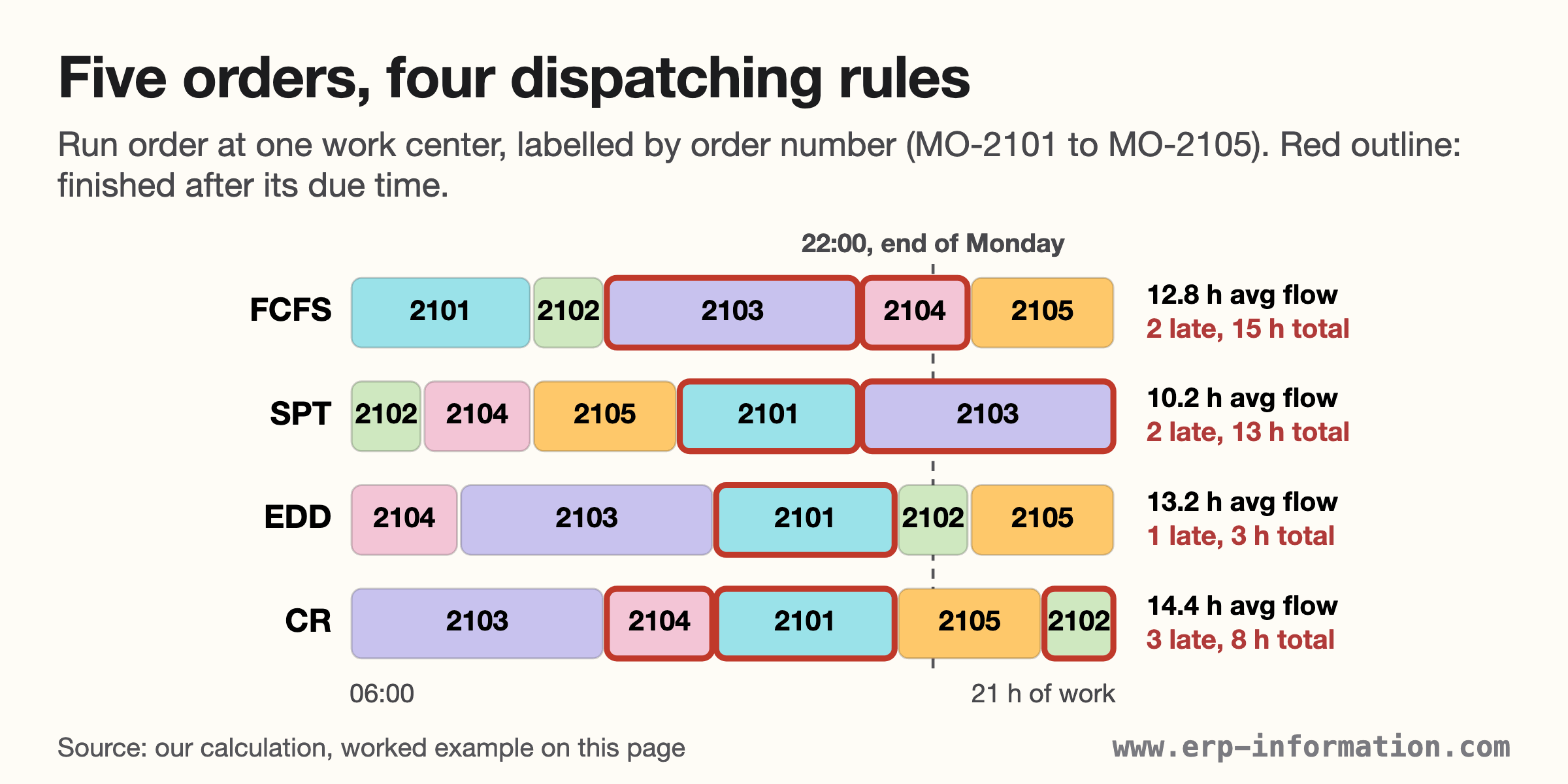
Read the EDD row step by step. MO-2104 runs first and finishes at hour 3, inside its due hour of 6. MO-2103 finishes at hour 10, exactly on time. MO-2101 finishes at hour 15 against a due hour of 12, three hours late. MO-2102 and MO-2105 then finish early.
SPT clears the small jobs first, so orders leave the work center sooner on average: 10.2 hours against 13.2 for EDD. The cost lands on the longest job. MO-2103 waits until last and finishes 11 hours late.
CR put MO-2103 first, because 10 hours to its due time for 7 hours of work gives the lowest ratio, 1.43. That made MO-2104, due at hour 6, four hours late, while EDD finished both on time. With only one operation left, CR just compares slack with work, and it can rank a job ahead of one that is due sooner.
The ratio also moves with the clock. By hour 7, MO-2104’s ratio is (6 − 7) ÷ 3 = −0.33: already late. Regenerating the list every day, as JD Edwards advises and APICS describes as normal, keeps the ranking current.
How ERP systems build the dispatch list
The documentation of five systems shows how differently the same list can be filled and sorted. Each row was checked against the vendor’s current help page on 25 October 2026.
| System | What the list shows | How it is sorted |
|---|---|---|
| JD Edwards EnterpriseOne 9.2 (P31220) | Work orders with remaining operations at a work center. The order “might not be physically present at the work center.” | By start date or requested date |
| Oracle Fusion Cloud Manufacturing 26D | In-house operations of released and completed work orders for a work area and its work centers, by status: Ready, In Process, Completed, Scrapped, Rejected | Earliest completion date by default; operators can resequence eligible operations |
| NetSuite | Outstanding operation tasks of released or in-process work orders, filtered by location and work center. Printing a task ticks its Dispatched box. | Not stated on the help page |
| Rover ERP (Zumasys), WO.R4 | Work orders per work center over a chosen period, with setup and run hours and the previous and next operation | Work order priority, then work center, then date, with a page break per work center |
| AddonSoftware (BASIS) | Open, planned or quoted work orders with outstanding production requirements | Scheduling priority set on the work order; the module also calculates a critical ratio |
Two details matter on the floor. JD Edwards warns that a job can be listed before it reaches the work center, so read the status or location before pulling it. And Oracle makes the list the place where operators report operation, material, resource and output transactions, so the list doubles as the progress record.
Dispatch list, picking list and dispatch plan
Three documents get confused, partly because “dispatch” also means sending goods out of the plant.
| Document | What it lists |
|---|---|
| Dispatch list | Manufacturing orders in priority sequence at one work center (APICS) |
| Picking list | APICS: “the material to be picked for manufacturing or shipping orders” |
| Dispatch plan | The consignments leaving the plant or warehouse, with the documents that travel with each one |
Dispatch plan format for outgoing goods (India)
Many readers who search for a “dispatch list format” or “dispatch plan format” want this outbound list. In India its columns follow the e-way bill rules, because the paperwork has to match the goods on the vehicle.
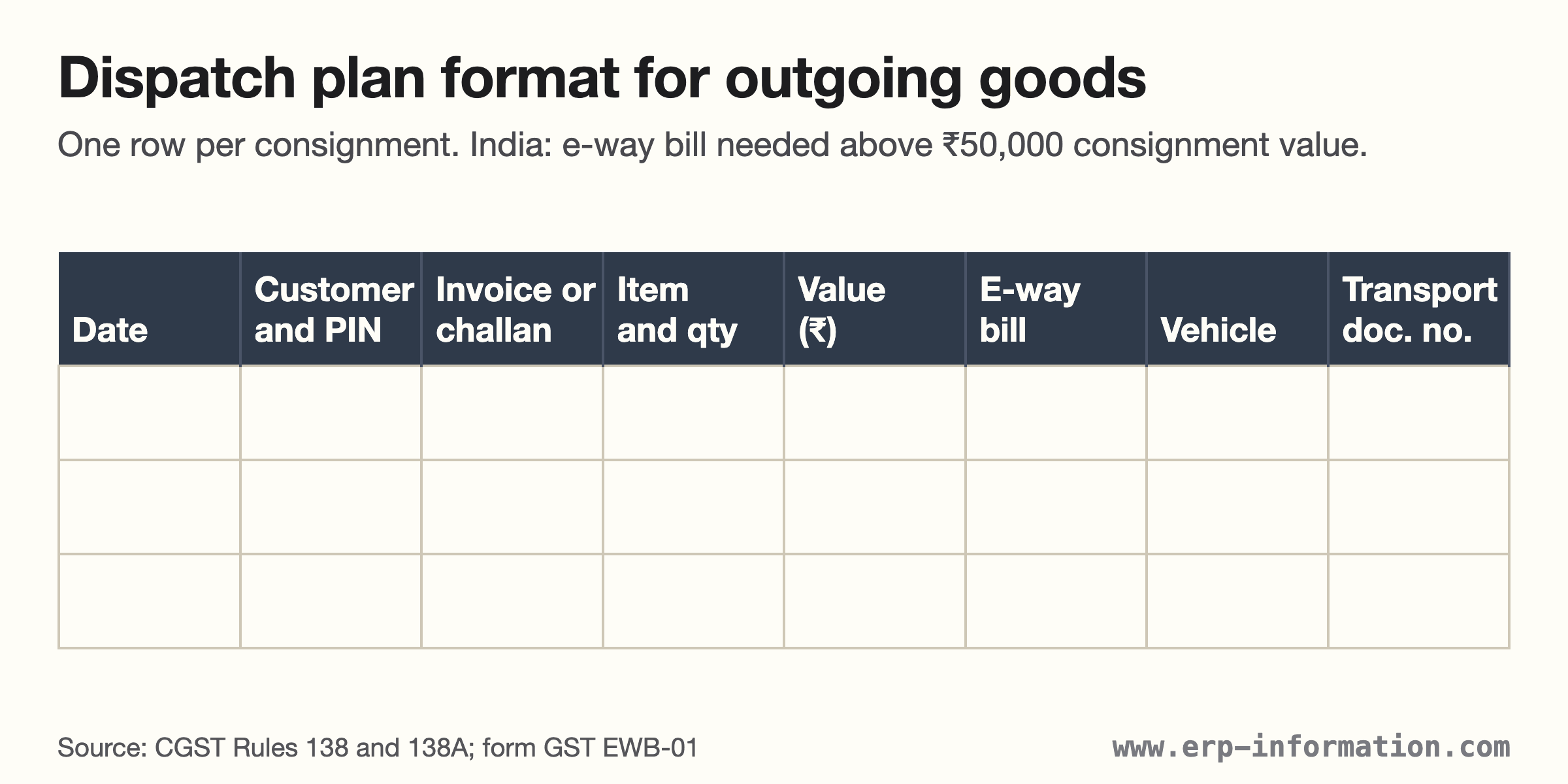
| Column | Why it is there |
|---|---|
| Invoice, bill of supply or delivery challan number | The document the person in charge of the vehicle must carry (Rule 138A) |
| Consignment value | Decides whether an e-way bill is needed (Rule 138) |
| E-way bill number | Carried as a copy or as the number (Rule 138A) |
| Customer and delivery PIN code | Part A of form GST EWB-01 asks for the PIN code of the place of delivery |
| Vehicle number | Part B of form GST EWB-01 |
| Transport document number | Goods receipt, railway receipt, airway bill or bill of lading number (form GST EWB-01) |
Under Rule 138 of the CGST Rules, 2017, a registered person moving goods of “consignment value exceeding fifty thousand rupees” must file Part A of form GST EWB-01 before the movement starts. Rule 138A requires the person in charge of the vehicle to carry “the invoice or bill of supply or delivery challan, as the case may be,” plus the e-way bill or its number.
Inter-state movements to a job worker, and some inter-state movements of handicraft goods, need an e-way bill whatever their value. The rule text quoted here is from Notification 12/2018-Central Tax of 7 March 2018, and the e-way bill portal’s FAQ, checked on 25 October 2026, gives the same ₹50,000 figure. Check the current rules before relying on them for a specific movement.
For the wider process of getting goods to customers, see our guide to outbound logistics.
What a dispatch list does well, and where it misleads
- It turns the plan into a daily running order. Each work center gets its own list, generated daily, so nobody has to guess what to run next.
- It shows hours next to each job. A supervisor can see that 21 hours of queue will not fit a 16-hour day before the day starts, as in the sample above.
- It is one place to report progress. In Oracle Fusion, operators report operation, material, resource and output transactions from the list.
- It is only as good as the standards behind it. The hours on each line come from routing standards, so a wrong standard puts the wrong job first.
- A listed job may not be there yet. JD Edwards notes the work order may not be physically at the work center, so check its status before pulling it.
- It does not add capacity. If the queue keeps exceeding the shift, resequencing only moves the lateness around. The fix is in capacity planning.
FAQs
How to create a dispatch list?
In an ERP system, release the manufacturing orders and run the dispatch list for the work center: it lists every open operation there with quantity, hours and due dates. To build one by hand, list each order waiting at the work center, work out the setup and run hours still needed, sort the orders by a dispatching rule such as earliest due date, shortest processing time or critical ratio, and issue the list at the start of each day.
Is a despatch list the same as a dispatch list?
Yes. Despatch is another spelling of dispatch: the Cambridge Dictionary entry for despatch simply refers readers to dispatch. A despatch list is the same document.
Which dispatching rule should you use?
Pick the measure your customers feel most. If late orders cost you most, start with earliest due date: in the example it left one order late, by 3 hours, against two or three late orders under the other rules.
If work in process and lead time cost you most, shortest processing time cleared orders soonest on average, but watch the long jobs it keeps pushing back. Critical ratio suits orders that still have several operations ahead, because its denominator then includes their later work; read it next to the due date.
Whichever you choose, regenerate the list daily and check that the hours fit the shift. More definitions are in our ERP dictionary.
Using Google Search? Add erp-information.com as a preferred source.