
A customer order is a customer’s request to buy specific goods or services, recorded by the seller with the items, quantities, delivery date and terms. The buyer files the same order as a purchase order. Once the seller accepts it, the order is a commitment, and in an ERP system it counts as firm demand rather than forecast.
| Where you meet it | What “customer order” means there |
|---|---|
| Trade between companies | The buyer’s order as the seller receives it. The buyer’s copy is the purchase order. |
| ERP and production planning | Firm demand from a named customer, which consumes the forecast so the same units are not planned twice. |
| Retail stores | An order a shopper places for later pickup or home delivery, often with a deposit. |
| Banks and payments | “Ordering customer” is the payer on a transfer, called the Debtor in ISO 20022. |
What is a Customer Order?
A customer order is the seller’s record of what a customer has asked to buy: who the customer is, which items, how many, and when they are wanted. Asprova’s MRP glossary describes it as “the order information received from customers”. That record carries a customer number, the number of the person who took the order, the product number, the delivery date and the quantity. IFS Cloud splits the same content into an order header, holding “the customer’s identity and the wanted delivery date”, and order lines holding the parts and quantities.
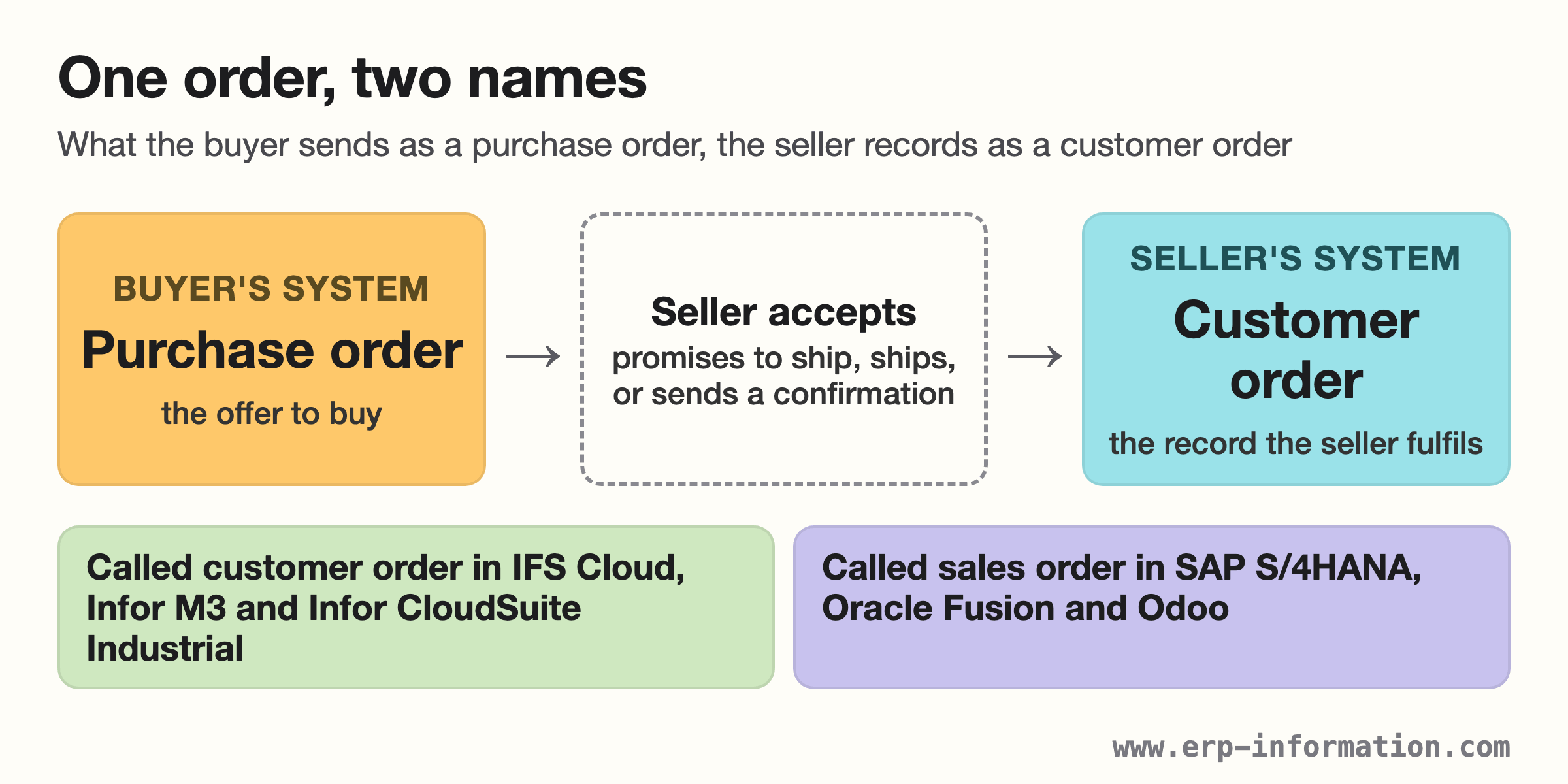
The confusion starts with the name. One order sits in two companies’ systems at once: the buyer sends a purchase order, and the seller enters it as a customer order. Several ERP systems call the seller’s copy a sales order instead (see the table further down), so customer order and sales order are two names for the same kind of record on the same side of the deal.
| Document | Created by | What it does |
|---|---|---|
| Quotation | Seller | Proposes items, prices and terms. In IFS Cloud a quotation the customer accepts is converted into a customer order. |
| Purchase order | Buyer | Asks to buy. US law treats an order to buy goods for prompt shipment as an offer the seller can accept (UCC section 2-206). |
| Customer order (sales order) | Seller | Records the order the seller has taken on, so it can be checked, scheduled, delivered and invoiced. |
| Order confirmation | Seller | Tells the buyer the order is accepted. A written confirmation can count as acceptance even when it adds terms (UCC section 2-207). |
When does a customer order become binding?
In the United States, sales of goods fall under Article 2 of the Uniform Commercial Code. Section 2-206 says “an order or other offer to buy goods for prompt or current shipment shall be construed as inviting acceptance either by a prompt promise to ship or by the prompt or current shipment of conforming or non-conforming goods”. So the customer’s order is the offer, and the seller accepts by promising to ship or by shipping. Section 2-204 adds that a contract can be made “in any manner sufficient to show agreement”, including conduct by both parties.
The order acknowledgment carries more weight than it looks. Under section 2-207, a written confirmation sent within a reasonable time “operates as an acceptance even though it states terms additional to or different from those offered or agreed upon”. Between merchants those extra terms join the contract unless the order limited acceptance to its own terms, the new terms materially alter it, or the buyer objects. Read the terms printed on both documents, not only the one you sent.
In India the Indian Contract Act, 1872 uses different words for the same steps. Section 2(a) defines a proposal; under section 2(b), when the person receiving it signifies assent, “the proposal is said to be accepted. A proposal, when accepted, becomes a promise”; and section 2(h) says “An agreement enforceable by law is a contract”. Read against those definitions, a customer’s order is a proposal, and the seller’s acceptance makes it a promise.
Acceptance does not freeze an order. Order systems let accepted orders be edited and cancelled. Microsoft Dynamics 365 Commerce, for example, lets store staff recall a customer order to edit or cancel it, and lets the retailer set a cancellation charge. Its documentation adds: “If deposits that you paid exceed the cancellation charge, refund payments might be due”.
This section summarises statute text. It is not legal advice: the contract’s own terms and the law that governs it decide a real dispute.
Uses
Later steps in order-to-cash refer back to the customer order. In practice it does six jobs.
- Records firm demand. Planning systems treat it as actual demand and let it consume the forecast (explained in the next section).
- Triggers supply. In IFS Cloud, releasing a customer order can create “a purchase requisition, purchase order, shop order requisition, or DOP header”, depending on how the part is acquired.
- Reserves stock. Inventory parts have to be reserved before they can be picked and delivered (IFS Cloud).
- Applies credit control. The order is checked against the customer’s credit block and credit limit. In IFS Cloud an order over the limit “acquires the status Blocked and is stopped in the order flow”.
- Links the paperwork. SAP’s Sales Order app shows an order’s deliveries, billing documents and customer returns in one place, alongside its credit status.
- Saves retail sales. Microsoft says retailers use customer orders “to minimize lost sales that stock outages might otherwise cause”.
How do customer orders work in ERP planning?
A planning system gets demand from two places: forecasts, which are projections, and customer orders, which are real. Forecast consumption is how the system avoids counting the same units twice. Infor’s CloudSuite Industrial documentation says existing demands such as customer orders “consume the forecast quantity”, and what is left, the outstanding requirement, “reflects the remaining forecast quantity that will drive independent requirements for planning”.
Infor’s own worked example shows the mechanics. In it, customer orders are set to be planned before forecasts:
| Step in Infor’s example | Units |
|---|---|
| Forecast for the item | 200 |
| On-hand inventory | 150 |
| Customer order entered; it consumes the forecast | 120 |
| Forecast still outstanding: 200 − 120 | 80 |
| Stock left after the order is covered: 150 − 120 | 30 |
| Planned order for the rest of the forecast: 80 − 30 | 50 |
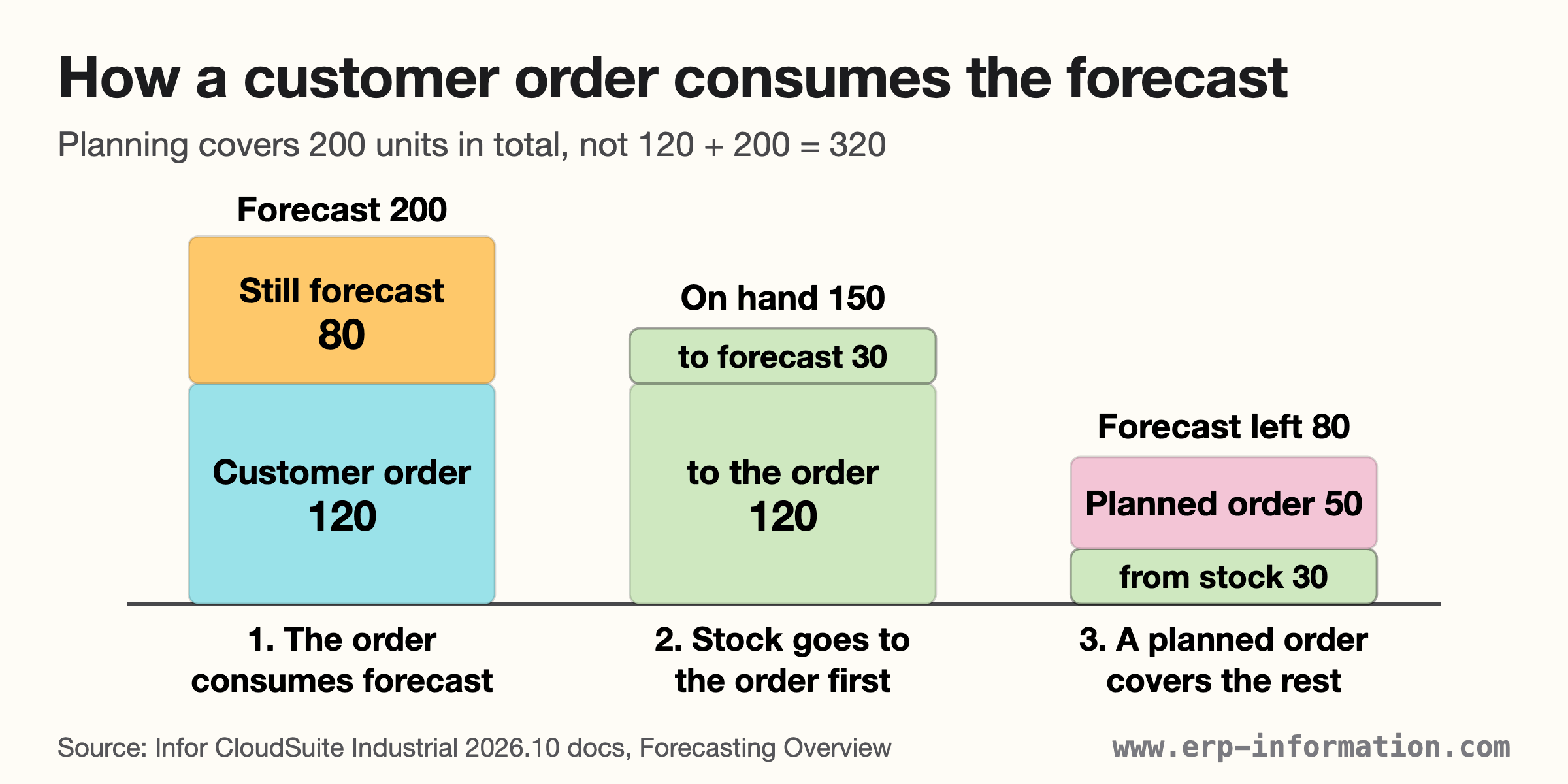
Without consumption the plan would carry 320 units of demand, the 120 ordered plus the full forecast of 200, for an item the planner expects to sell 200 of. The 120 would be planned twice.
Two rules decide how this behaves in practice. First, a time window: Infor’s Forecast Look Behind and Look Ahead settings define the period “within which existing customer orders and other demands can consume a forecast”. Second, overflow: an order larger than the forecast left in that window spills into the next valid forecast, and if none is found, it consumes nothing. Infor also notes that once an order has consumed a forecast, a later available-to-promise or capable-to-promise check on that order takes the consumption into account when it projects the date.
Where customer orders start to drive the work depends on the production strategy. Olhager and Donk describe the customer order decoupling point as “the point in the supply chain at which a product is linked to a specific customer”: downstream of it, operations are based on actual customer orders; upstream, they run on forecasts. Make to stock, assemble to order, make to order and engineer to order are different positions of that point. To trace which customer order a component is being made for, see pegged requirements; for how orders and forecasts meet in the plan, see the master production schedule.
What do ERP systems call a customer order?
The same object has two common names, and it helps to know which one your system uses before searching its documentation. We checked each vendor’s current documentation on 15 October 2026.
| System | What it is called, and what the documentation shows |
|---|---|
| IFS Cloud (26R2) | Customer order. Entered directly or converted from an accepted quotation, credit-checked, then released from Planned to Released. |
| Infor M3 | Customer order. Its API, OIS100MI, is the “Customer order interface”. |
| Infor CloudSuite Industrial (2026.10) | Customer order (CO). Customer orders consume the item forecast in MRP and APS planning. |
| SAP S/4HANA Cloud | Sales order. The Sales Order app (F1814) shows status, deliveries, billing documents and credit status. |
| Oracle Fusion Order Management | Sales order. Release 26A adds an AI agent that converts a purchase order PDF into a sales order. |
| Odoo 20 | Quotation, then sales order. Clicking Confirm changes the quotation’s status to Sales Order. |
| Microsoft Dynamics 365 Commerce | Customer order at the store till; its lines are handled as sales order lines. |
| LS Central (28.2) | Customer order (CO), for collection in a store or home delivery. |
Oracle’s 26A agent shows the relationship plainly: it reads the buyer’s purchase order and creates the seller’s sales order from it. If your ERP calls it a sales order, everything on this page about customer orders applies to it.
Steps of Customer Order Processing
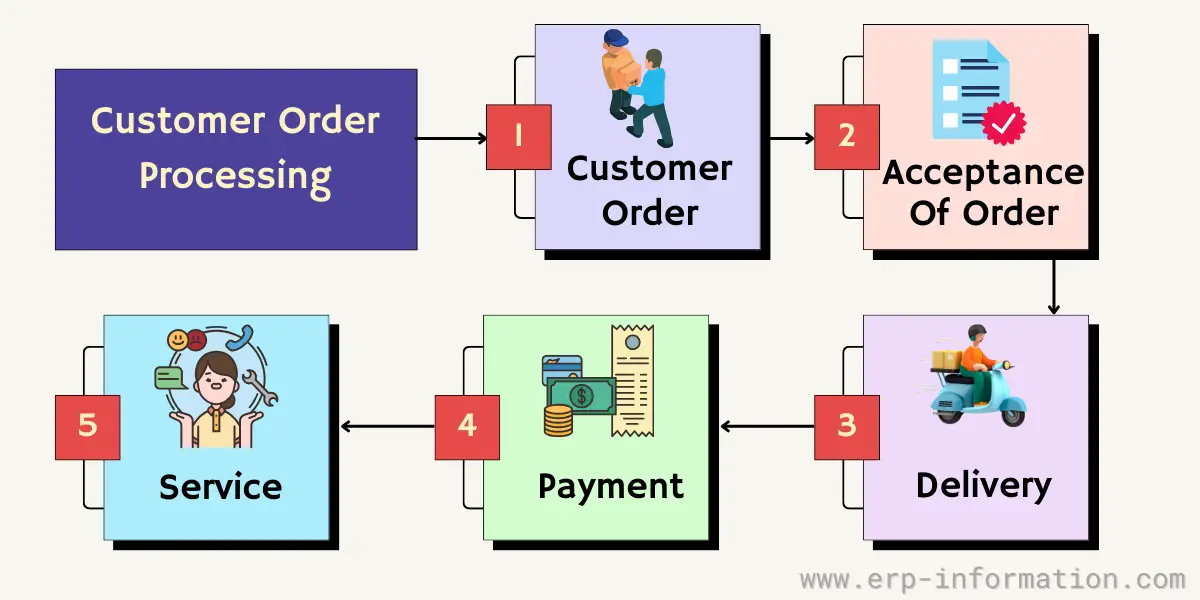
1. Customer order
The order is captured. IFS Cloud lists three ways an order starts: “Regular order placement by phone, fax, mail, or similar means”, plans and call-offs, and service management. Whatever the channel, the order is entered as a header (customer and wanted delivery date) and lines (items and quantities). Before committing, the order taker can check “whether or not it is possible to send the parts on the desired date”.
2. Acceptance of order
Acceptance has a system side and a legal side. In the system, the order is credit-checked and released: IFS Cloud blocks an order that takes the customer over its credit limit, someone can release a blocked order by hand, and release moves the order from Planned to Released. On the legal side, the seller accepts by confirming the order or by shipping, as described above under binding orders.
3. Delivery
Stock is reserved, picked and delivered. Anything not on hand has to be sourced first, which is why releasing an IFS Cloud order can raise a purchase requisition, purchase order or shop order requisition. In a store the customer may collect instead: Dynamics 365 Commerce has separate till operations to pick up all the products on an order or only selected ones.
4. Payment
Payment does not always come last. The ARTS retail data model from the Object Management Group lists four payment patterns for a customer order: pre-authorization, partial pre-payment, full pre-payment and payment in full. Where the order is invoiced, SAP’s Sales Order app lists the billing documents raised against it. ARTS calls the last step settlement: the point where the order, taxes and payment are “recognized for financial reporting purposes”.
5. Service
After delivery come returns and service. SAP’s Sales Order app shows related customer returns next to the order’s deliveries and billing documents, so a return can be traced to the order it came from. For the delivery side of the measurement, see delivery performance.
What is a customer order in retail?
In retail the term is narrower. LS Central defines a customer order as “a way for customers to order an item and collect it at a store of their choice or have the item delivered to their address”. Microsoft Dynamics 365 Commerce uses customer orders for shoppers who want to pick up later, pick up somewhere else, or have items shipped.
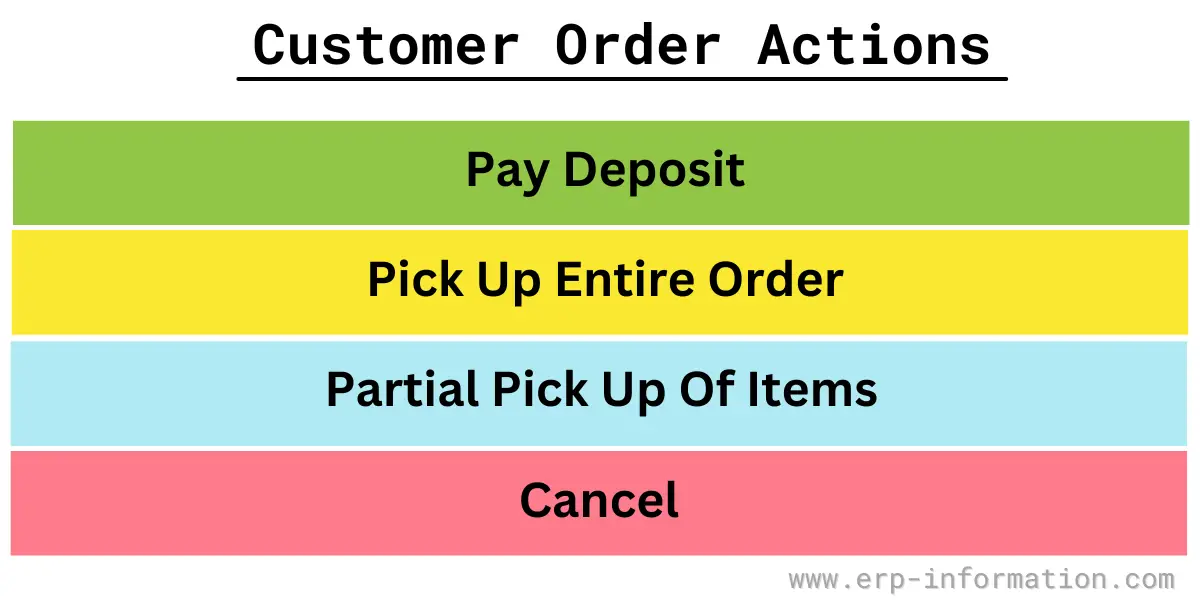
Four actions come up at the till, shown in the image below.
- Deposit. Microsoft lets a retailer set the percentage of the order total “that the customer must pay as a deposit before an order can be confirmed”; LS Central deposits a payment against an existing order.
- Pick up the whole order. The “Pick up all products” operation in Dynamics 365 Commerce.
- Pick up part of it. The “Pick up selected products” operation.
- Cancel. The retailer can set a cancellation charge, and deposits above it may be refunded. LS Central’s “Put Back” step returns items the customer has not collected.
What is Customer Order Management?
Customer order management is the control of open orders from entry to settlement: knowing each order’s status, what is holding it up, and what is late. The statuses are the tool. An IFS Cloud order moves from Planned to Released, and a credit failure is parked as Blocked until someone releases it; SAP’s Sales Order app shows overall status, delivery status, rejection status and credit status for each order.
Targets of management
- Open orders and backlog: lines entered but not yet delivered, by due date (see customer service level).
- Blocked orders: credit and other holds waiting for a decision.
- Acknowledgments: confirmations sent to customers, which can carry terms of their own (see the UCC section 2-207 point above).
- Cycle time: how long orders take from placement to delivery.
For cycle time, Inbound Logistics defines order cycle time as the time between a customer placing an order and the fulfilment process being complete. It calculates it per order as delivery date minus order date, then divides the total by the number of orders shipped. Our example: three orders delivered in 3, 7 and 2 days give 12 days ÷ 3 orders = 4 days.
For the software that runs these steps, see the ERP sales module.
Customer Order Form
A customer order form is a paper or template version of the same record: it collects what the seller’s system will need to enter the order.
The sample below has four blocks: company details; order information (number, date and type); customer information (name, address, phone and email); and item lines with quantity, unit price and totals, followed by payment details, terms and a signature.
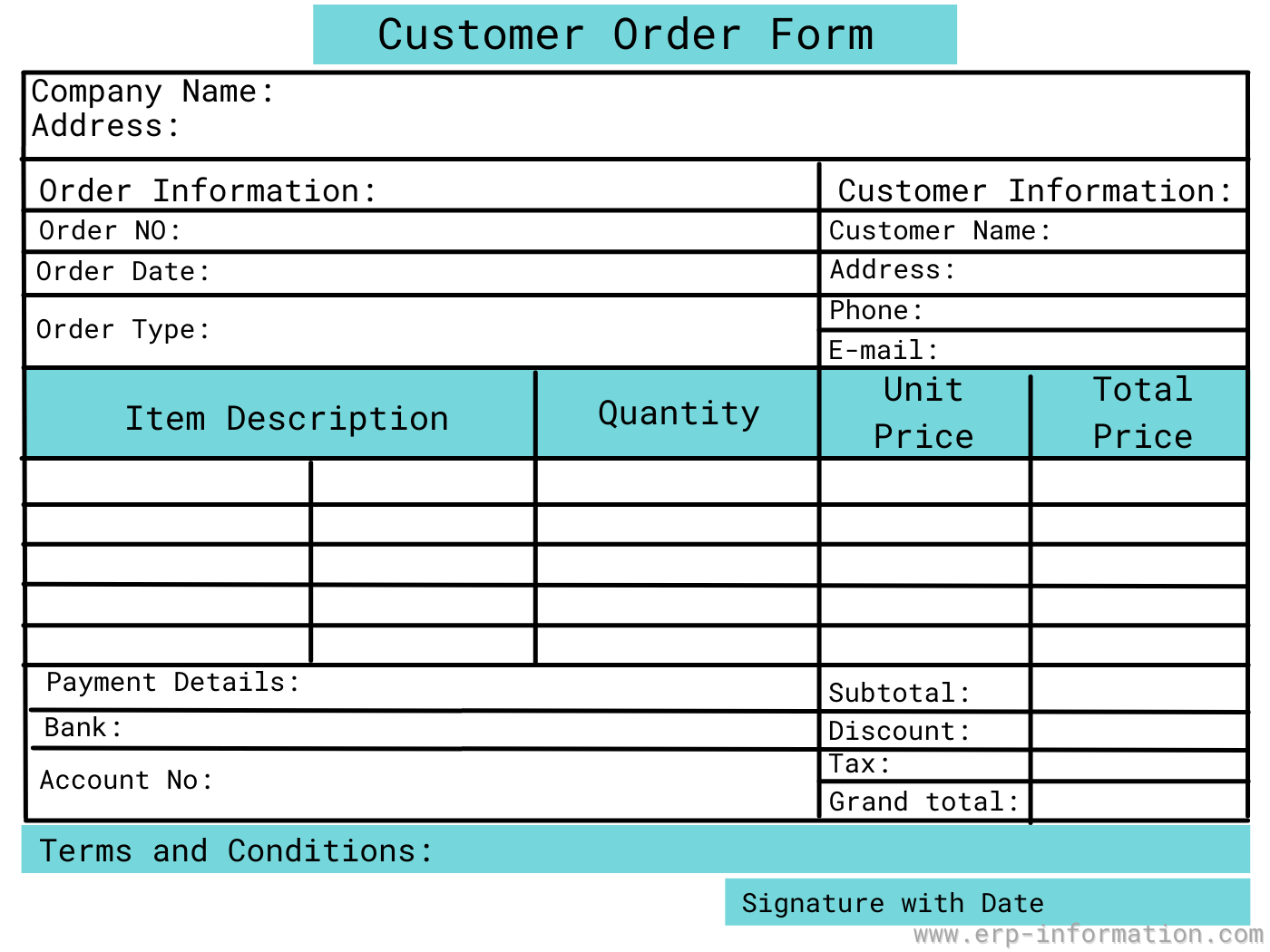
Whatever the format, check that it captures the fields an ERP order needs anyway. Asprova’s list is a good minimum: customer number, the person who took the order, product number, delivery date and quantity.
What does ordering customer mean in banking?
In payments, “ordering customer” has nothing to do with sales orders. It is the bank customer who orders a transfer. In a Swift MT103 payment message it sits in field 50 as the Ordering Customer, opposite the Beneficiary Customer. JPMorgan’s ISO 20022 mapping guide maps the two to the Debtor and the Creditor in the pacs.008 message that MT103 translates to. The ISO 20022 standard defines the Debtor as the “Party that owes an amount of money to the (ultimate) creditor”.
The ISO 20022 name is the one to look for now. Swift completed the switch of cross-border payments to ISO 20022 on 22 November 2025, ending coexistence with the MT format.
FAQs
How to take orders from customers?
Capture who is ordering, what, how many and by when, check that the date can be met and that the customer’s credit allows it, then confirm the order in writing. IFS Cloud follows that sequence: a header with the customer and wanted delivery date, lines with parts and quantities, a check on whether the parts can be sent on the desired date, and a credit check when the order is released.
What is the customer order process?
An optional quotation, then order entry, credit check and release, reservation, picking and delivery, invoicing and settlement. In IFS Cloud, releasing an order can also create the purchase requisition, purchase order or shop order requisition needed to supply it.
Is a customer order the same as a sales order?
Usually, yes. Both name the seller’s record of an order it has taken. IFS Cloud and Infor call it a customer order; SAP S/4HANA, Oracle Fusion and Odoo call it a sales order. In retail till software a customer order is narrower: an order for later pickup or delivery.
What is customer order used for?
To record what a customer has asked to buy so the seller can check credit, reserve or make the goods, deliver them, invoice them and trace any return. In ERP planning it is firm demand that consumes the forecast, so the same units are not planned twice.
What is customer order cycle time?
The time from a customer placing an order to the order being fulfilled. Inbound Logistics calculates it per order as delivery date minus order date, then averages across the orders shipped. Three orders taking 3, 7 and 2 days average 4 days.
What is the difference between a purchase order and a customer order?
They are usually the same order seen from opposite sides. The buyer creates and sends the purchase order; the seller records it as a customer order, or sales order, and fulfils it. Under US UCC section 2-206 the buyer’s order is an offer that the seller accepts by promising to ship or by shipping.
Which meaning of customer order do you need?
Start from the job in front of you.
- Agreeing a sale: treat the customer’s order as the offer and your confirmation as the acceptance, and read the terms on both.
- Setting up ERP: decide how customer orders consume the forecast and over what window, or the plan will count the same units twice.
- Running a store: set the deposit percentage and the cancellation charge before the first customer order is taken.
- Reading a payment: the ordering customer is the payer, called the Debtor in ISO 20022 messages.
How we researched this page (checked 15 October 2026). Definitions and process steps come from vendor documentation: IFS Cloud 26R2, Infor CloudSuite Industrial 2026.10, Infor M3, SAP S/4HANA Cloud, Oracle Fusion Order Management 26A, Odoo 20, Microsoft Dynamics 365 Commerce and LS Central 28.2, plus the OMG ARTS retail data model and Asprova’s MRP glossary. Legal points are quoted from the Uniform Commercial Code as published by Cornell’s Legal Information Institute and from the Indian Contract Act, 1872 on India Code. The payments section uses Swift’s 25 November 2025 press release, JPMorgan’s ISO 20022 mapping guide and an ISO 20022 message definition report. An earlier version of this page said a customer order comes in two types, purchase orders and sales orders, and that once payment is due no more negotiation is possible; both were wrong and have been removed.
References
- Uniform Commercial Code section 2-206, Offer and Acceptance in Formation of Contract (Cornell LII)
- Uniform Commercial Code section 2-204, Formation in General (Cornell LII)
- Uniform Commercial Code section 2-207, Additional Terms in Acceptance or Confirmation (Cornell LII)
- The Indian Contract Act, 1872 (India Code)
- Infor CloudSuite Industrial 2026.10: Forecasting Overview
- Infor M3: OIS100MI, Customer order interface
- IFS Cloud 26R2: Manage Customer Order
- IFS Cloud 26R2: Create Order from Quotation
- IFS Cloud 26R2: Release Customer Order
- SAP S/4HANA Cloud: Sales Order app (F1814)
- Oracle Fusion Order Management 26A: AI Agent, Purchase Orders to Sales Orders Converter
- Odoo 20.0 documentation: Create quotations
- Microsoft Learn: Customer orders in point of sale (POS), Dynamics 365 Commerce
- LS Central Help: Customer Order
- Object Management Group, ARTS Operational Data Model: Customer Order
- Asprova MRP glossary: Customer Order
- Olhager and Donk (2024), Managing Customer Order Decoupling Points in Supply Chains, Palgrave Handbook of Supply Chain Management
- Inbound Logistics: Order Cycle Time, Definition and How to Measure
- J.P. Morgan: Migration to ISO 20022, mapping guide
- ISO 20022 Message Definition Report Part 1 (Creditor Payment Activation Request)
- Swift press release, 25 November 2025: Global financial community completes switch to ISO 20022
Using Google Search? Add erp-information.com as a preferred source.