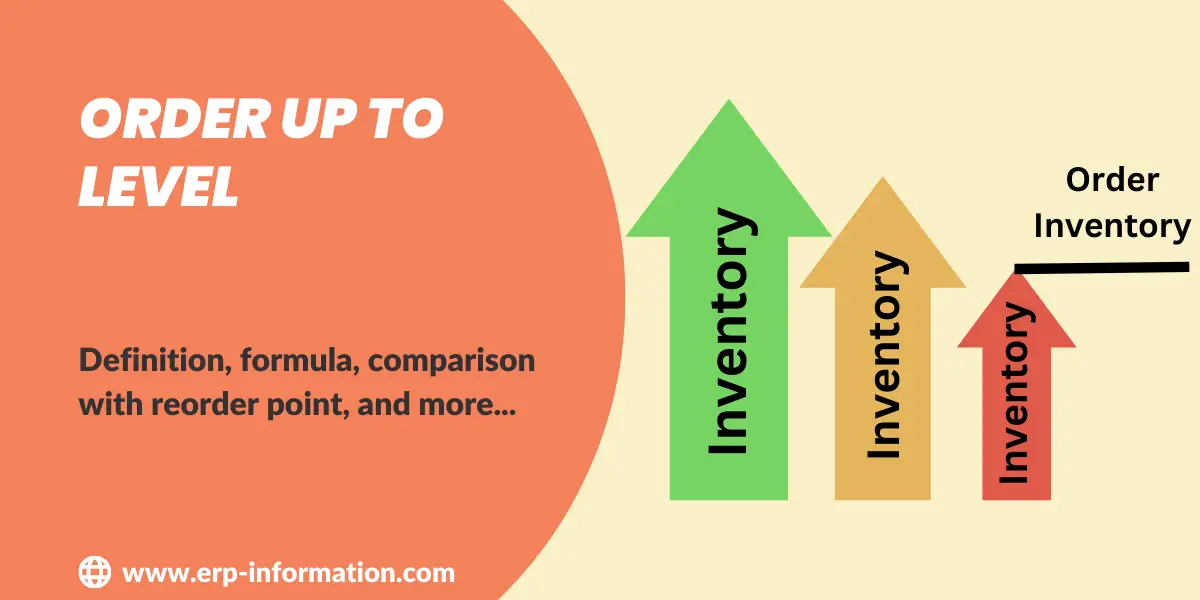
The order up to level, written S, is the stock position that a periodic-review policy orders back up to. At every review you order S minus your inventory position (on hand plus on order minus backorders). S covers expected demand over the review period plus the lead time, plus safety stock.
Below is the formula for this inventory management policy, with a worked example you can redo. It also covers how the policy differs from a reorder point, and how Oracle, Microsoft Dynamics 365, NetSuite, SAP, Odoo and Infor turn a maximum stock level into an order. We read each vendor’s documentation on 23 October 2026.
Evaluate order up to level using our online Order Up to Level Calculator
Find out reorder point using our online Reorder Point Calculator
Evaluate Safety Stock using our Online Safety Stock Calculator.
What is Order Up To Level?
A note on the video above (made in 2022): it gives the order quantity as target level minus reorder point and starts an order when stock is at or below the reorder point. That is a fixed-size min/max shortcut, not the periodic-review rule. The formula section below has the corrected version.
Order up to level is a target for inventory position. At each periodic review, you order enough to bring the position back up to that target.
Inventory position counts what is on hand plus what is already on order, minus backorders, so an order on its way counts toward the target. Penn State’s inventory teaching note calls the same number the base-stock level. Our target inventory level guide covers it from the safety stock side.
It is a position, not a quantity. The amount you order changes at every review, because the system orders the quantity that will return the inventory position to the base-stock level. S stays put until you re-plan it.
The review period usually follows how buying works. MIT’s supply chain course notes that periodic review is popular because it fits ordering once a week or once every two weeks.
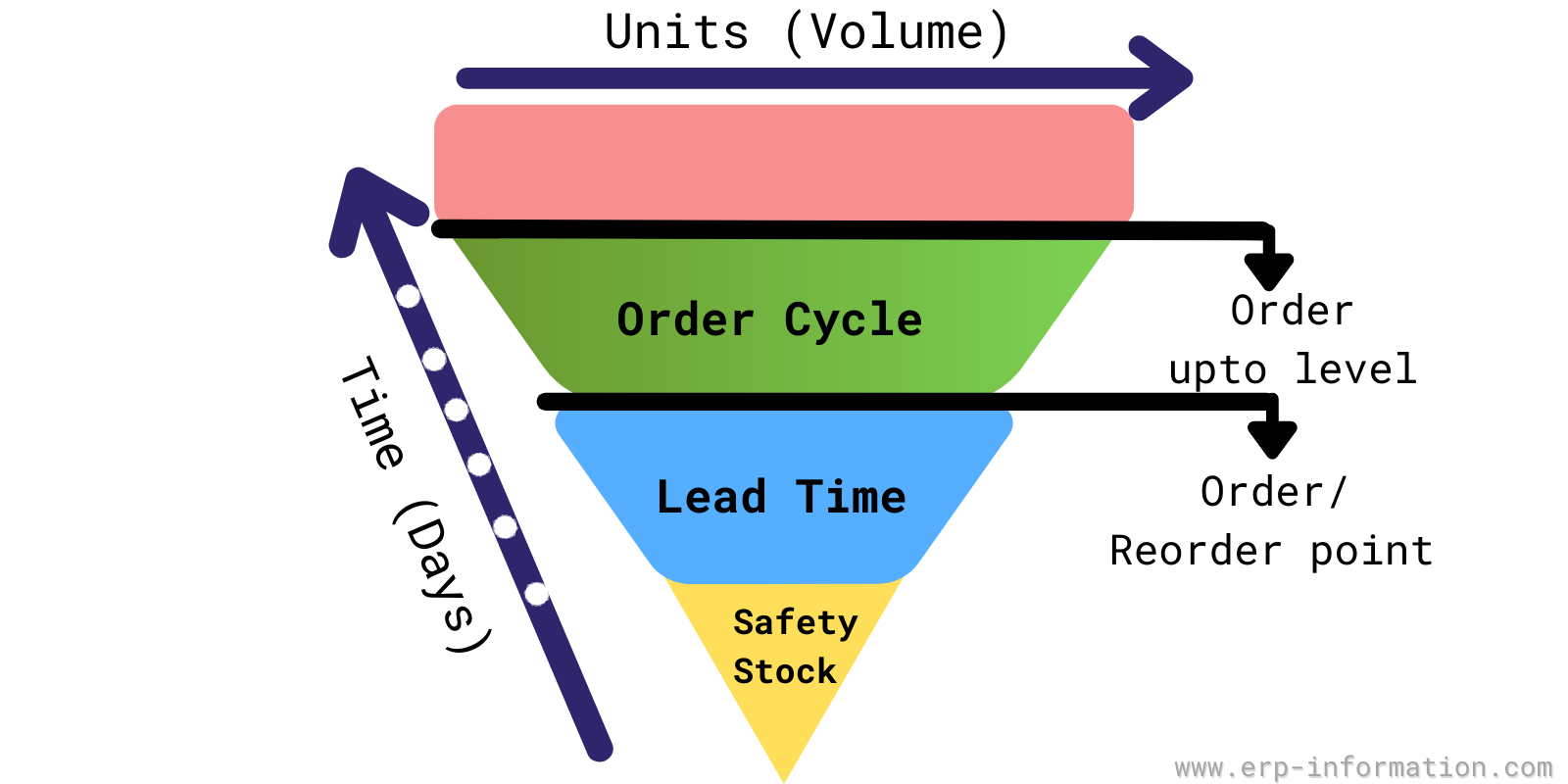
Illustration of Relation Between Order Up To Level and Reorder Point
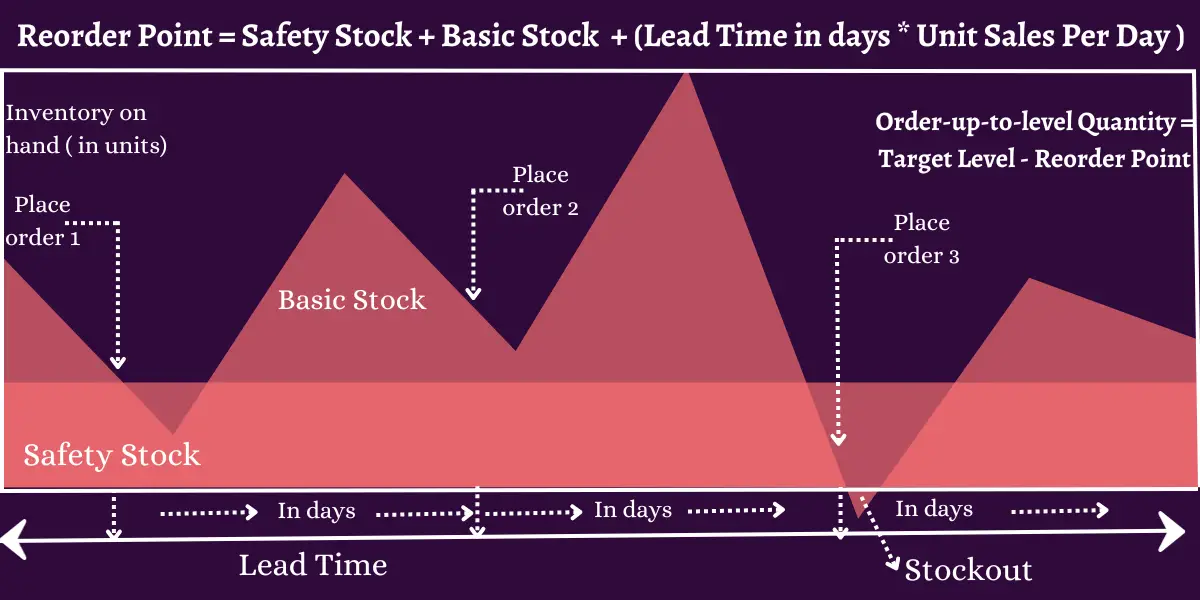
A reorder point watches stock all the time and fires when inventory position falls to a set level. An order up to level watches the calendar: at each review you order whatever closes the gap to S. MIT’s course describes the periodic rule as “Order up to S units every R time periods”.
A third rule combines the two. Under an (s, S) policy you review, and order up to S only if inventory position is at or below s, as a 2017 preprint by Qiu, Sun and Lim describes it. The ANSI Z94.14 glossary calls this a min-max system: the order quantity is the max minus available and on-order inventory when those are below the min. ERP min/max settings mostly behave this way, as the ERP section below shows.
Order Up To Level Formula
Two formulas do the work: the quantity you order at each review, and the level S that it orders up to.
Order quantity = S − IP (zero if IP is already at or above S)
IP (inventory position) = on hand + on order − backorders
S = expected demand over (R + L) + k × standard deviation of demand over (R + L)
With independent daily demand: S = d × (R + L) + z × σ × √(R + L)
S, R and L share one unit (days here). d is average demand per day, σ the standard deviation of daily demand, and z the safety factor for your cycle service level: 1.28 for 90 percent, 1.645 for 95 percent, 2.33 for 99 percent. The square root form assumes daily demands are independent and equally spread. If lead time also varies, use the standard deviation of demand over the whole R + L window.
MIT’s supply chain course states the same rule. The order quantity is S* minus IP. S* is the expected demand over the lead time and review period, plus a safety factor times the forecast error over that same window.
R is usually set by the buying rhythm, not calculated. A paper on periodic review, order-up-to level systems lists transportation economies, manufacturing schedules and multi-item order coordination as the usual reasons for a pre-specified R.
How much do you order at this week’s review?
Take an item that sells 40 units a day on average, with a daily standard deviation of 12 units. You review weekly (R = 7 days), the supplier takes 5 days (L = 5), and you want a 95 percent cycle service level (z = 1.645).
- Window to protect: R + L = 7 + 5 = 12 days.
- Expected demand over 12 days: 40 × 12 = 480 units.
- Standard deviation over 12 days: 12 × √12 = 41.6 units.
- Safety stock: 1.645 × 41.6 = 68.4 units.
- Order up to level: 480 + 68.4 = 548.4, rounded up to S = 549 units.
- At this week’s review you hold 210 units, have 150 on order and owe 20 on backorder, so IP = 210 + 150 − 20 = 340.
- Order quantity: 549 − 340 = 209 units.
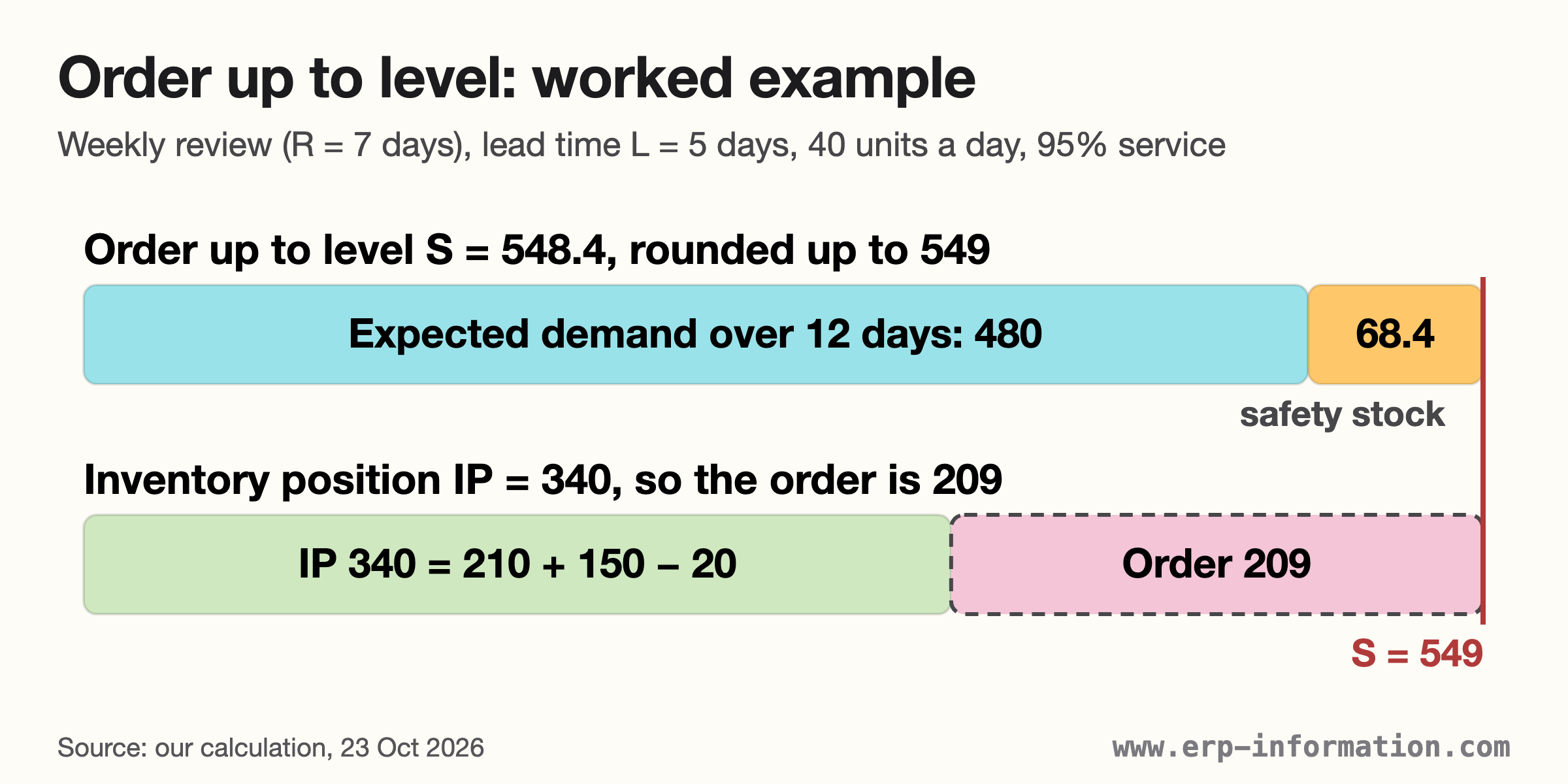
This is our calculation, made on 23 October 2026. We also simulated 400,000 days of demand under this policy: 95.1 percent of order cycles ended without a stockout, against the 95 percent target.
Why does an order up to level need more safety stock than a reorder point?
A reorder point protects the lead time. S protects the review period plus the lead time. For the same item, a continuous-review reorder point is 200 + 44.1 = 244.1, so 245 units: lead time demand plus safety stock. Its safety stock is 44.1 units, against 68.4 in S. Penn State’s note makes the same point: the periodic review system requires more safety stock than the continuous review system, because stock is exposed for the review period plus the lead time.
Is the order quantity target level minus reorder point?
Not under a periodic review rule. Target level minus reorder point is the smallest order that an (s, S) rule places, when inventory position sits exactly at s. Here S − s = 549 − 245 = 304 units, but the weekly review orders 209, because it starts from the real inventory position of 340.
A min/max rule with the same numbers orders nothing at this review, because 340 is above the reorder point of 245. Once stock falls below 245, the order is larger than 304, since it fills the gap up to S.
Some ERP systems do use the difference as a fixed order size. Infor’s min/max method, which it also calls the order-up-to method, defines the order quantity as the difference between the maximum and minimum quantity. That equals S − IP only when stock is exactly at the minimum. The ANSI Z94.14 definition of a min-max system is different: the order quantity is the max minus available and on-order inventory.
Correction, 23 October 2026: earlier versions of this page gave target level minus reorder point as the order up to level quantity. The rules above replace that.
Order Up To Level vs Reorder Point
| Order up to level | Reorder point | |
|---|---|---|
| Policy name | (R, S), periodic review | (s, Q), continuous review |
| Stock checked | Every R days | After every transaction |
| Orders when | A review day arrives | Inventory position is at or below s |
| Order size | S − IP, changes each time | A fixed Q, often the EOQ |
| Demand protected | R + L days | L days |
| Safety stock | Larger | Smaller |
Difference Between Reorder Quantity and Order Upto Level
Order Up To Level
- A target for inventory position, not an order size.
- Fixed until you re-plan it.
- Set from demand over R + L plus safety stock.
- Order quantity at each review = S − IP.
Reorder Quantity
- The number of units in one order (Q).
- Fixed in a reorder point policy.
- Usually found with the economic order quantity formula (MIT).
- An order is placed when inventory position is at or below s.
How ERP Systems Set the Order Quantity
Most ERP systems have no field called order up to level. They have a maximum, and an order that fills the gap up to it. Here is what each vendor documents.
| ERP setting | Orders when | Order quantity |
|---|---|---|
| Oracle Fusion Inventory, min-max planning (26C) | Total available is below the minimum | Maximum − (on hand + on order), then order modifiers |
| Dynamics 365, Min./Max. coverage code | Predicted on-hand is below the minimum | Maximum − predicted on-hand |
| NetSuite, preferred stock level | Available is below the reorder point | Preferred stock level − available, plus backorders |
| SAP S/4HANA, lot size HB (replenish to maximum stock level) | Reorder point planning or MRP triggers an order | Maximum stock level − stock |
| Odoo 20, reordering rule Min/Max | Forecast falls below Min | Max − forecast, rounded up to a set multiple |
| Infor SX.e, min/max order method | Stock reaches the order point (the minimum) | Maximum − minimum, a fixed amount |
Five of the six order the gap between the maximum and what you have, which matches the ANSI Z94.14 definition of min-max. In textbook terms that is an (s, S) policy: the minimum or reorder point is s, and the maximum is S. Infor orders a fixed amount instead.
SAP adds a twist. With reorder point planning that also counts external requirements, it works out two lot sizes and takes the larger, as SAP’s help page for S/4HANA 2025 explains.
None of the six describes an every-review order-up-to rule: each applies its maximum only after a minimum, reorder point or shortage triggers an order. Check how often your system runs that check before you treat its maximum as a weekly target.
To compare a suggested order, use the maximum minus your available stock, counting open orders. Differences usually come from rounding, order minimums or backorders.
FAQs
What happens if you raise the order up to level?
Safety stock rises, so service level rises, and so does the stock you carry. In the worked example, S is 534 units for a 90 percent cycle service level, 549 for 95 percent and 577 for 99 percent.
How do you choose the review period R?
Usually from the buying rhythm, such as a weekly supplier order, a delivery day or a shared truck, not from a calculation. A longer R raises S and safety stock, because S covers R plus the lead time. MIT notes that periodic review fits ordering once a week or once every two weeks.
Is the maximum stock level in my ERP the order up to level?
Usually it plays that role, with one difference. Oracle, Microsoft Dynamics 365, NetSuite, SAP and Odoo apply the maximum only when stock is below the minimum or reorder point. That is an (s, S) rule, whereas (R, S) orders at every review. Infor’s min/max method orders the fixed gap between maximum and minimum instead.
Which Rule Fits Your Items?
- Order up to level (R, S): you buy on a fixed rhythm, for example one supplier order a week with many items on it.
- Reorder point (s, Q): you can order on any day and one lot size makes sense, with the economic order quantity as the usual starting point.
- Min/max in your ERP: Microsoft suggests Min./Max. for predictable inventory draw, high runners or less expensive products. Infor describes its method as suited to products with a short, consistent lead time, usually less than a week.
Start from the S in the formula above, try the order up to level calculator, and check any order your ERP suggests against S minus inventory position before you accept it.
Using Google Search? Add erp-information.com as a preferred source.