The P2P (procure-to-pay) cycle in SAP is the chain from a purchase requisition (ME51N) to a purchase order (ME21N), goods receipt (MIGO), invoice verification (MIRO) and payment (F110 or F-53). Only the last three make actual postings to the general ledger, and the GR/IR clearing account holds the liability between the goods receipt and the invoice.
You will also see the same process written as PTP, short for purchase-to-pay. Procure-to-pay and purchase-to-pay are the same cycle under two names, so a PTP cycle in SAP and a P2P cycle in SAP are not two different things to learn.
The cycle begins with requisitioning the goods or services, and closes when payment is posted against the supplier invoice.
Below: the 12 steps of the P2P cycle in SAP with the transaction code for each, the SAP table each document is stored in, and the journal entries with their account keys. A worked example shows standard and moving average price posting differently, followed by what changes in S/4HANA and the controls that fail in practice: tolerances, release strategies and the duplicate invoice check. Running a different ERP? See the guides for Oracle, NetSuite and Infor.
Check our other articles on the p2p cycle.
Video Introduction
Steps of the P2P cycle
SAP MM (Materials Management) is the reference system throughout. Five SAP documents carry the whole cycle. The first two are purchasing documents with no actual ledger posting; the goods receipt, the invoice and the payment each create an accounting document.
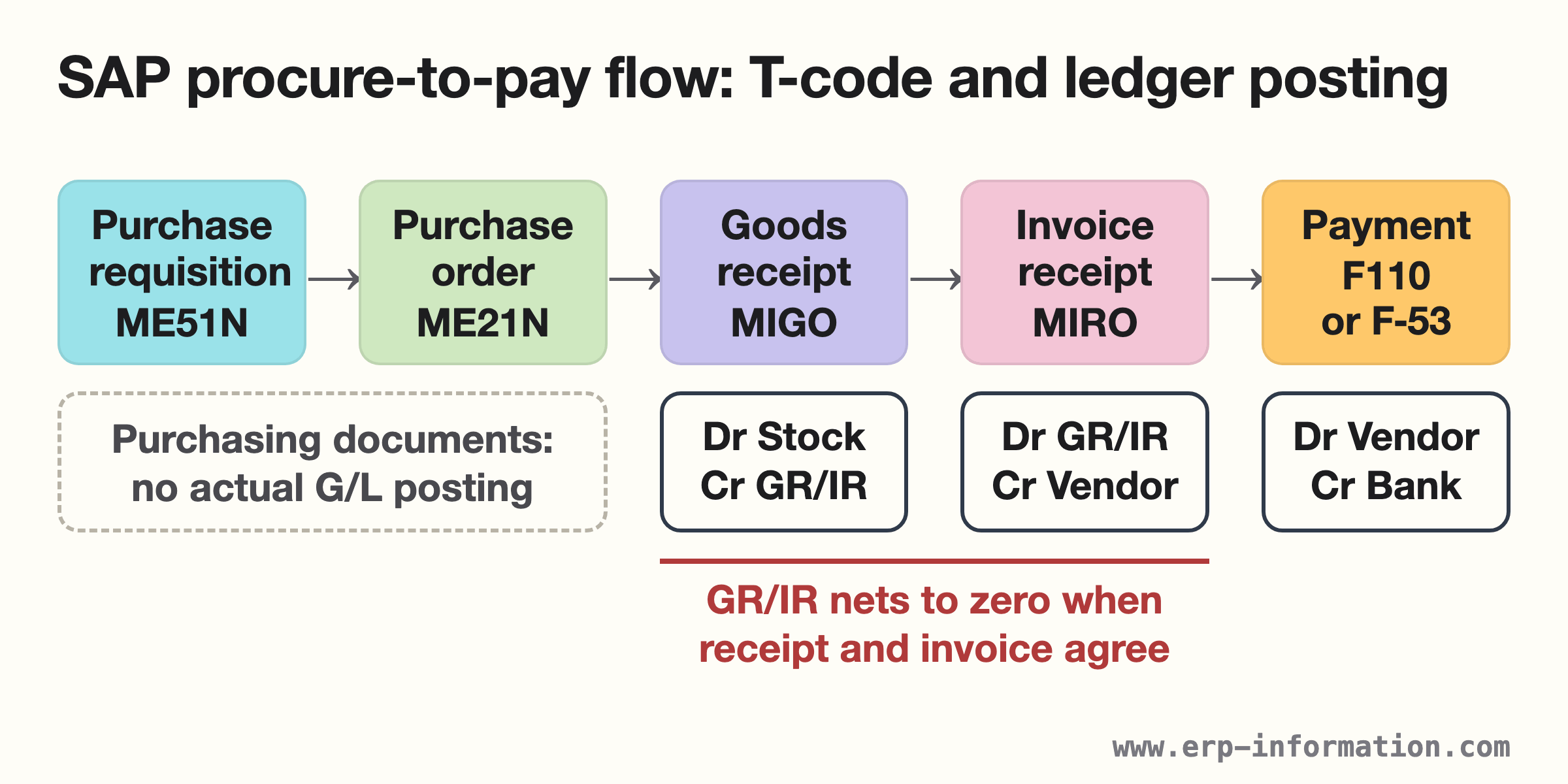
This guide splits those five documents into the 12 steps below, adding the approvals, the sourcing steps and reporting.
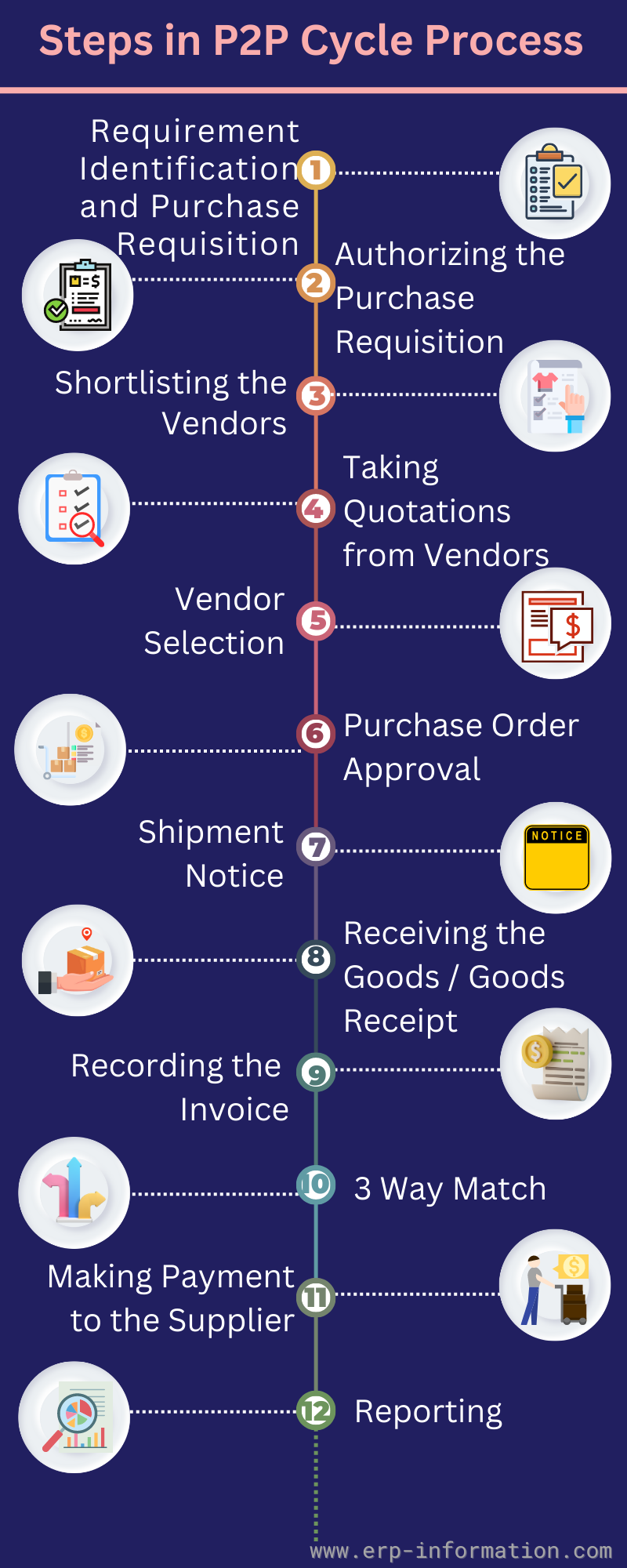
1. Requirement identification & purchase requisition
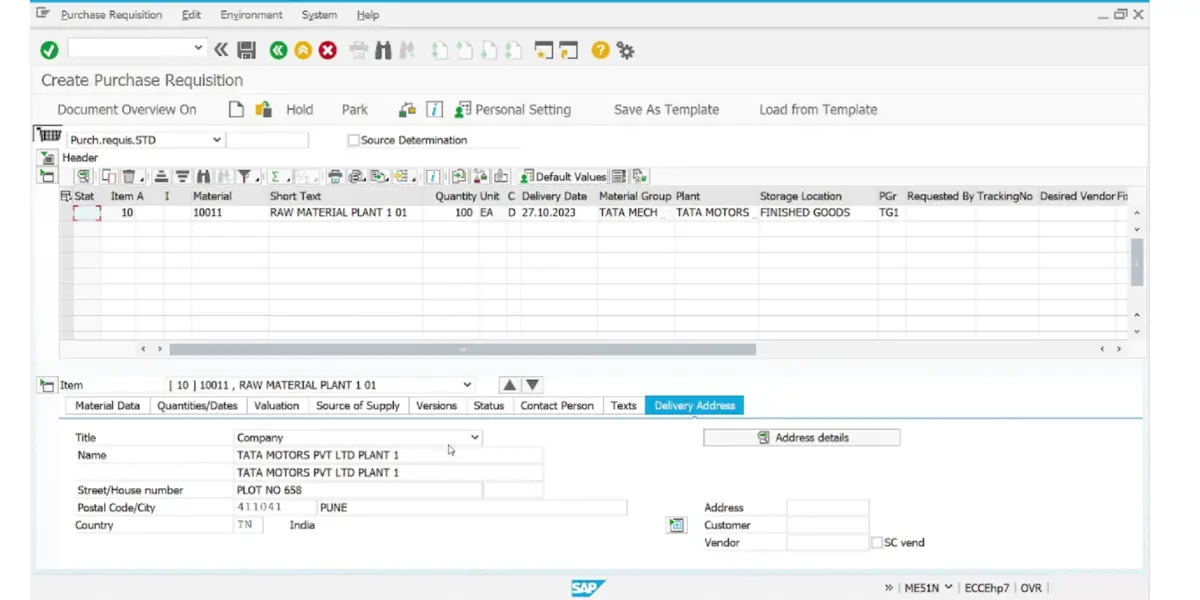
A requirement reaches purchasing in one of two ways. Someone enters it by hand in ME51N, or a material requirements planning (MRP) run creates it for a material that is bought in rather than made. Either way the result is a purchase requisition, stored in table EBAN.
If the material is already in stock, no requisition is needed: it is issued from stock instead. The requisition is an internal document. Nothing has been ordered from a supplier yet, and no actual posting has been made.
T-code for purchase requisition – ME51N
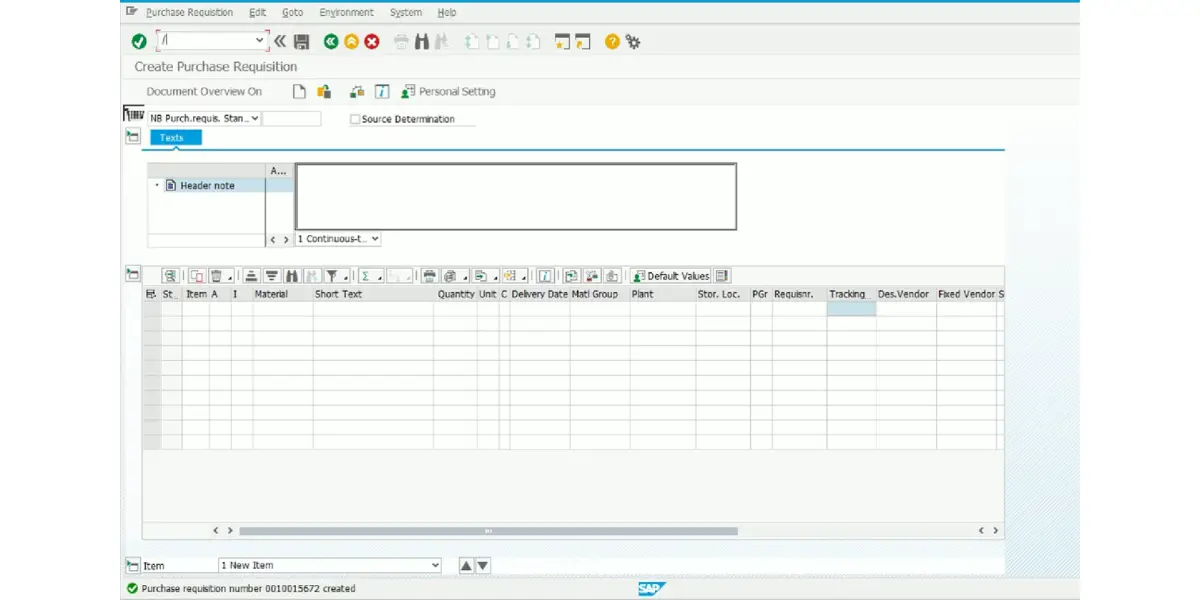
Once it is saved, the status bar shows the requisition number:
2. Authorizing the purchase requisition
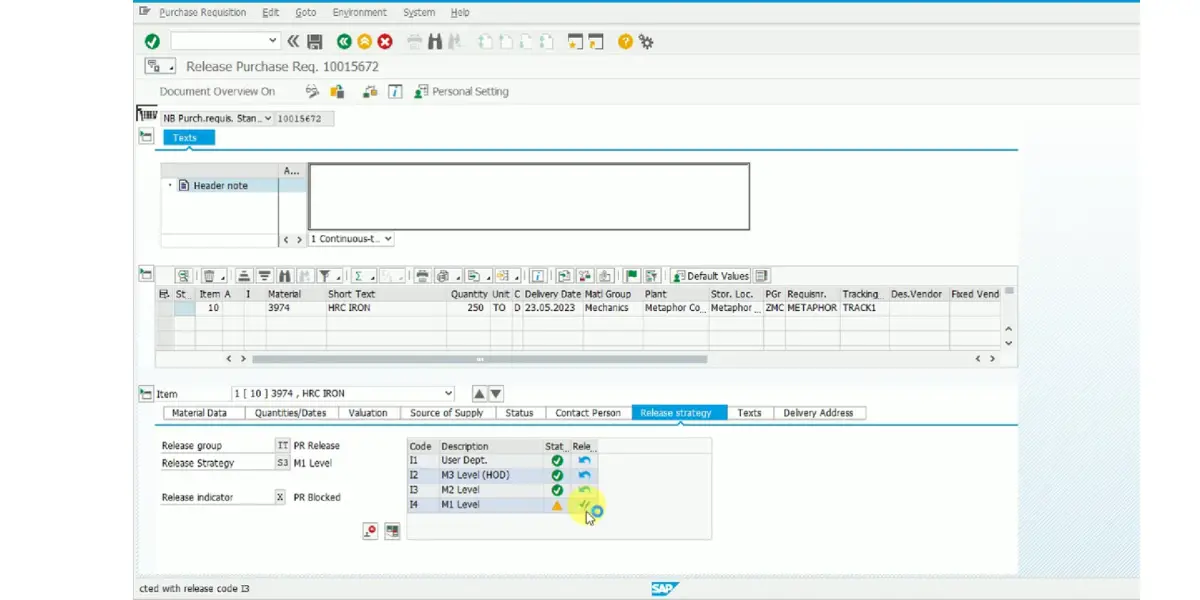
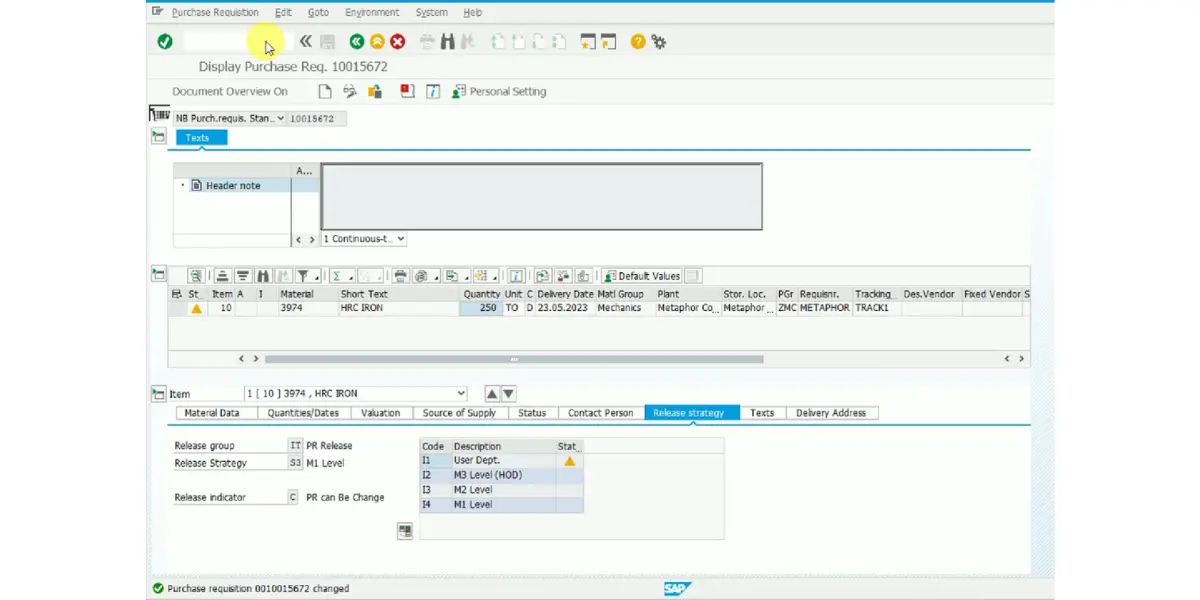
Approval in SAP runs through a release strategy. Customizing assigns a strategy from characteristics on the requisition, such as plant, material group or value, and the strategy sets which release codes must approve it. The approver releases one requisition in ME54N or a batch in ME55.
One rule matters more than the rest. A requisition that matches no release strategy is not held for approval: SAP releases it automatically for further processing. A gap in the release conditions therefore shows up as spend nobody approved, not as a stuck document.
T-code for releasing purchase requisition – ME54N
T-code for purchase requisition display – ME53N
3. Shortlisting the vendors
For a new requirement, purchasing draws up a shortlist of suppliers; for a repeat purchase it may go straight to an existing supplier.
Vendor shortlisting depends on credibility, vendor rating, quality of the product or service, and pricing.
4. Taking quotations from the vendors
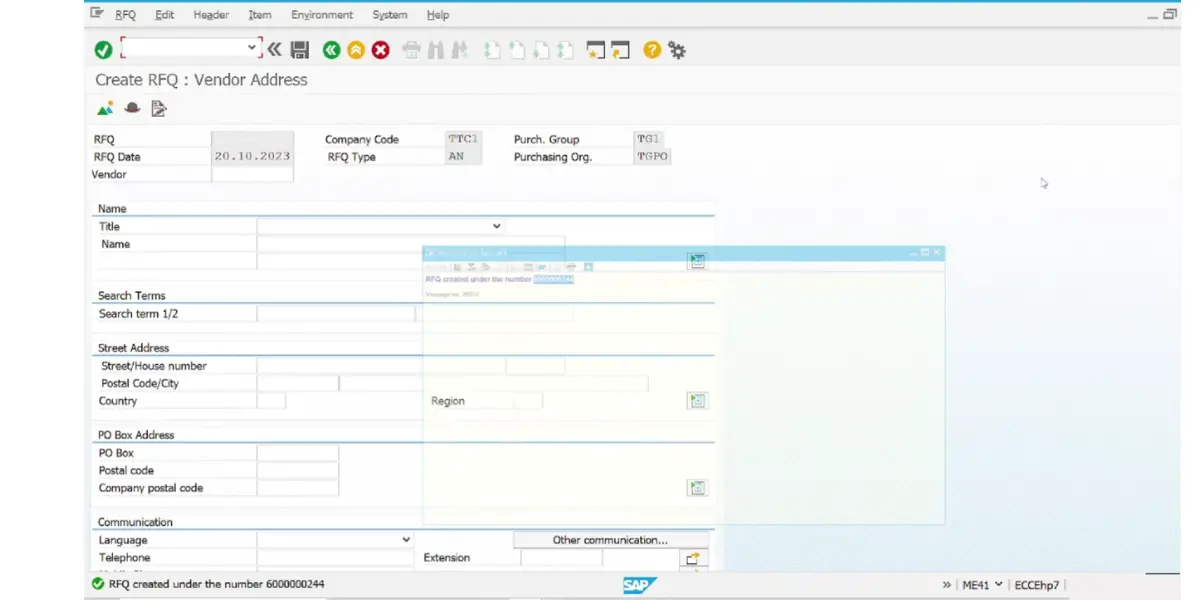
Where prices need to be competed, the buyer creates a request for quotation (RFQ) in ME41 and sends it to the shortlisted suppliers. Each supplier’s reply is then entered against the RFQ as a quotation in ME47. (Choosing a system rather than a price? That calls for a request for proposal.) In S/4HANA these RFQ transactions are deprecated in favour of Fiori apps, as explained below.
T-code for creating the request for quotation – ME41
5. Vendor selection
ME49, the price comparison list, ranks the quotations for an RFQ by item from lowest to highest price. The buyer negotiates with the preferred supplier and selects the winning quotation.
T-codes for quotations – ME47 (maintain quotation) and ME49 (price comparison)
6. Creation of purchase order
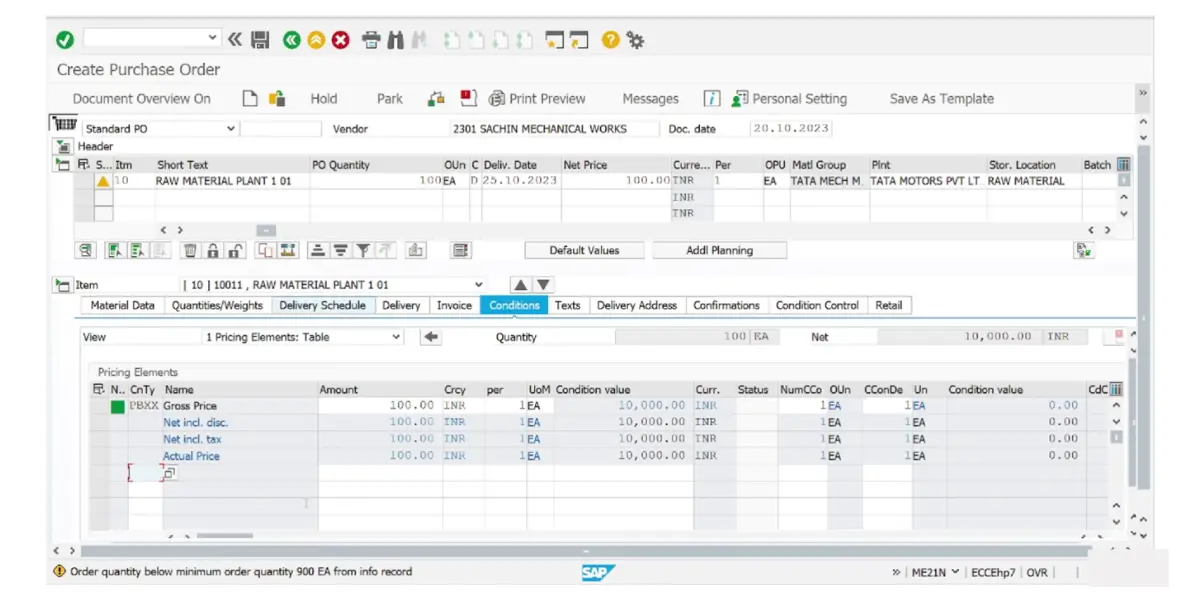
With the requisition released and a supplier chosen, the buyer creates the purchase order in ME21N. The PO carries material, quantity, price, delivery date and payment terms, and is stored in tables EKKO (header) and EKPO (items).
If a release strategy applies to purchase orders, the PO is approved in ME29N, or in bulk in ME28, before it goes to the supplier.
A purchase order item can be for stock, for consumption (an account-assigned item charged, for example, to a cost center with account assignment category K), for services, or a stock transport order that moves stock from one plant to another.
T-code for purchase order creation – ME21N
7. Shipment notice
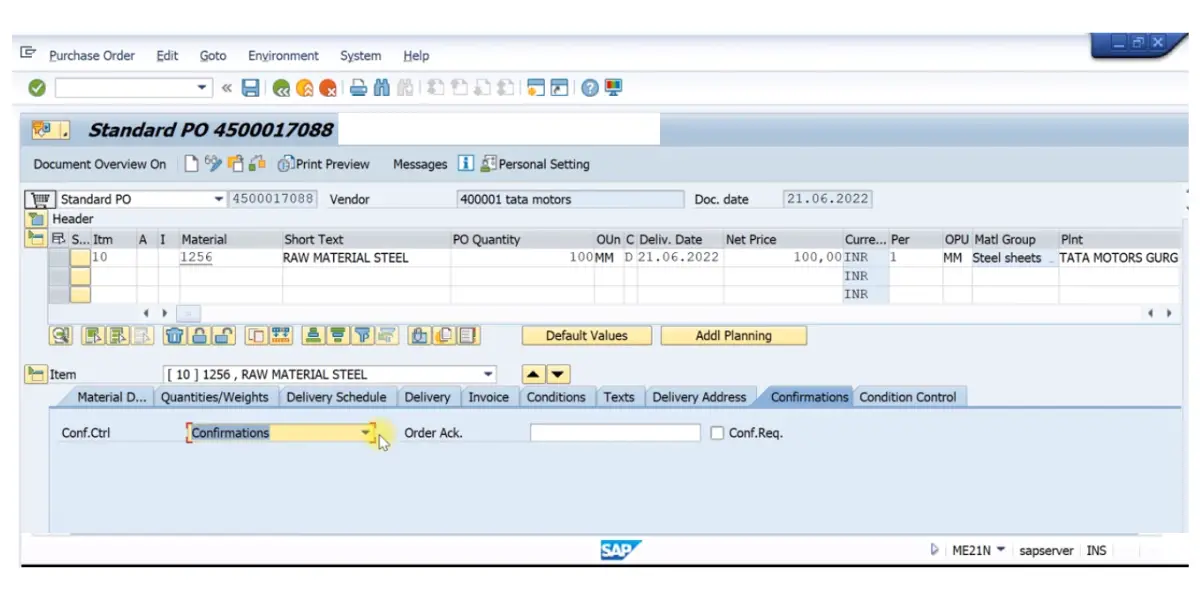
Some suppliers send an advance shipping notification (ASN) before the goods arrive. In SAP it is recorded as an inbound delivery, entered in VL31N or received by EDI, and the PO item accepts it only if its confirmation control key allows shipping notifications.
The step is optional. A PO item without a confirmation control key goes straight from order to goods receipt.
8. Receiving the goods/Goods receipt
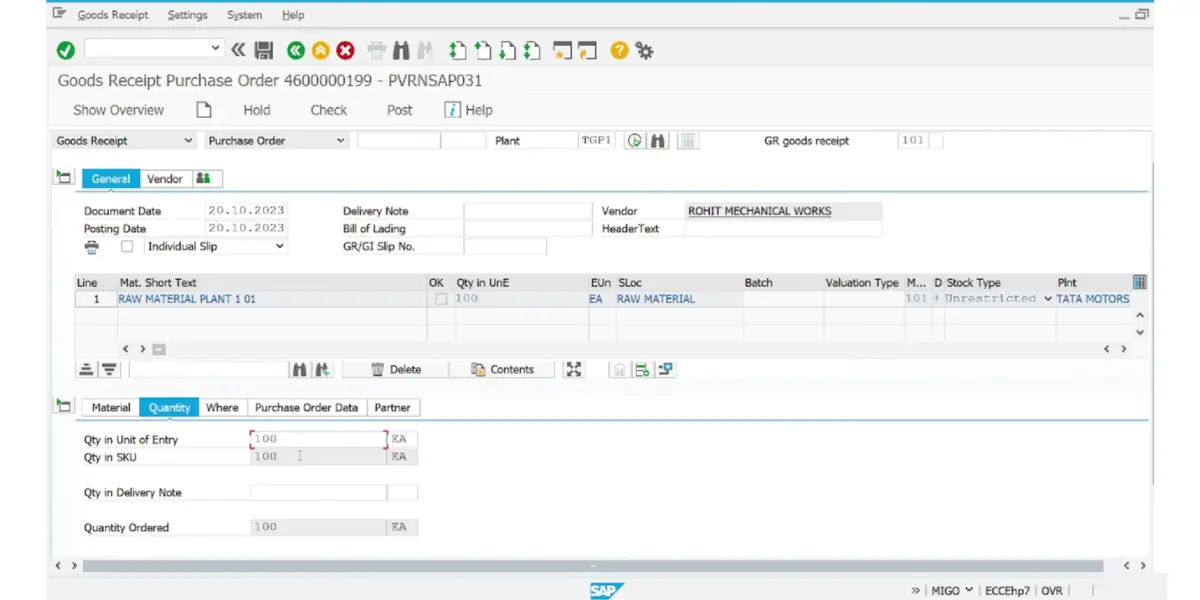
The goods are checked for quantity and quality and the goods receipt is posted in MIGO against the PO, normally with movement type 101. The goods receipt is an internal posting: it records what arrived, and nothing is sent to the supplier.
Posting it creates two documents: a material document in MM and, for a valuated receipt, an accounting document in FI. Both are linked to the PO history. If goods fail inspection, they go back to the supplier with a return delivery, movement type 122.
T-code for goods receipt purchase order – MIGO
9. Recording the invoice
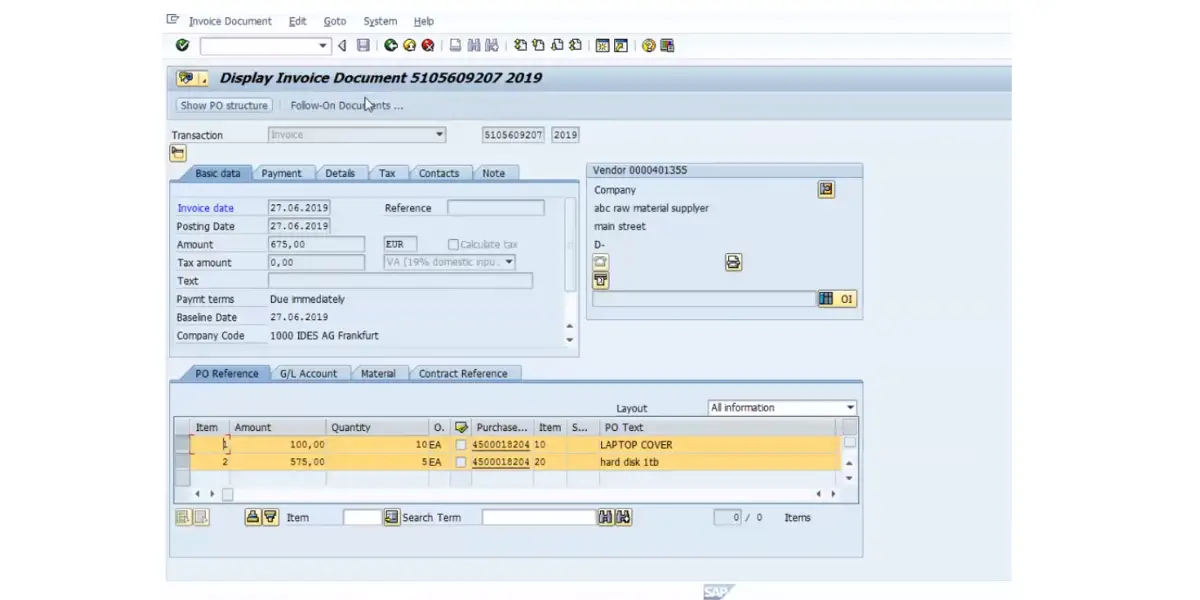
After the goods are received, the supplier sends an invoice for payment. Accounts payable enters this against the original purchase order, not as a standalone bill, so the system can match it automatically in the next step.
T-code for invoice verification – MIRO (Logistics Invoice Verification). MIRO is the correct code for a PO-based vendor invoice, since it ties the invoice to the purchase order and goods receipt for matching. FB60 is a separate transaction for a vendor invoice with no PO reference (for example, a utility bill), and FB70 is unrelated to this step entirely: it posts an outgoing customer invoice on the sales side, not a supplier bill.
Two variations are worth knowing. With evaluated receipt settlement (ERS), the supplier sends no invoice at all: MRRL creates it from the purchase order and the goods receipt. And an invoice that cannot be finished in one sitting can be parked in MIR7. SAP saves a parked invoice without running any checks and posts nothing until someone completes and posts it.
A parked invoice is not the same as a blocked one. A blocked invoice has already been posted; it is only held back from payment.
10. Three-way match
The three-way match is the control the whole cycle is built around, and the three documents it names are the purchase order (what was agreed), the goods receipt (what actually arrived), and the supplier invoice (what is being charged). SAP runs the check automatically when the invoice is posted at MIRO, comparing quantity and price across all three.
If the three agree within the configured tolerances, the invoice posts and is free for payment. If a variance exceeds a tolerance limit, the invoice still posts, but it is blocked for payment and stays blocked until someone releases it in MRBR, even after the cause has gone away. SAP documents the case: 100 pieces ordered, 80 delivered and 100 invoiced; the missing 20 arrive the next day, and the invoice must still be released before it can be paid.
What counts as agreement is a configuration decision rather than a fixed rule, and getting it wrong in either direction creates accounts payable work. That is covered under invoice matching exceptions below.
Where a PO item uses GR-based invoice verification, the invoice is entered with reference to a goods receipt and SAP creates a separate invoice item for each receipt, so every delivery is matched on its own rather than against the PO total.
For services, a service entry sheet stands in for the goods receipt. Approving it posts a goods receipt document automatically, and the invoice is matched against that.
11. Making a payment to the supplier
An invoice that posted without a block, or has since been released, is paid when it falls due under its payment terms.
T-code for vendor payment – F-53 (post a manual, one-off outgoing payment) or F110 (the automatic payment run, used to pay many due invoices in a single batch by company code and payment method).
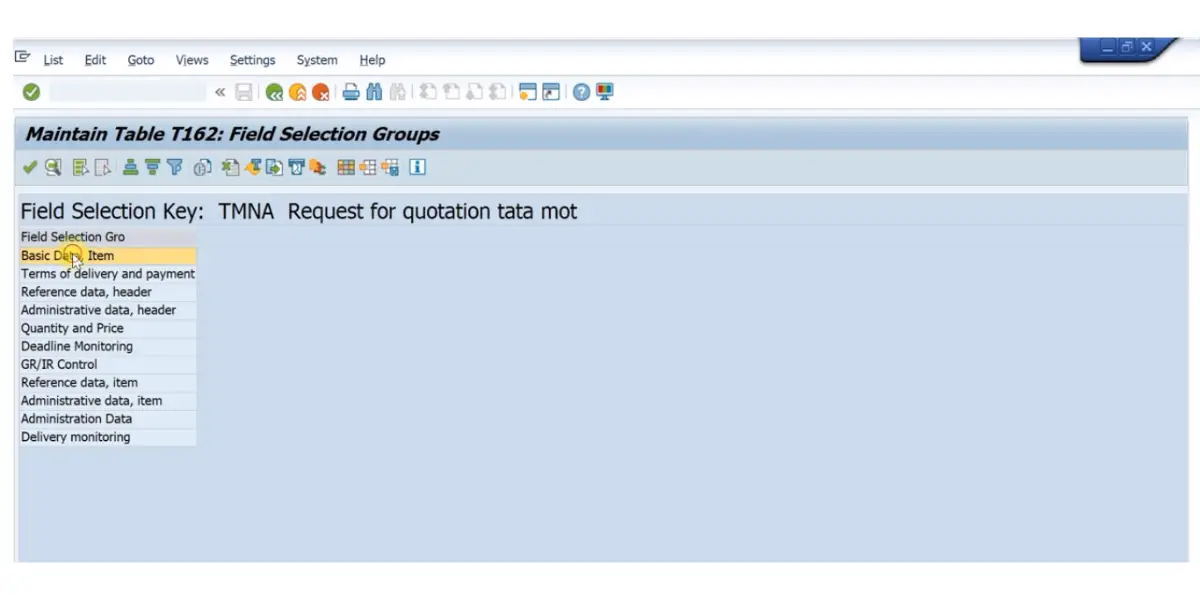
Before either of those will run, the supplier record itself has to carry the right settings, which is what the screens below show rather than the payment posting. Bank details and the reconciliation account determine whether the supplier can be paid at all. Payment terms drive the due date the payment run selects on. And the check double invoice flag, visible on the company code payment screen, is the setting behind the duplicate payment gap described later: it is maintained per supplier, so a record created without it has no duplicate protection.
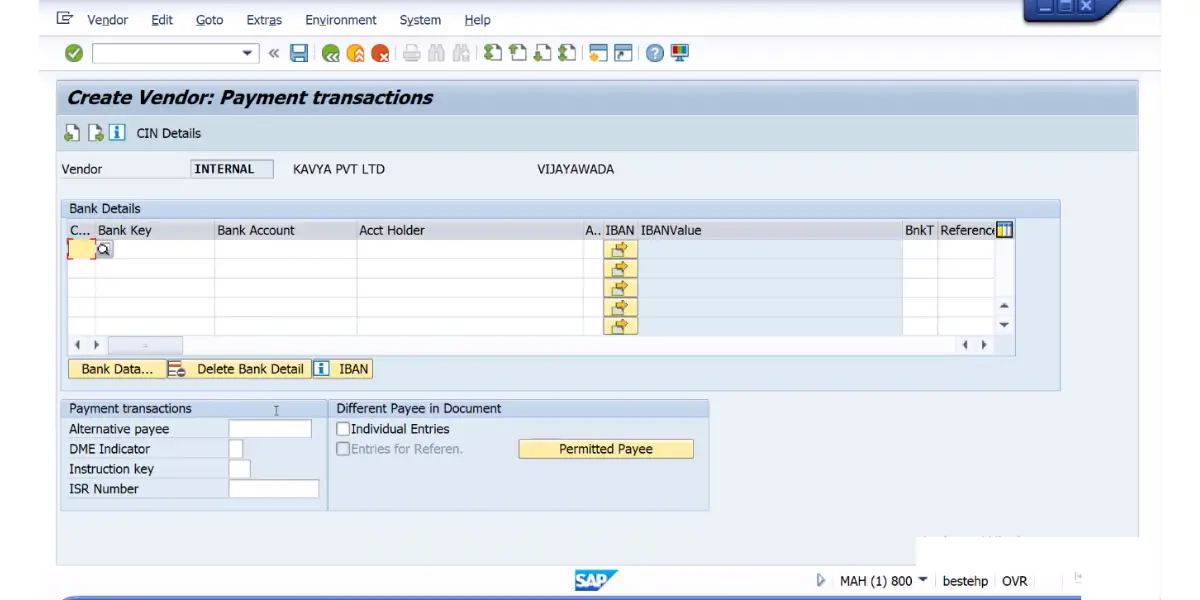
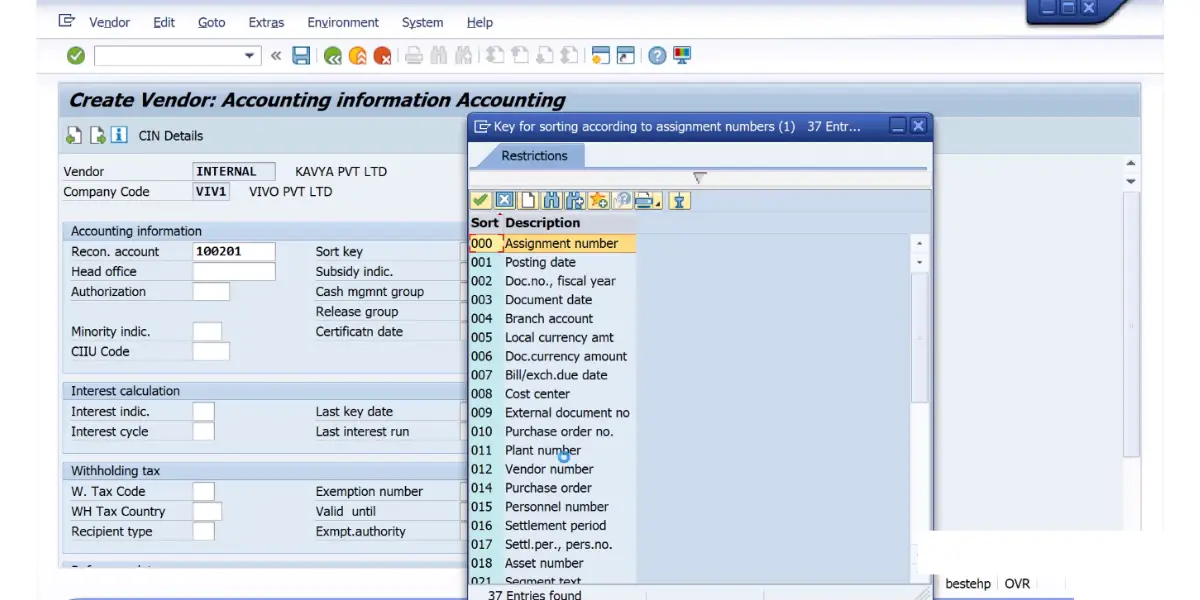
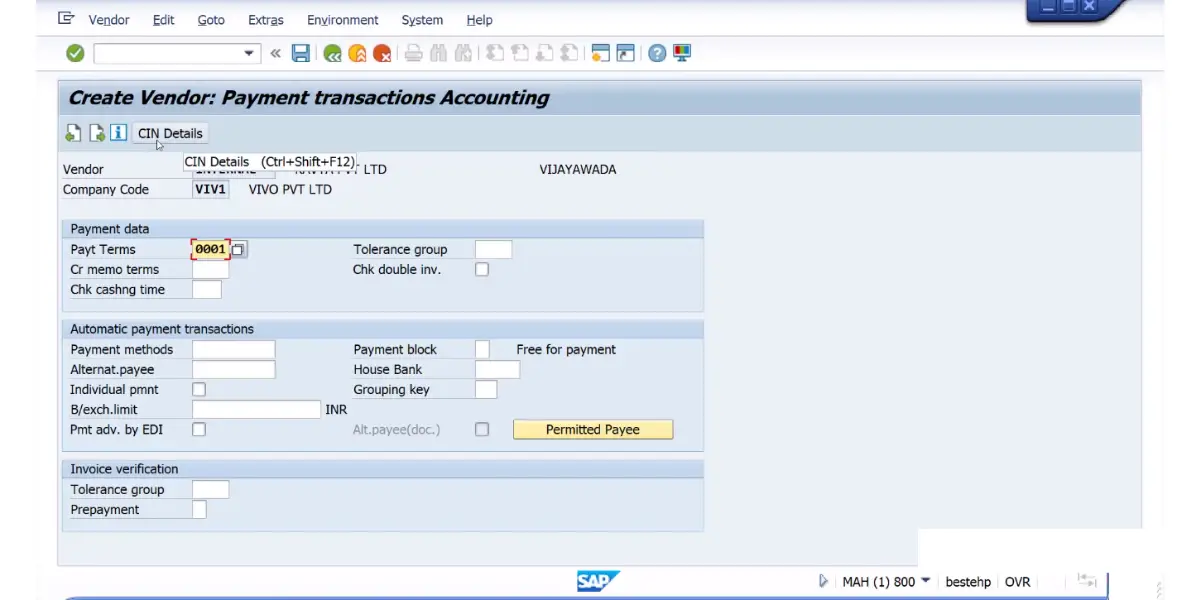
12. Reporting
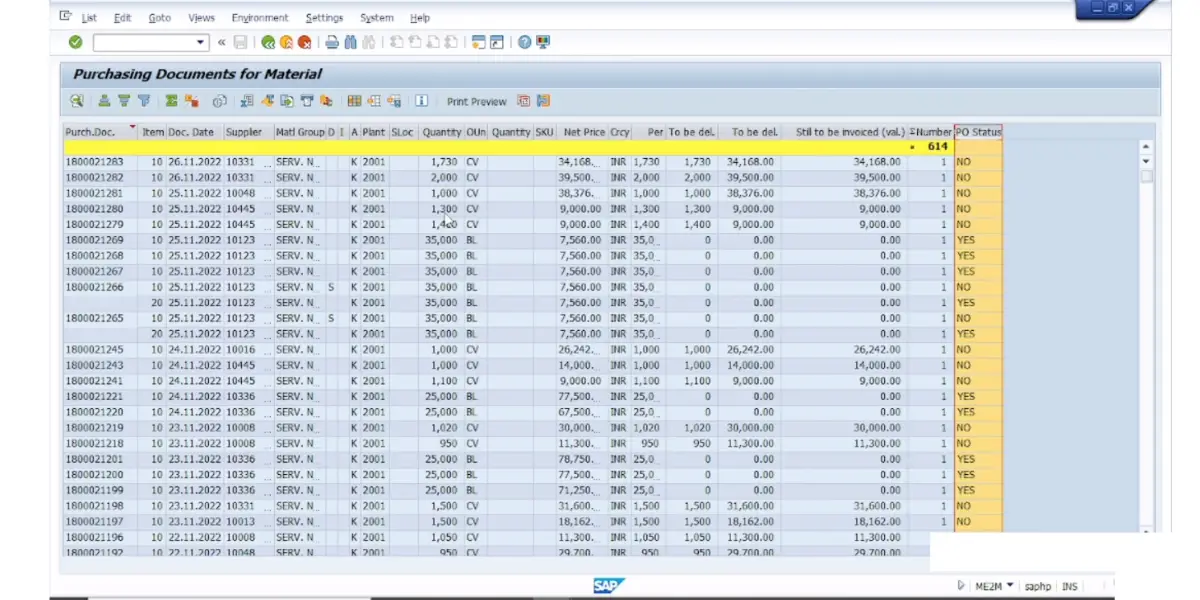
Every step leaves a document behind, so reporting means reading them back. ME2M (by material) and ME2N (by document number) list purchasing documents with the quantity still to be delivered and the value still to be invoiced, as in the screen below. MB5S lists GR/IR balances, and FBL1N shows a supplier’s open and cleared items.
SAP P2P transaction codes at a glance
The whole SAP MM procure-to-pay flow comes down to a short, predictable set of transaction codes. Here they are in the order you use them, with the document each one creates:
| Step | Transaction code | What it creates in SAP |
|---|---|---|
| Create purchase requisition | ME51N | Purchase requisition (table EBAN) |
| Release the requisition | ME54N, or ME55 for a batch | Released requisition |
| Create request for quotation | ME41 | RFQ to the shortlisted suppliers |
| Enter each quotation | ME47 | Quotation on the RFQ |
| Compare quotations | ME49 | Price comparison list |
| Create purchase order | ME21N | Purchase order (tables EKKO and EKPO) |
| Release the purchase order | ME29N, or ME28 for a batch | Released purchase order |
| Post goods receipt | MIGO, movement type 101 | Material document plus an accounting document |
| Enter the supplier invoice | MIRO, or MIR7 to park it | Invoice document (RBKP, RSEG) plus an accounting document |
| Settle without an invoice (ERS) | MRRL | Invoice document created from the goods receipt |
| Release a blocked invoice | MRBR | Invoice released for payment |
| Clear GR/IR differences | MR11 | GR/IR account maintenance document |
| Pay the supplier | F110 (payment run) or F-53 (manual) | Payment document |
Display and change variants exist for most of these: ME53N and ME23N display a requisition and a PO, and ME22N changes a PO. ME54N releases one requisition at a time, while ME55 handles the collective release when a buyer needs to approve a batch at once.
Where each P2P document is stored: the SAP tables
Each step writes its document to a known table, and the purchase order history ties them together. This is the map to use when a report, an ABAP query or an auditor asks where a number came from.
| Document | Created by | Table |
|---|---|---|
| Purchase requisition | ME51N or MRP | EBAN |
| Purchase order | ME21N | EKKO (header), EKPO (items) |
| PO history: every receipt and invoice against an item | MIGO, MIRO | EKBE |
| Material document | MIGO | MKPF and MSEG in ECC; MATDOC in S/4HANA |
| Invoice document | MIRO, MRRL | RBKP (header), RSEG (items) |
| Accounting document | MIGO, MIRO, F110, F-53 | BKPF (header), BSEG (items); in S/4HANA also the universal journal, ACDOCA |
The two S/4HANA changes in the last column are the ones that break old reports: material documents moved to MATDOC, and accounting line items are written to ACDOCA.
What posts to the ledger at each step
Only three of the twelve steps generate a financial accounting document, and seeing them together explains why the GR/IR account behaves the way it does at month-end.
| Step (T-code) | Debit | Credit |
|---|---|---|
| Goods receipt (MIGO) | Stock (BSX), or the consumption account on an account-assigned item | GR/IR clearing (WRX) |
| Invoice receipt (MIRO) | GR/IR clearing (WRX) | Vendor (reconciliation account) |
| Payment (F110 or F-53) | Vendor | Bank, often through an outgoing payments sub-account |
The codes in brackets are SAP’s transaction keys for automatic account determination, maintained in OBYC: BSX for the inventory posting, WRX for GR/IR clearing and PRD for price differences. Your chart of accounts decides which G/L account each key points to.
One refinement at payment. SAP lets you post outgoing payments to a bank sub-account, which holds them until the money actually leaves the bank account on the value date; the bank statement then moves the item to the main bank account. That keeps the bank G/L account reconcilable with the bank at any time.
Follow GR/IR down the table and its purpose is plain. The goods receipt credits it, the invoice debits it, and when both carry the same quantity and value it nets to zero for that purchase order line. It exists because goods and their invoice rarely arrive on the same day, and something has to hold the liability in between.
That is also what makes the GR/IR balance a useful report rather than an accounting nuisance. A line still open weeks after the goods arrived means the invoice never came, or came and failed the match. A line open in the other direction means an invoice posted against goods nobody ever receipted.
Worked example: the same purchase at standard price and at moving average price
Our example, with tax left out so the arithmetic stays visible. A purchase order for 100 EA at INR 100 each (INR 10,000). The material’s standard price is INR 95. The supplier invoices INR 102 each (INR 10,200), a 2% price variance that we assume is inside the PP tolerance, so the invoice posts without a block.
| Posting | Standard price (S) | Moving average (V) |
|---|---|---|
| Goods receipt: 100 EA at the PO price of INR 100 | Dr Stock 9,500 Dr Price difference 500 Cr GR/IR 10,000 | Dr Stock 10,000 Cr GR/IR 10,000 |
| Invoice: 100 EA at INR 102 | Dr GR/IR 10,000 Dr Price difference 200 Cr Vendor 10,200 | Dr GR/IR 10,000 Dr Stock 200 Cr Vendor 10,200 |
| Payment | Dr Vendor 10,200 Cr Bank 10,200 | Dr Vendor 10,200 Cr Bank 10,200 |
At standard price, stock is always valued at INR 95 a unit, so every difference from the standard goes to the price difference account (key PRD): INR 500 at goods receipt and INR 200 more at the invoice. The two together, INR 700, are (102 minus 95) x 100: the purchase price variance against standard.
At moving average price, the goods receipt values stock at the PO price, and the invoice difference goes to stock while that stock is still on hand, which moves the moving average price. If the stock has already been consumed, the difference goes to the price difference account instead.
GR/IR behaves the same way in both columns: credited INR 10,000 at goods receipt, debited INR 10,000 at the invoice. The price variance never sits in GR/IR. And where a PO item is account-assigned, for example to a cost center (account assignment category K), the consumption account specified in the PO is debited instead of stock.
Running P2P in SAP S/4HANA: what changes from ECC
Most P2P walkthroughs describe SAP ECC, and the dates behind it have not moved. SAP restated on 7 October 2026 that mainstream maintenance for SAP Business Suite 7, the suite SAP ECC belongs to, runs to 31 December 2027, followed by optional extended maintenance to 31 December 2030. SAP has also announced a time-bound cloud subscription, the SAP ERP, private edition, transition option, for business continuity from 2031 through 2033. It requires the system to be on SAP ERP, private edition on SAP HANA before the end of 2030, and SAP states that it is not a maintenance extension for on-premise systems. Anyone learning the cycle now is learning it on a platform with a published end date, so it is worth knowing which parts carry across unchanged and which do not.
The reassuring part is that the flow itself does not change. The twelve steps above are the same twelve steps, and the core transaction codes survive: ME51N, ME21N, MIGO, MIRO, F-53 and F110 all still work. Five areas do change, and they are the ones that catch people out.
| Area | SAP ECC | SAP S/4HANA |
|---|---|---|
| Supplier master record | Vendor master, created and maintained with XK01, MK01 and FK01 | Business Partner is mandatory. Those transactions redirect to transaction BP, and the object is referred to as a supplier |
| Goods movements | A range of specialized transactions: MB01, MB1A, MB1B, MB1C, MB31 and others | Replaced by MIGO. The old MB codes still exist, but calling one raises an error message |
| Request for quotation | ME41 through ME49 | Deprecated: ME41 to ME49 still run, but SAP points to the Manage RFQs app (F2049) |
| Material document storage | Tables MKPF (header) and MSEG (items) | Table MATDOC |
| Accounting line items | BKPF (header) and BSEG (items), with separate tables per component | One line-item table for all components, the universal journal ACDOCA; BKPF and BSEG remain |
Business Partner is the change that alters how you think about a vendor. In ECC, a vendor master and a customer master were separate records, so a company that both supplied you and bought from you existed twice. S/4HANA makes Business Partner the single object, with supplier and customer as roles held on it. SAP’s conversion checks decline any system that does not have Customer Vendor Integration (CVI) in place.
It is worth being precise about what that does and does not fix. It removes the split between a vendor record and a customer record for the same real-world company. It does not, on its own, merge duplicate suppliers created independently in two separate systems, which is a different problem and the one described under master data quality below.
On the RFQ side, the picture is more nuanced than most summaries suggest. Secondary sources often state flatly that ME41 is obsolete in S/4HANA. SAP’s documents are more precise. The S/4HANA 2025 Simplification List classes ME41 to ME49 as deprecated: the functionality is still available, but it is not considered future technology, and SAP points to the Fiori apps instead, starting with Manage RFQs (F2049). A separate SAP knowledge base article is titled “ME41, ME42, ME43, ME47, ME49 can be used in S/4 HANA”. One practical consequence is easy to miss: SAP says open RFQs created with the old transactions must be closed before you start using the Fiori apps.
Where the P2P cycle sits in the supply chain
P2P is the inbound half of a company’s supply chain: everything from recognizing a need through to paying the supplier who met it. It sits between two processes it is regularly confused with.
- Upstream is sourcing, often packaged commercially as source-to-pay (S2P). Sourcing decides who the supplier should be and on what commercial terms; P2P executes against that decision. The request for quotation at step 4 is the seam where the two meet, which is exactly where source-to-pay platforms such as Ariba and Coupa attach.
- Downstream is order-to-cash, described below, which is the same shape of process pointed at customers rather than suppliers.
For a supply chain planner, this cycle is where a plan becomes a commitment and then becomes cash leaving the business. A material requirements planning run proposes what to buy and when, and for bought-in materials it can create the purchase requisition at step 1 directly, so the requisition is not always typed by a person.
That connection explains something that otherwise looks like an accounts payable problem. When the material master carries the wrong lead time, unit of measure or lot size, MRP inherits it, the requisition inherits it from MRP, and the purchase order inherits it from the requisition. By the time it surfaces it looks like a purchasing error, but the defect entered the chain several steps upstream.
What is the P2P procedure?
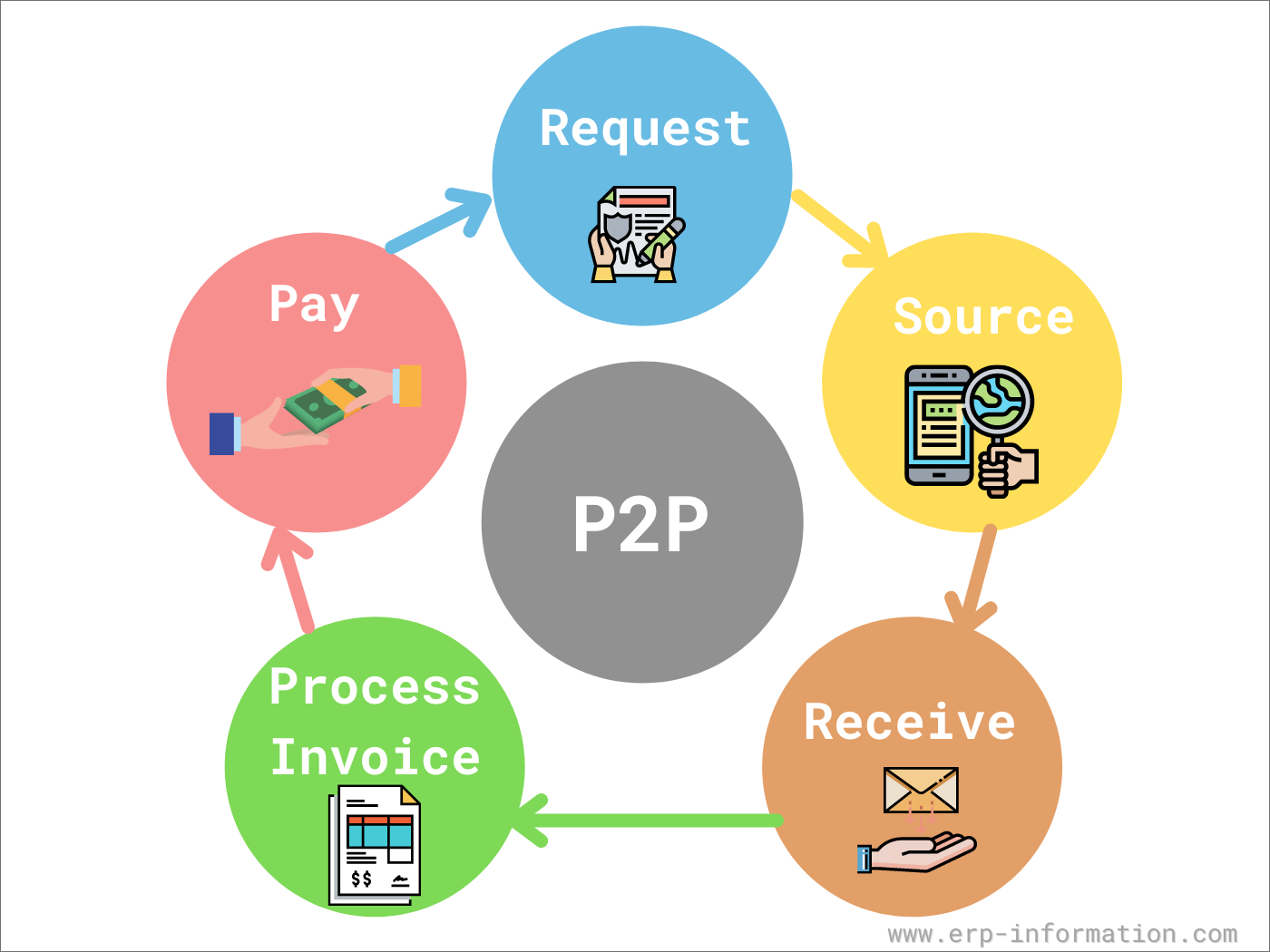
The procure-to-pay cycle is the full chain of activity between identifying a need and paying the supplier who met it, covered step by step above. In SAP each handoff is a document that references the one before it, which is what lets the system match the invoice to the order and the receipt without anyone retyping them.
Procure-to-Pay vs Order-to-Cash
People searching for the P2P cycle often land on order-to-cash (O2C) content by mistake, since the two terms get used together in finance and ERP training material. They describe opposite sides of the same transaction. Procure-to-pay is what happens on the buying side: a company identifies a need, orders from a supplier, and pays that supplier. Order-to-cash is the mirror process on the selling side: a company receives an order from a customer, fulfills it, and collects payment.
In practical terms, if you work in accounts payable or purchasing, you live in the P2P cycle. If you work in sales operations, billing, or accounts receivable, you live in the O2C cycle. A single ERP instance runs both processes at once, since one company’s outbound purchase order is frequently another company’s inbound sales order.
Advantages of procure-to-pay cycle
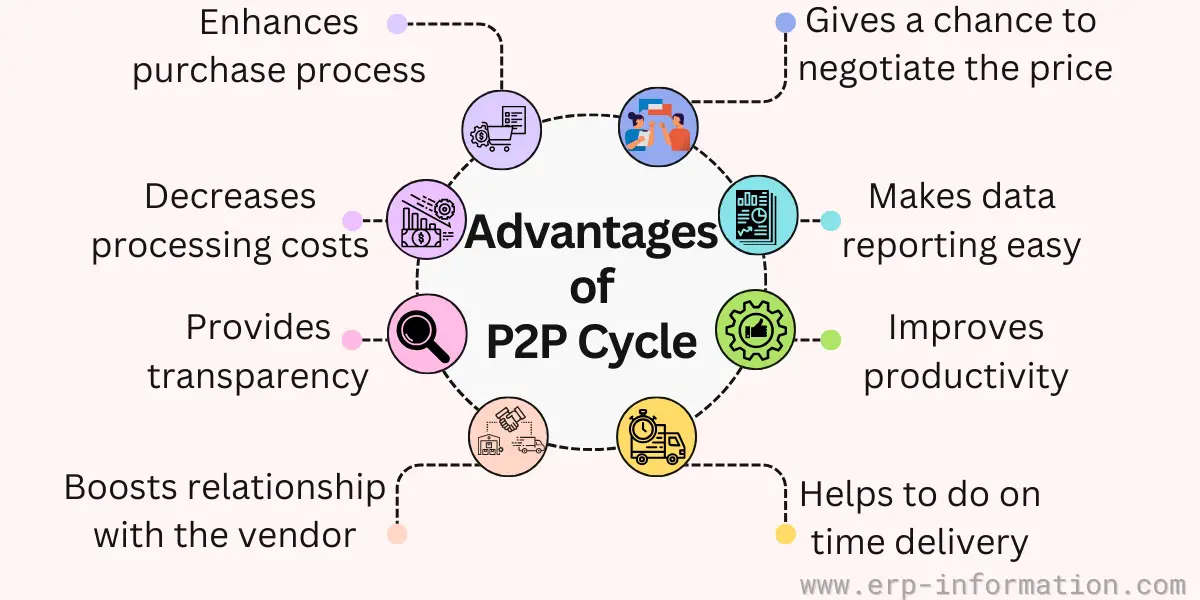
A well-run P2P cycle in SAP pays off in a few concrete ways, not just general efficiency.
Fewer invoice exceptions and less manual matching
Because every purchase runs through a PO before the goods arrive, SAP can run the 3-way match automatically at MIRO instead of accounts payable staff checking each invoice by hand. Even so, most invoices still need a person somewhere: Ardent Partners’ 2025 benchmark of 204 accounts payable teams found that only 35.4% of invoices are processed straight through on average, and 51.0% at best-in-class teams. The remainder is where the staff time goes, which is why the exceptions, not the process, are where the saving is.
Real-time visibility instead of email chasing
Once a requisition exists in the system, anyone with access can see exactly which stage it’s at: awaiting approval, converted to a PO, goods received, invoice posted, or paid. This replaces the older pattern of purchasing staff emailing vendors or other departments to ask where an order stands, and it’s the same data both buyer and finance are looking at, so there’s no separate spreadsheet to reconcile.
Cleaner spend data for negotiating with vendors
Since every purchase is tied to a vendor and material master record, procurement can pull actual historical spend by vendor or category instead of estimating from invoices. That’s what gives a buyer real leverage in a renewal conversation: showing a supplier the exact volume and price history rather than negotiating from memory.
Audit trail built in, not bolted on
Every step, requisition, approval, PO, goods receipt, invoice, and payment, is a separate document linked back to the others. When an auditor asks why a payment was made, the full chain from original requisition to payment is already there rather than requiring someone to reconstruct it from paper files or email threads.
Procure-to-Pay Cycle KPIs to Track
You cannot tell whether a P2P process is actually working from a process diagram alone. Procurement and accounts payable teams typically track a handful of metrics to catch bottlenecks before they show up as late payments or missed early-payment discounts.
- PO cycle time: the time from purchase requisition to an approved purchase order. A long cycle is worth breaking down by release code, because approval waits sit there rather than in purchasing.
- Invoice exception rate: the share of invoices that need manual handling because they do not match their PO or goods receipt. Ardent Partners’ State of ePayables 2025 puts the average at 18.4% and best-in-class teams at 11.1%.
- Straight-through rate: the share of invoices processed with no manual touch at all. Ardent’s 2025 figures are 35.4% on average and 51.0% for best-in-class teams, so a quoted rate far above that deserves a question about how it was measured.
- PO compliance rate (maverick spend): the share of purchases made without going through a PO first. High maverick spend usually means the requisition process is too slow or too rigid, so people route around it.
- Cost per invoice processed: total accounts payable processing cost divided by invoice volume. Ardent’s 2025 benchmark is USD 9.84 on average, USD 2.65 for best-in-class teams and USD 12.42 for the rest; APQC’s open benchmark puts the median at USD 6.00, from a sample of 5,846.
In SAP, the blocked invoices behind the exception rate are the ones waiting in MRBR, which makes that queue the fastest place to see where your exceptions come from.
Parameters to select the software for the procure-to-pay cycle
If SAP MM already covers the flow above, the real question is not whether to buy procure-to-pay software but whether to put another layer in front of what you have. These are the criteria that actually separate the options, rather than the ones that appear on every vendor comparison page.
- Decide where the purchase order is created: this is the first question, not an implementation detail. Some platforms expect the PO to originate in them rather than in SAP, which decides where your system of record for purchasing sits. Settle it before comparing feature lists, because it is expensive to reverse later.
- Look at how exceptions are handled, not the straight-through rate: a headline percentage of invoices processed without human touch is easy to quote. The staff cost lives in the remainder, so what matters is whether a blocked invoice arrives in front of a reviewer with the purchase order, goods receipt and the specific variance visible together, or whether they have to go and find those in three places.
- Check that non-PO spend is covered: invoices that never had a purchase order cause disproportionate trouble, because they bypass the three-way match, and the duplicate check only protects them when the supplier’s flag is set. A tool that only handles PO-backed invoices leaves that gap exactly where it was.
- Judge the requisition experience honestly: maverick spend is usually a symptom of a requisition process that people route around. If raising a request through the tool is slower than buying off-contract, adding the tool will not improve compliance.
- Confirm e-invoicing coverage for the countries you operate in: mandatory electronic invoicing regimes are country-specific and move on their own timetables. For a business trading across borders this is a hard requirement rather than a differentiator.
- Understand the master data synchronization: suppliers, cost centers and general ledger accounts have to stay aligned between the platform and SAP. Where the two systems speak different formats there is always a translation layer, and that layer is where the two copies begin to drift apart.
List of procure-to-pay software vendors
Seven procure-to-pay platforms, described from each vendor’s own site as of 10 October 2026, with ownership from the deal announcements:
- SAP Ariba
- SAP’s own procurement suite. Its supplier network, formerly Ariba Network, is now called SAP Business Network.
- Documents travel to the network as cXML. SAP’s integration gateway, formerly SAP Ariba Cloud Integration Gateway and now part of SAP Integration Suite, converts documents from SAP ERP or S/4HANA into cXML, so supplier and cost center data have to be kept aligned across that layer.
- GEP SMART
- GEP describes its platform as built for procurement and supply chains, orchestrating end-to-end workflows.
- GEP is consolidating GEP SMART, GEP NEXXE and its other brands into a single platform, GEP Quantum Intelligence, and states that GEP SMART remains fully supported.
- Coupa
- A spend management platform, owned by Thoma Bravo since the take-private deal closed on 28 February 2023.
- Can import purchase orders created in an external ERP such as SAP, by file or API, through its External Orders feature, so the PO does not have to originate in Coupa.
- Procurify
- Positions itself as a mid-market procure-to-pay platform.
- By its own description it covers intake, approvals, purchase orders, invoice matching and payment.
- Ivalua
- Describes itself as a unified source-to-pay platform for spend and supplier management.
- Names large brands and the public sector as its customer base.
- Basware
- Focused on accounts payable automation and e-invoicing, including an e-invoicing network and a compliance service for country e-invoicing mandates.
- Owned since August 2022 by a consortium of Accel-KKR, Long Path Partners and Briarwood Capital Partners.
- Precoro
- Describes itself as procurement software for mid-sized companies with distributed operations.
- Covers purchase requests with approvals and purchase orders, by its own description.
What are the challenges of a procure-to-pay cycle?

Most write-ups of P2P challenges stay at the level of “communication problems” and “change management.” The real failure points in a SAP P2P cycle are more specific than that, and they show up as blocked invoices, messy month-end closes, and payments that go out twice.
Invoice matching exceptions at MIRO
The 3-way match runs against tolerance keys set per company code in OMR6. PP covers price variance and DQ quantity variance. DW covers an invoice that arrives when a goods receipt is expected but none has been posted: it is checked against an absolute upper limit, and if DW is not maintained at all, SAP blocks every invoice that arrives before its goods receipt. When an upper limit is exceeded, the invoice posts but is blocked for payment and waits for release in MRBR. A variance inside tolerance posts through, and where the difference lands depends on the material’s price control, as the worked example shows.
The practical problem is tuning these tolerances correctly. Set too loosely, and a genuine pricing error slips through and posts automatically. Set too tightly, and ordinary rounding differences generate a payment block on nearly every invoice, which buries accounts payable in exceptions that have nothing to do with real risk.
The GR/IR clearing account never quite reconciles
Goods receipt and invoice receipt post to a transitional GR/IR account that should clear itself once both sides match. In practice it rarely does cleanly. Goods can arrive in one posting period and the invoice in the next, leaving an open balance sitting on the books at month-end close.
Clearing has rules that explain much of the month-end pain. Automatic clearing (F.13) only clears line items whose grouped balance is zero, so a purchase order line with a receipt but no invoice simply stays open. Small residues left after receipt and invoice are written off in MR11, GR/IR account maintenance. If a late goods receipt or invoice then arrives for that line, SAP’s guidance is to cancel the maintenance document and match again.
Maverick spend around the PO process
SAP MM records a transaction once it’s created, but it doesn’t stop someone from buying outside the process in the first place. If getting a PO approved through the release strategy takes days, and posting a direct invoice through FB60 with no PO reference takes minutes, the incentive runs the wrong way. FB60 is a legitimate transaction for genuinely PO-less purchases like a utility bill, but it’s also the standard route by which off-contract spend enters the books without ever touching the 3-way match.
Vendor and material master data quality
Duplicate vendor master records are a known problem in landscapes running more than one SAP instance, since each system can issue its own vendor number for the same real-world supplier with no automatic cross-system dedup. That matters directly for P2P because SAP’s duplicate-invoice check runs per vendor code. If the same supplier exists under two different vendor numbers, an invoice posted against each one looks like two separate, legitimate payments to the system, not a duplicate.
On the material side, wrong units of measure, valuation class, or procurement type on the material master feeds directly into PO pricing errors and incorrect stock postings, since the PO and goods receipt both inherit whatever is set on the master record.
Release strategy misconfiguration
SAP’s release strategy for PRs and POs is a condition-based rules engine built from release groups, release codes and characteristics such as plant, material group or value, not a flexible approval-chain builder. Its failure mode is the reverse of what many teams expect. A document whose characteristics match no strategy is not stuck: SAP releases it automatically for further processing. A missing value in the release conditions therefore lets a requisition or PO through with no approval at all, and nothing on screen says so.
Collective release (ME55 for requisitions, ME28 for POs) lets the holder of a release code approve a batch at once. It is useful for clearing a genuine backlog, but a batch approved without being read is an approval in name only.
Duplicate payments slip past the standard check
SAP’s duplicate invoice check is not a blanket safety net, and its gaps are specific. It only runs for suppliers whose master record has the Chk double inv. flag set (XK02 in ECC, BP in S/4HANA). It matches on fixed fields: company code, supplier, currency, invoice date and the supplier’s reference number, or the amount when the reference check is switched off. In MIRO it only runs when a reference number is entered, and a reference keyed as INV-1001 once and INV1001 the next time is two different values to the check. It does look at Financial Accounting documents first, so an invoice already posted through FB60 is found when the same invoice is entered in MIRO.
Three settings decide whether it stops anything. The messages M8 108 and M8 462 must be set as errors in OMRM, or a duplicate only raises a warning the clerk can continue past. Invoices created automatically, by EDI or BAPI, are not checked in standard without SAP Note 2689288, and SAP’s support team notes that invoices posted from Ariba usually fall in this group. And passing the 3-way match says nothing about whether an invoice is a duplicate: they are two independent checks.
Integrating SAP P2P with Ariba or Coupa
When a separate procurement platform sits in front of SAP for requisitioning and sourcing, documents have to be translated between the two. SAP Ariba exchanges documents with suppliers in cXML through SAP Business Network, and SAP’s integration gateway converts documents from SAP ERP or S/4HANA, such as IDocs, into cXML. Supplier and cost center data have to stay aligned across that layer, and mapping errors are where the two systems drift apart. Coupa can import purchase orders created in an external ERP, by file or API, so the PO does not have to originate in Coupa. That makes the system-of-record question a design decision rather than one the software makes for you.
How to deal with the challenges?
Each of the challenges above has a specific, testable fix rather than a general call to automate more.
Tune tolerance keys by material category, not globally
A single PP or DQ tolerance applied across every material category is what causes both silent overpayment and exception overload. Review OMR6 tolerance settings against actual variance patterns per category, tighter for high-value or high-risk materials, looser for low-value consumables where a manual review costs more than the variance itself. Decide DW deliberately too: leaving it unmaintained blocks every invoice that arrives before its goods receipt.
Close the non-PO invoice gap
FB60 and FB65 bypass the purchase order and the goods receipt, and with them the 3-way match. Restrict who can post through them and require a documented reason for any non-PO invoice. That addresses maverick spend directly; the duplicate check still applies to these invoices, provided the supplier’s flag is set.
Deduplicate the vendor master on a schedule
Run a supplier master dedup pass regularly, not just at go-live, and make the Chk double inv. flag part of the standard for creating a supplier. Then close the configuration gaps. Set M8 108 and M8 462 to error in OMRM. If invoices arrive by EDI, BAPI or Ariba, confirm SAP Note 2689288 is implemented with its manual steps, which set the background-check messages M8 804 and M8 805 to error.
Test release strategy against real purchasing scenarios
Before go-live and after any change to purchasing organization structure, walk real purchase scenarios through the release conditions and confirm that every combination that should need approval resolves to a strategy. Anything that matches no strategy is released automatically, so the test that matters is the one with values nobody configured: a new plant, a new material group, a value just above a band limit.
Decide the source of truth before integrating a procurement platform
If Ariba or Coupa sits in front of SAP, settle up front which system owns PO creation and which one is downstream for financial posting, rather than letting that get decided implicitly by whichever integration gets built first. This avoids the master data drift that comes from both systems assuming they’re authoritative.
FAQs
What is the full form of P2P in SAP?
P2P stands for procure-to-pay. It covers the complete cycle from identifying a need inside the business through to paying the supplier who fulfilled it.
The same process is also written as PTP, short for purchase-to-pay. Both abbreviations describe the identical cycle, so there is no separate PTP process to learn.
What is a P2P cycle?
A P2P cycle is the end-to-end business process a company follows to buy goods and services and pay for them: identify the requirement, get it approved, select a supplier, raise a purchase order, receive the goods, match the invoice against the order and the receipt, and pay.
Running it inside an ERP rather than on paper matters because each step creates a linked document. That is what makes the three-way match possible and gives auditors a complete chain from the original requisition to the payment.
What are the steps in the P2P cycle in SAP?
In SAP MM the cycle is commonly taught as twelve steps: purchase requisition (ME51N), requisition approval (ME54N), shortlisting vendors, requesting quotations (ME41), vendor selection (ME49), purchase order (ME21N), shipment notice, goods receipt (MIGO), invoice (MIRO), three-way match, payment (F110 or F-53), and reporting.
The number of steps is a presentation choice rather than a standard. Other sources compress the same flow into six or seven by combining sourcing steps. What matters is the sequence and which document each step creates, not the count.
What are the accounting entries in the P2P cycle in SAP?
Three steps post to the general ledger. Goods receipt (MIGO): debit stock (account key BSX), credit GR/IR clearing (WRX). Invoice (MIRO): debit GR/IR clearing, credit the vendor. Payment (F110 or F-53): debit the vendor, credit the bank.
Price differences go to the price difference account (key PRD) for a material at standard price, and to stock for a material at moving average price while that stock is on hand. The purchase requisition and the purchase order create no actual posting in the ledger.
What is the difference between P2P and PTP?
There is no difference. P2P is procure-to-pay and PTP is purchase-to-pay, and both refer to the same cycle from requisition through to supplier payment.
Usage varies by organization and region rather than by meaning. If a job description asks for PTP cycle experience in SAP, it is asking for the process described on this page.
Does the P2P cycle change in SAP S/4HANA?
The process flow does not change, and the core transaction codes still work, including ME51N, ME21N, MIGO, MIRO, F-53 and F110.
What changes: the vendor master is replaced by the mandatory Business Partner object, where supplier is a role rather than a separate record; the classic MB goods movement transactions are replaced by MIGO; material documents are stored in table MATDOC; and while the classic RFQ transactions still function, SAP’s stated direction is the Manage RFQs Fiori app.
SAP restated in October 2026 that mainstream maintenance for SAP Business Suite 7, which includes SAP ECC, ends on 31 December 2027, with optional extended maintenance to 31 December 2030.
What is the difference between P2P and O2C?
They are the two sides of the same trade. Procure-to-pay is the buying side: a company identifies a need, orders from a supplier and pays that supplier. Order-to-cash is the selling side: a company receives a customer order, fulfills it and collects payment.
One company’s outgoing purchase order is another company’s incoming sales order, and a single ERP instance runs both processes at once. If you work in purchasing or accounts payable you live in P2P; in sales operations, billing or accounts receivable you live in O2C.
What is procure-to-pay software?
Procure-to-pay software automates the handoffs in the cycle: turning an approved requisition into a purchase order, capturing supplier invoices, running the match against the order and the goods receipt, and routing the exceptions that fail it.
Where an ERP such as SAP already handles the flow, these tools are usually added for a specific reason rather than as a replacement: for example, to improve invoice capture, to give requisitioners a usable catalogue so they stop buying off-contract, or to meet country-specific electronic invoicing rules.
The decision worth making first is which system creates the purchase order, because that determines which one is your system of record for purchasing.
Where to start if your SAP P2P cycle is leaking money
The procure-to-pay cycle is the same underlying process everywhere: identify a need, get it approved, order it, receive it, match the invoice, and pay for it. SAP MM breaks that into 12 steps with its own transaction codes; Oracle, NetSuite and Infor run the same logic with different screens.
Money leaks at the controls rather than in the process design. Four checks are quick, and each targets a documented behavior of standard SAP:
- Pull the requisitions and purchase orders that were released without a release strategy, and ask whether they should have needed one. SAP releases those automatically.
- List the suppliers without the Chk double inv. flag, and check how OMRM treats messages M8 108 and M8 462. A warning lets a duplicate through.
- If invoices arrive by EDI, BAPI or Ariba, confirm SAP Note 2689288 is in place. Without it those invoices are not checked for duplicates.
- Review the invoices waiting in MRBR. A blocked invoice stays blocked after its cause is gone, so the queue can hold invoices that are ready to pay.
Then compare your exception rate with Ardent Partners’ 2025 benchmark, 18.4% on average and 11.1% for best-in-class teams, before deciding whether the answer is configuration or new software.
How we researched this page (10 October 2026). Every SAP behavior described here was checked against SAP documentation on 10 October 2026. That means SAP Help Portal pages on release conditions, tolerance limits, blocked and parked invoices and the duplicate invoice check; SAP knowledge base articles; SAP Product Support and SAP Learning material; and the maintenance announcements of 4 August 2025 and 7 October 2026. Vendor descriptions come from each vendor’s own site on the same day. We also read 14 of the guides that compete for these searches. None mapped the documents to SAP tables or showed how standard and moving average price post differently, which is why those sections are here. The worked example is our own calculation. Where we found no primary source, for example for a widely repeated claim about how GR/IR clearing documents are reversed, we left the claim out.
References (read 10 October 2026)
- SAP Help Portal, Release Conditions (SAP ERP)
- SAP Learning, Releasing Purchasing Documents (ME29N, ME28)
- SAP Help Portal, Tolerance Limits for Invoice Postings (SAP S/4HANA)
- SAP Help Portal, Invoice with Variances (SAP S/4HANA)
- SAP Help Portal, Validity of a Block (SAP S/4HANA)
- SAP Help Portal, Document Parking (SAP ERP)
- SAP Help Portal, GR-Based Invoice Verification
- SAP Learning, Performing Receipt Settlements (ERS, MRRL)
- SAP Help Portal, Postings: Goods Receipt for Purchase Order (SAP S/4HANA)
- SAP Help Portal, Postings at Goods Receipt and Invoice Receipt (SAP S/4HANA)
- SAP Learning, Setting Up Account Determination for Specific Transactions (BSX, WRX, PRD)
- SAP Learning, Executing a Payment Run
- SAP Help Portal, GR/IR Clearing Account (SAP S/4HANA)
- SAP Knowledge Base Article 2306348, GR/IR account clearing
- SAP Learning, Performing GR/IR Account Maintenance (MR11)
- SAP Library, Check for Duplication of Invoice Entry
- SAP Community (SAP Product Support), Found a duplicate MM invoice? Here’s how to troubleshoot the reason
- SAP Help Portal, Inbound Delivery (support content)
- SAP Help Portal, Creation Indicator (MRP, SAP ERP)
- SAP, Simplification List for SAP S/4HANA 2025 (PDF): items on Business Partner, MM-IM transactions and data model, RFQ
- SAP Knowledge Base Article 3582679, ME41, ME42, ME43, ME47, ME49 can be used in S/4 HANA
- SAP News, 7 October 2026: Planning Beyond 2030
- SAP News, 4 August 2025: Updates for SAP ERP, private edition, transition option
- SAP Learning, Introducing the Integration Suite, Managed Gateway Mapping Tool (cXML)
- Coupa documentation, External Orders Import
- Ardent Partners, The State of ePayables 2025: AP benchmarks and Best-in-Class performance
- APQC Open Standards Benchmarking, total cost to process accounts payable per invoice processed
[You are free to copy and distribute materials in this article.]
Using Google Search? Add erp-information.com as a preferred source.