
Rough-cut capacity planning (RCCP) checks whether a master production schedule (MPS) is achievable before it is released. It converts the schedule into hours at a few key resources, usually the bottleneck work centers, and compares those hours with the capacity available in each period.
ASCM places RCCP at the tactical level, next to master scheduling and ahead of material requirements planning (MRP). That timing is the point: an overloaded schedule is caught while there is still time to add capacity or move the plan, not weeks later as a missed shipment. Below, one four-week schedule is run through all three RCCP methods so you can see where they disagree, and a free worksheet does the arithmetic for your own numbers.
Check one key resource quickly with our Rough Cut Capacity Planning Calculator, or download the three-method RCCP worksheet.
Definition
Rough-cut capacity planning is “the process of converting the master production schedule into required capacity, that is, capacity of (key) resources to produce the desired output in the particular periods”, followed by a comparison with available or demonstrated capacity for each key resource. That is the wording of ETH Zurich’s OPESS course, which cites the ASCM Dictionary, 17th edition.
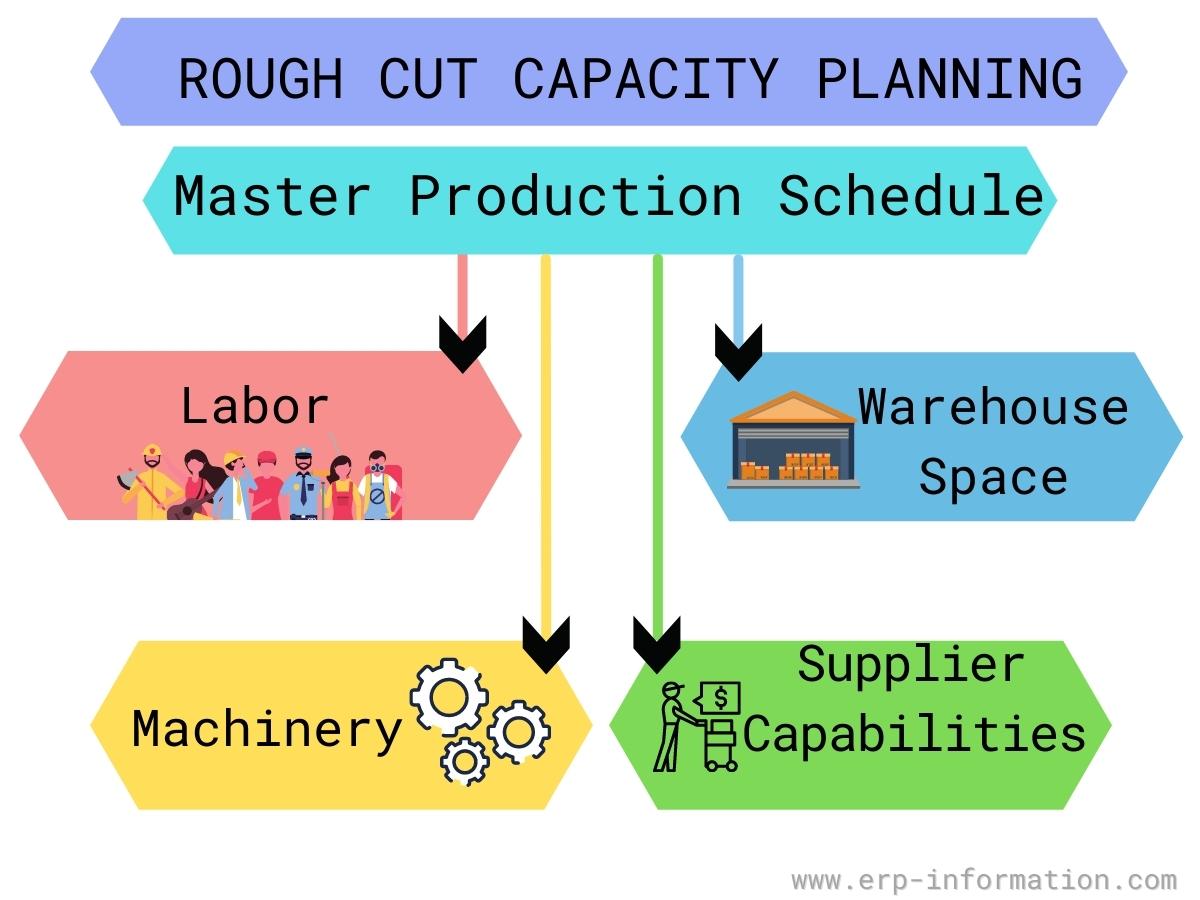
ASCM’s CPIM learning material puts it more plainly: RCCP “is a check to see if bottleneck work centers and other key resources will have sufficient capacity.” The resources are usually labor and machine hours at key work centers. Oliver Wight’s glossary widens the list of key resources to “manpower, machinery, warehouse space, vendors’ capabilities, and in some cases, money”, which is what the image above shows. The ones you choose to check become your critical resources.
RCCP is still core planning practice. The current CPIM exam from ASCM (Exam Content Manual version 9.0, effective 1 June 2026) lists “Develop a Rough-Cut Capacity Plan” as a task, starting with a review of the bill of resources and the key resources that support the MPS.
“Rough-cut” describes how capacity is measured, not materials. RCCP works with standard hours per unit at a handful of resources, not an operation-by-operation load on every work center.
What RCCP leaves out matters as much. It starts from end items in the MPS, so it does not subtract components already in stock, scheduled receipts or work in progress. Oracle’s documentation calls it “a gross capacity planning technique that does not consider scheduled receipts or on-hand inventory quantities”. Netting and lot sizes come later: MRP handles materials, and capacity requirements planning (CRP) checks capacity in detail.
RCCP is also an infinite-loading check. It calculates the load the schedule creates and reports any overload, but it does not move work to fit. Oracle’s documentation says plainly that “Oracle Capacity assumes infinite capacity”, and SAP notes that its unconstrained IBP heuristic “often results in overloaded resources that show utilization levels exceeding 100%”. Deciding what to do about the overload is the planner’s job.
What you need to run RCCP
- The master production schedule: how many of each end item, or product family, is due in each period, usually by week.
- A short list of key resources: the bottleneck work centers, scarce skills or long-lead machines that set the pace. Everything else is assumed to cope.
- Hours per unit at each key resource: one overall factor, a bill of labor, or a resource profile with lead-time offsets. The three methods are compared below.
- Available capacity per period: Oracle’s formula for a resource is capacity units × shift hours per day × shift days per week × efficiency × utilization. Where you have the data, use demonstrated capacity: “proven capacity calculated from actual performance data” (ETH Zurich OPESS, after ASCM).
Rough cut capacity planning software
Many ERP and planning systems run some form of RCCP, but they do not all mean the same thing by the name. The ERP section below shows what SAP, Oracle, Microsoft, NetSuite, Infor and IFS actually document. For a handful of products and key resources, a spreadsheet is enough.
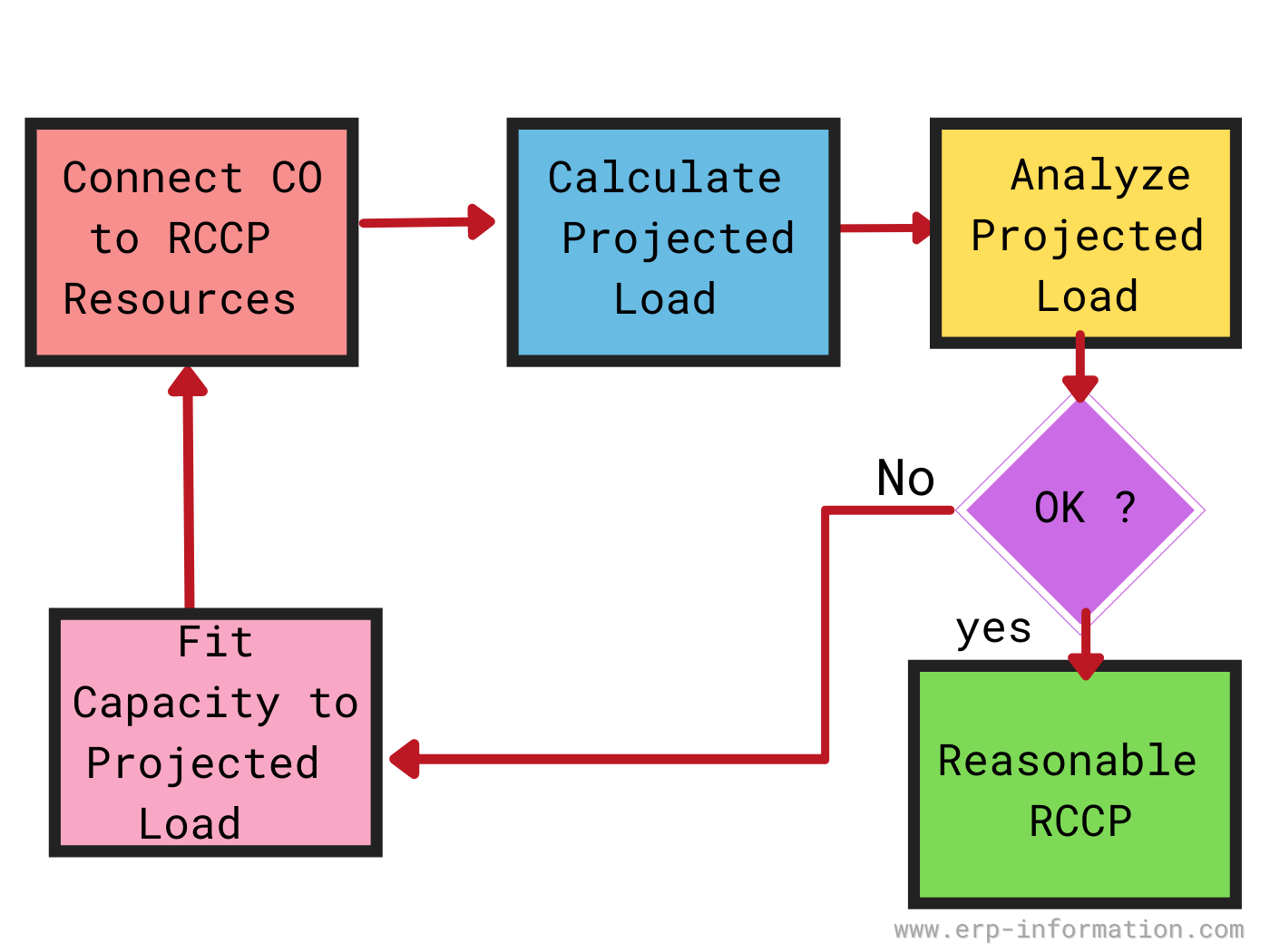
Where RCCP fits in the planning hierarchy
RCCP is the second of three capacity checks, each tied to a different plan. ASCM’s CPIM learning system lays them out like this, with horizons it calls illustrative and dependent on the industry:
| Plan being checked | Capacity check | ASCM level, horizon, bucket |
|---|---|---|
| Sales and operations plan (S&OP) | Resource planning | Tactical, about 18 months, monthly |
| Master production schedule | Rough-cut capacity planning | Tactical, about 3 months, weekly |
| MRP planned orders | Capacity requirements planning | Operational, about 10 weeks, daily |
The three form a funnel. Resource planning works with plants and major resources, RCCP narrows to the key bottlenecks, and CRP checks every work center. RCCP sits in the middle because it is detailed enough to trust the master schedule, yet rough enough to re-run whenever the schedule changes.
Usage is not uniform, so check what a tool or textbook means before comparing. Oliver Wight’s glossary and the Encyclopedia of Production and Manufacturing Management treat resource requirements planning and RCCP as the same check. NetSuite’s help calls RCCP “a long term process”, and SAP describes its rough-cut planning profiles as “an ideal tool for medium- and long-term planning”. Of 15 top-ranking RCCP articles we read in October 2026, 7 called it long-term. The useful question is which plan is being validated: the S&OP plan, the master schedule or the order-level MRP plan.
Three Methods of Rough Cut Capacity Planning
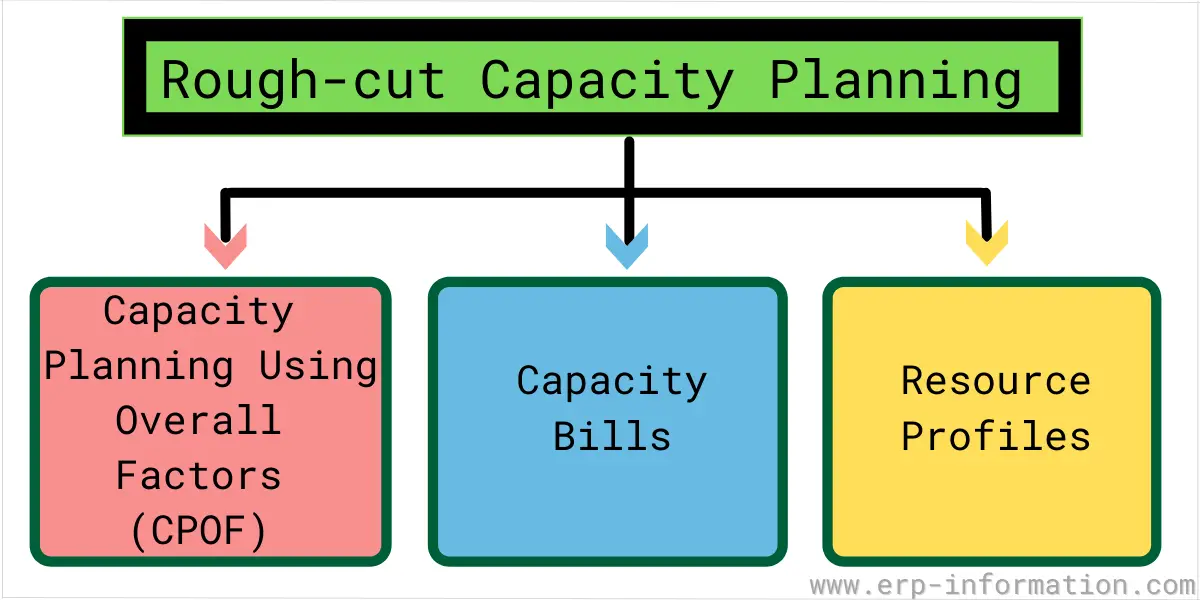
There are three ways to calculate RCCP, from the least to the most detailed. The names come from Vollmann, Berry, Whybark and Jacobs, Manufacturing Planning and Control for Supply Chain Management (McGraw-Hill): capacity planning using overall factors (CPOF), capacity bills and resource profiles. More detail gives more accurate loads and more data to maintain.
1. Capacity planning using overall factors (CPOF)
CPOF multiplies the total quantity in the master schedule by an overall number of standard hours per unit, then splits that total across work centers using historical percentages (ETH Zurich OPESS, section 14.4). It is fast and needs only accounting-level data. Its blind spot is product mix: when the mix leans toward products that load one work center more heavily, the historical split puts the hours in the wrong place.
2. Bill of labor (bill of capacity)
A bill of labor lists the standard hours each product needs at each key work center, estimated from experience or generated from the bill of materials and routing files (process sheets). Required capacity is the bill of labor multiplied by the MPS, product by product, so it picks up mix changes. It does not time-phase. As Jonsson and Mattsson’s study of capacity planning methods puts it, “No load off-setting is carried out”: every hour is booked in the period the item is due, even work done a week or two earlier.
3. Resource profile
A resource profile is the bill of labor with lead-time offsets. Each operation’s hours land in the period the work is actually done, so machining for an order due in week 4 shows up in week 3. It gives the most realistic period-by-period load, at the cost of keeping offsets current for every product and key resource. It still ignores lot sizes and stock on hand, which is the job of CRP.
| Method | Data you need | Gets right | Misses |
|---|---|---|---|
| CPOF | Overall hours per unit and each work center’s historical share | Total load | Shifts in product mix |
| Bill of labor | Hours per product at each key work center | Total load and mix | When upstream work happens |
| Resource profile | Bill of labor plus a lead-time offset per operation | Load, mix and timing | Lot sizes, stock on hand, work in progress |
Levels for Calculating RCCP
Oracle E-Business Suite’s Capacity module (Release 12.2) runs RCCP at two levels. The terms are Oracle’s; the same choice, planning by resource in hours or by line in units, appears in other systems under other names:
- Routing-based RCCP plans by resource. Required and available capacity are in hours per week per resource.
- Rate-based RCCP plans by production line, for repetitive manufacturing. Capacity is a production rate per week per line. Because items run at different rates on the same line, Oracle converts each item’s rate with a load factor (the line’s maximum hourly rate ÷ the item’s production rate) before adding them up.
Both end in the same measure:
Capacity load ratio = required capacity ÷ available capacity
A ratio above 100% means the key resource cannot carry the schedule as planned. How much headroom to keep below 100% is a policy choice that depends on how variable the work center’s output is.
RCCP Calculation
Here is the calculation with the bill of labor method. A plant makes two products, A and B, that both pass through two key work centers, Machining and Assembly. The bill of labor lists the standard hours each product needs at each one:
| Product | Machining (hrs/unit) | Assembly (hrs/unit) |
|---|---|---|
| A | 0.5 | 0.4 |
| B | 0.3 | 0.6 |
The master production schedule for next week calls for 200 units of A and 150 units of B. Multiply the schedule by the bill of labor to get the required capacity at each work center:
- Machining: (200 × 0.5) + (150 × 0.3) = 100 + 45 = 145 hours
- Assembly: (200 × 0.4) + (150 × 0.6) = 80 + 90 = 170 hours
Each work center has 160 hours available next week (four people at 40 hours). Divide required by available capacity:
- Machining: 145 / 160 = 91%, within capacity.
- Assembly: 170 / 160 = 106%, overloaded by 10 hours.
RCCP has done its job. The schedule cannot be built at Assembly as it stands, and this is known before MRP runs or any material is ordered. The planner can add about 10 hours of overtime at Assembly, move some of product B into another week, or trim the schedule.
Rough Cut Capacity Planning Examples
Two examples show what a single-week calculation cannot: how the methods disagree over several weeks, and why the check is made period by period.
Example 1: one schedule, three methods, four weeks
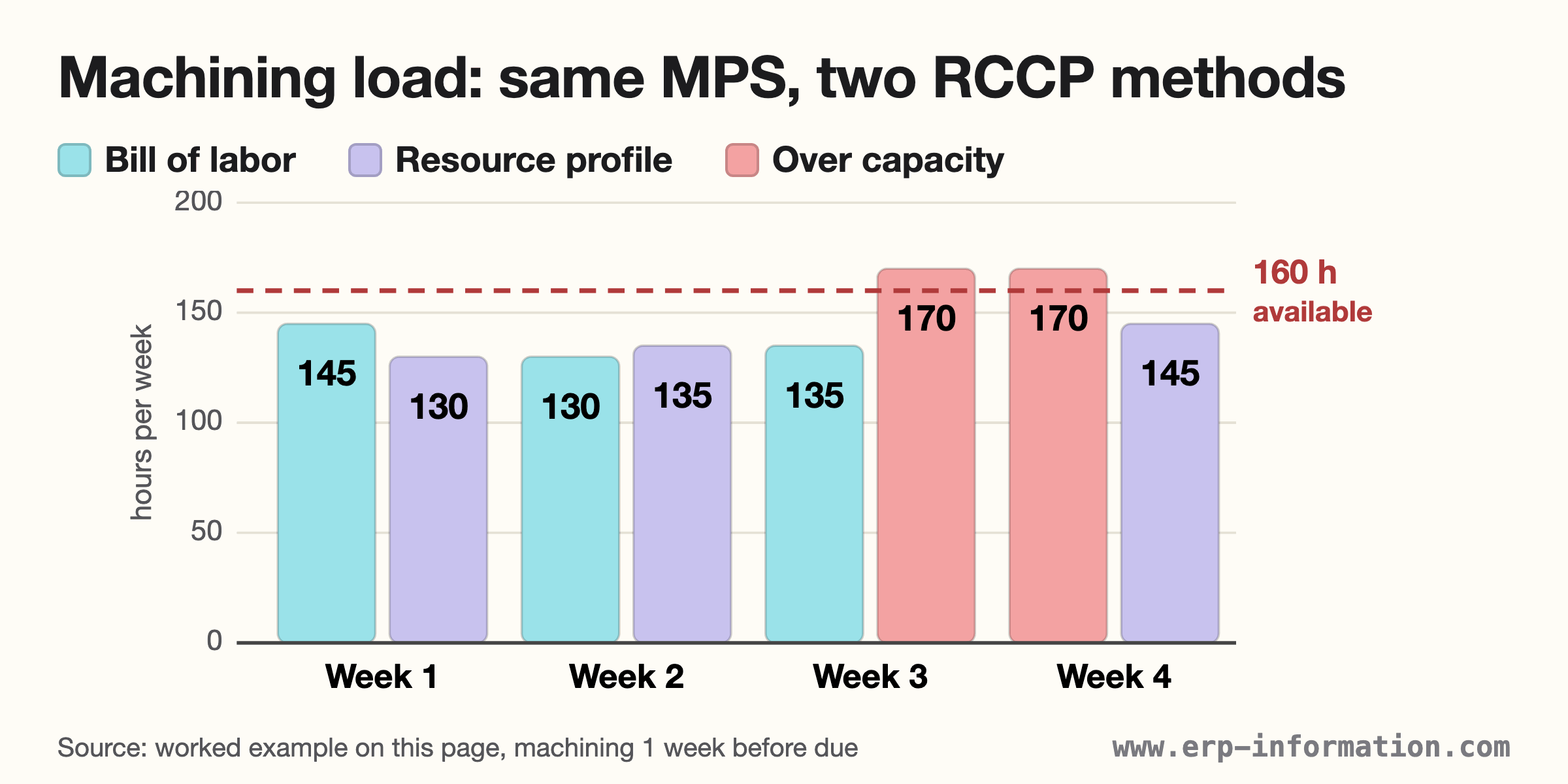
Same plant and bill of labor as above, now over four weeks with 160 hours available at each work center every week. Machining happens one week before an order is due; assembly happens in the due week. For CPOF, last year’s mix was 60% A and 40% B, which gives an overall factor of 0.9 hours per unit, split 46.7% to Machining and 53.3% to Assembly.
| Units due | Week 1 | Week 2 | Week 3 | Week 4 | Week 5 |
|---|---|---|---|---|---|
| Product A | 200 | 200 | 150 | 250 | 200 |
| Product B | 150 | 100 | 200 | 150 | 150 |
| Work center and method | Week 1 | Week 2 | Week 3 | Week 4 |
|---|---|---|---|---|
| Machining, CPOF | 147 (92%) | 126 (79%) | 147 (92%) | 168 (105%) |
| Machining, bill of labor | 145 (91%) | 130 (81%) | 135 (84%) | 170 (106%) |
| Machining, resource profile | 130 (81%) | 135 (84%) | 170 (106%) | 145 (91%) |
| Assembly, CPOF | 168 (105%) | 144 (90%) | 168 (105%) | 192 (120%) |
| Assembly, bill of labor | 170 (106%) | 140 (88%) | 180 (113%) | 190 (119%) |
| Assembly, resource profile | 170 (106%) | 140 (88%) | 180 (113%) | 190 (119%) |
- CPOF gets each week’s total right but splits it by last year’s mix. Both products need 0.9 hours in total, so the weekly totals match. In week 3, when the mix swings toward B, CPOF shows Assembly at 168 hours (105%) where the bill of labor shows 180 (113%). Overtime planned from CPOF would fall 12 hours short.
- The bill of labor gets the split right but books machining in the due week. It shows the machining overload in week 4. The resource profile moves it to week 3, when the machining for week 4’s orders, heavy in product A, is actually done. Overtime planned for week 4 would arrive a week late.
- All three agree that Assembly is the real problem. Under the bill of labor it is over by 10, 20 and 30 hours in weeks 1, 3 and 4, 60 hours in all, with only 20 spare hours in week 2.
- The resource profile also shows 145 machining hours before week 1. That is the machining for week 1’s orders, which should already be under way. If it is not, week 1 is late before it starts.
Example 2: why you check period by period
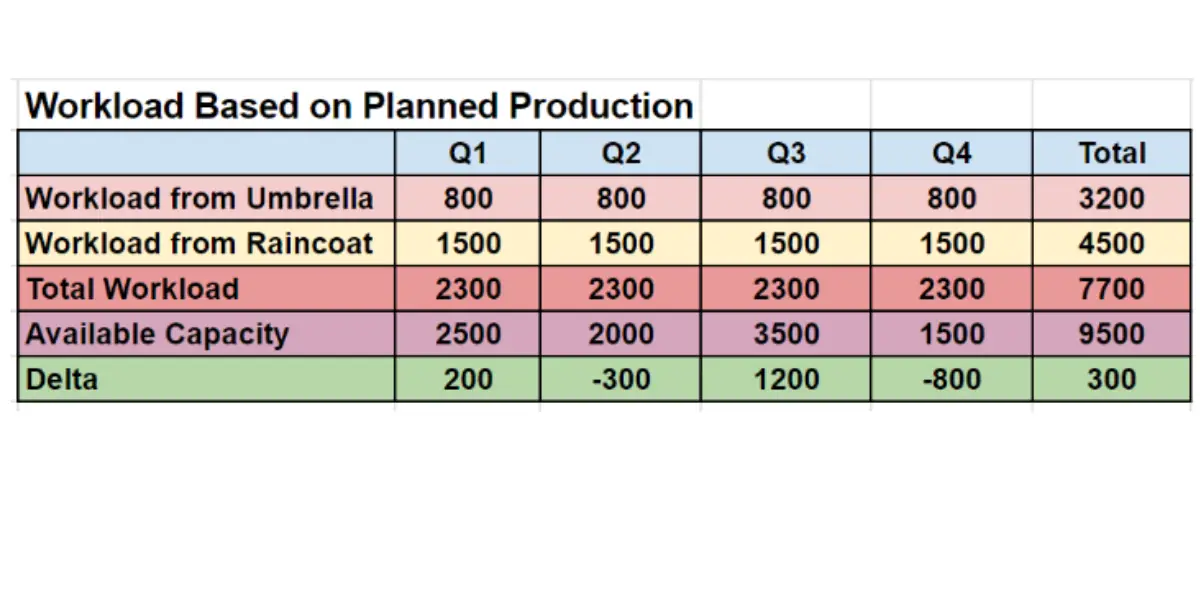
This quarterly load profile for two products, umbrellas and raincoats, carries 2,300 units of workload every quarter against available capacity of 2,500, 2,000, 3,500 and 1,500. Over the year, capacity exceeds load by 300 (9,500 against 9,200), so an annual check passes. Quarter by quarter it does not: Q2 is 300 short and Q4 is 800 short.
The fix depends on whether the products can be built ahead. If they can, Q3’s 1,200 spare covers Q4’s 800 shortfall, and Q1’s 200 spare covers two thirds of Q2’s 300. The remaining 100 in Q2 needs overtime, an extra shift or a schedule change. If the products cannot be stored, every short quarter needs its own capacity fix.
Free RCCP worksheet (Excel)
The worksheet runs CPOF, bill of labor and resource profile side by side for up to 6 products, 4 key work centers and 12 weeks. Blue cells are inputs and every other number is a formula; load above 100% turns red. It opens with Example 1 loaded, so you can check it against the table above before entering your own schedule. It uses only standard functions (SUM, SUMPRODUCT, SUMIF, INDEX, IF), and we checked every result in a second spreadsheet program.
What to do when RCCP shows an overload
An overload has two kinds of fix: add capacity, or change the load. Short-term levers work inside the master schedule’s horizon; long-term ones change what the plant can do.
| Response | Watch out for |
|---|---|
| Overtime Adds capacity, within days | In the US, hours over 40 a week cost at least 1.5 times the regular rate for non-exempt employees (29 CFR 778.107). Fatigue limits how long it lasts. |
| Extra shift Adds capacity, within weeks | Needs people, supervision and maintenance cover. |
| Alternate work center or routing Moves load, within days | Only if another resource can do the work at acceptable cost and quality. |
| Subcontracting Moves load, within weeks | Supplier lead time, quality and margin. |
| Build ahead in a period with spare capacity Moves load, within the horizon | Holding cost. Works only for storable, predictable items. |
| Move MPS quantities or due dates Changes the load, immediate | Customer promises: check available-to-promise first. |
| Hire, train or add equipment Adds capacity for good, takes months | Worth it only if the overload shows up run after run. |
A one-off overload calls for a short-term lever. An overload that appears in every RCCP run is a capacity decision, such as hiring or new equipment, and it belongs in resource planning and production planning rather than in the master schedule.
How ERP systems handle RCCP
If you run RCCP inside an ERP, the label on the screen may not match the textbook. This is what each vendor’s own documentation says, checked on 9 October 2026:
| System and feature | How it works, per the vendor’s documentation |
|---|---|
| SAP ERP and SAP S/4HANA Rough-cut planning profiles in Sales and Operations Planning (SOP), created with transaction MC35 | A profile states the resources one unit of a material or product group needs, by workday. SAP calls it an aggregate view of “workdays rather than hours or minutes, and work center groups and product groups rather than individual work center or products”. |
| SAP S/4HANA (status) SOP is not future technology | SAP’s simplification list says SOP “will be replaced by Integrated Business Planning IBP” and is “intended as a bridge or interim solution”. Check the compatibility-scope usage rights in your SAP contract. |
| SAP Integrated Business Planning Rough-cut capacity plans in time-series supply planning | Version 2608 lists “the development of rough-cut capacity plans” among the key features. Its unconstrained heuristic can show resources above 100%. |
| Oracle E-Business Suite Oracle Capacity: Rough Cut Capacity Planning (RCCP) | Works from the master schedule through bills of resources, routing-based (hours per resource) or rate-based (rate per line). Gross: no netting of receipts or stock. |
| Oracle Fusion Cloud SCM Bills of resources in Sales and Operations Planning (26B) | Bills of resources “collapse routing operations to focus on critical components and resources” for rough-cut capacity planning “at a strategic level”. |
| Oracle NetSuite Advanced Manufacturing: Rough Cut Capacity Planning (RCP) | Reports work center percentage use over a planning period. The plan is built from open work orders, sales orders or a demand plan. |
| Microsoft Dynamics 365 Supply Chain Management Operations scheduling | Microsoft: “Operation scheduling, also known as rough-cut capacity planning”. It estimates the production process over time without exploding routes into jobs. |
| Microsoft Dynamics 365 Business Central Capacity constrained resources | Provides “a rough-cut schedule” rather than shop floor control. You set a Critical Load % for each bottleneck work center or machine center. |
| Infor M3 Rough-cut Capacity Planning | Used “if capacity is created based on the Master Production Schedule”; Resource Planning covers the aggregated level. |
| Infor LN Bill of critical capacities | Enterprise Planning uses it “to generate the rough capacity requirements for critical capacities”. |
| IFS Cloud (26R2) Rough cut capacity plan | Built through resource requirements planning (RRP), which IFS describes as long-term planning to check that the manufacturing plan is feasible. |
| Odoo 20.0 No RCCP feature documented | Work centers carry capacity and working hours, but the manufacturing documentation has no rough-cut capacity check. |
Three questions sort these out when you evaluate software:
- Which plan does it check? The master schedule is textbook RCCP. A check of the S&OP or product-group plan, such as SAP’s SOP profiles or IFS’s RRP, is closer to resource planning. A check of planned and released orders, such as NetSuite’s work-order plan type, is closer to CRP.
- Does it time-phase? Offsets by operation make it a resource profile; booking all hours in the due period makes it a bill of labor.
- Does it net stock and work in progress? Textbook RCCP does not. A tool that does is giving you something closer to CRP.
Advantages
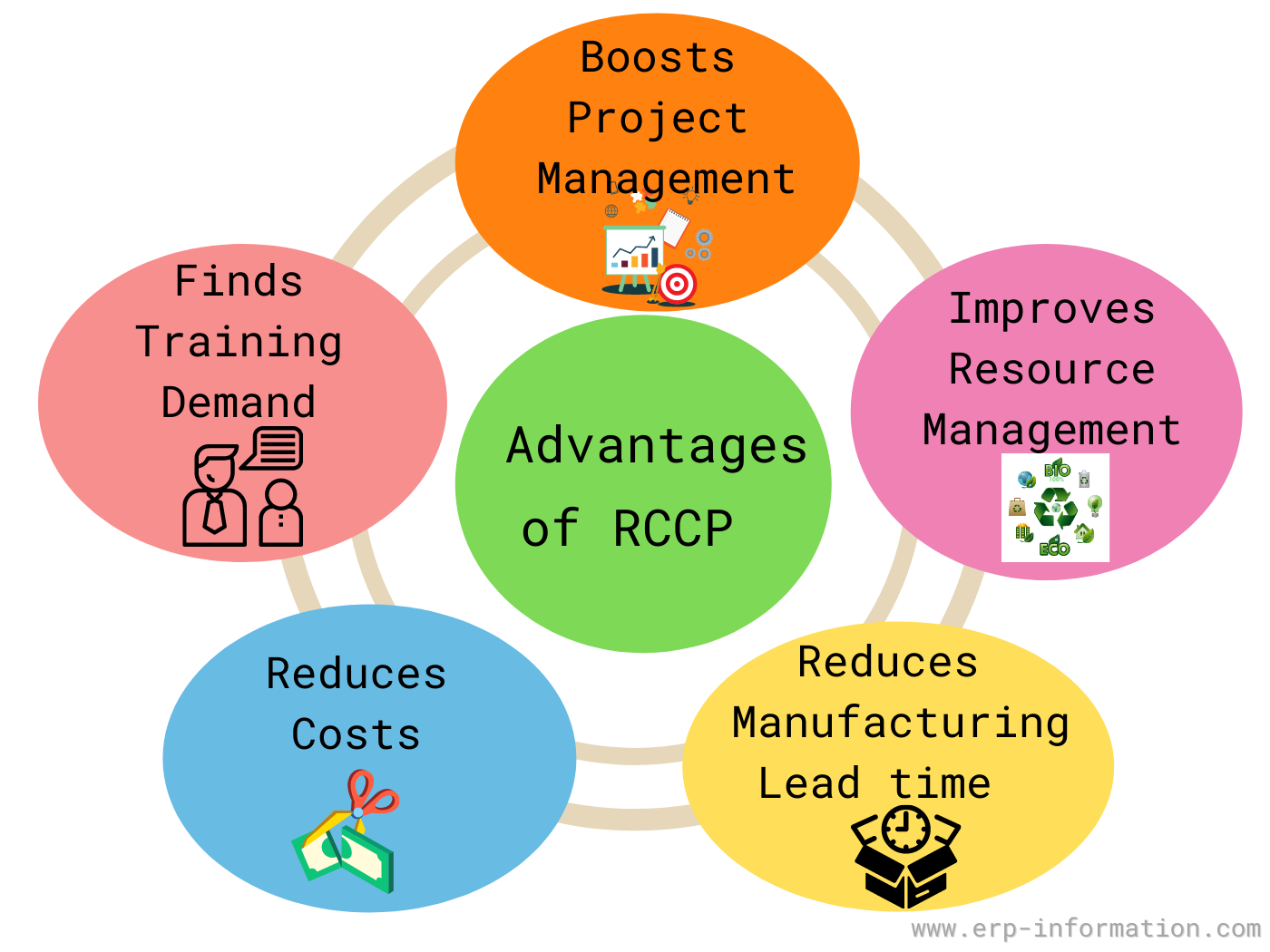
Validates the master schedule
This is RCCP’s core job. A schedule the key resources cannot carry is caught before it is released to MRP, purchasing and the shop floor.
Quick to re-run
RCCP needs only the MPS, a short list of key resources and hours per unit, so it can be re-run every time the schedule changes. CRP, with its routings and open-order data, cannot be repeated as cheaply.
Improves resource management
Planners see the load on each bottleneck period by period, so overtime, shifts and subcontracting are arranged in advance rather than improvised.
Reduces costs
Planned responses cost less than emergencies. Expediting, premium freight and unplanned overtime, which in the US costs at least 1.5 times the regular rate for non-exempt employees, are what an unchecked schedule tends to produce.
Reduces manufacturing lead time
Orders released into an overloaded work center wait in a queue. Keeping the load on key resources within capacity keeps those queues, and the lead time they add, under control.
Challenges
Approximate by design
RCCP looks only at the resources you name as key. If an unlisted work center becomes the bottleneck after a mix or routing change, RCCP will not see it. Review the key-resource list whenever the product mix or routings change.
The simpler methods can point to the wrong place or week
Example 1 shows both failures: CPOF understated Assembly by 12 hours when the mix shifted, and the bill of labor put the machining overload a week late.
Gross, not net
RCCP does not subtract inventory on hand, scheduled receipts or work in progress, and it ignores lot sizes. In the near-term periods it can show load that MRP and CRP would net away, so read short-horizon overloads with that in mind.
Data upkeep
Bills of labor and offsets must follow routing changes, and available capacity must reflect what the work center really produces. ETH Zurich’s course notes the “practical difficulties in measuring the utilization and efficiency factors”, which is why demonstrated capacity from actual output is often the safer input. The load is only as good as the data accuracy behind it.
Labels differ between systems
As the ERP table shows, “rough-cut” can mean a product-group check in one system and an order-level check in another. Agree on the plan being validated before comparing results across tools or sites.
Difference Between RCCP and Capacity Planning
Capacity planning is the umbrella term, and RCCP is one level of it. ASCM describes rough-cut capacity planning as “the second level of capacity planning”, after resource planning and before capacity requirements planning.
| Capacity planning | RCCP | |
|---|---|---|
| Scope | Every capacity decision, from long-range resource plans to daily work center loads | The check of the master production schedule |
| Resources | From whole plants down to individual work centers | Key, bottleneck resources only |
| Techniques | Resource planning, RCCP, CRP, input/output control and finite scheduling | CPOF, bill of labor, resource profile |
Difference Between RCCP and CRP
| RCCP | Capacity requirements planning (CRP) | |
|---|---|---|
| Plan checked | Master production schedule (end items) | MRP planned orders plus released shop orders |
| Resources | Key work centers only | Every work center in the routings |
| Data | Bill of labor or resource profile | Routings, bills of material, lead times, lot sizes and the status of open orders |
| Stock and work in progress | Not netted | Netted through MRP |
| Speed | Quick enough to re-run with every MPS change | Heavier; in practice it needs an ERP system |
| ASCM illustration | About 3 months, weekly buckets | About 10 weeks, daily buckets |
In short, RCCP asks whether the master schedule is realistic for the bottlenecks. CRP asks whether the detailed order plan fits every work center, after MRP has netted stock and sized the lots.
FAQs
What is rough cut capacity planning in SAP?
In SAP ERP and SAP S/4HANA, rough-cut capacity planning is done in Sales and Operations Planning (SOP) with rough-cut planning profiles, created with transaction MC35. A profile states how much of each resource one unit of a material or product group needs, by workday, and SOP compares that load with the capacity available. SAP describes SOP as a bridge to SAP Integrated Business Planning (IBP), whose time-series supply planning builds rough-cut capacity plans.
Is rough-cut capacity planning done before or after MRP?
Before. RCCP checks the master production schedule against key resources, so an overload is fixed before MRP explodes the schedule into planned orders. The detailed check after MRP is capacity requirements planning (CRP), which covers every work center.
What are the three methods of rough-cut capacity planning?
Capacity planning using overall factors (CPOF), which splits total hours across work centers by historical percentages; the bill of labor, or capacity bills, which uses each product’s hours at each key work center; and the resource profile, which adds lead-time offsets so the load falls in the week the work is done.
How do you calculate rough-cut capacity?
Multiply the quantity of each product in the master schedule by its standard hours at each key resource, add the hours by resource and period, then divide by the hours available. A load ratio above 100% means the schedule overloads that resource.
What does RCCP mean in construction?
In construction, RCCP usually means roller-compacted concrete pavement: a zero-slump concrete mix spread with paving machines and compacted with rollers. It has nothing to do with rough-cut capacity planning in manufacturing.
Is RCCP enough for your plant?
Run RCCP every time the master schedule changes; it is the cheapest way to catch an impossible plan. Choose the method by what varies in your plant: CPOF if the mix is stable, the bill of labor if the mix moves, and the resource profile if routings span more than one planning period. If RCCP keeps passing while the shop floor still misses dates, the bottleneck is probably outside your key-resource list, or the problem is at the order level, where CRP and finite scheduling take over.
How we researched this page
Checked on 9 October 2026. Definitions and the planning hierarchy come from ASCM’s CPIM learning material and Exam Content Manual (version 9.0, effective 1 June 2026), ETH Zurich’s OPESS course and the capacity planning literature. The ERP table quotes each vendor’s own documentation. We read 15 top-ranking RCCP articles to see what they cover and where they go wrong. Every number in the examples was computed in the downloadable worksheet and cross-checked in a second spreadsheet program.
This update corrected four errors in the earlier version of the page:
- Two totals in the quarterly example image did not add up (raincoats 4,500 instead of 6,000; total 7,700 instead of 9,200).
- Two advantages, in the list and the diagram, described staff-training planning rather than manufacturing.
- The old example had RCCP planning material purchases, which belongs to MRP.
- The old calculation file computed workload as units multiplied by the number of production lines. It is replaced by the worksheet above.
References
- ASCM, CPIM Learning System excerpt, version 6.2 (2020), pages 1-61 to 1-63 and Exhibit 1-18.
- ASCM, CPIM Exam Content Manual, version 9.0, effective 1 June 2026.
- Schönsleben, P., OPESS, ETH Zurich: 5.2.3c Rough-cut capacity planning, 14.4 Rough-cut capacity planning, 14.1.1b Demonstrated capacity.
- Jonsson, P. and Mattsson, S-A. (2002), “The use and applicability of capacity planning methods”, Production and Inventory Management Journal 43(3/4), 89-95.
- Jacobs, Berry, Whybark and Vollmann, Manufacturing Planning and Control for Supply Chain Management, McGraw-Hill, chapter 10.
- Oracle, Oracle Capacity User’s Guide, Release 12.2: Rough Cut Capacity Planning; Using Sales and Operations Planning, 26B; NetSuite: Creating Rough Cut Capacity Planning; JD Edwards World: Validating Master Schedules.
- SAP, Rough-Cut Planning Profiles (SAP S/4HANA 2025 FPS02); Simplification List for SAP S/4HANA 1709; SAP IBP Time-Series-Based Supply Planning, version 2608; SAP Knowledge Base Article 2706900 (transaction MC35).
- Microsoft Learn, Scheduling engine performance and Operations scheduling (Dynamics 365 Supply Chain Management); Set up work centers and machine centers (Business Central).
- Infor, M3 documentation; LN 2026.x glossary. IFS, About Rough Cut Capacity Plan (IFS Cloud 26R2). Odoo, Work centers (20.0).
- Oliver Wight, Glossary: rough-cut capacity planning. Swamidass, P. M. (ed.), Encyclopedia of Production and Manufacturing Management, “Resource requirements planning (RRP)”, Springer, 2000.
- US Code of Federal Regulations, 29 CFR 778.107, General standard for overtime pay.
- Pittman, D. W. (1986), “Construction of Roller-Compacted Concrete Pavements”, Transportation Research Record 1062, 13-19.
Using Google Search? Add erp-information.com as a preferred source.