
Net requirements are the quantity of an item that material requirements planning (MRP) still has to make or buy in a period, after the stock on hand and the open orders already released (scheduled receipts) are netted against the gross requirements. ASCM’s definition also takes out allocated stock and keeps safety stock in reserve.
The formula in one line: net requirement = gross requirement + allocations + safety stock − on-hand inventory − scheduled receipts. If the result is zero or less, the net requirement is zero. Lot-sized and offset for lead time, net requirements become planned orders.
Check a single period with our Net Requirements Calculator (it uses the basic formula: gross requirements minus on hand and scheduled receipts).
Introduction
Net requirements are a calculated quantity, not a product. They are one row in the time-phased record that material requirements planning keeps for every item, at every level of the bill of materials and for each time bucket.

For an end product, the gross requirements come from the master production schedule, which is built from forecasts and customer orders. For a component, they come from the planned order releases of its parents, multiplied by the quantity each parent uses. That is why component demand is called dependent demand: it is calculated, not forecast.
Netting then answers one question per period: is the stock already here, plus the orders already on their way, enough? If yes, the net requirement is zero and nothing new is ordered. If not, the shortfall is the net requirement, and MRP creates a planned order to cover it.
The five inputs and where they come from
| Input | What it means | Where MRP gets it |
|---|---|---|
| Gross requirement | Total demand for the item in the period, before anything is netted | Master production schedule (end items); parents’ planned order releases (components) |
| On-hand inventory | Stock of this item now. Every item, from raw material to finished product, has its own | Inventory record of the item |
| Scheduled receipts | Open orders already released, purchase or production orders, with a due date | Purchasing and the shop floor |
| Allocations | Stock assigned to specific orders but not yet issued from the stockroom | The orders that reserved it |
| Safety stock | A buffer the plan keeps as a floor | Item planning settings |
Two inputs are often misread. Scheduled receipts are orders for material, not a payment schedule. And on-hand stock is not only finished goods: a component is netted against its own stock, never against the products it goes into. Your ERP inventory module holds both figures for every item, so the net requirement is only as good as those records and the inventory management behind them.
Net requirements planning
Netting is arithmetic, not forecasting. It does not predict what customers will want; it takes demand that is already set, by the master schedule or by parent orders, and works out what is still missing. There is no statistical model and no optimization in it, just a subtraction repeated item by item and period by period.
The order of work matters. MRP plans items in low-level-code order: end products first, then each level down to raw materials and purchased parts. An item’s low-level code is the lowest level at which it appears in any bill of materials. ASCM’s dictionary spells out the rule: “Net requirements for a given component are not calculated until all the gross requirements have been calculated down to that level.” So a part used in several places is netted once, against all of its demand.
For each item, in that order, MRP repeats five steps:
- Gross requirement. Take the demand for the period from the master schedule or from the parents’ planned order releases.
- Net. Subtract the stock available for the period (the balance carried in plus scheduled receipts due), add safety stock, and floor the result at zero.
- Lot size. Turn the net requirement into a planned order receipt using the item’s lot-sizing rule: lot-for-lot, a fixed lot, period order quantity or part period balancing.
- Offset. Move the receipt back by the lead time. That gives the planned order release.
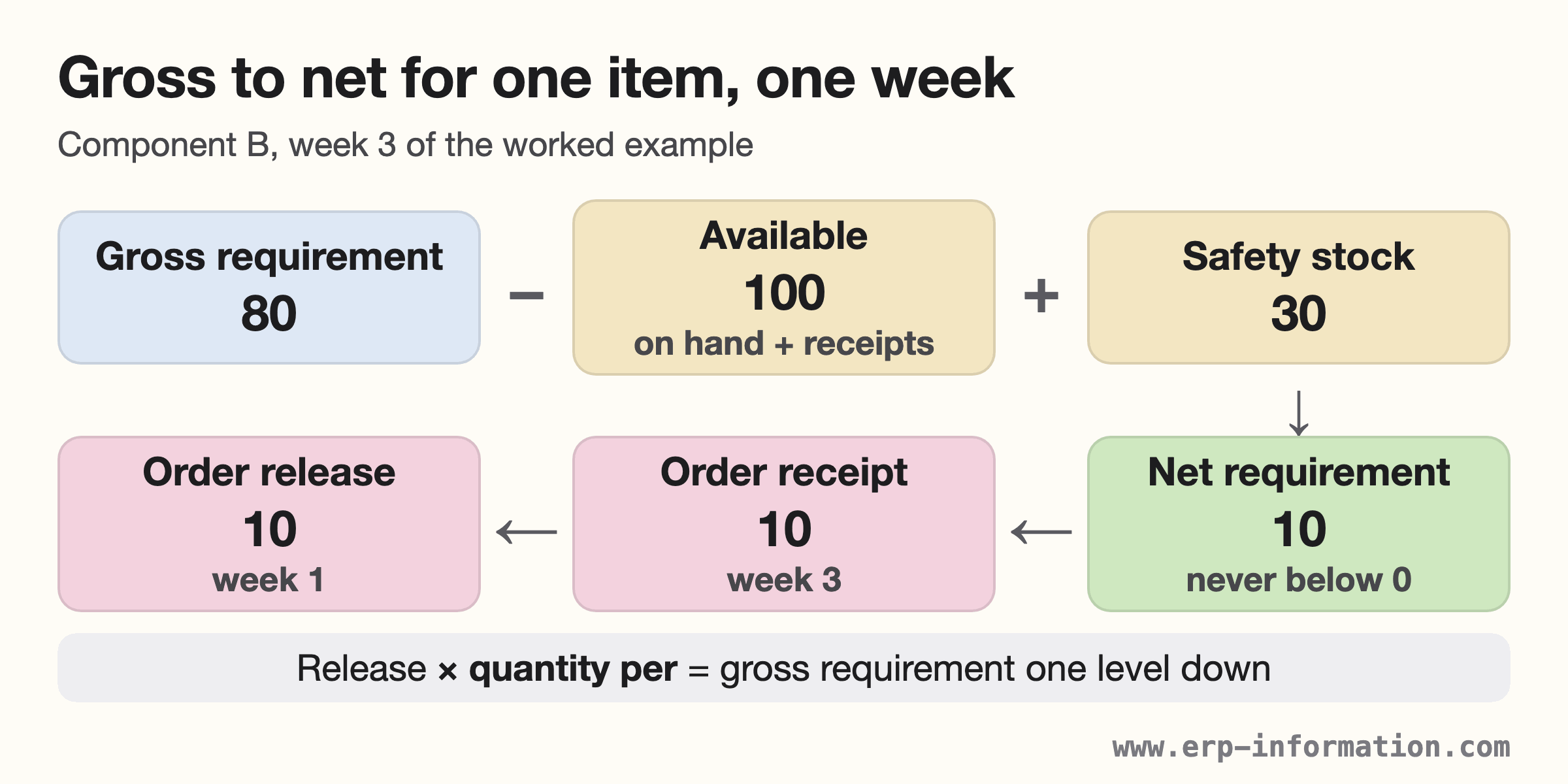
- Explode. Multiply the release by the quantity per parent. The result is each component’s gross requirement, one level down.
Before it plans a new order, MRP looks at the open orders it already has. ASCM notes that time-phased MRP “makes recommendations to reschedule open orders when due dates and need dates are not in phase.” IFS documents the same rule for its MRP: “MRP always suggests moving the dates of existing orders before recommending any new orders to cover the requirements.”

How often MRP recalculates net requirements
Every time it runs, in one of two ways. ASCM’s dictionary describes regeneration MRP as re-exploding the whole master production schedule, with requirements and planned orders completely recalculated. Net change MRP keeps the plan and, whenever requirements, open orders, stock or a bill of materials change, makes “a partial explosion and netting” for only the parts affected.
ETH Zurich’s course adds the trade-off: net change is usually faster when demand changes only slightly, but when many items are affected the whole order network has to be recalculated. A University of Houston course describes regeneration as usually triggered by the weekly master schedule update, and net change as a daily update from inventory transactions.
Net requirements formula
Net requirements= Gross requirements- (Scheduled receipts+ On-hand inventory)
This is the version in most course notes, including MIT OpenCourseWare, Columbia’s production management notes and IGNOU. It is exact when nothing is reserved and no buffer is kept.
The full formula (ASCM)
ASCM’s Supply Chain Dictionary defines the term this way: “In material requirements planning, the net requirements for a part or an assembly are derived as a result of applying gross requirements and allocations against inventory on hand, scheduled receipts, and safety stock. After being lot-sized and offset for lead time, net requirements become planned orders.”
Net requirement = gross requirement + allocations + safety stock − on hand − scheduled receipts (zero if the result is negative)
Oracle’s MRP user guide (E-Business Suite 12.1) works one period exactly this way. Gross requirements of 100 plus a safety stock level of 50 make a total demand of 150. Scheduled receipts of 110 plus 20 on hand make a total supply of 130, so the net requirement is 150 − 130 = 20.
The formula period by period
In a time-phased record, on hand is not one fixed number. Each period starts with what the previous period left:
Net requirement (week t) = gross requirement (t) + safety stock − [projected balance at the end of week t−1 + scheduled receipts (t)]
Week 1 starts from on hand minus allocations. The balance at the end of each week is the balance carried in, plus scheduled and planned receipts, minus the gross requirement. Gardner’s University of Houston text and Yeh’s University of Toronto chapter both set the calculation up this way.
| Source | What the formula nets | Safety stock |
|---|---|---|
| MIT OCW 2.854, Columbia IEOR 4000 | Gross minus on hand (Columbia: and scheduled receipts) | Not in the formula; MIT treats it as the minimum planned inventory |
| ASCM Supply Chain Dictionary | Gross and allocations against on hand and scheduled receipts | Included |
| Yeh (University of Toronto) | Gross minus available: on hand plus receipts, less allocations and backorders | Subtracted from available once, in period 1 |
| Gardner (University of Houston) | Gross plus safety stock minus stock on hand at the start of the week | Added every week; negatives reset to zero |
Why a net requirement is never negative
A net requirement is a quantity you still have to obtain, so when supply covers demand it is zero, not negative. Gardner’s MRP1 model states it directly: “Net requirements cannot be negative in MRP1. If this formula results in a negative value, the model resets net requirements to zero.”
Some course grids show the same shortfall another way. MIT’s example lets projected on hand fall to −5, Beasley’s OR-Notes to −135, and ETH Zurich defines net requirements as the negative projected available inventory. The quantity is the same; only the sign convention differs, so use the one your course or system uses.
Safety stock is a floor, not extra demand
MIT’s notes treat safety stock as the planned minimum inventory. ETH subtracts it from available inventory at the start, so orders are timed to arrive before the balance would dip below it. Gardner’s course adds two cautions. A net requirement can appear only to restore safety stock. And if you raise gross requirements as a buffer, do it at end-item level only, so safety stock is not duplicated at every level.
The projected available balance is the running result of all this. ASCM defines it as the running sum of on-hand inventory minus requirements plus scheduled receipts and planned orders. Its projected on hand is the same balance excluding planned orders. That is why projected on hand can show a shortage that the projected available balance, after planned orders, does not.
Evaluate Safety stock using our Online Safety Stock Calculator
MRP calculation example
Example 1: one item, one shortage
Start with 40 units on hand and no scheduled receipts. Gross requirements are 45 in week 1 and 40 in week 2. The order quantity is a fixed lot of 60.
| Week | 1 | 2 |
|---|---|---|
| Gross requirements | 45 | 40 |
| Scheduled receipts | 0 | 0 |
| Available from the previous period | 40 | 55 |
| Net requirement | 5 | 0 |
| Planned order receipt | 60 | 0 |
| Projected available balance | 55 | 15 |
Week 1. Gross requirement 45 against 40 on hand. Without an order the balance would fall to minus 5, and that shortfall of 5 units is the net requirement.
The order. The net requirement is 5, but the lot size is 60, so a planned order receipt of 60 is scheduled. Available becomes 40 plus 60 minus 45 = 55. Netting says how much is missing; the lot-sizing rule decides how much is actually ordered.
Week 2. Gross requirement 40 against 55 carried in, so the net requirement is zero and no order is released. The balance closes at 55 minus 40 = 15.
Example 2: two levels, allocations, safety stock and a shared part
Courses often set this kind of problem: find the net requirements for each component in a given week. The data:
- Product A (end item): 20 on hand, lead time 1 week, lot-for-lot. The master schedule needs 30 in week 2, 40 in week 4 and 50 in week 6.
- Component B: 2 per A. 100 on hand, of which 20 are allocated to an existing production order. Safety stock 30. A scheduled receipt of 40 is due in week 2. Lead time 2 weeks, lot-for-lot.
- Part C: 1 per A and 1 per B, so it sits on two levels and its low-level code is 2. 150 on hand, lead time 1 week, lot-for-lot.
Every figure below is our calculation, by the period-by-period formula above. We checked the method with a script that reproduces the worked MRP1 record in Gardner’s University of Houston text exactly.
Step 1: net product A. Week 2 needs 30 against 20 on hand, so 10 are missing. Nothing is left after that, so weeks 4 and 6 are net in full. Each receipt is released one week earlier.
| Wk | Gross | Balance | Net | Receipt | Release |
|---|---|---|---|---|---|
| 1 | 20 | 10 | |||
| 2 | 30 | 0 | 10 | 10 | |
| 3 | 0 | 40 | |||
| 4 | 40 | 0 | 40 | 40 | |
| 5 | 0 | 50 | |||
| 6 | 50 | 0 | 50 | 50 |
Step 2: explode to B. Each A needs two B, so A’s releases of 10, 40 and 50 in weeks 1, 3 and 5 become B gross requirements of 20, 80 and 100 in the same weeks.
Step 3: net B. B starts with 100 − 20 allocated = 80. Week 1 leaves 60, and the scheduled receipt lifts week 2 to 100. Week 3: 80 + 30 safety stock − 100 = 10. By week 5 the balance is down to the 30 of safety stock, so all 100 is net. Lot-for-lot, each net requirement is also the planned receipt, released two weeks earlier.
| Wk | Gross | Sched. | Balance | Net | Release |
|---|---|---|---|---|---|
| 1 | 20 | 60 | 10 | ||
| 2 | 40 | 100 | |||
| 3 | 80 | 30 | 10 | 100 | |
| 4 | 30 | ||||
| 5 | 100 | 30 | 100 | ||
| 6 | 30 |
Step 4: net C once, at level 2. C’s gross requirements add both parents’ releases: 10 + 10 = 20 in week 1, 40 + 100 = 140 in week 3 and 50 in week 5. Against 150 on hand, week 3 is 10 short and week 5 is 50 short, released one week earlier.
| Wk | Gross | Balance | Net | Release |
|---|---|---|---|---|
| 1 | 20 | 130 | ||
| 2 | 130 | 10 | ||
| 3 | 140 | 0 | 10 | |
| 4 | 0 | 50 | ||
| 5 | 50 | 0 | 50 | |
| 6 | 0 |
The low-level code trap: net C separately for each parent, each time against the full 150 on hand, and neither calculation shows a shortage. Both count the same 150 units. The real plan is 60 units short. Netting each item once, after all its parents, is what prevents this.
Answer: B’s net requirements are 10 in week 3 and 100 in week 5; C’s are 10 in week 3 and 50 in week 5.
Same data, four answers: which formula does your course use?
Take component B again and change only the formula. Its week 5 net requirement moves from 60 to 100 units:
| Formula used | Week 3 | Week 5 |
|---|---|---|
| Gross minus on hand and scheduled receipts | 0 | 60 |
| Also subtract the 20 allocated | 0 | 80 |
| Hold 30 safety stock, ignore the allocation | 0 | 90 |
| Allocation and safety stock both applied | 10 | 100 |
None of these is an arithmetic error. They are different conventions, so check whether your course, exam or ERP system subtracts allocations and protects safety stock before you compare answers.
When the lot size is not lot-for-lot
If B is bought in lots of 100, week 3’s net requirement of 10 becomes a planned receipt of 100. That leaves 120 after week 3, so week 5 needs only 100 + 30 − 120 = 10. A net requirement depends on the lots planned in earlier weeks, which is why MRP nets one week at a time. Gardner’s text shows the same effect: a net requirement of 215 rounds up to a planned order receipt of 300.
Practice question
Item X has 80 on hand, 10 allocated, safety stock 20, a scheduled receipt of 30 due in week 2, a lead time of 1 week and lot-for-lot ordering. Gross requirements are 40, 50, 30 and 60 in weeks 1 to 4. Find the net requirements and the planned order releases.
Answer: available at the start is 80 − 10 = 70. Week 1: 40 + 20 − 70 is negative, so 0, and 30 carries forward. Week 2: 50 + 20 − (30 + 30) = 10. Weeks 3 and 4 start at the 20 of safety stock: 30 + 20 − 20 = 30, and 60 + 20 − 20 = 60. Net requirements: 0, 10, 30, 60. Releases: 10 in week 1, 30 in week 2, 60 in week 3. With the basic formula (no allocations, no safety stock) the net requirements are 0, 0, 10, 60.
How SAP, Dynamics 365 and other ERP systems calculate net requirements
Every MRP engine runs the same gross-to-net logic, whether it sits in the ERP system or in a separate supply chain planning tool. Where they differ is which stock counts, how safety stock enters and how often the calculation runs. This is what each vendor’s own documentation says, read on 11 October 2026.
SAP S/4HANA: the net requirements calculation
SAP describes the step in one sentence: “The net requirements calculation is carried out in MRP in the planning run after the planning file check and at plant level.” The system checks whether plant stock and fixed receipts already planned cover each requirement, and creates a procurement proposal for any shortage. The lot-sizing procedure, scrap and rounding then set the proposal quantity.
Plant stock for MRP is unrestricted-use stock, stock in quality inspection, and unrestricted-use and quality-inspection consignment stock, in every storage location not excluded from planning. Whether stock in transfer, blocked stock and restricted-use stock also count is set in Customizing.
On safety stock, SAP’s training course says “Safety stock reduces the stock available for planning”, and MRP replenishes it even when stock is only slightly below the level. SAP’s support content shows that a percentage of safety stock can be released to cover requirements, set per plant and MRP group. Runs are regenerative (NEUPL) or net change (NETCH, or NETPL within the planning horizon). In MRP Live, leaving the Regenerative Planning checkbox empty runs net change, and net change in the planning horizon is not supported. Materials are planned in low-level-code order, level 0 first.
Microsoft Dynamics 365: the Net requirements page
In Dynamics 365 Supply Chain Management, the Net requirements page “shows the net requirements that master planning calculated for the product”. It also shows the coverage settings applied in the run, requirement totals by transaction type, pegging, and receipts, issues and projected available inventory per period.
Safety stock (the item coverage minimum) is tracked as a requirement type, like sales lines or BOM lines. Because it is not real demand, real demand is served first when strict safety stock pegging is off. The coverage code (Period, Requirement, Min./Max., Manual, Priority or Decoupling point) decides how a net requirement becomes a planned order. Positive days limit how far ahead existing stock or receipts may cover future demand, and negative days set how late a receipt may be before new supply is planned. With Planning Optimization, every plan run is regenerative, and a negative on-hand quantity is treated as zero.
Other systems at a glance
| System | Safety stock in netting | A setting worth knowing |
|---|---|---|
| Business Central | Loaded as demand on the planning start date; can be consumed, then refilled | Low-level codes must be current before planning (dynamic, or by batch job) |
| Oracle Fusion Cloud (26C) | Netting runs against the daily safety stock level | Netting on or off per subinventory, such as stock on quality hold |
| ERPNext | Optional, off by default | The projected-quantity checkbox changed meaning between versions 15 and 16 |
| Odoo 19 | The MPS keeps a safety stock target as a minimum | Reordering rules trigger on forecasted stock, not on-hand |
| NetSuite | Set per item location, as a quantity or as days of supply | Inside the planning time fence, no new or rescheduled orders |
| IFS Cloud (26R1) | Planned on the run date or one day before | Moves existing orders before suggesting new ones |
ERPNext deserves a warning. Its documentation gives the netting rule, with Skip Available Raw Materials enabled, as “Required Qty = BOM Required Qty − Projected Qty”. In its source code, the field behind that rule was labelled “Ignore Available Stock” in version 15, where ticking it orders even if stock exists. In version 16 the same field is labelled “Consider Projected Qty in Calculation (RM)”, is on by default, and ticking it nets against projected quantity. Same field, opposite effect, so read the label on your version before you trust a production plan.
Common mistakes when calculating net requirements
- Treating the net requirement as the order quantity. Netting says what is missing; the lot-sizing rule decides what is ordered.
- Netting every week against the starting stock. The balance carries forward: week 3 starts with what week 2 left, including planned receipts.
- Using a parent’s net requirement as the component’s demand. A component’s gross requirement comes from the parent’s planned order releases, in the week of release, not from its net requirements.
- Netting a shared part once per parent. It double-counts the same stock (Example 2, part C).
- Ignoring allocations. Stock assigned to specific orders is not free to use again.
- Adding safety stock at every level. It multiplies the buffer through the bill of materials.
- Mixing up scheduled receipts and planned order receipts. A scheduled receipt is an order already released; a planned order receipt has not been released.
- Missing a release date that has already passed. If the offset puts the release before today, the order cannot arrive in time. Gardner’s MRP1 model flags it with a “Not enough leadtime” message.
Why is it calculated?
Because it is the step that turns demand into orders in MRP-based production planning. Without netting, MRP would order the full gross requirement every period and buy again what is already in stock or already on order. With it, each planned order covers only a real shortfall, on the date the lead time requires. Beasley’s OR-Notes put the principle simply: “never order before you need to, never plan to stockout.”
Net requirements also make the plan traceable. Pegging traces a component’s requirement back up to the order or end item that caused it, so a planner can see which customer order a late part will delay. ASCM lists MRP as one of the linked processes that make up manufacturing resource planning (MRP II), between master scheduling and capacity planning.
FAQs
How to calculate net requirements in MRP?
Work item by item in low-level-code order, one period at a time. Take the gross requirement, add safety stock, and subtract the stock available for that period: the projected balance carried in plus any scheduled receipts due. Start week 1 from on hand minus allocations. If the result is zero or less, the net requirement is zero. Lot-size what is left and offset it by the lead time to get the planned order release.
How are gross-to-net calculations processed for MRP?
In MRP, gross-to-net is the netting step, and it has nothing to do with revenue or profit. For each item in each period MRP takes the gross requirement, subtracts the quantity on hand (less allocations) and any scheduled receipts, and adds back any safety stock that must be preserved. Whatever remains, floored at zero, is the net requirement. MRP runs this level by level down the bill of materials: the net requirement is lot-sized and offset by the lead time to create a planned order release, and that release becomes the gross requirement for the components one level below, which are then netted in turn.
Can a net requirement be negative?
No. A net requirement is the quantity still to be obtained, so when on-hand stock and scheduled receipts cover the gross requirement it is zero, and the surplus carries forward as the projected available balance. Some textbook grids show the same shortfall as a negative projected balance before the planned order is added. The quantity is the same; only the sign convention differs.
How often are net requirements recalculated?
Every time MRP runs. A regenerative run re-explodes the whole master production schedule and recalculates every net requirement; a net change run re-nets only the items affected by a change. SAP S/4HANA offers both, while Dynamics 365 Planning Optimization always runs regenerative plans. One University of Houston course describes regeneration as usually weekly and net change as daily.
Is safety stock included in net requirements?
In ASCM’s definition, yes: safety stock is applied in the netting, so a net requirement appears as soon as the projected balance would fall below it. SAP S/4HANA reduces the stock available for planning by the safety stock, Oracle Fusion nets against the daily safety stock level, and in ERPNext it is an option that is off by default. Many course formulas leave it out, so check which convention your course or system uses.
Before you trust a net requirement figure
Check these six things in the run, or in your own working, before you act on the number:
- Gross requirements include every parent’s releases, so low-level codes are up to date.
- On hand is usable stock of this item, minus allocations.
- Scheduled receipts are real released orders with current due dates.
- Safety stock is counted once, at the level where it is meant to sit.
- Releases dated in the past are flagged and expedited, not ignored.
- The lot-sizing rule is known, so the net requirement is not confused with the order quantity.
How we researched this page
Updated 11 October 2026. We read ASCM’s Supply Chain Dictionary (18th edition), course texts from ETH Zurich, the University of Houston, Columbia, MIT, the University of Toronto, IGNOU and Brunel, and the MRP documentation of SAP, Microsoft, Oracle, IFS, Odoo and ERPNext, all fetched on 11 October 2026. Every worked example is our own calculation, checked by a script that reproduces the published MRP1 record in Gardner’s University of Houston text exactly. We also corrected two cells in our 2024 plan image: the projected on-hand in the week of each requirement now reads 0, as an end-of-week balance should.
References
- ASCM Supply Chain Dictionary, 18th edition (2024), entries: net requirements, gross requirement, scheduled receipt, allocation, projected available balance, low-level code, net change MRP, regeneration MRP, pegging (ASCM lists the 20th edition as current)
- ETH Zurich (Schoensleben), Integral Logistics Management: 12.3.2 The MRP technique
- ETH Zurich: 12.3.2b Comparing the effects of MRP and order point
- ETH Zurich: 12.1.1 Allocated quantities and the projected available inventory
- Gardner, University of Houston: Chapter 4, Material Requirements Planning (MRP1 model)
- Gardner, University of Houston: MRP lecture slides
- Gallego, Columbia University IEOR 4000: Material Requirements Planning
- Gershwin, MIT OpenCourseWare 2.854: Material Requirements Planning
- Yeh, Material Requirement Planning (MGT2405, University of Toronto), chapter 2
- IGNOU eGyanKosh: Unit 3, Material Requirements Planning
- Beasley, OR-Notes: Materials requirements planning
- SAP Help, S/4HANA 2025: Net requirements calculation
- SAP Learning: Understanding MRP in SAP S/4HANA
- SAP support content: How to check possible causes if MRP does not create any proposals
- SAP Help, S/4HANA 2025: Planning run type
- SAP Help, S/4HANA 2025: Carrying out MRP Live
- SAP Help, S/4HANA 2025: Calculating low-level codes
- Microsoft Learn: Net requirements and pegging information (Dynamics 365 SCM)
- Microsoft Learn: Safety stock fulfillment for items
- Microsoft Learn: Coverage settings
- Microsoft Learn: Master plans overview (positive and negative days)
- Microsoft Learn: Master planning home page
- Microsoft Learn: Business Central, balancing supply and demand
- Microsoft Learn: Business Central, planning parameters
- Oracle Fusion Cloud SCM 26C: Supply plan options for organizations and schedules
- Oracle Fusion Cloud SCM 26C: How FIFO pegging is used in supply chain planning
- Oracle MRP User’s Guide, E-Business Suite 12.1 (netting worked example)
- ERPNext documentation: Production Plan
- ERPNext source, version-15: production_plan.json
- ERPNext source, version-16: production_plan.json
- Odoo 19.0 documentation: Reordering rules
- Odoo 19.0 documentation: Master production schedule
- Oracle NetSuite Help Center: Setting supply planning parameters
- IFS Cloud 26R1: Phases of MRP
- IFS Cloud 26R1: Material requirements planning
Using Google Search? Add erp-information.com as a preferred source.