Epicor Inventory Management is the stock-control capability inside Epicor Kinetic (the platform formerly sold as Epicor ERP). It tracks every part across sites, warehouses, and bins in real time, values that stock as each transaction posts, and tells planners when to reorder before an item runs short. It is aimed mainly at manufacturers and distributors that need lot and serial traceability, multi-site visibility, and tight links between inventory, purchasing, and production.
This guide covers how the module works, how to set reorder points and safety stock, how to get low-stock alerts and reorder notifications, how lot, serial, and bin tracking behave, and where the Kinetic Warehouse (WMS) and Epicor IP&O add-ons fit. The aim is to give you a clear, practical picture before you configure it or compare it against another system.
What is Epicor inventory management?
Epicor inventory management is a module of the Epicor Kinetic ERP system that records what you hold, where you hold it, and what it is worth, and keeps that record accurate through every receipt, issue, transfer, and adjustment. Because it shares one database with purchasing, manufacturing, and sales, the on-hand number a planner sees is the same number that feeds MRP, order promising, and the general ledger.
In practice the module tracks stock at every stage of the supply chain, from raw material through work in process to finished goods, and holds the detail that regulated and serialized industries need: supplier, receipt date, lot, serial, expiration date, country of origin, and bin location. You configure which of those attributes each part carries, so a distributor tracking cartons and a medical manufacturer tracking expiring lots both use the same engine with different controls switched on.
| Aspect | Detail |
|---|---|
| Software | Epicor Kinetic (formerly Epicor ERP), inventory module |
| Best for | Mid-market and larger manufacturers and distributors, often multi-site |
| Core capabilities | Real-time stock tracking, reorder point / min-max / safety stock, lot and serial traceability, multi-site and bin control, valuation, cycle counting |
| Costing methods | Average, FIFO, LIFO, standard, lot, last |
| Alerts | Active Home Page tiles, Epicor Data Discovery, BAQ and BPM email or SMS |
| Add-on modules | Kinetic Warehouse (WMS), Advanced Material Management (PCID), Epicor IP&O |
| Deployment | Public cloud (SaaS) or on-premises |
Related Articles
Key features of Epicor inventory management
The module bundles the day-to-day stock-control tools a planner works with, plus the traceability and costing controls that keep the numbers auditable. The core capabilities are:
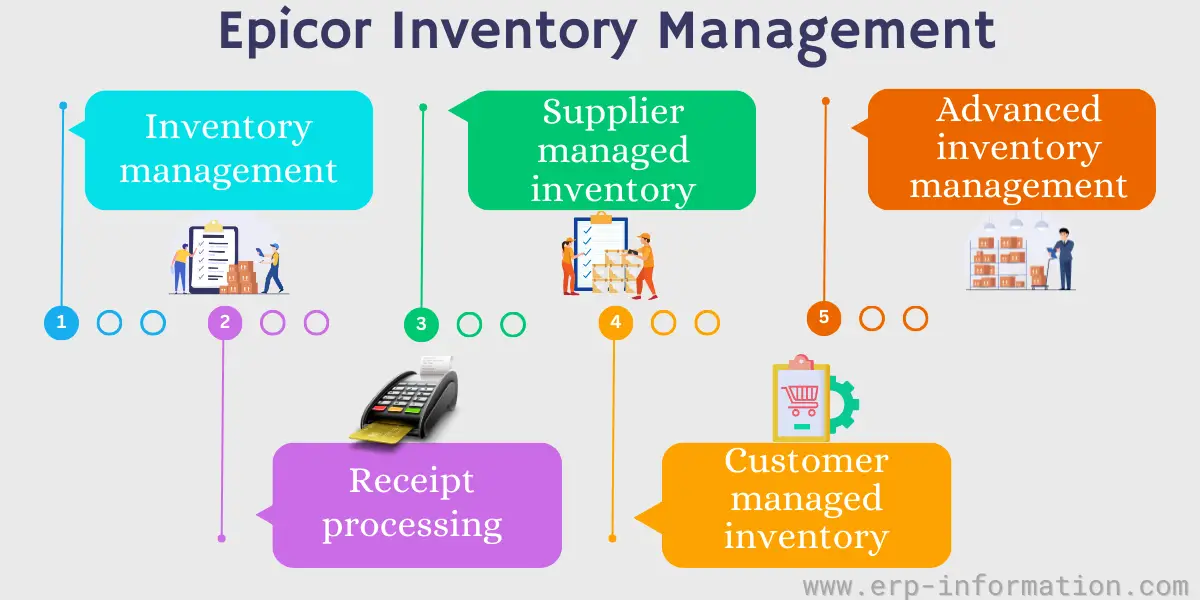
- Real-time stock tracking for raw materials, work in process, and finished goods, updated by every receipt, issue, transfer, and adjustment.
- Reorder analysis and shortage monitoring that flag parts below their minimum and suggest purchase or transfer action.
- Lot and serial tracking with full forward and backward traceability through receiving, production, storage, and shipment.
- Multi-site and bin control across plants, warehouses, consignment locations, and in-transit stock, with inter-site transfer orders.
- Inventory valuation using average, FIFO, LIFO, standard, lot, or last cost, recalculated automatically on each transaction.
- Cycle counting driven by ABC class, plus full physical inventory counts with variance review.
- Available-to-promise checks that net demand against supply so sales does not oversell stock.
- Part cross-referencing, alternate parts, and country-of-origin tracking for substitution and trade compliance.
Reorder points, min/max, and safety stock
Reorder control in Epicor lives on the part’s Site (plant) record, not on the part as a whole, so the same item can carry different rules in each warehouse. On the planning fields you set a minimum, maximum, and safety stock quantity, choose whether the part is planned by reorder point, min/max, or day-of-supply, and enter the purchasing or manufacturing lead time. Epicor’s reorder point calculation weighs that lead time, demand variability, and the service level you want to hold, so fast-moving and long-lead parts do not share one blunt threshold.
| Planning method | What triggers replenishment | Best for |
|---|---|---|
| Reorder point | On-hand falls to a trigger calculated from lead time, demand variability, and service level | Independent-demand items with steady usage |
| Min/max | On-hand hits the minimum, then replenishes up to the maximum | Simple, visually managed stock |
| Days of supply | Projected coverage drops below a set number of days | Items with seasonal or shifting demand |
| MRP | Netted demand from sales orders, forecasts, and bills of material | Dependent-demand components in manufacturing |
When projected stock drops below the trigger, the system does not just warn you. MRP or the reorder analysis generates suggested actions: a purchase requisition for bought items, a job for made items, or a transfer order when another site holds the stock. A planner reviews those suggestions in the Time Phase inquiry, which lays out on-hand, demand, and incoming supply period by period, and then releases the ones to act on. Setting the min, max, and safety numbers correctly is the single biggest lever on whether the module prevents stockouts or buries planners in noise.
Before you load those numbers into Epicor, it helps to work them out independently. Our reorder point calculator and safety stock calculator let you test a threshold against real lead-time and demand figures, so the value you enter on the Site record is grounded rather than guessed.
Epicor inventory alerts and reorder notifications
Epicor surfaces low-stock and reorder alerts in three ways, and most sites use a mix of them rather than one.
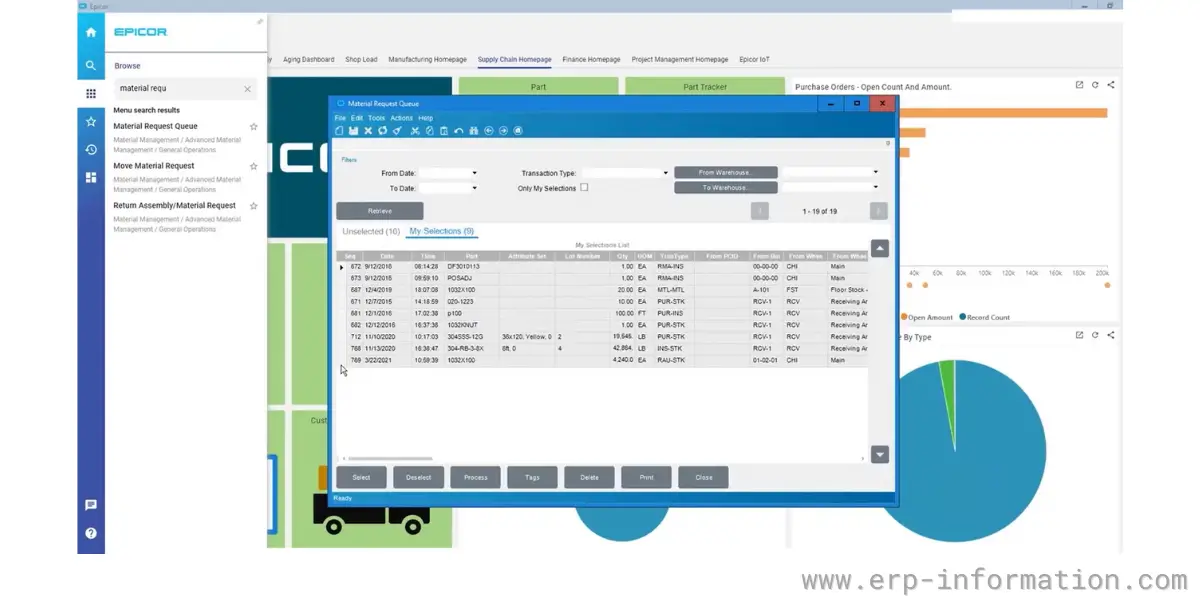
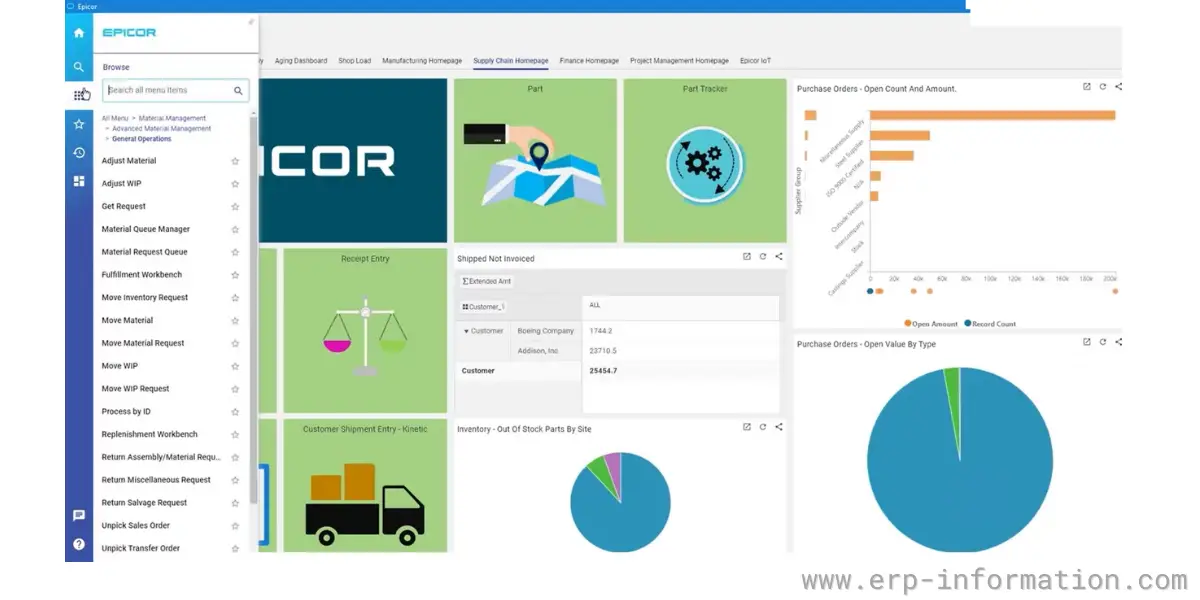
- Role-based dashboards. The Active Home Page gives each user a configurable start screen with tiles and metrics. Epicor ships home pages for executive, financial, manufacturing, and supply chain roles, so a materials manager can pin real-time on-hand, items below reorder point, and pending receipts to one view.
- Epicor Data Discovery (EDD). EDD turns live inventory data into visual cards and dashboards, so staff spot slow movers, excess stock, or a location running short at a glance instead of reading rows of numbers. EDD cards drop straight into the Active Home Page.
- Automated email and SMS alerts. Using a Business Activity Query (BAQ) to define the condition and Business Process Management (BPM) to act on it, Epicor can email or text a buyer the moment a part crosses its reorder point, a lot nears expiry, or a count variance exceeds tolerance. Third-party tools such as Codeless Platforms add the same reorder-point notifications without custom code.
The practical answer to “how do I get a low-stock alert in Epicor?” is to set the reorder point on the part’s Site record, add an items-below-minimum tile or EDD card to the buyer’s Active Home Page, and, for anything time-critical, wire a BAQ plus BPM alert so the notification reaches the right person by email or SMS rather than waiting for someone to open a screen.
Lot, serial, and bin traceability
For regulated and high-value goods, Epicor tracks each unit or batch end to end. Lot control follows a batch from supplier receipt through every job and shipment, and serial tracking does the same for individual units, which supports recalls, warranty claims, and audit trails in industries like automotive, aerospace, food, and medical devices. Expiration-date control lets the system pick the oldest usable lot first and quarantine stock that has aged out.
Underneath the lot and serial layer sits bin-level location control. Every part can be assigned to a specific bin within a warehouse, and Epicor knows whether that bin is standard stock, inspection, or shipping. That location detail is what makes directed picking and accurate cycle counts possible, and it feeds straight into the mobile warehouse tools described below.
Inventory costing and valuation
Epicor values stock using the costing method you assign to each part, and receipt processing updates the running cost on every transaction, so the on-hand value in inventory always ties back to the general ledger without a separate reconciliation step. This is a live perpetual inventory system, which means month-end reporting and stock-status inquiries pull from the same figures planners use during the day rather than a periodic count. The method you pick per part matters, because it changes both the cost of goods sold you report and how much your on-hand value swings when purchase prices move.
| Costing method | How Epicor applies it | Best suited to |
|---|---|---|
| Average | Blends every receipt into one moving average cost | Distributors with fluctuating purchase prices |
| FIFO | Issues the cost of the oldest stock first | Perishable or date-sensitive goods |
| LIFO | Issues the cost of the newest stock first | Specific US tax-driven scenarios |
| Standard | Uses a preset cost and reports the variance | Repetitive manufacturing that tracks variances |
| Lot | Holds a distinct cost for each lot | Batch industries where lot cost differs |
| Last | Uses the most recent purchase cost | Simple, fast-moving reorder items |
Cycle counting and physical inventory
Rather than shutting the warehouse for one annual count, Epicor supports rolling cycle counts scheduled by ABC class, so high-value A items are counted often and low-value C items less so. Counts run against bin and lot detail, variances route through an approval workflow before they post, and the system still supports a full physical inventory when you need one. This keeps record accuracy high enough that planners can trust the on-hand number the reorder logic depends on, which is the whole point of counting in the first place.
Epicor Kinetic Warehouse (WMS) and mobile
Epicor’s warehouse management layer moves inventory transactions onto the floor with barcode and QR scanning on handheld devices, so receiving, put-away, picking, counting, and shipping post to Kinetic in real time instead of on paper. The mobile trackers let a worker look up bins, lots, parts, orders, jobs, receipts, and PCIDs from the device, and scan validation checks the operator at part, PCID, bin, and lot level so a wrong scan is caught before it becomes a wrong pick.
For sites that handle stock in cartons, pallets, or mixed containers, Epicor Advanced Material Management (AMM) adds PCID (Package Control Identification) tracking. An AMM license lets you receive, transfer, adjust, and fulfill by scanning a single container ID that carries all the parts and lots inside it, which cuts keystrokes and errors in high-volume operations. Core WMS functions covered include order management, picking and packing, put-away, returns, cross-docking, task and load management, and shipping.
Supplier managed inventory, consignment, and VMI
Not all stock on your shelves is stock you own or replenish yourself. Epicor’s Supplier Managed Inventory lets a vendor see agreed stock levels for the products they supply and propose replenishment, which shifts the routine reordering of commodity items onto the party closest to them. Consignment support tracks goods that physically sit in your warehouse but stay on the supplier’s books until you consume them, so the value moves to your ledger only at the point of use. The same visibility, run the other direction, underpins vendor-managed inventory arrangements where you replenish a customer’s stock of your products. These models cut carrying cost and free planners to focus on the parts that actually need judgment.
Epicor IP&O for inventory optimization
The base module keeps inventory accurate; Epicor Inventory Planning and Optimization (IP&O) is the optional layer that makes it leaner. IP&O adds statistical demand forecasting and probability-based stocking so safety stock and reorder points are set from real demand patterns and target service levels rather than a static number a planner typed once. For businesses carrying thousands of SKUs across several sites, it is the difference between reacting to shortages and planning stock deliberately, and it is usually the upgrade a growing Epicor site reaches for once the fundamentals are clean.
How to set up Epicor inventory management
A workable rollout follows a clear order rather than switching everything on at once:
- Define your sites, warehouses, and bins so the system knows every physical place stock can sit.
- Set up parts with the right controls: unit of measure, costing method, and whether the part is lot, serial, or expiration tracked.
- Enter planning data on each part’s Site record: minimum, maximum, safety stock, lead time, and the reorder method.
- Load accurate opening balances, then start cycle counting so record accuracy stays trustworthy from day one.
- Build the alerts: add reorder and stock-status tiles or EDD cards to the buyers’ Active Home Pages, and set BAQ plus BPM notifications for the exceptions that cannot wait.
Get the site, part, and planning data right first, because reorder points and alerts are only as good as the numbers behind them.
Who Epicor inventory management is for
Epicor fits mid-market and larger manufacturers and distributors that run multiple sites and need real lot or serial traceability, not a small retailer looking for a lightweight stock app. It earns its keep where inventory is tied tightly to production and purchasing, where compliance demands an audit trail, and where the cost of a stockout or an expired lot is high. Businesses on Epicor already, or evaluating it against systems like NetSuite or Infor, get the most value because inventory shares one live database with the rest of the ERP rather than syncing across bolt-on tools.
FAQs
How do I set up inventory alerts in Epicor?
Set the reorder point, minimum, and safety stock on the part’s Site record, then add an items-below-minimum tile or an Epicor Data Discovery card to the buyer’s Active Home Page. For time-critical items, use a Business Activity Query (BAQ) with a Business Process Management (BPM) rule to send an email or SMS alert the moment a part crosses its reorder point.
Where are reorder points set in Epicor?
Reorder points, minimum, maximum, and safety stock are set on each part’s Site (plant) record, so the same part can carry different rules in different warehouses. Epicor calculates the reorder trigger from lead time, demand variability, and your target service level, then MRP or reorder analysis suggests a purchase, job, or transfer when stock falls below it.
What inventory costing methods does Epicor support?
Epicor supports average, FIFO, LIFO, standard, lot, and last cost. The costing method is set per part, and receipt processing recalculates the value on every transaction so inventory stays reconciled to the general ledger in real time.
What is the difference between Epicor inventory management and Epicor WMS?
Inventory management records what you hold, its value, and when to reorder. Epicor’s warehouse management (WMS) executes the physical movements, using handheld barcode and QR scanning for receiving, put-away, picking, counting, and shipping, with Advanced Material Management (AMM) adding PCID container tracking. Most sites use both together.
Can Epicor track lot and serial numbers?
Yes. Epicor provides full forward and backward traceability by lot or serial number through receiving, production, storage, and shipment, along with expiration-date control that issues the oldest usable lot first. This supports recalls, warranty claims, and audit requirements in regulated industries.
What inventory reports are available in Epicor?
Epicor includes on-hand, valuation, and stock-movement reports, plus stock-status, shortage, and reorder inquiries. Epicor Data Discovery and custom Business Activity Queries let you build additional views, and everything can be surfaced as tiles on the Active Home Page.
Conclusion
Epicor inventory management is strongest when it is treated as the accurate core of the wider Kinetic system rather than a standalone stock list. Set the site, part, and planning data correctly, keep records honest with ABC cycle counts, put reorder points and alerts where the buyers actually look, and add the Kinetic Warehouse or IP&O layers as volume and complexity grow. Done that way, the module does the quiet work of preventing stockouts, protecting margin, and keeping every promised order backed by stock that is really there.
References