A bill of materials (BOM) is the structured list of every subassembly, part and raw material that goes into one unit of a product, with the quantity of each. ERP systems use it to work out what to buy and make (MRP), what the product costs, and which parts to issue to each production order.
It is one of the three inputs to material requirements planning (MRP), alongside the master production schedule and inventory records. Just as important is what a BOM does not hold: in SAP, Microsoft Dynamics 365 and Oracle, the operations, labour and machine times sit in a separate record, the routing.
What this guide adds: one bicycle BOM worked through explosion, netting and four standard views; sourced definitions of phantom, planning and pseudo BOMs; and tables of what seven ERP systems call each BOM concept, checked against their documentation on 11 October 2026.
What is a Bill of Materials?
The ANSI Z94 terminology for operations and inventory planning, published by the Institute of Industrial and Systems Engineers (IISE), defines a BOM as “A listing of all the subassemblies, parts, raw materials, components, bulk products, etc. that go into a parent assembly showing the quantity of each required.” SAP’s documentation puts it more tightly: a BOM is “a complete, formally structured list of the components that make up a product or assembly”, and each line carries the component’s number, its quantity and its unit of measure.
Three ideas carry the rest of this page:
- Parent and child. Every line links a component (the child) to the item it goes into (the parent). Kurbel’s ERP textbook calls these “consists of” relationships; read the other way, the same links answer where a part is used.
- Quantity per parent. The quantity on a line is for one unit of the parent directly above it, not for one finished product. The system does the multiplying.
- Levels. The finished product is level 0, its direct components level 1, and so on; MRP explodes from level 0 downward one level at a time. Some textbooks number the top level 1, so check the convention before comparing two reports.
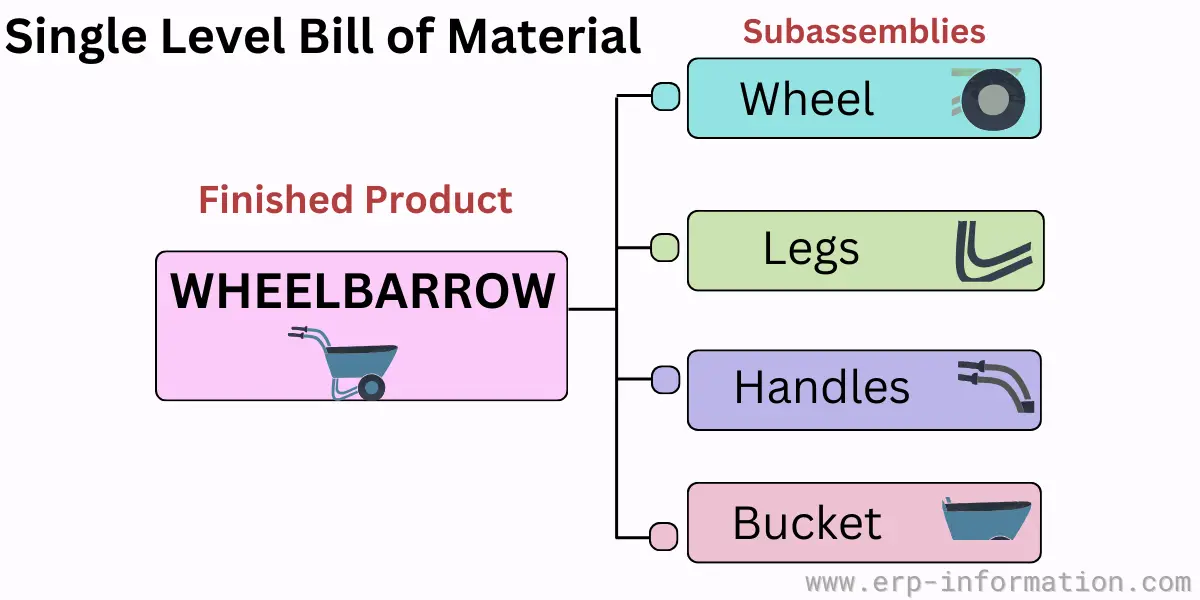
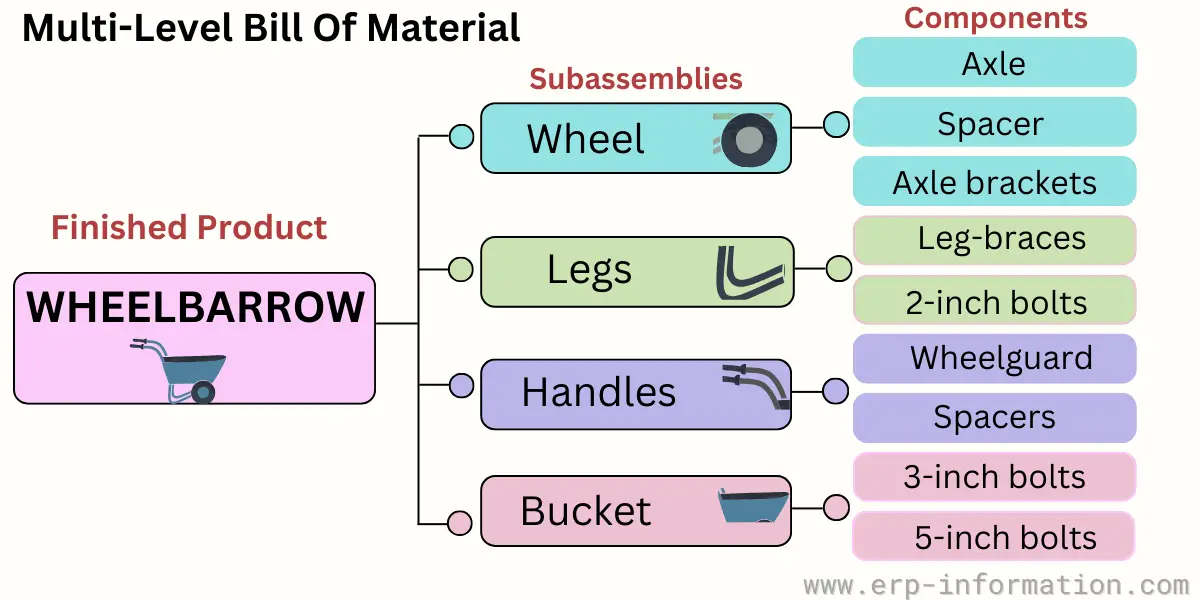
The two wheelbarrow diagrams show the two basic layouts. The ANSI definition of a single-level BOM: “Shows only those components that are directly used in an upper-level item.” A multi-level BOM goes on to list the components of every subassembly too. Several popular guides describe a single-level BOM as a flat list of every part in the product; that is a summarized BOM, covered below.
What a BOM holds, and what belongs in the routing
A BOM holds components and quantities. The steps to make the product, the work centers and the setup and run times belong to the routing in most ERP systems. SAP describes a routing as the record of “which operations must be carried out and the order in which they have to be carried out to produce a material”, including where the work is done and its standard times.
| Record | What it holds | Names in ERP |
|---|---|---|
| BOM | Components, quantity per parent, unit of measure, item type (stock, non-stock, phantom) | SAP material BOM; Dynamics 365 BOM lines; Oracle item structure |
| Routing | Operations in order, work center, setup and run time | SAP routing; Dynamics 365 route; Business Central routing |
| The link | Which component is used at which operation | SAP puts every component on the first operation until you move it; Oracle’s work definition combines both |
There are exceptions. Odoo lets a BoM carry production operations and the time spent on them, and ERPNext says a BOM “may also contain the manufacturing operations required to manufacture the Item”. Business Central’s assembly BOM can list the resources used to assemble the item. Some teaching texts, such as an IIT Roorkee lecture for India’s NPTEL programme, also put work-center information in the BOM file. In every case the operations are recorded as operations, not as component lines.
The split matters for costing: SAP will only build a cost estimate with a quantity structure once both a BOM and a routing exist, taking materials from the BOM and internal activities from the routing. For the labour side of a plan, and for workforce planning, start from the routing’s work centers and times. Our page on discrete manufacturing covers the same split.
BOM vs bill of quantities, formula and SBOM
Several documents share the word bill or the letters BOM. They are not interchangeable:
| Term | What it lists | Where it is used |
|---|---|---|
| Bill of materials | Parts and quantities in one unit of a product | Manufacturing and ERP |
| Routing | Operations, work centers and times | Manufacturing and ERP |
| Formula or recipe | Ingredients, plus co-products and by-products | Process industries |
| Bill of quantities | Measured items of building work, priced by contractors in a tender | Construction |
| SBOM | Software components and their supply chain relationships | Software security |
RICS, the surveyors’ body, defines a bill of quantities as “a list of the items with detailed identifying descriptions and quantities, which make up the component parts of a building”; it becomes a contract document used to price tenders and value work done. SAP notes that, depending on the industry, BOMs “may also be called recipes or lists of ingredients”.
Bill of Materials Example
A racing bicycle shows how the structure works. Written as a multi-level (indented) BOM, indentation shows how parts roll up into subassemblies, and each quantity is per one unit of the parent directly above it:
| Level | Part | Qty per parent |
|---|---|---|
| 0 | Bicycle (finished product) | 1 |
| . 1 | Frame | 1 |
| . 1 | Wheel assembly | 2 |
| . . 2 | Rim | 1 |
| . . 2 | Tire | 1 |
| . . 2 | Spoke | 32 |
| . 1 | Drivetrain | 1 |
| . . 2 | Chain | 1 |
| . . 2 | Crankset | 1 |
| . 1 | Handlebar | 1 |
| . 1 | Seat | 1 |
The quantities multiply down the levels, which is exactly how MRP turns a build plan into a parts plan. Build one bike and you need two wheel assemblies; each wheel assembly needs 32 spokes, so one bike takes 64 spokes. Plan 100 bikes and that becomes 200 wheel assemblies and 6,400 spokes. Explosion is the ANSI term for this step: “The function of utilizing the parent assembly bill of material to determine the quantity needed of every subassembly or component.”
How MRP explodes and nets it: 100 bikes with stock on hand
Real plans subtract stock at every level before going further down. In the textbook method, the planned orders of the level 0 items become the gross requirements of level 1, then level 2, and so on. At each level, gross requirements are netted against stock on hand and scheduled receipts to give net requirements. Here is our calculation for 100 bikes, with 10 finished bikes, 20 wheel assemblies and 1,000 spokes already in stock:
| Item (level) | Gross need | On hand | Net to build or buy |
|---|---|---|---|
| Bicycle (0) | 100 | 10 | 90 |
| Frame (1) | 90 | 15 | 75 |
| Wheel assembly (1) | 180 | 20 | 160 |
| Rim (2) | 160 | 30 | 130 |
| Tire (2) | 160 | 50 | 110 |
| Spoke (2) | 5,120 | 1,000 | 4,120 |
| Drivetrain (1) | 90 | 0 | 90 |
| Chain (2) | 90 | 25 | 65 |
| Crankset (2) | 90 | 0 | 90 |
| Handlebar (1) | 90 | 40 | 50 |
| Seat (1) | 90 | 0 | 90 |
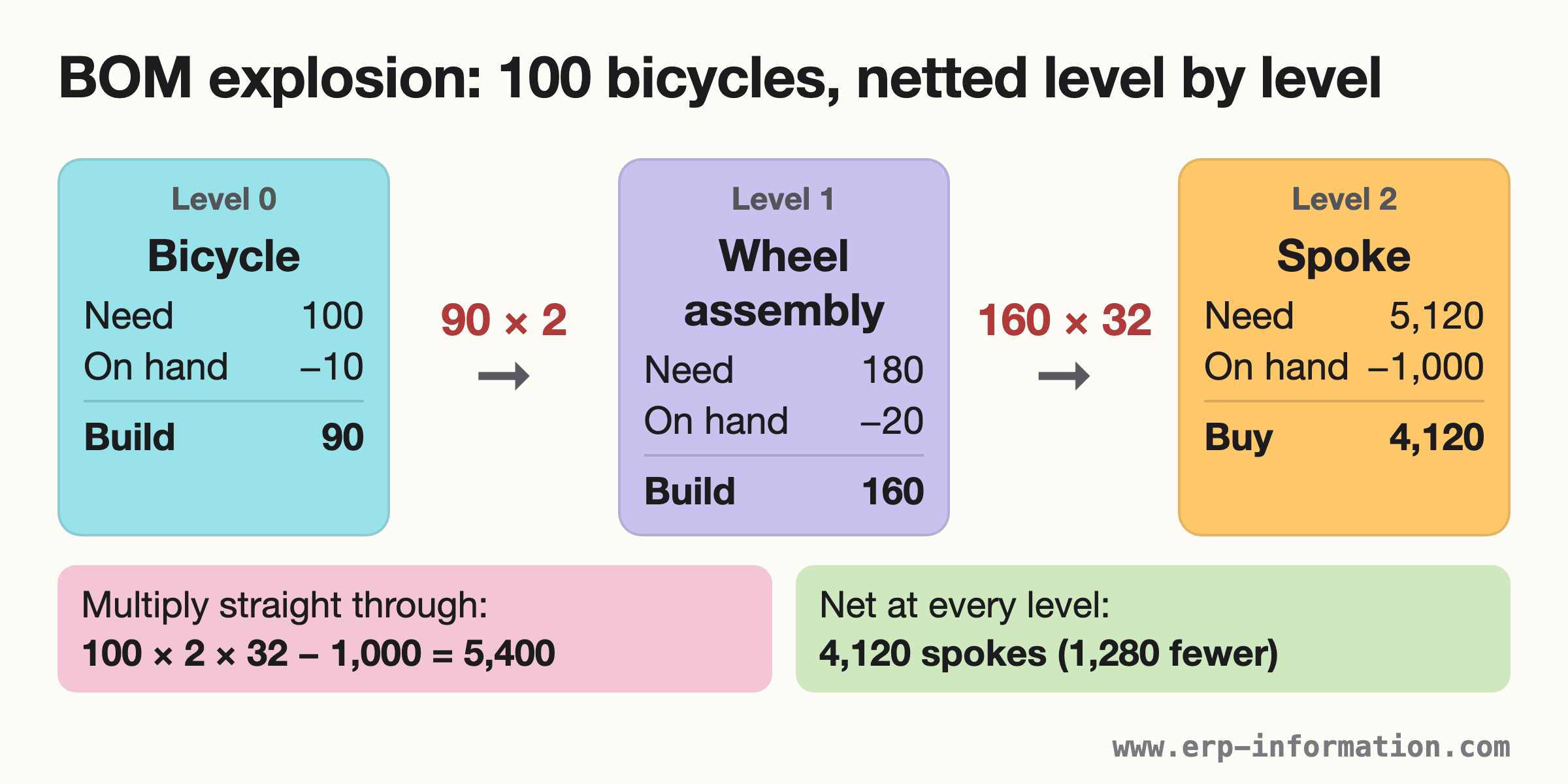
Multiply straight through and subtract stock only at the bottom, and the plan asks for 100 x 2 x 32 = 6,400 spokes, less the 1,000 in stock: 5,400. Netting level by level asks for 4,120. The 1,280 difference is the spokes already built into the 10 finished bikes (640) and the 20 wheel assemblies (640). A plan that ignored them would buy them twice.
Some parts appear at more than one level, for example a spoke used in the wheel and also sold on its own as a spare. MRP plans such a part once, at its low-level code: “the lowest level in any bill of material at which a particular component may appear”. Net requirements for it are not calculated until all gross requirements down to that level are known, which stops stock being handed to the wrong parent. SAP plans low-level code 0 first, then 1, and so on. The period-by-period mechanics are on our pages on gross requirements, net requirements and scheduled receipts.
Four views of one BOM: single-level, indented, summarized and where-used
The same data can be printed four ways, and each answers a different question:
| View | What it shows | For the bicycle |
|---|---|---|
| Single-level | Only the direct components of one parent | Bicycle: frame 1, wheel assembly 2, drivetrain 1, handlebar 1, seat 1 |
| Indented | Every level, each lower level indented further; a part used in two subassemblies appears twice | The table at the top of this section |
| Summarized | Every part once, with its total quantity and no levels | Per bike: 64 spokes, 2 rims, 2 tires, 1 chain, 1 crankset, 1 frame |
| Where-used | Read upward: every parent a component goes into, and how many | Spoke: 32 per wheel assembly, 2 wheel assemblies per bicycle |
SAP calls the top-down report a BOM explosion and the bottom-up one a where-used list, and sets no limit on the number of levels. Run the where-used list before an engineering change. SAP’s own examples of its use are finding the products affected by a change to one part and costing the effect of a raw-material price rise.
Bill of materials management in ERP: planning, costing, production and change control
Once a BOM is in an ERP system, four jobs run from it: planning material, costing the product, issuing parts to production orders and controlling changes. A fifth, keeping it accurate, decides whether the other four work.
Planning: material requirements
In the ANSI definition, MRP is “A system which uses bills of material, inventory and open order data, and master production schedule information to calculate requirements for materials”, then recommends releasing and rescheduling orders. This is where the BOM meets inventory management: the plan should buy only what stock and open orders cannot cover. Because quantities multiply down the levels, one wrong quantity per on a subassembly line is repeated in every plan that uses it.
Costing: the cost roll-up
A cost roll-up adds the cost of every component, level by level, into its parent. Microsoft calls the cost roll-up and sales price calculations “bill of materials (BOM) calculations” and requires a BOM version and a route version for them. In Business Central the unit cost of an assembly BOM always equals the total of its components and resources. SAP takes materials from the BOM and internal activities from the routing. A material-only roll-up for the bicycle, with illustrative prices in US dollars:
| Item | Calculation (USD) | Material cost |
|---|---|---|
| Wheel assembly | Rim 18.00 + tire 14.00 + 32 spokes x 0.40 | 44.80 |
| Drivetrain | Chain 15.00 + crankset 35.00 | 50.00 |
| Bicycle | Frame 120.00 + 2 x 44.80 + 50.00 + handlebar 22.00 + seat 18.00 | 299.60 |
In SAP S/4HANA Cloud Public Edition’s standard setup, the costing run selects BOMs with usage 1 (production), 3 (universal) or 6 (costing). A material whose only BOM has usage 5 (sales and distribution) is not exploded when costs are calculated.
Production: issuing parts to the order
Each manufacturing order takes its components from the BOM. In SAP, only items flagged as relevant to production are copied to the production order. There, a stock item (category L) creates a reservation, a non-stock item (category N) creates a purchase requisition, and a bulk material item is staged at the work center and left out of MRP and costing. Oracle offers push supply (issued by hand) and pull supply, backflushed automatically when the product is completed or when a count-point operation is reported.
Change control: revisions and effective dates
Changes to a released BOM go through an engineering change order, which the ANSI terminology defines as “A document issued by engineering to modify the bill of material and/or graphic drawing previously released to manufacturing”. SAP stores a changed BOM twice, before and after the change, and starts a new validity period from the change date. With no end date set, a BOM stays valid until 31 December 9999. The rules in other systems are in the tables below.
Accuracy: what good looks like
The clearest published target is in US defense contracting. Contracts carrying the material management and accounting system clause, DFARS 252.242-7004, state: “A 98 percent bill of material accuracy and a 95 percent master production schedule accuracy are desirable as a goal”. It is a goal, not a legal floor: a contractor below it must show the Government is not materially harmed.
Hard numbers on what BOM errors cost are scarce. The industry study this page has long cited, a March 2002 white paper by the National Electronics Manufacturing Initiative (NEMI), describes its own data as anecdotal. In it, one contract manufacturer estimated an 80% error rate when validating BOMs received from customers. We found no recent peer-reviewed measurement, and we do not repeat vendor statistics that cite no study.
Key terms associated with the Bill of Materials
The image shows five terms that come with BOMs. Two of them, pseudo BOM and planning BOM, turn out to name the same thing.
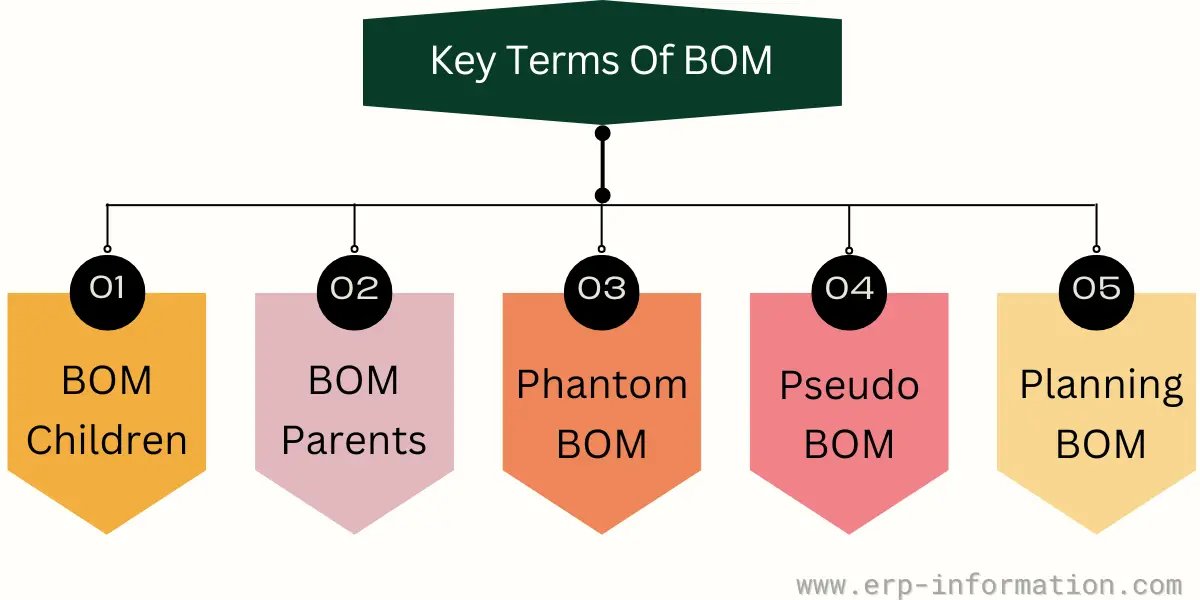
BOM Children
A child is any item that goes into a parent: a raw material, a part or a subassembly. In the bicycle, the wheel assembly is a child of the bicycle and the parent of its rim, tire and spokes. The same item can be a child of many parents, which is what a where-used list shows.
BOM Parents
A parent is any item with its own BOM, from the finished product at level 0 down to every subassembly. Microsoft Dynamics 365 stores each parent’s BOM as one level and builds deeper structures by giving components BOMs of their own.
Phantom BOM
Phantom bill is the ANSI synonym for a transient bill of material: “A bill of material coding and structuring technique used primarily for transient (non-stocked) sub-assemblies.” Its lead time is set to zero and its lot sizing to lot-for-lot, so MRP drives requirements straight through it to its components. It can still use up any stock of the subassembly that happens to exist.
Take the bicycle. If the drivetrain is fitted on the final assembly line and never put into stock, flag it as a phantom: MRP then plans no drivetrain order and passes the 90 straight to chains and cranksets. Each system sets it differently:
- SAP: special procurement key 50, phantom assembly; the header material is not planned. An explosion type with the Phantom assembly off indicator makes MRP plan it after all.
- Microsoft Dynamics 365: BOM line type Phantom; the phantom’s route operations are merged into the parent route, and Microsoft advises avoiding deep hierarchies of phantoms.
- Business Central: a phantom production BOM needs no item card, and its component costs roll straight into the parent’s standard cost.
- Oracle Fusion: supply type Phantom; the same structure can be a phantom under one parent and a stocked subassembly under another.
- Odoo: the BoM type shown as Kit is stored as
phantomin Odoo 20’s source code, although the Odoo user guides we read do not use the word. - ERPNext: an Is Phantom BOM flag on a non-stock item; the BOM is always exploded when used in another BOM.
Pseudo BOM
In the ANSI terminology, the entry for pseudo bill of material simply points to planning bill of material. It is another name for a planning bill: not a phantom, and not a flexible BOM for substitutions.
Planning BOM
A planning BOM is “An artificial grouping of items used to facilitate master scheduling and/or material planning.” Its job is forecasting, not building. A modular bill arranges parts by option, which suits products with many optional features such as cars, and a super bill ties the modules together, with each module’s quantity per equal to its forecast popularity.
Why it exists: in a lecture example from LIUC University, a tractor with seven option families would need 3 x 2 x 5 x 2 x 2 x 3 x 3 = 1,080 separate BOMs to cover every combination. Modular bills, one per option (3 + 2 + 5 + 2 + 2 + 3 + 3 = 20), plus one super bill replace them. In Oracle, the percentages on a planning structure do not need to add up to 100.
Types of Bill of Materials
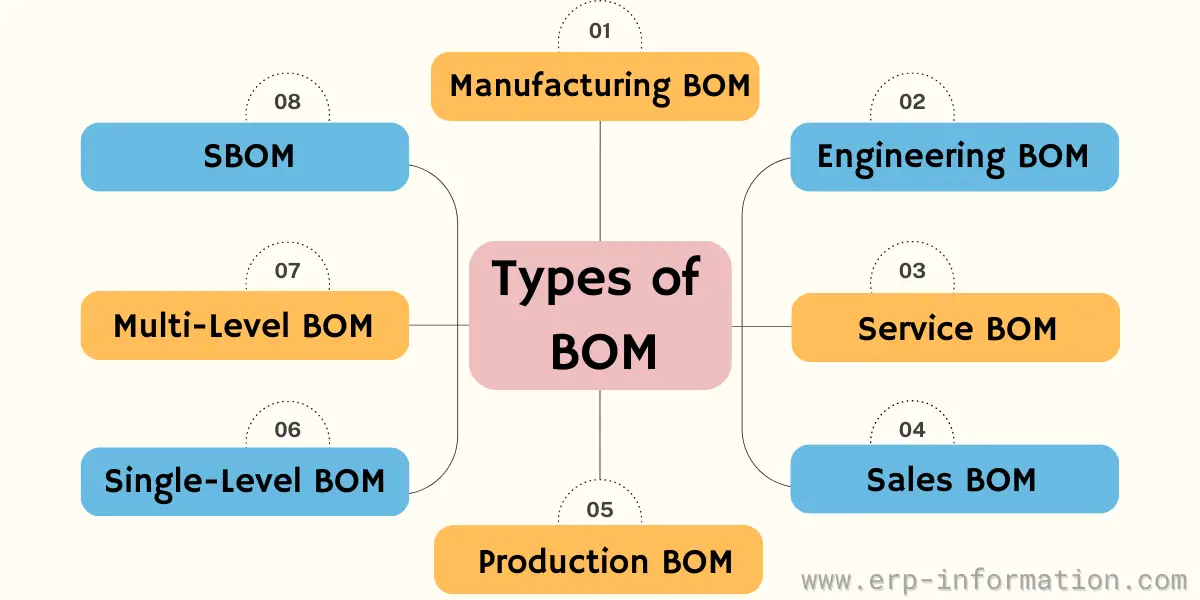
BOM types differ by who uses them and what for, and ERP vendors do not share one list. SAP keeps separate BOMs for areas such as design, production, costing and sales and distribution, each under its own internal number, or one BOM for all areas. Microsoft names sketching or draft, engineering, planning, production and costing BOMs, and says a simple setup can model the last three as one.
| Type | Used by | What it is for |
|---|---|---|
| Engineering (eBOM) | Engineering | The product as designed |
| Manufacturing (mBOM) | Production | The product as built, in assembly order |
| Planning | Master scheduling | Forecasting options and families |
| Sales or kit | Sales and shipping | Selling a set as one line |
| Service | Maintenance | Spare parts for equipment |
| Costing | Finance | Cost roll-up |
| Formula | Process plants | Ingredients, co-products and by-products |
Manufacturing Bill of Materials (mBOM)
The mBOM is the BOM production runs on. SAP’s production BOM “includes all the items required from the production and assembly point of view”; Microsoft and Business Central call it the production BOM. A peer-reviewed 2024 paper on the digital thread says it includes all the components of the engineering BOM. It is structured to follow the production sequence and carries more information, such as tooling, stock and manufacturing processes.
Engineering BOM (eBOM)
The eBOM is the product as engineering designed it. SAP’s design BOM “includes all the components of the product and their technical data from the design point of view” and “is generally not linked to any order”. In Dynamics 365 with engineering change management, engineering BOMs take their effective dates from an engineering version. Oracle’s product development side calls a BOM a structure.
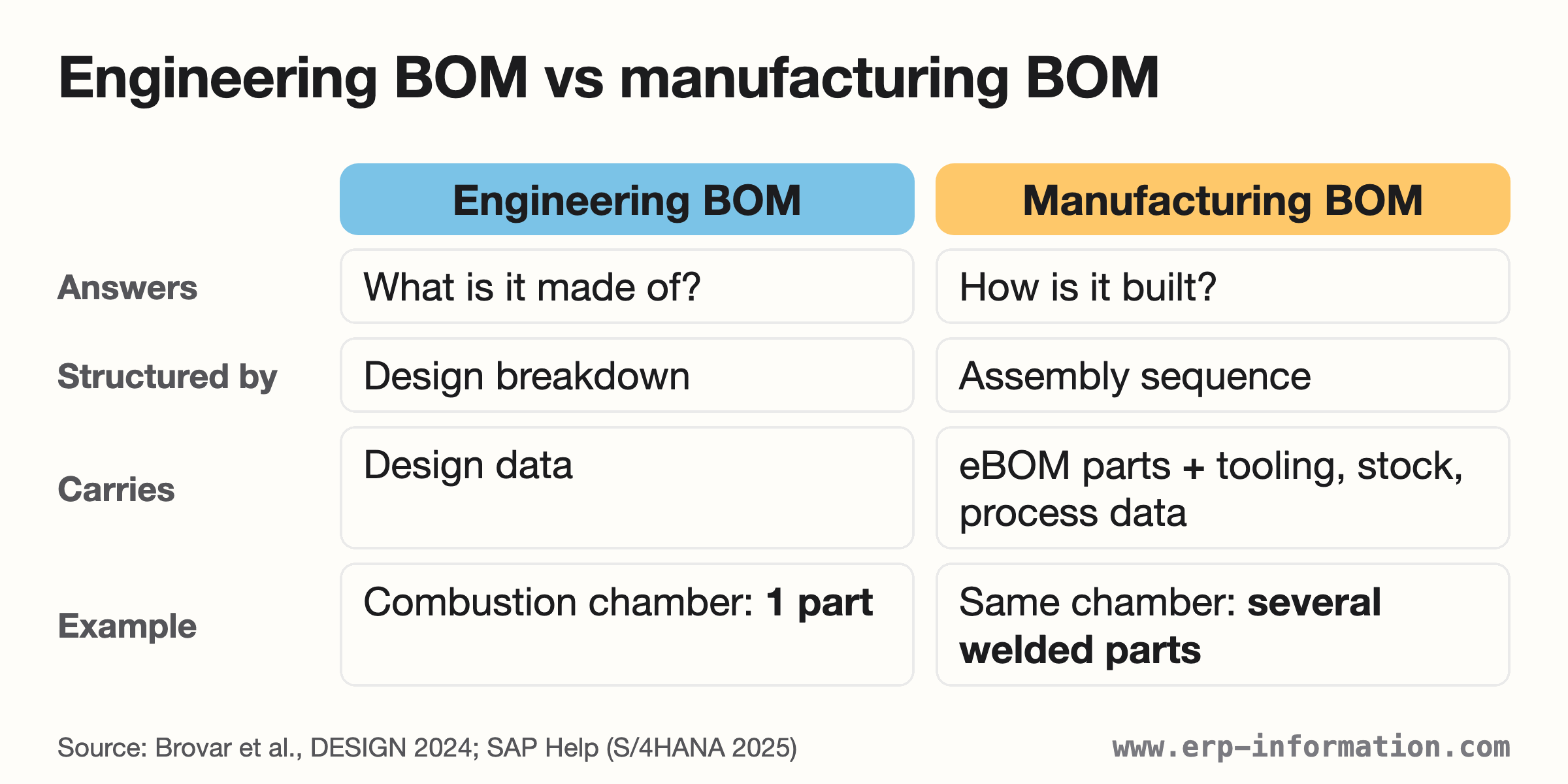
The difference is structural, not just extra fields. In that 2024 paper, Brovar and co-authors describe a jet-engine combustion chamber that is a single part number in the eBOM and several parts that must be welded together in the mBOM. See product data management and PLM software for the systems that manage engineering data.
Service BOM
A service or maintenance BOM lists the spare parts for a piece of equipment rather than how to build it. SAP’s equipment BOM is used “to describe the structure of equipment and to assign spare parts to equipment for maintenance purposes”. PTC and Autodesk abbreviate service BOM as SBOM, the same letters used for a software BOM, so check which one a document means.
Sales BOM
A sales BOM, often called a kit, sells a set of items as one line. In Odoo, a kit “appears as a single line item on the quotation and sales order” while the delivery order lists each component, and kit stock cannot be adjusted at kit level. SAP keeps sales BOMs under their own usage, sales and distribution.
Production Bill of materials
Production BOM is mostly a vendor name for the manufacturing BOM. Business Central uses it for items made through production orders with a routing and work or machine centers, and uses an assembly BOM for simple assembly. Its production BOMs must be certified before they can be used in production or planning.
Single-level Bill of materials
A single-level BOM lists one parent’s direct components and nothing below them. ERP systems often store BOMs this way and chain them. Dynamics 365 describes each BOM as a single level whose components can have BOMs of their own, and ERPNext builds its multi-level tree the same way. Dynamics 365 also requires single-level explosion for standard cost calculations.
Multi-level BOM
A multi-level BOM shows the full tree. SAP puts no limit on the number of levels. Odoo advises building multilevel BoMs from the bottom up, and using a kit instead when the aim is only to group components. ERPNext work orders plan subassembly materials too unless Use Multi-Level BOM is switched off.
Configurable, variant and alternative BOMs
Products with options need one structure that covers many variants. SAP offers two technical types: a variant BOM groups BOMs of different products that share most parts, and a multiple BOM holds alternative material combinations for one product, chosen by lot size. In a configurable SAP BOM, a class item is a placeholder that a real material replaces during configuration. Oracle’s equivalents are model and option class structures, and you never build the model itself, only its configurations. TallyPrime lets one stock item carry several BoMs and pick one when recording the manufacture. See configure to order for how this is used in practice.
Formula BOMs in process industries
Process plants use the same idea under another name. Dynamics 365 defines a formula as “a subtype of BOM that is typically used for process manufacturing” that also lists co-products and by-products. TallyPrime BoMs can mark lines as co-product, by-product or scrap, and its own example is sugar with molasses as a co-product. For costing, SAP needs a BOM and a routing in discrete production, or a master recipe in its process industries component (PP-PI).
SBOM
A software bill of materials lists the components inside software rather than a physical product. The EU Cyber Resilience Act defines it as “a formal record containing details and supply chain relationships of components included in the software elements of a product with digital elements”. In the US, CISA’s 2026 Minimum Elements for a Software Bill of Materials, published on 29 July 2026 with the NSA, the FBI and international partners, replaced the list the NTIA published in 2021.
More about SBOM, and the two main formats in SPDX vs CycloneDX.
What SAP, Oracle, Microsoft, Odoo and ERPNext call each BOM concept
The same ideas carry different names in each system. Checked against each vendor’s documentation on 11 October 2026:
| System | The BOM record | Phantom setting |
|---|---|---|
| SAP S/4HANA 2025 | Material BOM, kept per usage | Special procurement key 50 |
| Dynamics 365 SCM | BOM; formula in process manufacturing | Line type Phantom |
| Business Central | Assembly BOM or production BOM | Phantom production BOM |
| Oracle Fusion 26D | Item structure | Supply type Phantom |
| Odoo 20 | BoM: Manufacture this product, Kit or Subcontracting | Kit (phantom in the code) |
| ERPNext | BOM | Is Phantom BOM flag |
How each one controls a change to a BOM:
| System | How BOM changes are controlled |
|---|---|
| SAP S/4HANA | Change number; before and after states kept; valid-from dates |
| Dynamics 365 SCM | BOM versions must be approved, then activated to become the default |
| Business Central | Production BOMs certified before use; each version valid from its starting date |
| NetSuite | One active revision at a time; revision dates cannot overlap |
| Odoo | Each BoM version stored in an engineering change order (PLM app) |
| ERPNext | A submitted BOM cannot be edited; cancel it and submit a copy |
Where-used is not universal either. SAP has a where-used list, multi-level for materials, and Oracle has a Where Used tab on the item. Business Central documents a Where-Used action for assembly BOMs; we found none documented for its production BOMs. TallyPrime keeps the BoM on the stock item and consumes it through a Manufacturing Journal voucher. Our reviews: Odoo, ERPNext.
How to create a Bill of materials?
Build it from the engineering structure down to a BOM production can run, in this order:
- Start from the engineering BOM and decide, subassembly by subassembly, whether each one is made and stocked, made and used at once (a phantom) or bought. In SAP a phantom is set with special procurement key 50, and a part bought for one order with item category N.
- Give every item one part number and one unit of measure. SAP’s definition lists number, quantity and unit of measure for every component.
- Enter the quantity per one unit of the parent, never per finished product; explosion does the multiplying.
- Choose the item type: stock, non-stock (bought for one order), text or phantom. In SAP a non-stock item makes MRP raise a purchase requisition instead of a dependent requirement.
- Add scrap where losses are known. Business Central keeps component scrap on the BOM line and output scrap on the routing line.
- Build the routing separately and link each component to the operation that uses it.
- Release it under change control with an effective date.
- Explode and cost it before the first build: compare the summarized quantities with a real kit of parts, and the cost roll-up with the expected cost.
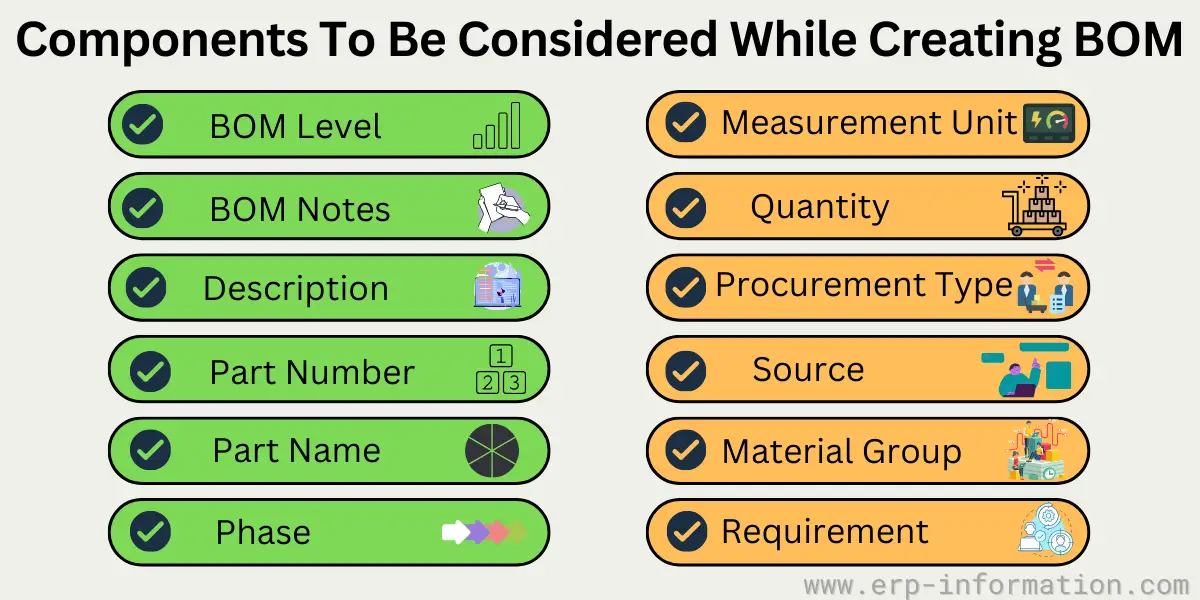
How to read a BOM table
A BOM table, on screen or in a spreadsheet template, reads column by column. These are the columns that matter, and the mistake to watch for in each:
| Column | What it means | Watch for |
|---|---|---|
| Level | 0 is the finished product, 1 its direct components, and so on | Some texts number the top level 1 |
| Part number | The one identifier for the item | Two numbers for one part break where-used |
| Description | The part’s name in words | Not a substitute for the number |
| Quantity per | Per one unit of the parent above | Not per finished product |
| Unit of measure | Each, kilogram, metre | Must match how the part is stocked |
| Item type | Stock, non-stock, phantom, text | Decides reservation or purchase requisition |
| Procurement | Make or buy | Decides whether MRP plans a build or a purchase |
| Revision or valid from | Which version applies, from when | Two versions with overlapping dates |
| Reference designator | Electronics: ties each part to its place on the circuit diagram | Duplicates; the count should match the quantity |
Reference designators follow ASME Y14.44 (the 2008 edition, reaffirmed in 2024), which uses them to identify and locate each part on a diagram and match it to its line in the parts list, and requires that no complete designation is duplicated. The image above shows the fuller set of fields many teams also track, such as notes, phase, source and material group. Use these columns as a template, then check which of them your ERP’s import actually reads.
BOM management software: ERP, PLM or a spreadsheet?
The production BOM belongs in the ERP system, because MRP, costing and production orders all read it there. Where the engineering BOM lives varies. Some ERP suites build it in. Dynamics 365’s engineering change management lets one engineering company own product data and release it to other legal entities. Odoo’s PLM app versions BoMs through engineering change orders. Other companies keep engineering BOMs in a separate PLM or BOM tool and release them to ERP.
| Where | What it does well | Examples (checked 11 Oct 2026) |
|---|---|---|
| ERP manufacturing module | Runs MRP, costing and production orders from the BOM | SAP S/4HANA, Dynamics 365, Oracle Fusion, NetSuite, Odoo, ERPNext, TallyPrime |
| PLM or BOM tool | Engineering BOMs, revisions and change requests before release | Arena (a PTC business), OpenBOM, PDXpert (HX3 Solutions) |
| Spreadsheet | Fast to start | No approvals, effective dates or where-used |
Our reviews go deeper on OpenBOM, Siemens Teamcenter and Autodesk Vault on the engineering side, and on Epicor and Infor among full ERP suites. For a wider choice, see our lists of cloud ERP and open-source ERP solutions.
What is changing for BOMs in 2026 and 2027
The dated changes are in software BOM rules and electronics data standards:
- EU software BOMs. Under the Cyber Resilience Act, manufacturers of products with digital elements must draw up an SBOM “in a commonly used and machine-readable format covering at the very least the top-level dependencies of the products”. The Act entered into force on 10 December 2024, its reporting obligations apply from 11 September 2026, and the main obligations, including the SBOM, from 11 December 2027.
- US guidance. CISA’s 2026 minimum elements (29 July 2026) ask for all components, including transitive dependencies: “There is no minimum depth.” The NTIA’s 2021 list asked for the top-level dependencies at minimum.
- Electronics. IPC-1752C, the standard for exchanging materials and substance declarations, became the current version in June 2026. IPC-2581 design files can carry a Bom section alongside the CAD data and the approved vendor list.
FAQs
What does BOM stand for?
BOM stands for bill of materials: the list of every part, subassembly and raw material in one unit of a product, with the quantity of each. SBOM usually means software bill of materials, although some vendors use the same letters for a service BOM.
What does a bill of materials include?
Each line names a component, its quantity per one unit of the parent and its unit of measure, usually with an item type such as stock, non-stock or phantom. In SAP, Microsoft Dynamics 365 and Oracle the operations, work centers and labour times belong in a separate record, the routing, although Odoo and ERPNext let a BOM record hold operations too.
What is the difference between an engineering BOM and a manufacturing BOM?
The engineering BOM describes the product as designed, broken down by its design structure. The manufacturing BOM describes how it is built: it contains the same parts, structured in production sequence, with tooling, stock and process data added. One part in the engineering BOM can become several parts in the manufacturing BOM.
What is a phantom BOM?
A phantom BOM describes a subassembly that is not stocked. MRP plans no order for it and passes its requirements straight to its components, while still using any stock of it that happens to exist. SAP sets it with special procurement key 50, Dynamics 365 with the Phantom line type and Oracle with the Phantom supply type.
How does MRP use the bill of materials?
MRP multiplies each parent’s planned quantity by the quantity per on its BOM to get the gross requirement of every component, nets that against stock on hand and scheduled receipts, and repeats one level at a time. Netting at each level matters: in our 100-bicycle example it cuts the spoke order from 5,400 to 4,120.
What is the difference between a bill of materials and a bill of quantities?
A bill of materials lists the parts that go into a manufactured product. A bill of quantities is a construction contract document: a list of measured items of building work, with descriptions and quantities, that contractors price when they tender and that is later used to value work for interim payments.
Which BOM view do you need?
- Planning or buying parts: the summarized BOM for totals, and the indented BOM to see which subassembly needs them.
- Changing or replacing a part: the where-used list first, to find every product and open order the change touches.
- Costing a product: a costed roll-up from the BOM plus the routing; materials alone understate the cost.
- Choosing or setting up an ERP system: check how it handles phantoms, versions and where-used, using the tables above, before loading a single BOM.
How we researched this page (11 October 2026). We read the BOM documentation of SAP S/4HANA (2025 FPS02 help), Microsoft Dynamics 365 Supply Chain Management and Business Central, Oracle Fusion Cloud SCM 26D, Oracle NetSuite, Odoo 20.0 (including its source code), ERPNext and TallyPrime. Definitions come from the ANSI Z94 industrial engineering terminology published by IISE, MRP course notes from Columbia University, MIT and LIUC, Kurbel’s ERP textbook and a 2024 peer-reviewed paper. The bicycle explosion and cost roll-up are our own calculations with the method shown. We also read ten widely read BOM guides: four describe a single-level BOM as a flat list of every part, four put labour or assembly steps in the BOM, and only one cites a textbook for its definitions. This rewrite also corrected this page: it had described a pseudo BOM as a flexible BOM, put labour and build steps in the BOM, and predicted blockchain-based BOMs without a source.
References
- IISE: ANSI Z94.14 Operations and Inventory Planning and Control terminology (bill of material, explosion, low level code, transient and planning bills)
- Columbia University IEOR 4000: Material requirements planning lecture notes
- MIT OpenCourseWare 2.854: Material requirements planning (lecture slides)
- Kurbel, K. E. (2013). Enterprise Resource Planning and Supply Chain Management. Springer, chapter 2.
- LIUC University: Operations Management 2018, MRP lecture (planning and super bills)
- NPTEL, IIT Roorkee: Industrial Engineering, MRP lecture 1
- Brovar, Sadeghzadeh and Fortin (2024): Supporting the digital thread, DESIGN 2024
- SAP Help: phantom assembly (S/4HANA)
- SAP Help: where-used list (S/4HANA)
- SAP Help: Create Routing app (S/4HANA)
- Microsoft Learn: Bills of materials and formulas (Dynamics 365 SCM)
- Microsoft Learn: Create production BOMs (Business Central)
- Oracle Fusion Cloud SCM 26D: Structure types
- Oracle NetSuite: Advanced Bill of Materials
- Odoo 20.0 source: mrp_bom.py
- ERPNext documentation: Bill of Materials
- TallyPrime help: Manage inventory in manufacturing
- RICS. New Rules of Measurement: NRM 2, detailed measurement for building works, part 2 (bill of quantities).
- ASME Y14.44-2008 (R2024): Reference designations for electrical and electronics parts and equipment
- eCFR: DFARS 252.242-7004 Material management and accounting system
- In Search of the Perfect Bill of Materials (NEMI, March 2002)
- CISA: 2026 Minimum Elements for a Software Bill of Materials
- European Commission: Cyber Resilience Act, Regulation (EU) 2024/2847 (Official Journal, 20 November 2024)
- IPC: Materials declaration data exchange standards (IPC-1752C)
Using Google Search? Add erp-information.com as a preferred source.